Apple’s Photos app is often criticized for its lack of organizational features that go beyond a list of photos and screenshots, and the company will bring some improvements in this area with iOS 7 and a Photos app capable of organizing items in Moments and Collections. Photowerks, free on the App Store, enhances Apple’s default solution with sorting options and smart albums available today to iOS 6 users.
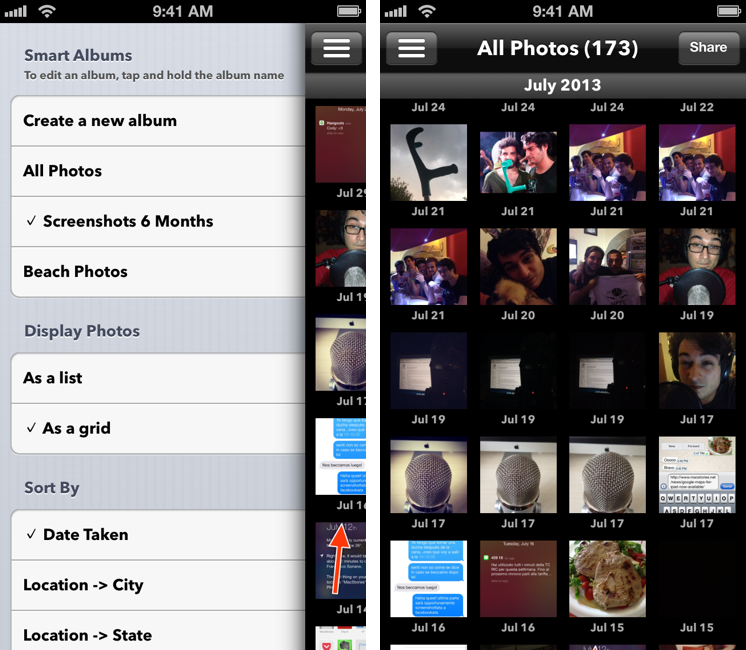
Photowerks comes with two main features: sorting, which is included in the free download, and Smart Albums, which can be unlocked with a $0.99 In-App Purchase. Once you’ve granted Photowerks permission to access your photos, the free version will allow you to load photos from your Camera Roll, show them as thumbnails on a grid or a list, and sort them (in ascending or descending order) by:
- Date Taken
- Location > City
- Location > State
- Location > Country
- Camera > Make
- Camera > Model
Even without unlocking the IAP, these features prove already handy as, in my opinion, they provide a better view of a stream of photos than what Apple has (or, more appropriately, hasn’t) done with the Photos app. Photos can be viewed in full-screen (where the app will display available information at the bottom), shared to Mail, Facebook, and Twitter, and grouped together to create a new album. Alas, there is no Open In support to send photos to other installed apps, like Evernote and Droplr in my case.
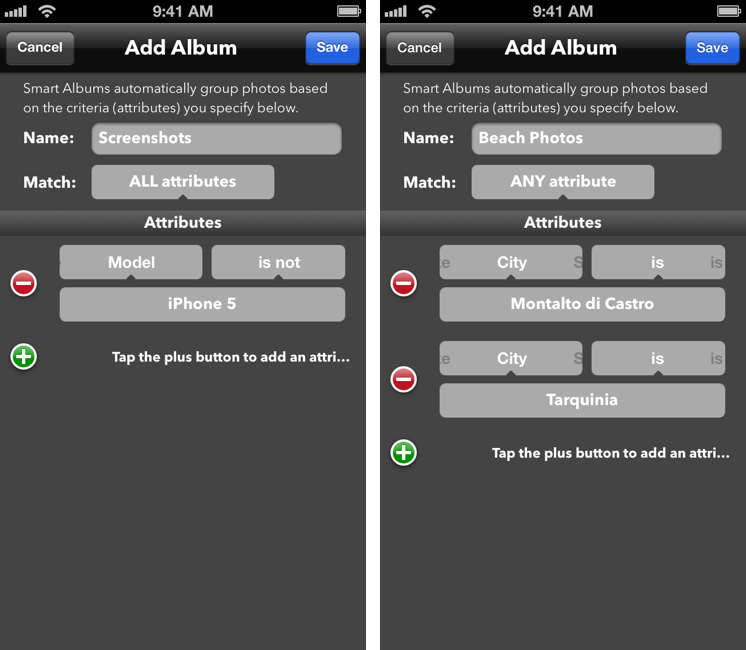
The Smart Albums feature is what really sells Photowerks. As the name suggests, they’re similar to iTunes’ smart playlists in that they let you automatically group photos based on pre-defined criteria that work with the sorting options mentioned above. By using a familiar any/all system for matching rules, Photowerks lets you specify attributes such as “date is after/is not/is/is before” or “model is/is not”; these attributes can be combined to create albums that will be populated with items that match your criteria and that you’ll be able to sort using the same sidebar that you’d use in the IAP-free version of Photowerks. On my iPhone, I have created an album that fetches screenshots taken after June 30 (“date is after June 30, model is not iPhone 5”) and photos taken at the beach (“city is Tarquinia” or “city is Montalto” with Match: Any).
I believe that iOS 7 will reduce the need for Photos.app replacements such as Photowerks, which is why I think the developers should focus on improving the feature that Apple won’t replicate in the short term – smart albums. It would be nice to be able to keep albums in sync across devices (Photowerks is a Universal app) and have access to more attributes for dates (like “past two months” or “this week”), image size, source (like Photo Stream) as well as nested conditions for even smarter filtering. I’m a big fan of the idea of having smart albums based on user-defined criteria, and I hope that the developers will keep on supporting and enhancing Photowerks for iOS 7.
Photowerks is free on the App Store.