


Last week, I made the case for thumb-typing (among other things) on the iPad mini. Last night, John Gruber published his review of the iPad Air, which covers this aspect. Exactly what I wanted to know.
Fantastical 2 Review
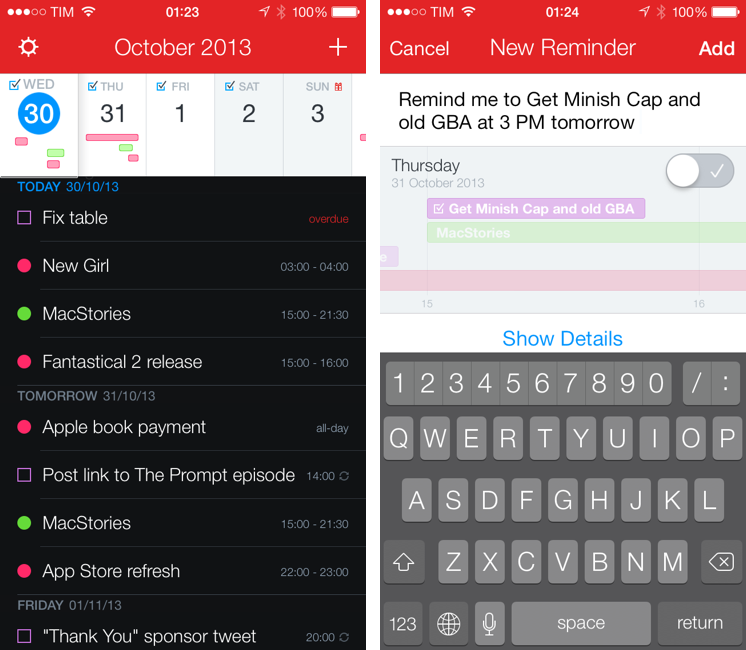
Last month, I was discussing my schedule for this Fall’s check-ups with my oncologist. During our conversation, she asked me if I had a list of all the appointments and todos that I had saved for the next weeks because she couldn’t find the department’s calendar and she doesn’t save patients’ information in her personal one.
I know that my doctor has an iPhone, and I know that she uses Apple’s Calendar and Reminders apps to manage her own schedule, so I showed her the beta of Fantastical 2 that I had on my iPhone.[1] “You can search for events and reminders that match a keyword or location and get a single list showing all results”. She was intrigued. “For my appointments here, I save them with the hospital’s name, so I can just look for that if I want to see them all at once”. At that point, I’m pretty sure she was sold on the app. “But you can’t buy it yet”, I added with a subtle smirk.
Fantastical 2 for iPhone, released today on the App Store and on sale at $2.99 for a limited time, is one of the best iOS 7 apps I’ve tried so far and the best calendar and reminder client for iPhone, period. It improves upon several aspects of the original app and it introduces powerful new features while sporting a complete redesign that makes the app feel at home on iOS 7 without compromising its identity.
Fantastical 2 is, for my workflow, better than Apple’s built-in apps, and it builds upon the solid foundation of the original Fantastical to offer new functionalities and more flexibility. Read more
Jim Dalrymple on the iPad Air→
This smaller size is great. If you have decent sized hands you can type with two thumbs on the iPad in portrait, something I wasn’t really able to do with the last generation iPad without a lot of stretching. Clearly a full-size iPad is not something you will be thumb typing with all the time, but it does give you an idea of how much smaller the iPad Air is.
Jim’s review addresses a point that I was curious to know about, and he also talks about battery life with the LTE model he reviewed.
Ben Bajarin’s Review of the iPad Air→
When recommending products to consumers I always encourage them to look at it as an investment. Whether someone is buying a PC, TV, smartphone, or tablet, it is best to get one that is worthy of your money and will last. What makes the iPad Air interesting–from the view of personal computing–is the A7 processor.
Much has been written about the power of the A7. Creativity apps like iMovie and GarageBand run extremely smoothly and fast on the A7. I made a 4-minute high definition movie on the iPad Air and it exported in just under one minute. When I attempted the same on the iPad 4 it took just over three minutes. When it comes to exporting movies or even compressing video or a photo to upload to the web, send in an email, or even using AirDrop the A7 does it all faster.
Ben’s review of the iPad Air is different from the ones that have been published this evening, and he offers some practical advice.
Macworld’s Transcript of Apple’s Q4 2013 Earnings Call→
Tim Cook:
In terms of new product categories, specifically, if you look at the skills that Apple has from hardware, software, and services, and an incredible app ecosystem, these set of things is very, very unique, I think no one has a set of skills like this, and we obviously believe that we can use our skills in building other great products that are in categories that represent areas where we do not participate today. So we’re pretty confident about that.
The Great Apple Lull→
But where Apple has disappointed recently is in novelty, or surprise. Perhaps this is unfair, but it’s real. Apple became the company that delivered “new”. People got used to hearing about new stuff all the time — iPod nanos, iPhones, MacBook Airs, iPads — and now it seems like it’s been a while. The more people got, the more they wanted. And then you have to work even faster.
What really happened? Steve Jobs spoiled us with two mind-altering substances in quick succession — the iPhone and iPad. Meanwhile, the majority of people who have ever owned Apple products likely bought their first (and second…) during this period. So all of a sudden, a bunch of people who didn’t really pay attention to Apple before — people who never had to boot up a Performa with Extensions off, or upgrade RAM in a Power Mac 8500 — are now expecting some crazy new toy to appear every few years, whether it’s realistic or not.
This is certainly an honest perspective by Dan Frommer. Being the “Apple guy” among my friends, I get regular questions about “what’s really next for Apple” or “when is the watch coming out”. There is a natural tendency for humans to want “new” – imagine by customers who got the iPhone and iPad in the past five years alone.
The software and products Apple released this year are great, but many of them (game controller API, Touch ID, and even iOS 7 itself) seem to suggest Apple is laying the foundation for interesting new things to come.
Apple Q4 2013 Results: $37.5 Billion Revenue, 33.8 Million iPhones, 14.1 Million iPads Sold

Apple has published their Q4 2013 financial results for the quarter that ended on September 28, 2013. The company posted revenue of $37.5 billion. The company sold 14.1 million iPads, 33.8 million iPhones, and 4.6 million Macs, earning a quarterly net profit of $7.5 billion.
We’re pleased to report a strong finish to an amazing year with record fourth quarter revenue, including sales of almost 34 million iPhones,” said Tim Cook, Apple’s CEO. “We’re excited to go into the holidays with our new iPhone 5c and iPhone 5s, iOS 7, the new iPad mini with Retina Display and the incredibly thin and light iPad Air, new MacBook Pros, the radical new Mac Pro, OS X Mavericks and the next generation iWork and iLife apps for OS X and iOS.
For Q1 2014, Apple is providing guidance of revenue between $55 billion and $58 billion. Read more
“The Computer We Were Insane To Build”→
Judging by the marketing copy, Apple seems pretty excited about the new Mac Pro. Jeff Carlson posted more photos at TidBITS.
Evernote, Penultimate, and the Adonit Jot Script→
From the Evernote blog:
We believe that the best technology experiences happen when software and hardware are built together to achieve a shared goal. Penultimate was already a great handwriting app, but it needed a hardware complement that didn’t exist. In working closely with Adonit for the last 18 months, we’ve co-created the stylus we always wanted: the Jot Script Evernote Edition, the first true precision-point stylus on the market. Together, we’ve developed the first app and stylus combination that finally makes digital handwriting the experience it should be.
Does that sound familiar?
I wish that I was enough of an artist to truly appreciate apps like Penultimate and Paper and use them on a daily basis. The Adonit Jot Script seems like an interesting device, and the new features that have been added to Penultimate (zoom and drift) should make for a more natural handwriting experience. Maybe I should use Penultimate to create sketches site redesign ideas (I already keep website screenshots in Evernote).