Terrific update to Panic’s SSH client for iOS, Prompt. The new version brings iOS 9 features such as Spotlight search and 3D Touch, but, most of all, it adds Split View support on the iPad and the ability to open multiple connections in separate tabs.
I’m planning to install AirSonos on my Synology DS214play soon (I haven’t gotten around it yet because the instructions aren’t exactly…user-friendly), and I plan to use Prompt for the job. What a great iOS app.
See also: Dan Moren at Six Colors.
Dave Teare, writing on the AgileBits blog about the latest addition to 1Password – a way to share 1Password securely with your family:
1Password for Families builds on our new Teams infrastructure to give you everything you need to protect your loved ones. And it’s only $5 a month for your family of 5.
It’s never been easier to share 1Password with your whole family. There’s no sync service to set up, vaults appear automatically, and there’s an Admin Console where you can invite people and manage sharing with your family.
Every family member gets their own copy of 1Password, and their own personal space to store private information. With this, you can give them the tools they need to stay safe without taking away their independence.
The service costs $5/month and it comes with the full suite of 1Password apps for every platform. It also offers 1 GB of document storage for attachments (2 GB if you’re already a 1Password user and sign up before March 21), and the interface to manage access and review permissions looks polished and friendly. I should seriously consider this so my parents can stop calling me about their forgotten passwords (I love them, but they’re terrible with online accounts).
You can read more and sign up for 1Password for Families here.
We all struggle with productivity. We are constantly pressured to accomplish more, and to do it quicker. There is no one definitive way to accomplish that, and we have all devised our own little method to make things work.
At Igloo, they think your way is the best way, they just want to support you, and make your way better.
Work has evolved and your tools should too. Never email yourself a file again. Bring your company into the 21st century - send your IT guy to try Igloo Software for free.
Igloo is an intranet you’ll actually like.
Our thanks to Igloo for sponsoring MacStories this week.
Rogue Amoeba’s Paul Kafasis, writing on the latest version of their audio recording app, Piezo, and their decision to exit the Mac App Store:
A major reason for the initial creation of Piezo was our desire to allow recording from other applications on the Mac within the limits of what Apple’s Mac App Store rules allowed. We were pleased to provide audio capture to customers of the Mac App Store, and for a time, things worked just fine. However, Apple eventually changed the rules, requiring that all applications distributed through the Mac App Store be sandboxed. This was a problem. Piezo’s need to capture audio from other applications precludes the possibility of it being sandboxed. This new requirement effectively stopped our ability to upgrade Piezo in any meaningful way.
[…]
We’d like to provide customers with the option of buying Piezo through the Mac App Store, but it’s more important to us that we provide a quality product with full functionality. In the case of Piezo, that now means exclusively distributing the application via our site. Users have always had the option of downloading and buying Piezo direct, so this didn’t involve much in the way of additional work. The biggest issue was simply choosing to remove Piezo from the Mac App Store. Ultimately, we feel the decision was made for us by both technical and bureaucratic factors outside of our control.
It says a lot about the Mac App Store that, whenever another app exits it, our reaction isn’t “why” but “of course”.
David Smith:
What doesn’t work is easiest to say. Apps that try to re-create the functionality of an iPhone app simply don’t work. If you can perform a particular operation on an iPhone, then it is better to do it there. The promise of never having to take your iPhone out of your pocket just isn’t quite here yet. The Apple Watch may advance (in hardware and software) to a point where this is no longer true but the platform has a ways to grow first.
There seems to be only three kinds of apps that make sense given the current hardware and software on the Apple Watch.
Bingo. As I tweeted yesterday, my favorite Watch apps aren’t trying to mimic iPhone apps at all. If the same task can be completed on the iPhone, I don’t see why I would try on a smaller, slower device.
The best Watch apps will be the ones that wouldn’t be possible or make sense on an iPhone.
A sad but true post by Lauren Goode at The Verge:
What do Endomondo, MyFitnessPal, MapMyFitness, Runtastic, FitStar, and RunKeeper all have in common?
Aside from all being smartphone apps that track your health and activity, all of these apps have been acquired by bigger companies — bigger brands — over the past couple of years, the latest being RunKeeper, which was just bought by running shoe maker Asics. Endomondo, MyFitnessPal, and MapMyFitness went to Under Armour. Runtastic was acquired by Adidas. FitStar was bought by Fitbit, which at the time wasn’t yet a public company, but in its own right has swelled to become the market leader for activity trackers.
Large companies operating at scale with free services and lots of users who don’t bother to pay for extras? It’s photo management, all over again.
If history does repeat itself, we’ll continue to see, as Goode argues, consolidation of independent services being acquired by bigger brands. The good news: smaller, more focused health and fitness utilities seem to have a profitable niche in which they can thrive, while still retaining the ability to save data into HealthKit. I appreciate how Apple’s Health puts everyone on the same playing field – from brands to solo developers (the real indies in this case) like David Smith.
At which point, though, do we expect Apple and Google to make their own all-encompassing fitness and meal tracking apps for smartphones? Apple may be pushing the Watch as their premier fitness device, but they know how much people use their phones for these tasks, and a future Sherlocking wouldn’t surprise me at all. Just like it happened with photos.
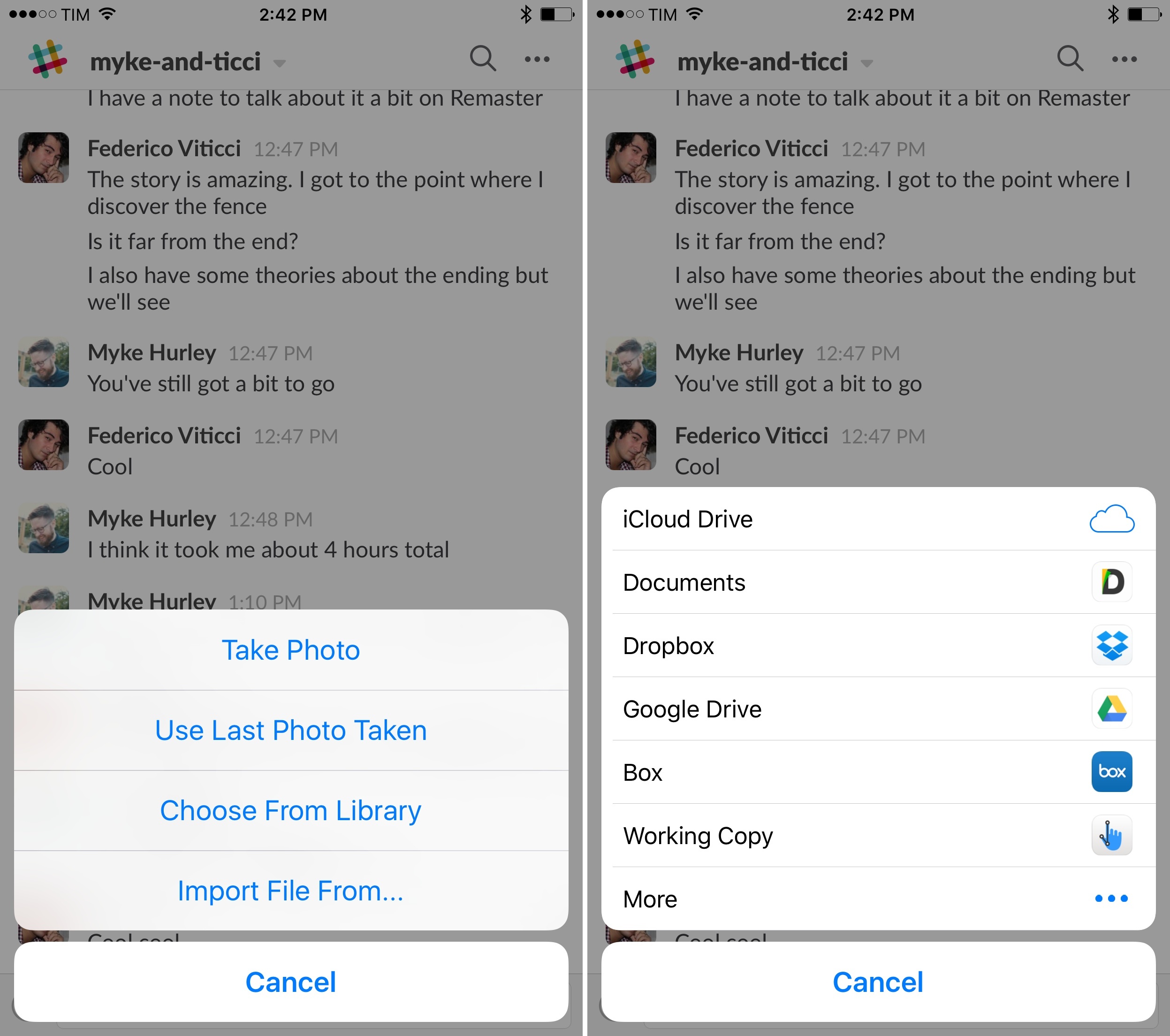
I’ve been using Slack every day for a couple of years, and especially after we upgraded to a paid team account last August, we’ve completely cut email from our internal communications (in addition to other features). One missing functionality that always annoyed me was the inability to natively attach files to conversations on iOS – Slack could either upload photos and videos from your library or preview links to files, but it couldn’t upload documents from other iOS apps.
Read more
Final Fantasy IX Final Fantasy IX, Square’s classic RPG for the original PlayStation, has launched on iOS this week. The port features higher-res movies and characters models and tweaks to make the experience more enjoyable for modern players, such as game boosters and the ability to skip random encounters. It’s also 20% off for the...
Question: I’m having an odd issue with 1Writer and the Wordpress Workflow I’m not sure if you’ve encountered. When I post to Wordpress from 1Writer via Workflow, all of the Markdown code come across, not the desired effect. For example, If I type in bold text, in the Wordpress post I get bold text and...