

Stories Unlock Big App Savings with Club MacStories+ and Premier Memberships Drawing a Blank S-GPT 1.0.2 Brings Date and Time Awareness, Integration with macOS Services Menu, Passthrough Mode, Better HomePod Support, and More Automation April: The Loupedeck Live S Is a More Portable and Affordable Automation Control Panel for the Mac Last Week, on Club...
Automation April 2023: Shortcuts Workshop, Part 1
Club MacStories Town Halls are part of the monthly and other special live audio events we hold in the Club MacStories+ Discord community. The show is a recorded and lightly edited version of the Town Halls that we produce, so Club MacStories+ and Club Premier members who can’t attend the event live can listen later. To learn more about Club MacStories+ and Club Premier, visit our Club plans page.
:::

AppStories Episode - Automation April 2023: Shortcuts Workshop, Part 1
0:00
0:00
0:00
Today, Federico and John are joined by Jack Wellborn, who won Best Overall Shortcut in last year’s Automation April Shortcuts Contest, to talk about tips for coming up with shortcuts ideas, their recent shortcuts experiments and projects, incorporating AppleScript and other techniques into Mac-based Shortcuts, and more.
BetterTouchTool: The Essential App to Customize Your Mac Experience [Sponsor]
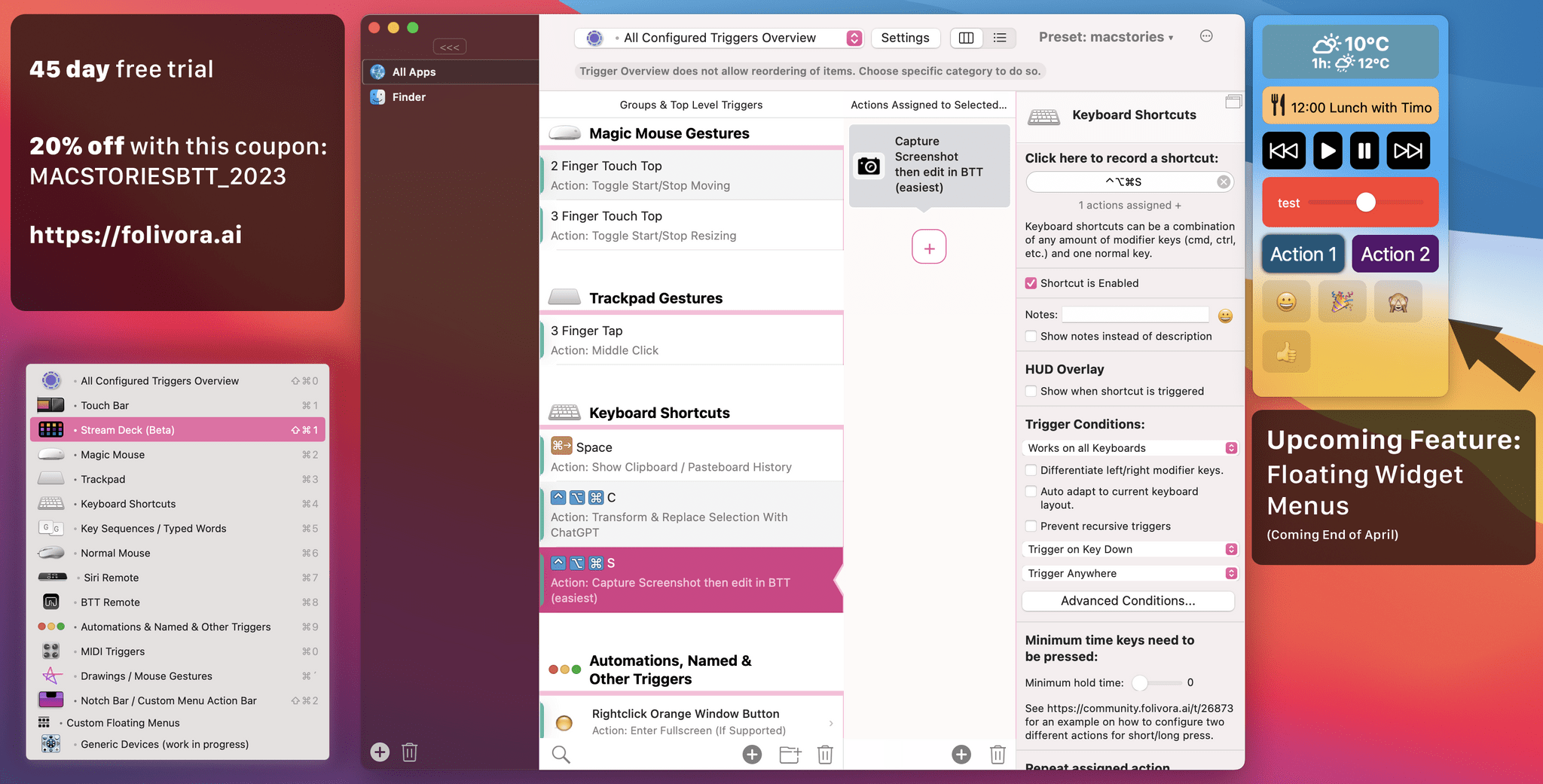
BetterTouchTool is an essential Mac application that has stood the test of time since it was one of the first to be covered by MacStories back in November 2009. In its early days, BetterTouchTool was a simple application primarily designed for adding customizable gestures to MacBook trackpads and Magic Mouse.
Today, BetterTouchTool has evolved to become a powerful tool that enables users to configure customizable gestures for Magic Mouse and Magic Trackpad (1-3), customize the Touch Bar and map keyboard shortcuts, bind mouse buttons, create custom mouse gestures, and customize the Siri Remote. Additionally, BetterTouchTool can connect and configure MIDI devices, works great with the Shortcuts app on macOS Monterey & Ventura, and comes with a plethora of predefined actions that can be combined to perform virtually any command on your Mac.
Recently, “Generic Devices” support has been added, enabling advanced users to add support for many devices on their own using simple JavaScript. For example, users have already created scripts even for exotic devices like the Griffin Power Mate, a Philips Foot Control, or the Microsoft Adaptive Controller.
Moreover, a fantastic feature that is currently being finalized and set to release by the end of April is the “Floating Widget Menus.” These menus are scriptable and customizable and can be placed anywhere on the screen, attached to particular windows, or shown upon demand. With a unique plugin system in place, these menus can integrate custom SwiftUI-based widgets and will even work seamlessly with BTT Remote on iPhone and iPad in the future.
Also, check out the new “Transform & Replace Selection With ChatGPT” predefined action that lets you use ChatGPT directly in any of your apps.
BetterTouchTool comes with a 45-day trial, after which you can choose between a license that includes all updates for 2 years and a lifetime license.
For a limited time, MacStories readers can purchase BetterTouchTool for 20% off by using the coupon code MACSTORIESBTT_2023 at checkout. So, don’t delay. Go to folivora.ai to learn more about this fantastic Mac app and take advantage of the special limited-time, 20% discount on BetterTouchTool.
Our thanks to BetterTouchTool for sponsoring MacStories this week.
 In This Issue
Federico shares how to customize his S-GPT shortcut with different personalities and a tip on how to make dictation the default input method for an Apple Watch shortcut, John on how to fill in the gaps in email automation with email utility apps, a MusicBox giveaway and new discount, interviews with Automation April Shortcuts Contest...
MusicBox
To celebrate Automation April this week, we have a giveaway of MusicBox. MusicBox, which is available on the iPhone, iPad, Mac, and Apple TV, is a great way to save albums and songs for later, with rich metadata and Shortcuts support. For today’s giveaway, we’ve got 25 codes for a free copy of MusicBox. To...
Up Next on MacStories’ Podcasts
Next week on AppStories, Federico and John cover S-GPT, Federico’s shortcut that incorporates OpenAI’s ChatGPT, and John’s new link collection and management workflow and shortcuts. This week on MacStories Unwind, John recommends the movie Tetris and Federico loves Shrinking....
Interviews: Christopher Lawley and Jack Wellborn
Mastodon: @ChrisLawley. YouTube and The Untitled Website. What’s your relationship with the Shortcuts app and automation on Apple platforms? I started using the app back in its indie days when it was called Workflow. Back then Workflow was a tool I used to bridge multiple apps together. Especially in my early days of working from...
Previously, On MacStories
Stories Introducing S-GPT, A Shortcut to Connect OpenAI’s ChatGPT with Native Features of Apple’s Operating Systems Jack Wellborn on Making Computers Personal with Automation Automation April: Thinking About Linking Enter Your Shortcuts in the 2023 Automation April Shortcuts Contest Last Week, on Club MacStories: Sending Web-Based Alerts with Shortcuts, Apple’s Laptops, Obsidian Bookmarks, and Automation...
Automation April Shortcuts Contest, Upcoming Shortcuts Workshop and Club Discount Update
As we approach the end of the first week of the Automation April Shortcuts Contest, the submissions have begun rolling in. There’s still plenty of time to enter your shortcuts in the contest. There are prizes for all winners, including a Loupedeck Live S and CalDigit Thunderbolt Station 4 for the winner of the Best...