
Today’s issue of MacStories Weekly is our first issue sent using Buttondown for the email version of the newsletter. We’ve used Mailchimp ever since the Club was first launched, and it is time to move on. Since the company’s acquisition by Intuit, it’s become more enterprise-focused and expensive. But more importantly, it’s never been easy...
Whisper Memos: Turn Your Ramblings into Paragraphed Articles, Sent Right to Your Email Inbox [Sponsor]
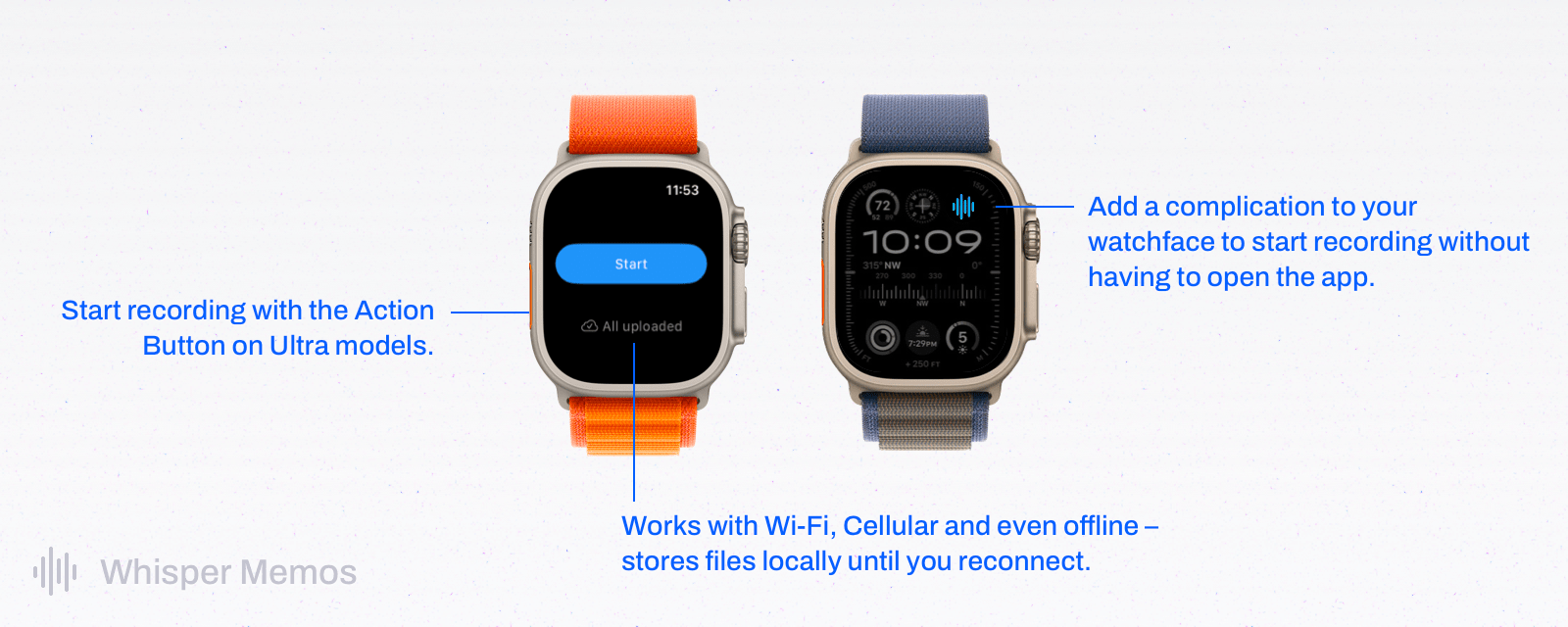
Ideas are precious but fleeting. One moment, inspiration strikes, but if you don’t capture that lightning in a bottle, it’s gone before you know it. With Whisper Memos, you can harness the power of artificial intelligence to turn your ideas into orderly memos.
Whisper Memos combines the convenience of quick capture with the power of GPT-4. You can save a voice memo using your iPhone’s Action Button, the app’s Lock Screen widget, Whisper Memos’ Apple Watch app, Shortcuts, and more. Then, Whisper Memos uses AI to turn your recordings into orderly, paragraphed memos delivered directly to your email inbox a few seconds later.
The results are incredible. One moment, you’re recording audio on your iPhone or Apple Watch, and the next, you’ve got an email message easily identifiable by its custom subject line that has been carefully transcribed and organized into neat paragraphs.
Whisper Memos works on Wi-Fi, over a cellular connection, and offline, so it’s always available. The app also supports a long list of languages, and it integrates with Zapier, which allows you to connect Whisper Memos to other productivity apps like Notion, Trello, or your task manager. There’s even a privacy mode for ensuring no trace is left behind after your voice memos have been processed.
So, check out Whisper Memos today and use the code MAC24 by March 16th for 25% off forever. You’ll be amazed at how fast, accurate, and reliable it is at preserving your precious thoughts.
Our thanks to Whisper Memos for sponsoring MacStories this week.
 Previously, On MacStories
Stories Vision Pro App Spotlight: Status Bar Builder’s Key Is Customization Combined with Simplicity Apple Music Debuts Heavy Rotation, A New Daily Made For You Playlist Simple Scan: A Scanning Solution for People Who Don’t Scan Often Apple Arcade’s Prestige Problem Some Game Developers Are Unhappy about Apple Arcade Mona 6 Moves from High Visual...
Up Next on MacStories’ Podcasts
Next week on AppStories, John interviews Federico about the journey that led him to his wildest project ever. Next week onMagic Rays of Light, Sigmund and Devon are joined by a special guest to take another look at Ridley Scott’s Napoleon upon the film’s streaming debut. They also dive into March releases on Apple...
In This Issue
John shares how he tracks time zones in the Mac’s menu bar and his Markdown research archive workflow, Jonathan has a shortcut that works with Simple Scan that incorporates a naming system and integration with Files, plus the usual Links, App Debuts, the latest happenings in the Club MacStories+ Discord community, a recap of MacStories...
In This Issue
This month, John builds a read-and-listen-later system based on Markdown and MP3s and Federico mods a game controller to work with the 11” iPad Pro....
Looking Past the Smoke and Mirrors of the MGM Hack [Sponsor]

The September 2023 MGM hack quickly became one of the most notorious ransomware attacks in recent memory. Journalists and cybersecurity experts rushed to report on the broken slot machines, angry hotel guests, and the fateful phishing call to MGM’s help desk that started it all.
And, like a slick magic trick, the public’s attention was drawn in the wrong direction. Now, months later, we’re still missing something critical about the MGM hack.
That’s because, for many of the most important questions about the breach, the popular answers are either incomplete or inaccurate. Those include: who hacked MGM, what tactics they used to breach the system, and how security teams can protect themselves against similar attacks.
Why is that a problem? Because it lets us write off the MGM hack as a one-off story, instead of an example of an emerging style of attack that we’ll certainly be seeing more of. And that leaves companies and security teams unprepared.
Who hacked MGM?
Plenty of news stories have confidently blamed the MGM attack on either the Scattered Spider or ALPHV hacking group, but the truth is still murky, and likely involves a dangerous team up between different groups, each bringing their own expertise to the table.
Their attacks first use fluent English social engineering skills to get onto networks, where they then deploy sophisticated ransomware that quickly establishes persistence across multiple systems.
What tactics did they use?
The dominant narrative has been that “a single phone call hacked MGM.” A phone vishing attack to MGM’s IT help desk is what started the hack, but there’s much more to it than that. The real issue is that this help desk worker was set up to fail by MGM’s weak ID verification protocols, and probably wasn’t doing anything “wrong” when they gave the bad actors access to a super administrator account.
How can security teams protect themselves?
Cybersecurity experts have centered most of their advice on user ID verification. But while it’s true that MGM’s help desk needed better ways of verifying employee identity, there’s another factor that should have stopped the hackers in their tracks.
That’s where you need to focus your attention. In fact, if you just focus your vision, you’ll find you’re already staring at the security story the pros have been missing.
It’s the device you’re reading this on.
To read more of what we learned when we researched the MGM hack–like how hacker groups get their names, the worrying gaps in MGM’s security, and why device trust is the real core of the story–check out the Kolide Blog.
Our thanks to Kolide for sponsoring MacStories this week.
Previously, On MacStories
Stories Automation Academy: My Collection of Advanced Shortcuts for Things The Fastest Way to Save RSS Articles to A Read-Later App Vision Pro App Spotlight: Longplay Adds Immersive Album Listening Looks Like Rain: Visualizing the Weather on a Color-Coded Timeline Apple Vision Pro Accessory Roundup: Our Favorites So Far iMessage Is Preparing for a Post-Quantum...
In This Issue
John shares a collection of apps for readers, Federico has a tip on hiding macOS windows instead of minimizing them and a shortcut that converts Things notes into a Markdown file, Jonathan shares some favorite Mac utilities, plus the usual Links, App Debuts, the latest happenings in the Club MacStories+ Discord community, a recap of...