
Next week onAppStories, Federico and John continue the MacStories Summer OS Preview series by interviewingMalin Sundberg, creator of time-tracking appOrbit. This week onMacStories Unwind, Alex and John cover the week at MacStories including John’s Summer OS Series feature on Quick Note, Apple’s new keyboards and peripherals, upcoming child safety features, and media picks...
 In This Issue
Federico continues his Obsidian setup series with a look at his ‘Dashboard’ note, how it’s organized andthe plugins and shortcuts he uses with it, an interview about the Playdate with developer Shahid Ahmad, John on why he chooses to not automate certain easily automated tasks,plus the usualLinks, App Debuts, arecap of MacStories articles, and a...
Previously, On MacStories
Apple Announces Child Safety Features Coming This Fall Fast Capture with Quick Note for iPad and Mac: The MacStories Overview Apple Releases New Mac Keyboards and Pointing Devices...
Interview: Shahid Kamal Ahmad

Twitter:@shahidkamal. Videogame developer and advocate. Co-host ofRemasteron Relay FM. What about the Playdate intrigues you as a developer? I’m not your typical developer, so my response will be atypical. I started in the 8-bit days, with limited hardware, and I enjoyed the challenge of getting those early machines to do things that seemed difficult. For...
FitnessView: All-in-One Health & Fitness Dashboard [Sponsor]
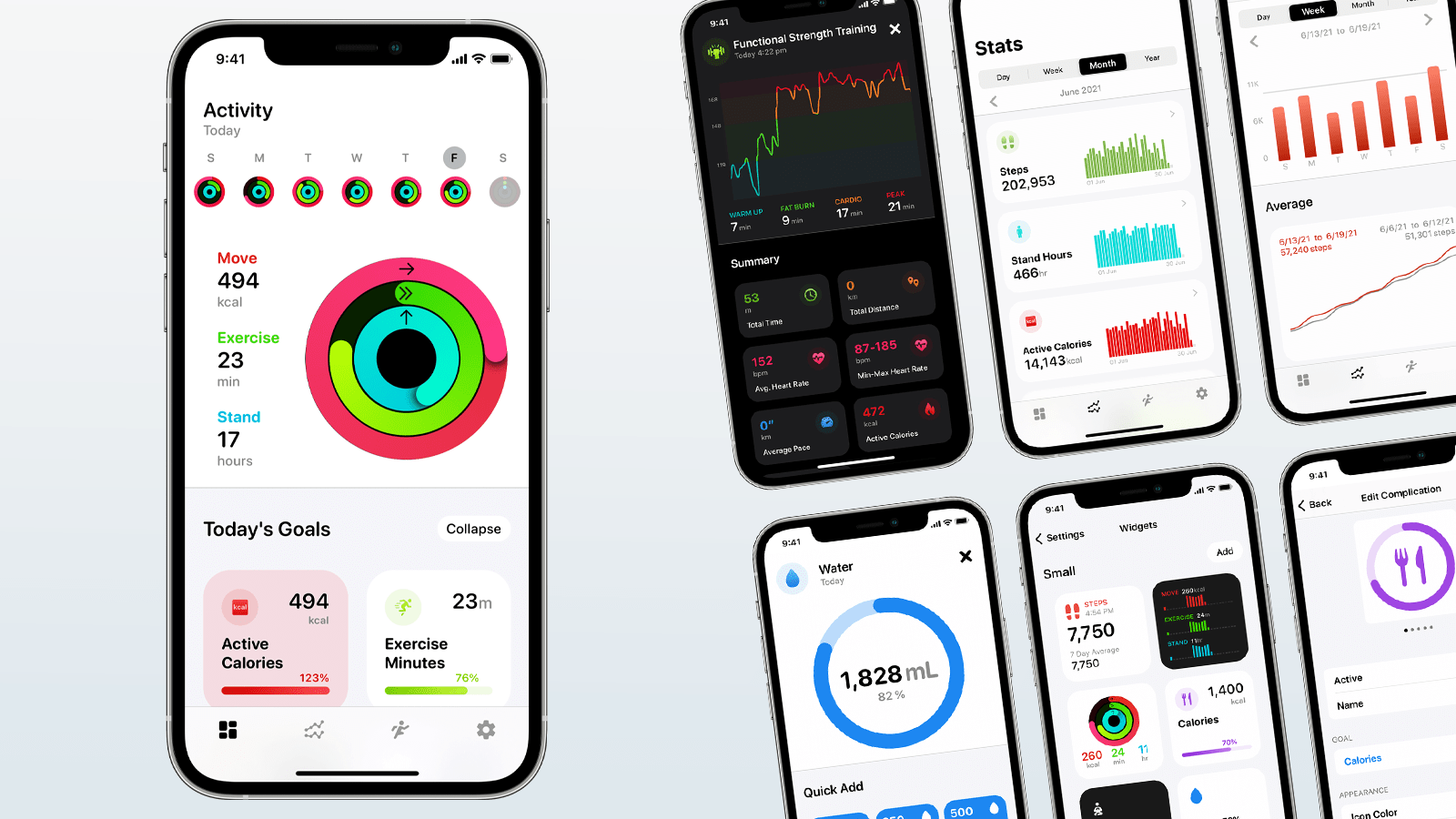
FitnessView is a brand new health and fitness dashboard for tracking Health data and gaining valuable insights using the iPhone and Apple Watch. The Apple Watch has become a robust health and fitness device that, coupled with the iPhone, lets you track more data than ever about your workouts and overall health. FitnessView takes that overwhelming mountain of data and makes sense of it with a beautifully designed app that helps you spot trends and measure your progress.
FitnessView tracks the progress of your Activity Rings and a whole lot more. By picking the goals that matter to you most from the app’s comprehensive list, you can create a dashboard designed just for you.
FitnessView also tracks workouts, providing the most important stats at a glance with in-depth data just a tap away. Those stats power the app’s Home Screen widgets, allowing you to keep track of your most essential data without opening the app. FitnessView’s data is available on the Apple Watch, too, along with multiple watch complications that bring FitnessView’s power to the face of your Apple Watch.
The app has detailed Stats and Workout sections. From Stats, you can analyze your health and fitness data over time to get a sense of your progress and dive into the details whenever you want. The Workouts section provides a similar experience, allowing you to browse through your training sessions chronologically. You can even filter workouts by type and access high-level monthly stats.
FitnessView also supports Quick Add for tracking goals like hydration, making it easy to keep up with all your objectives. You can even share your progress with friends and family or on social media with an animated version of your Activity Rings.
Download FitnessView today to stay on top of your health and fitness goals all year long with its beautiful all-in-one dashboard.
Our thanks to FitnessView for sponsoring MacStories this week.
In This Issue
In this issue: Federico on music server app Roon, John shares a shortcut for saving podcast clips as text, YouTuber and photographer Chris Lawley walks readers through his iPad Home Screens, a new issue of MacStories Unplugged, plus the usual Links, App Debuts, a recap of MacStories article, and a preview of upcoming MacStories podcast...
App Debuts
 John
JohnAudiograph Podcasts While I was in the midst of creating OverClip, my podcast excerpt shortcut that is featured above in Shortcuts Essentials, I came across Audiograph Podcasts, an app designed to solve a similar issue. Audiograph is focused on sharing episode transcriptions. The app is a podcast player that integrates transcripts of episodes into...
Interesting Links
Chris Lee shares a prototype of Chrome Home that was tested in 2016 and bears a resemblance and, according to Lee, drew some of the same criticism as the current Safari 15 for iOS beta. (Link) Spotify introduced a What’s New feed this week that aggregates all the releases from artists and podcasts that you...
Home Screen: Chris Lawley

Twitter: @chris_lawley. YouTuber and photographer covering iPad, iOS, and apps. The iPad has been my main computer for over four years now. The last time I wrote about my iPad Home Screen was in issue 75 of the Club MacStories Newsletter, which was all the back in 2017. This was a time where we were...