
This month, Federico on how he’s using Dropbox and symbolic links to sync the game emulator Dolphin between Windows and macOS and John on finding the right level of file organization that doesn’t create too much busy work, using a combination of folders, tags and search....
Prizmo: Pro Scanner App with OCR, Pencil Annotation, PDF & DOCX Export [Sponsor]

Prizmo is a fully-featured scanner app for iOS and Mac that lets you capture documents and receipts, turning them into professional PDFs that you can share, archive, annotate, fill out as forms, or sign with the Apple Pencil or your finger. The app is perfect for scanning business cards to add people to your contacts too.
The capture workflow on iOS has been streamlined in Prizmo’s latest release as a tap-free multi-page scanning process with the ability to review pages as you scan. Text recognition starts immediately in the background, and the PDF is auto-uploaded into your shared folder immediately without any user action.
Prizmo also offers some of the deepest editing tools available in any scanning app, such as page curvature flattening, edge repair, background cleanup, user-editable OCR layout, and much more. Prizmo edits are non-destructive, meaning you can reverse any operation at any time without the need of rescanning, so even your Apple Pencil annotations from a week ago can be edited at any time.
Among Prizmo’s output formats, PDF gets many customizable options, including image compression level and a JBIG2 encoder for extremely lightweight black and white scans of just 40KB per page, useful for archiving large amounts of data. It also comes with image and text exports and can create fully-formatted DOCX documents that you can edit further in Apple Pages or Microsoft Word.
Prizmo offers not one but three OCR engines to handle the variety of languages and document styles too. And its most advanced one, Cloud OCR, is about to get an important update in the coming weeks with new, breakthrough capabilities.
Prizmo is localized in many languages, and it offers specific accessibility features for blind and vision-impaired users, including VoiceOver support and a dedicated text reader.
Through Sunday, March 6th, Prizmo’s Premium Pack, which is a one-time payment, is 30% off on the App Store, so be sure to download it today for just $/€13.99. Prizmo for Mac is on sale, too, for 33% off ($/€39.99) on the Mac App Store.
Our thanks to Prizmo by Creaceed for sponsoring MacStories this week.
 In This Issue
John has a collection of alternative read-later apps, Federico shares a tip for preventing accidental Lock Screen activations, John explains why utility shortcuts work so well on the Mac, an all-new episode of MacStories Unplugged, plus the usual Links, App Debuts, the latest happenings in the Club MacStories+ Discord community, a recap of MacStories articles,...
It’s Time to Vote for March’s AV Club Session
The latest poll has been announced for the March AV Club session. Head to the Announcements channel on Discord for the details and to vote for one of the following four choices: Horizon: Forbidden West Elden Ring The Afterparty Suspicion We’ll discuss the videogame or show selected as a community with a live Discord Town...
Up Next on MacStories’ Podcasts
Next week on AppStories, Federico and John map out their hardware predictions for 2022, and on AppStories+, they dig deeper into what makes Raycast such a compelling new Mac utility. This week on MacStories Unwind, Federico and John share a joint pick: Horizon Forbidden West, a beautiful new game for PlayStation 4 and...
UpNote: A Clean and Powerful Note-Taking App Across Platforms [Sponsor]
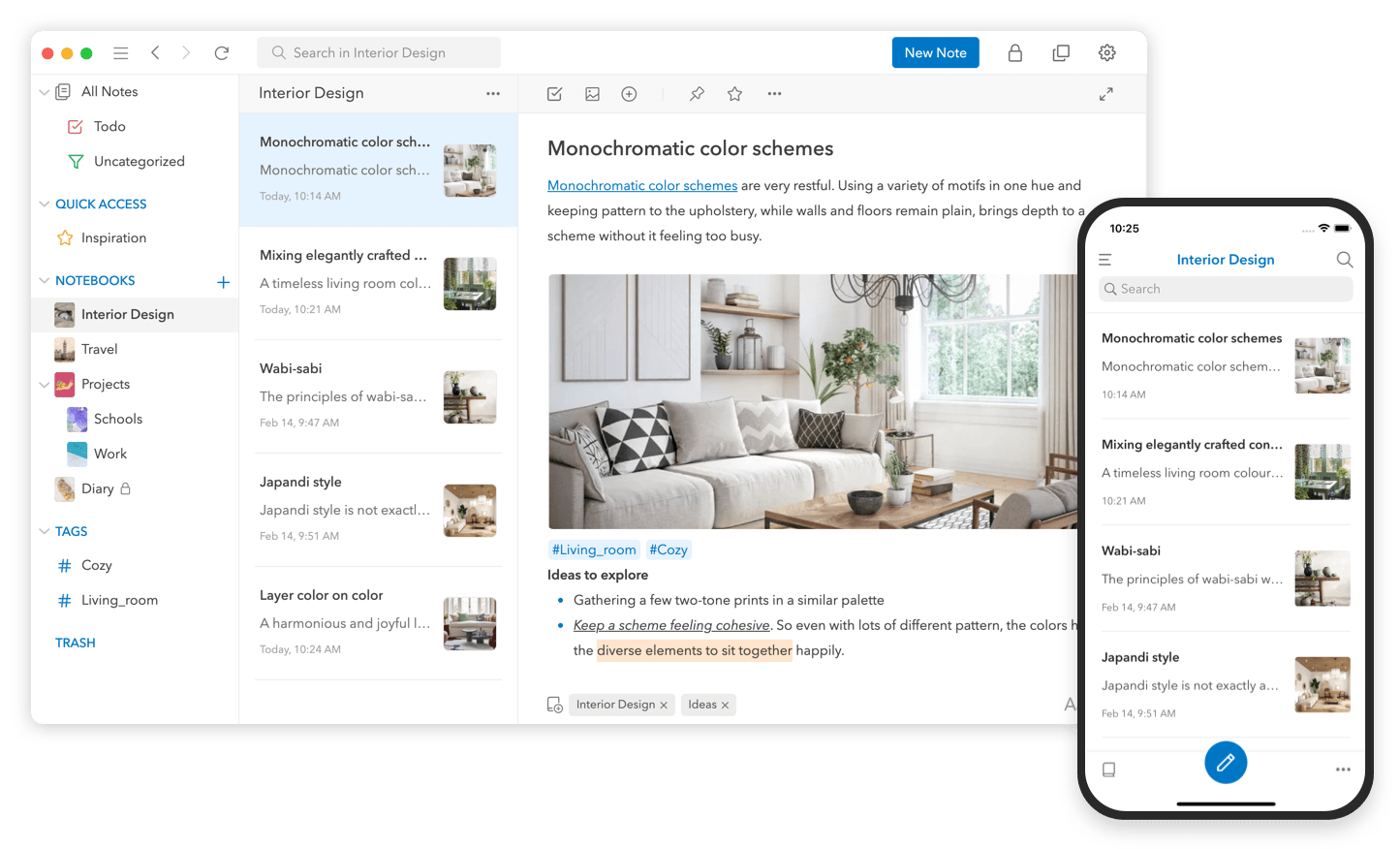
UpNote packs extraordinary power into a clean, delightful design that makes it a pleasure to take notes. Crafted to make focused note-taking effortless wherever you are, UpNote combines its beautiful, streamlined interface with powerful tools that use the latest technologies on every platform to deliver a superior experience.
The app works on iOS, Android, the Mac, and Windows, making it an excellent solution for anyone who needs access to their notes across multiple platforms thanks to the app’s fast, reliable sync. Plus, UpNote works however you want and wherever you are with themes, dark mode, a wide font selection, focus and typewriter modes, and the ability to work online and off.
Notes can be organized into notebooks and sub-notebooks too. Hashtags, note pinning, and bookmarking add even more ways to quickly access your notes. It’s a structure that’s supplemented by powerful search and sorting to make navigating even the largest collections of notes simple.
UpNote has all of your note-taking needs covered. Rich text formatting like tables, code blocks, attachments, images, bi-directional links, to-do lists, and more. Of course, the app supports Markdown syntax as well.
To handle your research needs, UpNote has a web clipper extension, so you can quickly save links and content as you browse the web. There’s even a great solution for longer notes: a table of contents feature that makes navigating long notes a breeze. The app can also be locked, which makes it perfect for journaling.
Switching to UpNote is easy, with powerful import functionality that can handle Evernote, Markdown, and other formats. The app handles backups automatically and includes a version history too. And, when you need to use your notes elsewhere, you can export them as Markdown text, HTML, or PDFs.
Now is the perfect time to try UpNote. The app includes subscription and lifetime upgrade options, and for a limited time, MacStories readers can purchase UpNote’s lifetime premium upgrade for 30% off. This is an amazing deal, so be sure to check it out today.
Our thanks to UpNote for sponsoring MacStories this week.
In This Issue
Federico continues his spelunking inside the Shortcuts file structure with a shortcut that can modify a shortcut file, resign and reimport it into Shortcuts, John shares techniques for scheduling shortcuts and triggering them remotely on the Mac using Apple’s Calendar and Mail apps, plus the usual Links, App Debuts, the latest happenings in the Club...
New Club MacStories+ and Club Premier Discount
For those who haven’t joined the Club MacStories+ and Club Premier Discord community, where this was announced earlier this week, we wanted to let you know that we have added a new discount to the rotating list of app and service discounts: An extended 3-month free trial of Recurrence, a task manager for iPhone, iPad,...
Previously, On MacStories
Stories MacStories Unwind: It’s All About the Picks Obscura 3 Takes the App’s Design in a New Direction Steve Troughton-Smith on Mac Catalyst’s Shortcomings Last Week, on Club MacStories: Parsing Shortcuts as XML and JSON, Apps That Extend Apple Apps, Safari Tips, and Developer Interviews Podcasts AppStories, Episode 260 – Shortcuts Wish List, 2022 Edition...