
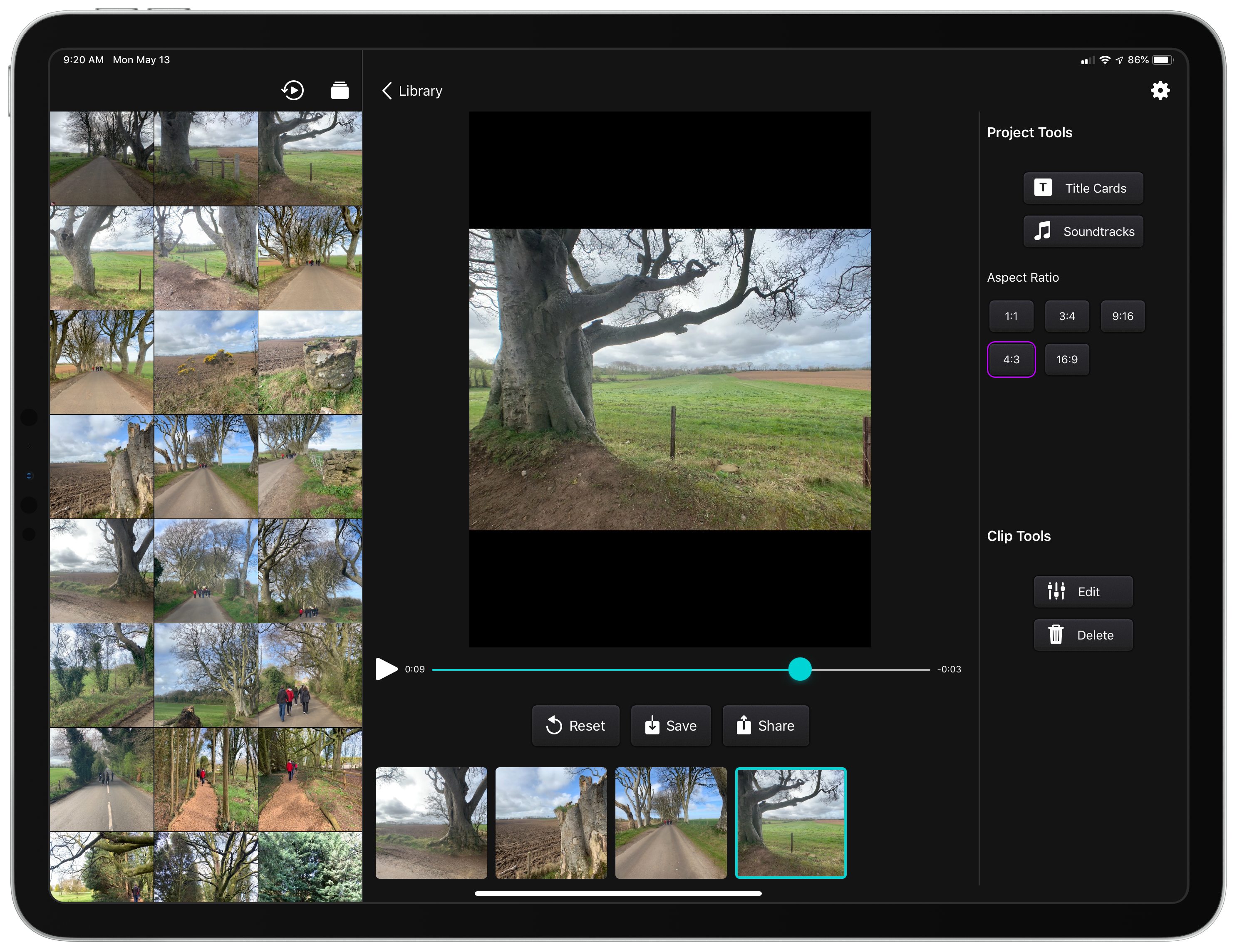
When I first covered Snapthread early last year, you could tell where it was headed. The app was conceived initially by developer Becky Hansmeyer as a way to combine Snapchat videos. By last January though, the app had evolved into a general-purpose solution for quickly and easily stitching together Live Photos, still photos, and short videos that could be shared on any social network or directly with friends and family. With version 2.0, which is out today, Hansmeyer has refined the existing user experience, added useful new functionality without complicating the app, and leveraged the iPad to create a more versatile video creation tool that works equally well for quickly sharing your creations on social networks as it does with small groups of friends and family.
 iOS 13 App Rumors and Wishes
 Federico
AppStories Episode 111 - iOS 13 App Rumors and Wishes
0:00
33:53
33:53
This week, Federico and John share their thoughts on the latest iOS 13 app rumors reported by Mark Gurman and 9to5Mac and other features and updates they’d like to see Apple implement this year.
An Interview with Khoi Vinh, Principal Designer at Adobe
Earlier this week I had the opportunity to sit down with Khoi Vinh, Principal Designer at Adobe who leads its Design Practices group and author of Subtraction.com. Vinh, who was in Chicago to speak at the HOW Design Live conference, talks about how Adobe is using Adobe XD to integrate UX and UI design and prototyping into the product creation process for everyone from freelancers to big companies. He also discusses designers’ role in addressing the problems social media is facing, how artificial intelligence is beginning to play a role in design, and his podcast, Wireframe.
(The following has been condensed and edited for readability.)
Tell me a little bit about what you’re working on at Adobe these days.
Adobe XD is one of the main priorities at Adobe. We’re really passionate about the experience design space; really passionate about how product designers, UX/UI designers, they’re really kind of leading the way for how professional creativity is changing and XD is more than just an app, it’s a platform to help us build what designers need. So we see it as more than just a design app. It’s also prototyping and sharing, and so it’s really meant to help designers, and also the people who work with them, get more value out of the design process and be more productive in general.
 App Debuts
 Ryan
RyanGoodTask GoodTask, the powerful third-party Reminders client, was updated this week with a handful of useful improvements. There’s a new gesture for activating search from within a list where you can simply pull down anywhere on the screen to have the search field pop in from the top of the screen. If you’d prefer...
Hardware Matters: CarPlay Then and Now

I’m not that into cars, but I’m very into CarPlay. The feature, which makes some of an iPhone’s apps available from a car’s entertainment system, is a close third place in importance to me after finding a vehicle that’s affordable and reliable. After years of tolerating flakey Bluetooth connections and terrible car entertainment systems,...
Q&A
Question: Is there a way to send recordings made with Voice Memos on an iPhone to the Apple Watch so I can listen to them there? (Jason Martion, @jasonact)
I’d suggest saving the file to a cloud storage service like iCloud Drive using the Files app extension from Voice Memos. Then go to Safari...
Bringing iOS Apps to the Mac Will Entail More Than Flipping a Switch→
Craig Hockenberry of The Iconfactory has an in-depth look at the challenges developers, designers, and marketers will face bringing their iOS apps to the Mac. Although Marzipan may make it possible to simply flip a switch in Xcode to build Mac and iOS versions of an app simultaneously, it’s unlikely to be that simple in practice. As Hockenberry notes:
that build setting is just the first step on a long and complicated road. Good interaction doesn’t come for free.
That’s because user interactions are different between iOS devices and Macs and driven by multiple factors including differing input devices, screen sizes, and individual UI elements.
One of the many examples of design challenges that Hockenberry covers is moving from iOS device screen sizes to Mac screens:
The most obvious design element that will change as you move from iOS to macOS is the screen. If you’ve designed for the iPad, you already understand the challenges of a larger display surface and adapting your views as that size changes. It’s not easy work, but an alternative design that’s just “a big iPhone” is highly unsatisfying for a customer.
The Mac alters this scenario slightly because your app is presented in a window that’s resizable: you might be running with the constraints of an iPhone SE one moment and the expansiveness of an iPad Pro the next.
Hockenberry also raises concerns about how developers will make money from Marzipan apps if they are universal apps as is the case with the iPhone and iPad versions of many iOS apps:
It’s my opinion that Universal apps were the worst thing to ever happen for the iPad ecosystem. There’s no way for a developer to recoup the costs for new interactions and the extra work needed for more sophisticated apps. Apple makes it easier for a customer up front by offering a single download, but at the same time they make things worse because a Universal version of the user’s favorite app isn’t financially viable.
One thing’s for sure, change is coming to the Mac. For some, it will be exciting, and for others, it will be fraught with peril. Mistakes will be made, and adjustments will be necessary, but for iOS developers, designers, and marketers new to this sort of transition, Hockenberry’s post is a great place to start thinking about bringing their apps to the Mac. He’s been through similar changes in the past, and with the magnitude of what Apple likely has in store at WWDC, there’s no time like the present to start considering these issues.
StopTheNews Forces Apple News Links to Open in Safari
Developer Jeff Johnson, the maker of StopTheMadness, has released a free Mac utility called StopTheNews that forces Apple News links to open in Safari instead of the News app.
The app works with Safari and Safari Technology Preview by registering itself as the default handler for the Apple News URL scheme. As Johnson explains on his website:
When StopTheNews gets an Apple News URL from Safari, it loads the page invisibly, finds the URL of the original article, and then opens the original article URL in Safari.
For example, this Apple News URL – https://apple.news/APIpuWVOoQQCi6gCg7H8zQg – opens a link on National Geographic’s website instead of in the News app. In my limited testing, StopTheNews works as advertised, opening Apple News links in Safari quickly. I don’t know if it’s possible, but I’d love to see StopTheNews also prevent Safari from asking if you want to open an RSS feed in Apple News when its URL is clicked.
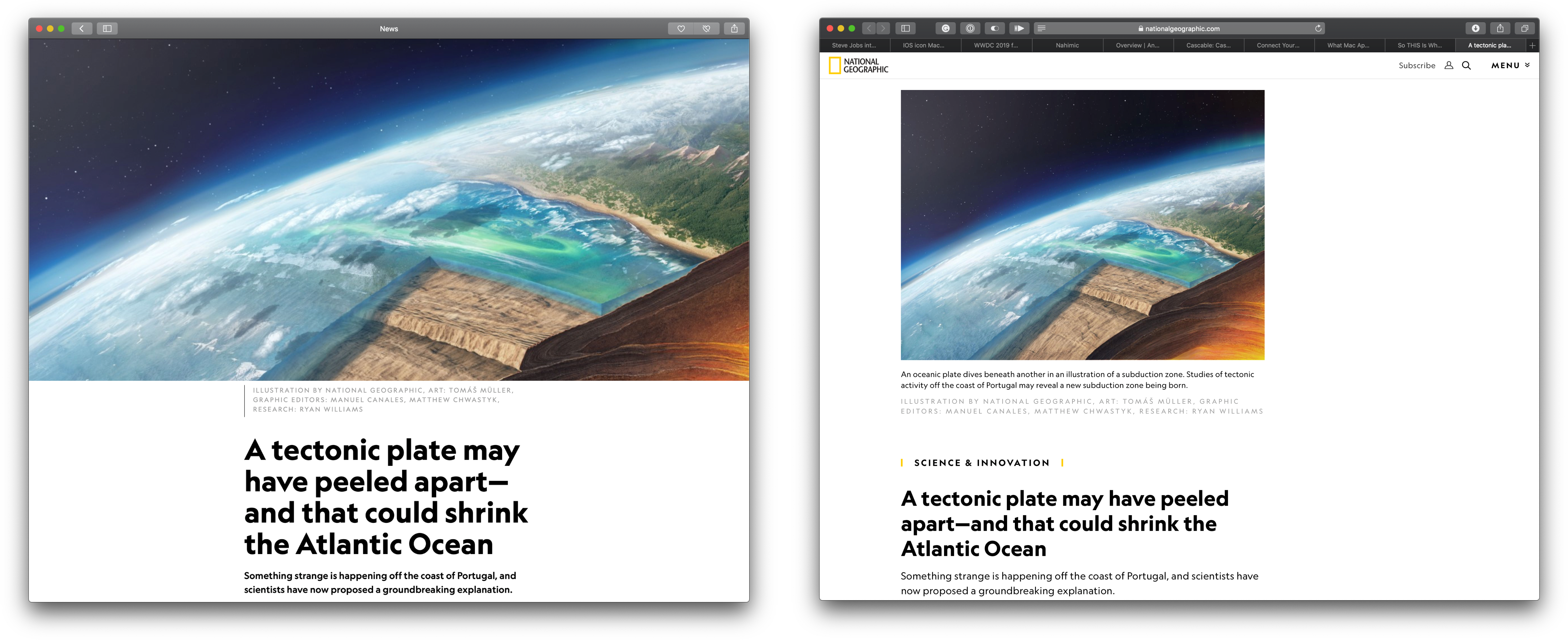
I understand Apple’s motivations to drive users to its News app, but if I’m already working with links in Safari, having another app open can be annoying. Johnson’s solution is simple but clever, and it’s free, so if you’d prefer using Safari instead of Apple News for News links, check out his utility, which is available on GitHub.
AppStories, Episode 110 – Revisiting the Breakup of iTunes→
On this week’s episode of AppStories, we revisit our discussion of the breakup of iTunes from Episode 21 in light of the latest Marzipan rumors.
Sponsored by:
- Hype Professional – Design beautiful HTML5 interactive pieces and animations.
- Linode - High-performance SSD Linux servers for all of your infrastructure needs. Get a $20 credit.
AppStories Episode 110 - Revisiting the Breakup of iTunes
0:00
30:29
30:29





