


[[John]] Apps for Apple Vision Pro is a new website that highlights apps available for Apple’s newest app platform. (Link) Stu Maschwitz published an in-depth post about shooting video on an iPhone in ProRes Log using footage he shot in Peru and Taiwan to show off his new set of color correction LUTs. (Link) Engadget...
Wallpaper Interviews Apple’s Alan Dye and Richard Howarth→
Today, Wallpaper published an interview with Alan Dye, Apple’s Vice President of Human Interface Design, and Richard Howarth, Vice President of Industrial Design. It’s a fantastic read with some great images, including an exploded view of the Vision Pro’s components.
Something I noticed as soon as I unboxed the Apple Vision Pro was how approachable it was. The setup process was easy, well-paced, and felt natural. That carries through to the hardware itself, too, which Dye explained to Wallpaper:
We wanted people around you to also feel comfortable with you wearing it, and for you to feel comfortable wearing it around other people. That’s why we spent years designing a set of very natural, comfortable gestures that you can use without waving your hands in the air. That’s also why we developed EyeSight, because we knew more than anything, if we were going to cover your eyes, that takes away much of what is possible when you connect with people. Getting that right was at the core of the concept of the product because we wanted people to retain those connections in their actual world.
My very early impression is that Apple’s design team accomplished its goal. Howarth puts a slightly different spin on the same message:
There’s a hardness and precision to the front of the product that is completely technical and feels like it’s been sent from the future, but then everything else that connects the product to you is soft and really approachable, so you feel cushioned and there’s not a barrier to putting it on or taking it off. And in fact, it should be a pleasure.’
Nobody is going to confuse the Vision Pro for something that it’s not. Still, the care that has been taken in its design goes a long way toward taking a device that is completely foreign to many people and making it one that isn’t intimidating. That’s something very uniquely Apple and why I’m optimistic about Vision Pro’s long-term prospects.
Apple Offers USB-C Enabled Vision Pro Strap to Registered Developers
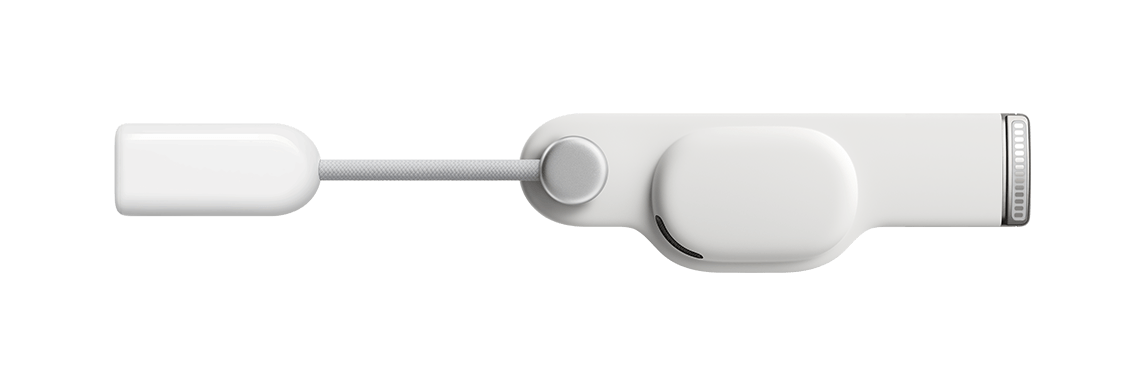
Apple is offering a new Vision Pro accessory to registered developers: a head strap with a USB-C connector for $299. There aren’t a lot of details about the strap, which is designed to be connected to a Mac to accelerate development and testing for the Vision Pro, other than this description that is behind a developer account login:
Overview
The Developer Strap is an optional accessory that provides a USB-C connection between Apple Vision Pro and Mac and is helpful for accelerating the development of graphics-intensive apps and games. The Developer Strap provides the same audio experience as the in-box Right Audio Strap, so developers can keep the Developer Strap attached for both development and testing.
Tech specs
- USB-C data connection
- Individually amplified dual driver audio pods
- Compatible with Mac
Although we haven’t been able to confirm the capabilities of the Developer Strap, USB-C may allow developers to connect the Vision Pro to their network over Ethernet or access external storage, for example.
Why is a USB-C dongle $299? It’s expensive, but as the description makes clear, it incorporates the speaker found in Vision Pro’s right strap, which it replaces, explaining at least part of the cost.
Tucked Away Nearby: A Refinement of my Desk Setup
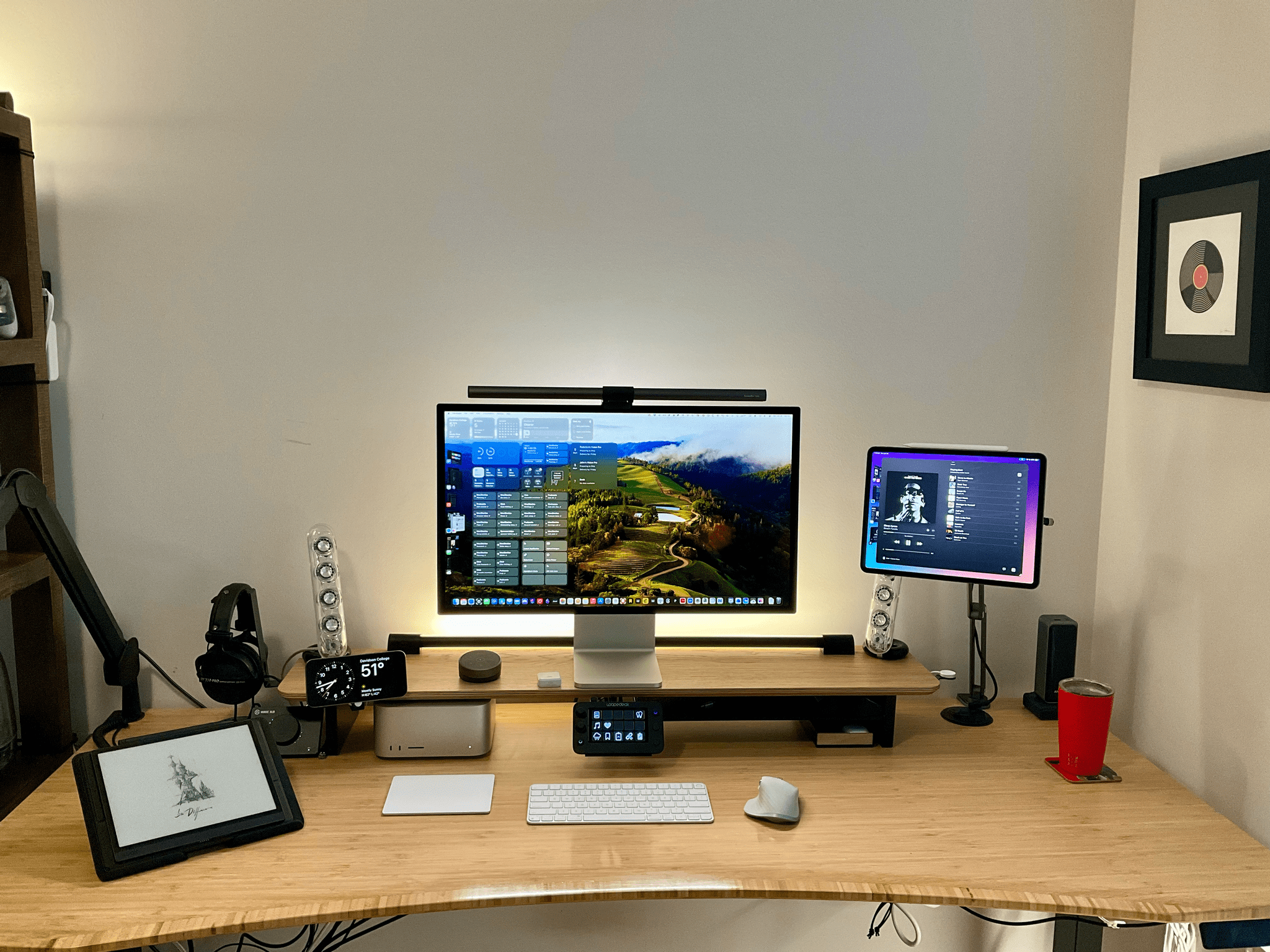
When Federico and I published our setups last November, I was happy with mine, but there was still something that bothered me. Every day, I wound up with too much stuff strewn across my desk. At the same time, some of the things I use most days felt annoyingly out of reach. These weren’t monumental annoyances, but they were daily distractions that led me to leave things on my desk for long stretches of time where they were in the way. So, I started thinking about ways to improve my setup again.
What I realized is that I had nowhere to put any of the little things I use each day, so they’d end up all over my desk, which then snowballed into a bigger mess. The solution was to bring those little things closer but create places for them that are out of the way. At the same time, I made a greater effort to tuck cables and wires out of the way where I can’t see them, which has also helped cut down on clutter.
The centerpiece of this revised setup is a Balolo Setup Cockpit. There are a lot of companies that make desk shelves, but they never appealed to me because I’ve always been able to adjust my Studio Display to a comfortable height without one. I could tuck things under the shelf, but I needed more than that.
What I like about the Balolo shelf is that it has a system of attachment points on the underside of the shelf for adding accessories that have allowed me to get more off my desk and out of the way. It’s turned out to be the perfect floating, modular extension of my old setup that makes a long list of small adjustments that add up to a big difference overall.
MacStories Unwind: John’s Surprise Payback







This week on MacStories Unwind, John turns the tables, surprising Federico with a more flexible, modular desk setup.
Sponsored By:
- Kolide – It ensures that if a device isn’t secure it can’t access your apps. It’s Device Trust for Okta. Watch the demo now.
John’s New Modular, Flexible Desk Setup
- Balolo Setup Cockpit
- KU XIU Magnetic Foldable Arm
- Right-angle USB-C adapters
- Anker Prime 27,650mAh 250W power bank and magnetic base
- Belkin SoundForm Connect
- BenQ ScreenBar Halo
- Meross HomeKit power strip
- Elastic loop cable stays
- Samsung T9 4TB SSD
- Trendnet 2.5Gbps switch
- Satechi 2.5 Gbps dongle
- Kiloview N40 NDI HDMI encoder
- For more be sure to check out John’s updated Desk Setup and related story.
- Club MacStories+ and Club Premier members can get a 10% discount on the Balolo Setup Cockpit by visiting the Club Discounts Page.
MacStories Unwind+

We deliver MacStories Unwind+ to Club MacStories subscribers ad-free and early with high bitrate audio every week.
To learn more about the benefits of a Club MacStories subscription, visit our Plans page.
Apple Reports Quarterly Revenue of $119.6 Billion for Q1 2024

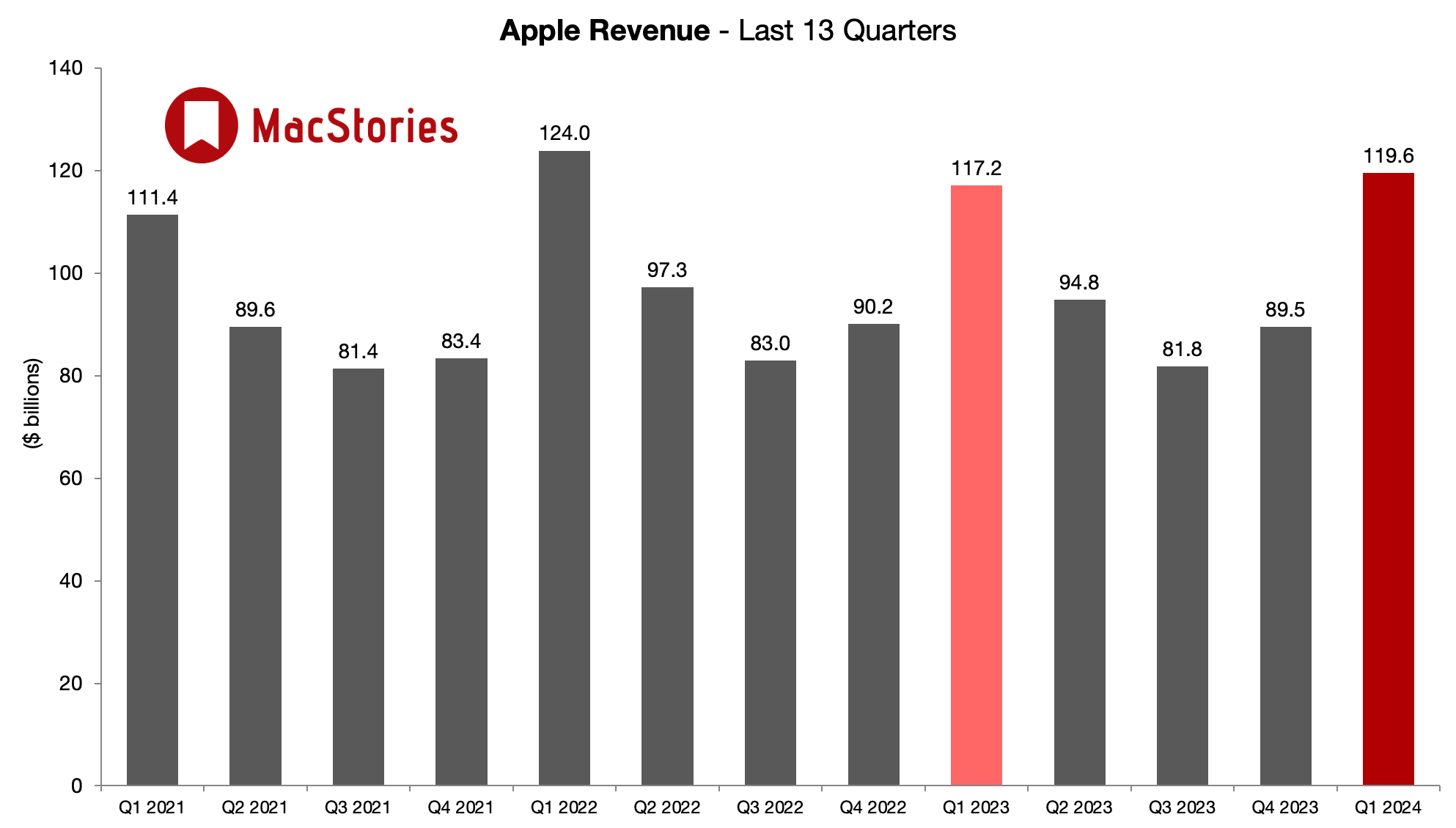
Last quarter, Apple reported that its revenue came in at $89.5 billion, which was down year-over-year but slightly more than expected. Today, the company reported $119.6 billion in revenue for the first quarter of 2024, which include the holiday season and the first full quarter of iPhone 15 sales.
According to Apple CEO Tim Cook:
Today Apple is reporting revenue growth for the December quarter fueled by iPhone sales, and an all-time revenue record in Services. We are pleased to announce that our installed base of active devices has now surpassed 2.2 billion, reaching an all-time high across all products and geographic segments. And as customers begin to experience the incredible Apple Vision Pro tomorrow, we are committed as ever to the pursuit of groundbreaking innovation — in line with our values and on behalf of our customers.
Going into today’s earnings call, the consensus among Wall Street analysts was that Apple would earn $117.97 billion. Apple beat those expectations by a healthy margin of nearly $2 billion. And, with 2.2 billion installed devices, an all-time high, the opportunity for continued growth of service revenue is significant.
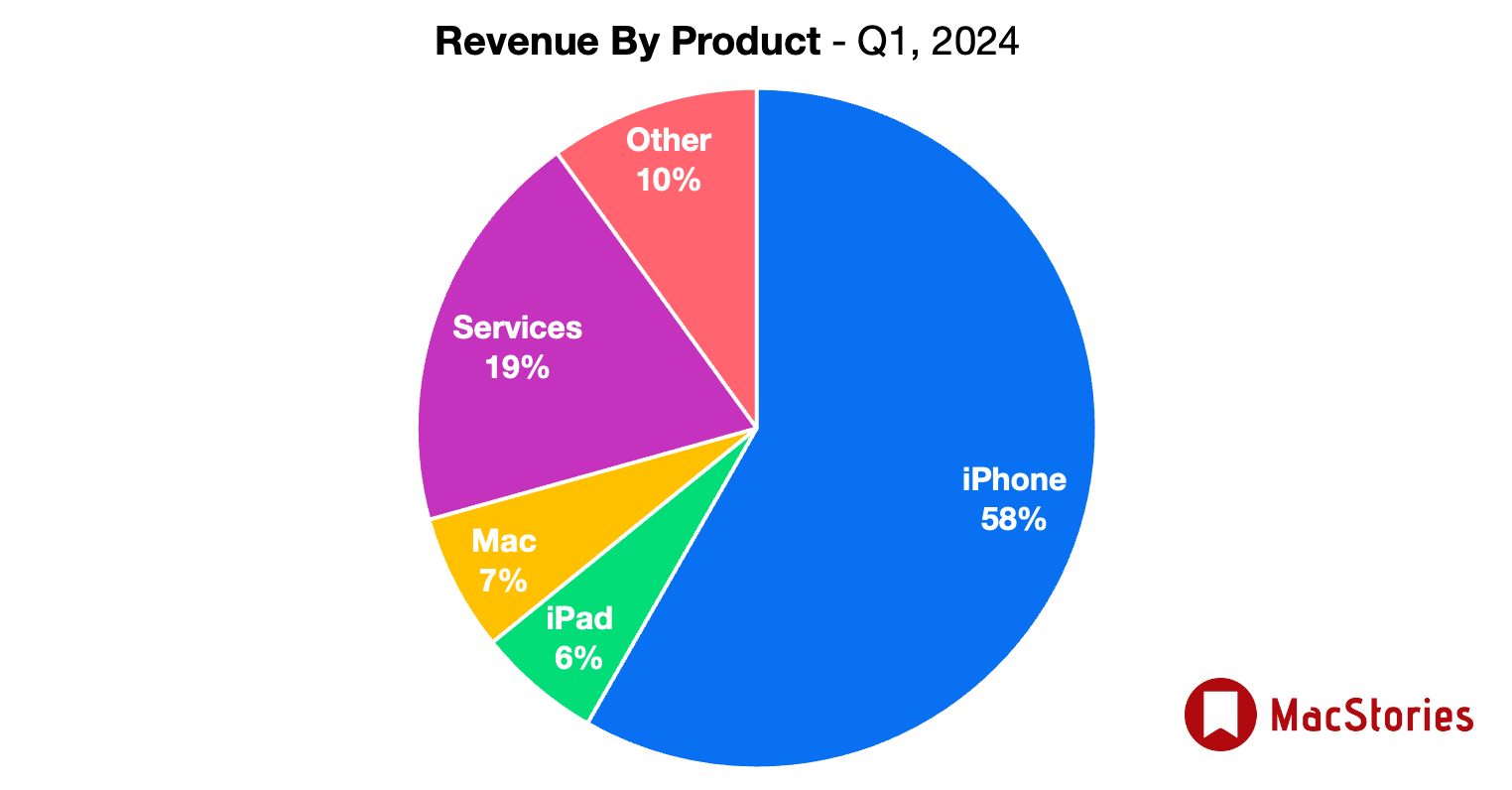
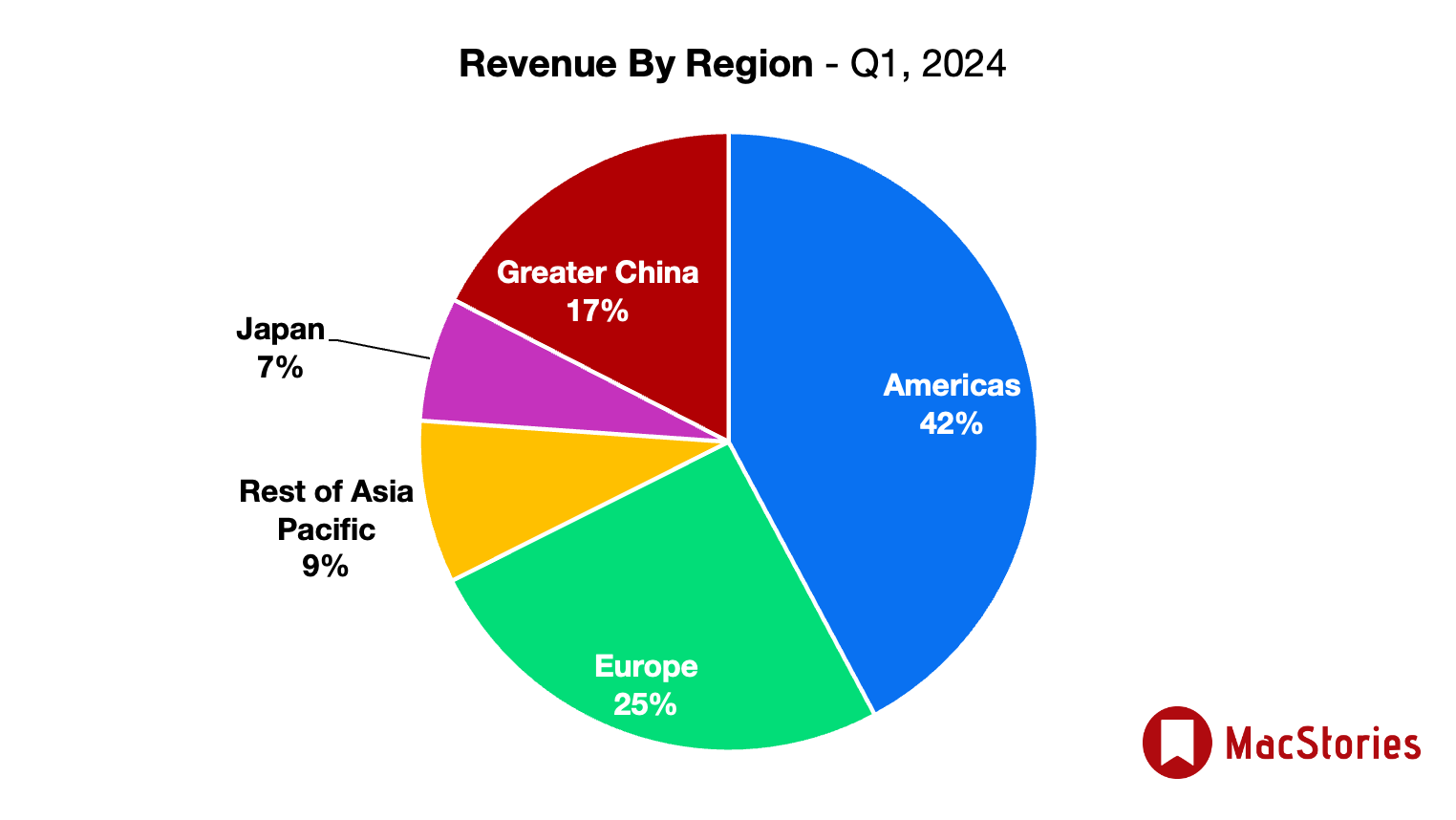
Once again, though, the iPhone was the star of the show with a sizable 58% of Apple’s revenue for the quarter, making up for concerns about consumer demand in China, regulatory pressures in Europe, and questions about whether consumers will embrace Apple Vision Pro.
The Iconfactory Launches Project Tapestry, a Kickstarter Campaign to Create a Universal Inbox for RSS, Social Media, and More
We’re at an exciting moment in the history of the Internet where the downsides of walled gardens of content have become painfully obvious to more people than ever. Those downsides weren’t so clear when companies like Twitter got their start. As it and other companies grew, the convenience and instant gratification of social media put a dent in things like blogging, RSS, and other ways people shared their thoughts, links, and other media online.
But, if there’s a silver lining to what’s become of Twitter, it’s that it opened the eyes of a lot of people who are now helping revitalize the open web standards that never went away for many of us. The trouble is that the feeds we monitor are spread over more places than ever before. There’s RSS, of course, but there’s also ActivityPub, Bluesky, and more. That makes it the perfect time for a new approach like the one The Iconfactory has announced via a Kickstarter campaign.
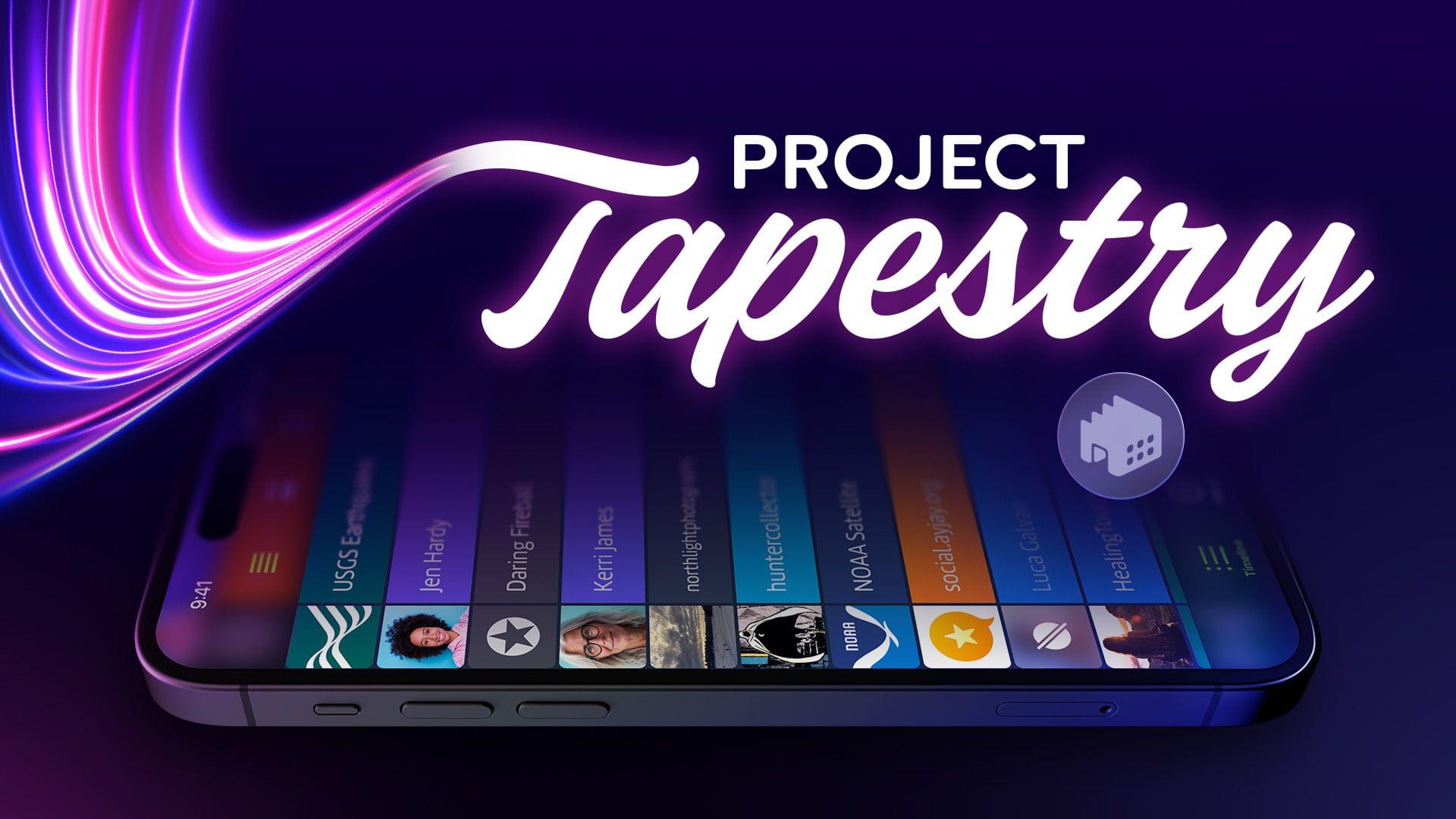
The campaign was launched today to fund the creation of Tapestry, an iOS universal inbox for the feeds in your life. The Iconfactory makes it clear that it doesn’t intend for Tapestry to replace your RSS reader or Mastodon client, though. Instead, the company wants Tapestry to be a unified, chronological timeline that will help you keep up with what’s new so you can pick the best that your favorite sources have to offer. The Iconfactory has also said the app will have a simple API for adding your own data sources to your feed.
I love this idea and backed the project immediately. The Iconfactory says that they expect the development to take 9 - 12 months, which comes with the usual caveats about the risks of funding a Kickstarter campaign, which is why I rarely link them except in cases like The Iconfactory’s, which has a proven track record. The initial goal is $100,000, and as of the publication of this story, they’re about 25% of the way there. The first stretch goal is $150,000, which would add features like muting, theming, bookmarking, filtering and searching, local notifications, a share plugin system similar to Shortcuts, a curated library of plugins, and a Mac app.
There are also multiple reward levels with a variety of rewards for anyone who pledges $5 to $1,500. To learn more, check out the campaign on Kickstarter and The Iconfactory’s blog.
What Reviewers Have Learned about Apple Vision Pro
By the time most Apple hardware is released, we usually know every minute detail of the specs and have a pretty good idea of what using it will be like. That hasn’t been the case with the Apple Vision Pro. Apple conducted multiple waves of demos in the months since WWDC 2023, but those were tightly controlled and limited. Today, however, we’re seeing the first hardware reviews from a range of media outlets and YouTubers who have had a chance to spend about a week testing the device.
There are some excellent reviews that are well worth reading in full, but I thought I’d highlight some of the most interesting tidbits that were either unknown or unclear before now to help give readers a better sense of what this hardware is all about.
AppStories, Episode 368 – Workflow Experiments→
This week on AppStories, we explore workflows we’ve been trying in a variety of apps.
Sponsored by:
- Memberful - Help your clients monetize their passion. Get started for free today!
](https://cdn.macstories.net/banneras-1629219199428.png)
On AppStories+, Federico and John follow up last week’s Vision Pro episode with follow up on their plans and consider what the device will be good for besides sitting by yourself watching movies.
We deliver AppStories+ to subscribers with bonus content, ad-free, and at a high bitrate early every week.
To learn more about the benefits included with an AppStories+ subscription, visit our Plans page, or read the AppStories+ FAQ.