John Voorhees

5405 posts on MacStories since November 2015

John is MacStories' Managing Editor, has been writing about Apple and apps since joining the team in 2015, and today, runs the site alongside Federico. John also co-hosts four MacStories podcasts: AppStories, which covers the world of apps, MacStories Unwind, which explores the fun differences between American and Italian culture and recommends media to listeners, Ruminate, a show about the weird web and unusual snacks, and NPC: Next Portable Console, a show about the games we take with us.

This Week's Sponsor:

Dropzone 5

Improve your Drag-and-Drop Workflow


Apple Spotlights 12 Spatial Computing Games Available on the Vision Pro along with More Than 250 Other Games That Can Be Played on the Device

Source: Apple.

Source: Apple.

Apple announced that its Arcade game subscription service includes a dozen titles designed for spatial computing, along with over 250 total that are playable on the Apple Vision Pro.

Alex Rofman, Apple’s senior director of Apple Arcade, said in a press release that:

This is just the beginning of a new era in gaming, with players being fully immersed in stunning game worlds and interacting with games in their physical environment in amazing new ways. We’re leading the way in offering players unique spatial games on Apple Arcade that are only possible on Apple Vision Pro, and we’re excited to bring even more magical spatial gaming experiences to our customers soon.

Synth Riders. Source: Apple.

Synth Riders. Source: Apple.

The 12 spatial titles available to Apple Arcade subscribers include:

Alto's Odyssey is coming to the Apple Vision Pro. Source: Apple.

Alto’s Odyssey is coming to the Apple Vision Pro. Source: Apple.

Although it’s a short list of spatial titles compared to the entire Arcade catalog, Apple says more are coming soon, including:

I’ve played a little LEGO Builder’s Journey so far and it’s a lot of fun as a spatial experience, and I’ll be digging into more of these titles for a story on the site soon.



Apple Introduces Two New Personalized Music Stations

Apple Music has added two new personalized stations: Love and Heartbreak. Here’s how Apple describes each:

The Love Station features songs about romantic love, falling in love, feeling amorous, and feelings that these experiences bring. Tailored to each listener’s taste, the Love Station will play songs and artists they know and love along with recommendations. Not exclusively ballads, these love songs are guaranteed to amplify the mood; whether they’ve got that rush of a new crush, or that fully grown long time love. 

The Heartbreak Station features songs about heartbreak, unrequited love, breaking up, or sad love. Having your heart broken is awful. Sometimes during these moments, music is the only thing that can make sense of it all. The Heartbreak Station will play a blend of songs from artists listeners know and recommendations, to help them let it all out.

The introduction of the new stations follows the Discovery station, which debuted last summer. It’s great to see Apple expanding these algorithmically-generated stations based on your listening habits because they’re nice complements to the curated playlists from Apple Music’s editorial team.


Apple’s iMessage Service Will Not Be Regulated under the EU’s Digital Markets Act

The EU has decided that Apple’s iMessage service is not a core platform, meaning that it will not be subject to regulation under the Digital Markets Act (DMA). Jon Porter writing for The Verge:

The decision is the culmination of a five month investigation which the Commission opened when it published its list of 22 regulated services last September. Although it designated Apple’s App Store, Safari browser, and iOS operating system as core platform services, it held off on making a final decision on iMessage until an investigation could be completed. A similar investigation into iPadOS is ongoing.

In the same press release, the European Commission also decided against designating Microsoft’s Edge browser, Bing search engine, and advertising business as core platforms subject to the DMA.

As you may recall from our prior coverage, Apple’s Safari browser, App Store, and iOS are all subject to the DMA, but the EC deferred making a decision on iMessage. In the interim, Apple announced it would support the RCS messaging standard that will exist alongside iMessage in Apple’s Messages app and will include several features that previously were unavailable to non-iPhone users who messaged iPhone users. It’s likely that Apple’s decision to incorporate RCS, which the company says is coming later this year, and iMessage’s relatively small European market share played a role in the EC’s decision, although the reasoning behind the decision was not shared by EU regulators.

Permalink

AppStories, Episode 370 – Apple Vision Pro: Hardware First Impressions

This week on AppStories, we tell the story of how Federico got his Apple Vision Pro before sharing our first impressions of the Vision Pro hardware.

Sponsored by:

  • Memberful – Easy-to-Use Reliable Membership Software
  • Bills to Budget – Get your Bills paid on time and your Budgets under control, with Bills to Budget!
  • 1Blocker – Enjoy websites without distractions

On AppStories+, we look back at CES and the gadgets we’re excited about and disappointed with.

We deliver AppStories+ to subscribers with bonus content, ad-free, and at a high bitrate early every week.

To learn more about the benefits included with an AppStories+ subscription, visit our Plans page, or read the AppStories+ FAQ.

Read more


Vision Pro App Spotlight: Parchi Brings Voice-Created Sticky Notes into Your Environment

Parchi is a new visionOS sticky note app by Vidit Bhargava, the maker of the dictionary app LookUp. The app is a straightforward, but handy utility for jotting down a quick note using your voice.

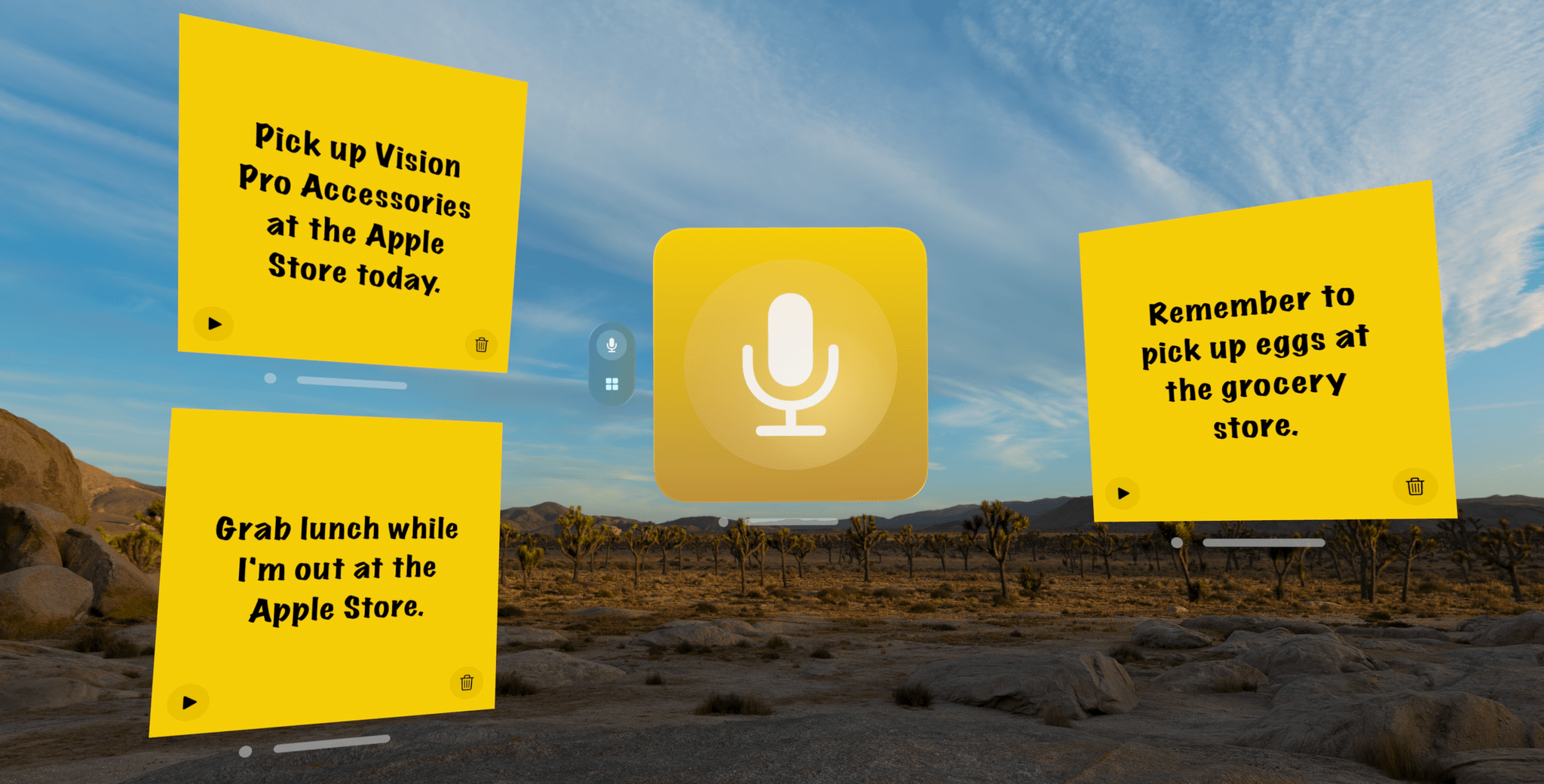
When you start recording, Parchi's record button turns into a big stop button.

When you start recording, Parchi’s record button turns into a big stop button.

When you launch the app, you’re greeted by a bright yellow gradient window with a big record button in the middle. Tap it and start speaking to record a note. Tap again to stop, and your audio recording will transform into a yellow sticky note with your recording transcribed into text. Once created, you can drag notes around your environment, leaving them in places where they will serve as valuable reminders. In the bottom corners of the note are buttons to play back your audio and delete the note.

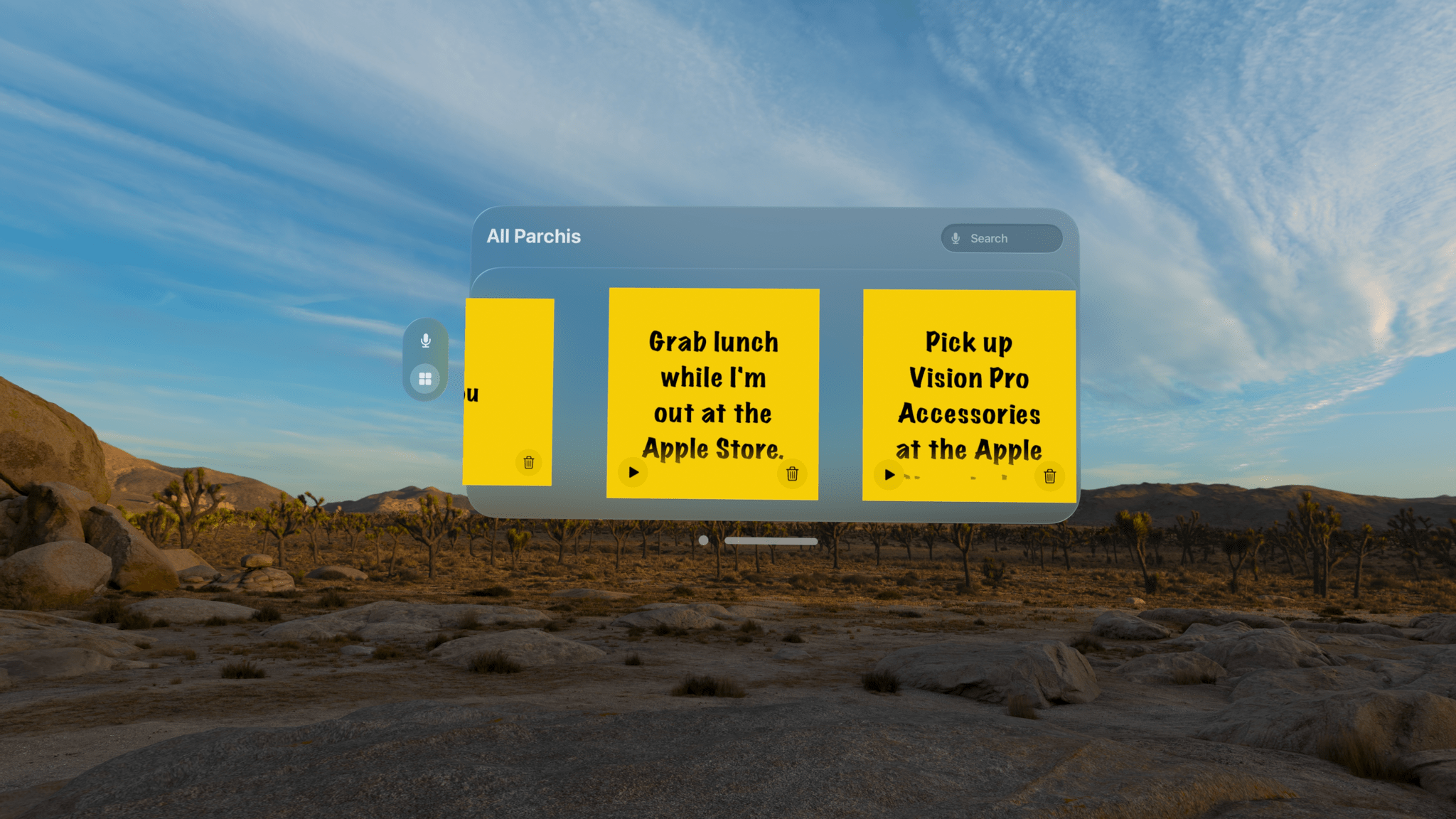
The All Parchi view.

The All Parchi view.

You can also access all of your notes from the app’s main UI by switching from the ‘Parchi Recorder’ view to ‘All Parchis,’ which displays each of your notes as a horizontally scrolling collection. The ‘All Parchis’ view also includes a search field for finding particular notes in a large collection.

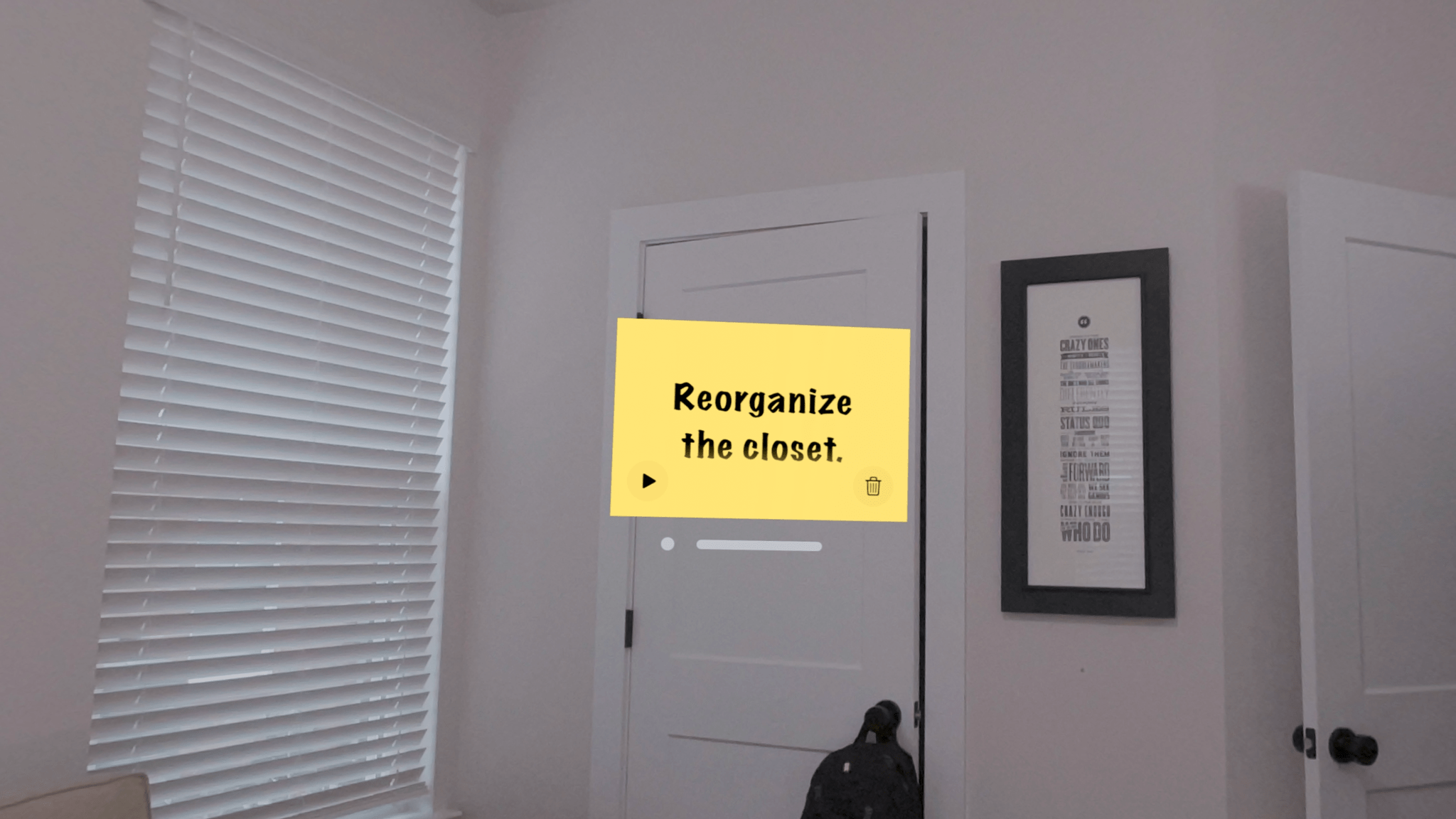
Leave notes where they make the most sense within your environment.

Leave notes where they make the most sense within your environment.

I love Parchi’s simplicity and ease of use, but I’d like to see it expanded a little too. The smallest size note is still somewhat large. It would be great if I could shrink them even further with the text transforming into a play button when there isn’t enough room to display it. I’d also like to see Siri and Shortcuts support added to make it possible to create a note without first opening the app. Finally, a copy button would make Parchi a better complement to task managers and other apps by allowing text to be moved to other apps as needed.

Overall, though, I’ve really enjoyed using Parchi. It’s the kind of quick interaction I appreciate when I’ve got something on my mind that I want to jot down without interrupting the flow of whatever else I’m doing.

Parchi is available on the App Store for $2.99.


MacStories Teams Up with ScreenCastsONLINE for a Big Discount for Club Members

For more than fifteen years, ScreenCastsONLINE has been a leading resource for online tutorials for Mac, iPhone, and iPad users. So we’re very pleased to announce today that we’ve teamed up with ScreenCastsONLINE to offer Club MacStories+ and Club Premier members who first-time subscribers to ScreenCastsONLINE: a 50% discount on their first year of an annual subscription. Club MacStories+ and Premier members can use this link to take advantage of ScreenCastsONLINE’s special discount as well as the other deals offered by Club MacStories. Not a Club member yet? Learn more here.

ScreenCastsONLINE has an incredibly deep catalog of tutorials that includes tutorials on:

  • Apple OS updates
  • Shortcuts and other automation tools
  • Apple system apps
  • Photography apps
  • Productivity apps
  • Music apps
  • And much more

Many of our favorite apps are included among ScreenCastsONLINE’s videos, making it a terrific compliment to the reviews and other app coverage you find on MacStories. So, if you haven’t joined Club MacStories before or are thinking of rejoining, now is a great time to join and become a ScreenCastsONLINE member too.

Discounts are just one of the many Club MacStories perks.

Discounts are just one of the many Club MacStories perks.

To put the Club deals into context, taking advantage of them all would save you enough to pay for more than two years of Club Premier, the highest Club tier. That’s before you even consider the many other perks Club MacStories+ and Club Premier members enjoy, including:

  • Weekly and monthly newsletters 
  • A sophisticated web app with search and filtering tools to navigate eight years of content
  • Customizable RSS feeds
  • Bonus columns
  • An early and ad-free version of our Internet culture and media podcast, MacStories Unwind
  • A vibrant Discord community of smart app and automation fans who trade a wealth of tips and discoveries every day
  • Live Discord audio events after Apple events and at other times of the year, including one coming this week about the Apple Vision Pro

On top of that, Club Premier members get AppStories+, an extended, ad-free version of our flagship podcast that we deliver early every week in high-bitrate audio.

Use the buttons below to learn more and sign up for Club MacStories+ or Club Premier.

Join Club MacStories+:

Join Club Premier:


Apple Vision Pro: Hardware First Impressions

AppStories+ Deeper into the world of apps

AppStories Episode 370 - Apple Vision Pro: Hardware First Impressions

0:00
50:26

AppStories+ Deeper into the world of apps

This week, Federico and John tell the story of how Federico got his Apple Vision Pro before sharing their first impressions of the Vision Pro hardware.

Read more


Interesting Links

[[John]] According to Engadget, Tencent is working on a free-to-play Genshin Impact-style mobile version of Elden Ring. (Link) OpenAI is implementing CP2A, a watermarking standard used to verify invisible metadata and visible symbols to identify the source and history of an image in Dall-E 3. (Link) Jason Snell reviewed the Apple Vision Pro on Six...


App Debuts

[[John]] Rolli: 360° Video Player Rolli is a simple visionOS app by Devin Davies, the maker of Crouton that plays 360° photos and videos, using the Apple Vision Pro to immerse yourself in them in a way that you probably haven’t before. Cricket Scores Live Matches I don’t know much about cricket, but I know...