Graham Spencer

917 posts on MacStories since January 2011

Former MacStories contributor.


Use The Power of IFTTT To Customize Your Apple TV Screen Saver

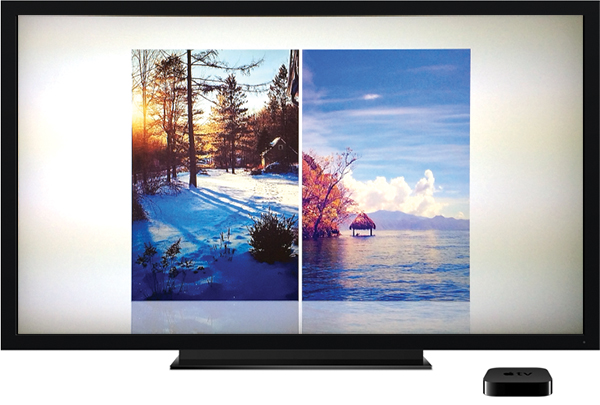
It’s a fairly hidden feature that not many people seem to know about, but the Apple TV has some pretty great options for customizing its screen saver. There are a few default sources of photos you can choose from, including National Geographic (probably what you are using now), Animals, Flowers, Trailers (which shows movie posters of films on the iTunes Trailers website) and iCloud Photos (Photostream and iCloud albums).

But more interesting is the option to use Flickr. That may sound odd, but the reason I say it is because when you combine it with the awesome power of IFTTT, you can create some really unique screen saver options. For example, for the last few months I’ve been using a combination of Flickr, IFTTT and Instagram to create an Apple TV screen saver that cycles through images that I have liked on Instagram and it is far better than seeing the same old National Geographic photos (as great as they are) over and over again.


Read more


Adobe Lightroom Mobile for iPad Now Available

Behind the scenes, Lightroom desktop creates Smart Previews of photos marked for sync and uploads them to the Creative Cloud servers. Smart Previews retain much of the editability and detail of the source images (even raw files) but occupy much less storage space. In Lightroom mobile, the app downloads low-resolution previews for display in its Grid layout, and when an image is opened it pulls down the higher-resolution Smart Preview file (enabling you to zoom in to check details if needed).

Make a change to a photo on the iPad, and that change should appear in Lightroom desktop within seconds, removing the need to export or import images. Edits you make to the photo synchronize back to Creative Cloud and Lightroom desktop when you close the image—in fact, only a small XML file describing the edits is transmitted, which is why updates appear in the desktop and mobile applications quickly.

Adobe’s Lightroom application made its way to iOS overnight with the launch of Lightroom mobile for iPad and Macworld’s Jeff Carlson has a detailed preview of the app. Adobe looks like they have done a really nice job with bringing the app to the iPad thanks to their implementation of a clever sync system (as explained above) and extensive compatibility between this mobile version and the desktop version of Lightroom.

As with most of Adobe’s offerings in recent years, Lightroom mobile is bundled as a part of their Creative Cloud subscription service, so whilst the app is free to download, you will need to sign up for one of their subscription plans to use Lightroom mobile.

Permalink

Sparkle Public Beta: Create Websites With No Coding Knowledge

Launched as a public beta just over a week ago, Sparkle is a new Mac app designed to let you build fully functional websites with no coding knowledge necessary. At its core it is a modern WYSIWYG editor that is super simple to use and more than powerful enough for building a static webpage such as a product promotional page or a personal landing page.

Design in full freedom, finely control positioning, use layout grids and smart snapping. Stay neat and tidy or break all the rules. Your web page is your canvas.

No HTML expected!

I’ve been playing around with Sparkle for a little while over the weekend and one of the features that stood out most for me is the easy ability to modify your layout design for different devices. It really is a breeze to dive in and change how the website displays on a smartphone so that it is as easy to read and view as it is on the desktop. Something that makes designing a website so very easy with Sparkle is its Live Preview function. Open a preview in your browser and it will be automatically updated whenever you make any change from Sparkle.

Sparkle includes over 600 fonts, and over 300 background patterns, as well as support for YouTube and Vimeo embeds. It’s a great start but I would like to see Sparkle add support for embedding Tweets; it would also be useful to be able to embed HTML code – a feature that’s not available at the moment. The other aspect to Sparkle that I think is missing at its current stage is HTML5 animations. I think some support for basic animations would be a really solid addition to really set this app apart from its competitors.

You can download and test drive the public beta of Sparkle for Mac here. Remember that if you do try Sparkle, the developers want to make it a better app, so give them some helpful feedback. Read more


The Ultimate Guide to Solving iOS Battery Drain

This is not one of those “Turn off every useful feature of iOS” posts that grinds my gears. My goal is to deliver practical steps to truly solve your iOS battery woes.

One quick thing before we start — 99.9% of the time it is not actually iOS that is causing your battery to drain quickly. I guarantee you that if you erased your phone and there were no apps or email on it, it would last for ages. But, no one uses their device like that, nor should they. Hopefully with these steps you will be living in iOS battery bliss while still using all the apps and features you love.

If you’ve ever had iPhone battery life issues, or constantly get pestered by friends and family with poor iPhone battery life, this article by Scotty Loveless is a must-read. Unlike many rather sensational articles that suggest a myriad of ‘solutions’ that may or may not actually work, Loveless offers just a handful of rational and practical solutions and explains why he is suggesting them.

Permalink

Deckset Empowers You To Create Great Presentations From Your Text Editor Of Choice

We’ve all been there: bored out of our minds in a meeting because someone has put together a PowerPoint presentation with about ten million words written on each slide and their speech comprises of them just (struggling) to read the slides. But as easy as it is to criticise people for doing this, the truth is, it can actually be really hard to make a great PowerPoint or Keynote presentation. Deckset, a new app on the Mac App Store, aims to make it just a little bit easier to create something great when it is your turn to present. Read more


Tuning into the Curious Design Decisions of iTunes Radio

Last week, I listened to Jared Leto from Thirty Seconds to Mars talk about his hometown of Los Angeles. He talked about, and then played, the songs that remind him of the City of Angels and other songs that have inspired him as a musical artist. It was great to listen to, not just as a big fan of Thirty Seconds to Mars but as someone who has just spent over two months living, studying, and working in Los Angeles.

So where did I listen to Leto and these songs? iTunes Radio.

Read more


Required Reading On App Store Pricing For Developers

Required Reading On App Store Pricing For Developers


The development of an app no doubt involves many tough decisions and trade-offs that you have to make, and one of the biggest will be at what price to sell your app for. To help clarify the important lessons and issues to consider when pricing an app, Michael Jurewitz has posted a five-part series based on his Çingleton and NSConference talks on ‘Understanding App Store Pricing’.

I’ve included below a brief summary of each article by Michael, but it’s really no substitution for reading the entire series yourself. It’s well written and although at times it covers some moderately complex microeconomic theories, it is broken down in easy to understand language with helpful diagrams and practical examples.

Permalink

Quantifying The Australian “Apple Tax”

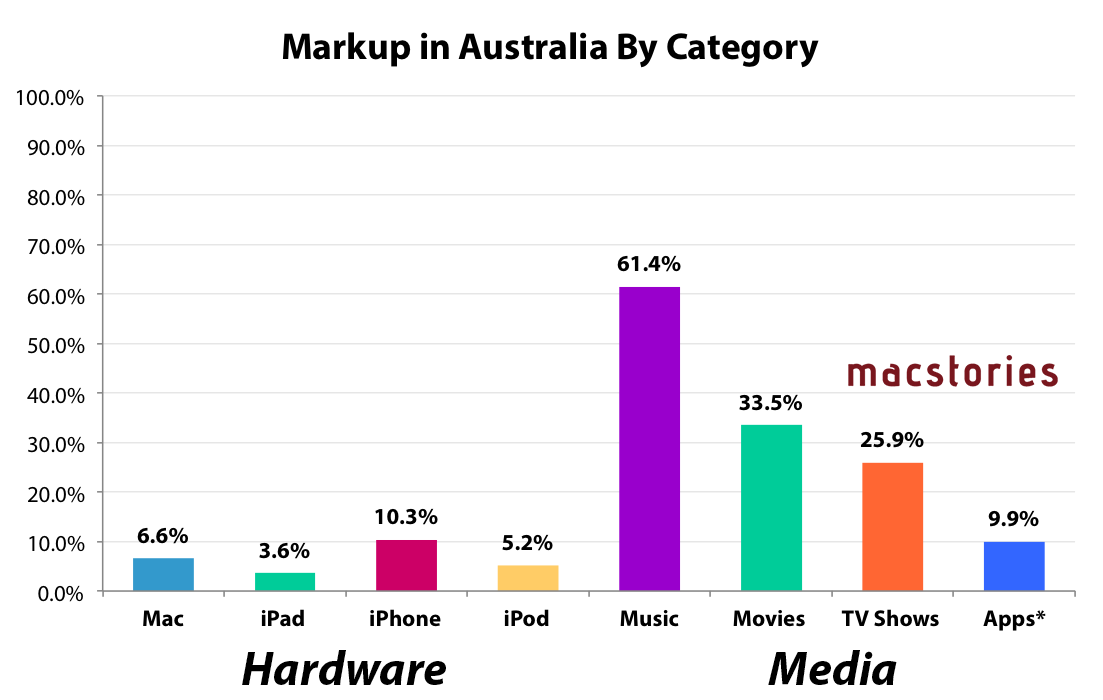
On Friday, Apple (along with Microsoft and Adobe) will front the Federal Australian Parliament’s inquiry into IT Pricing. You may recall that after failing to voluntarily appear, the committee in February of this year summonsed the three, effectively forcing them to appear. Given Apple’s appearance, I wanted to take a closer look to see what Apple actually charges for their products (both hardware and media from their iTunes and App Stores) and see how it compares to the US.

Methodology

Doing this kind of analysis can be fairly contentious given there are a few ways to do it, various assumptions you have to make, and different ways of presenting the information. To be clear, here is how I have constructed the data presented in the graphs in this article.

  • I collected from Apple’s website, the Australian and US prices of all their key products and main models (but not built-to-order models).
  • GST is removed from Australian price: The Australian price includes a 10% GST (goods and services tax), so I removed that from the Australian price because US prices do not include a sales tax, that is added at checkout based on which US state the customer is from (sales taxes varies across US states).
  • Now that both prices don’t include sales taxes, I convert the Australian price from Australian dollars (AUD) to US dollars (USD). I use a 3 month average of the exchange rate. The 3 month average smoothes out any temporary peaks or troughs in the exchange rate and gives Apple a fairly lengthy period of time to alter prices if there was a significant change in the exchange rate.
  • This now gives me the price of the Australian good in USD and without GST, a figure that can now be compared with the US price. So I calculate the percentage markup of the Australian price based on the original US price.
  • NOTE: Methodology for the Media calculations do vary a bit, read the notes I include with them.
  • I encourage you to scrutinise my calculations by taking a look at the Excel document I created, linked below.

Acknowledging The Threat Of Samsung


In the past week Apple’s marketing chief, Phil Schiller, gave three interviews and the company sent out a new “Why iPhone” email campaign - both timed perfectly around the announcement of Samsung’s new flagship smartphone, the Galaxy S4. Some have called it out as Apple going on the defensive, others have said it’s Apple on the offensive. I’m not sure that you can categorically say it’s one or the other – it doesn’t really matter much.

Read more