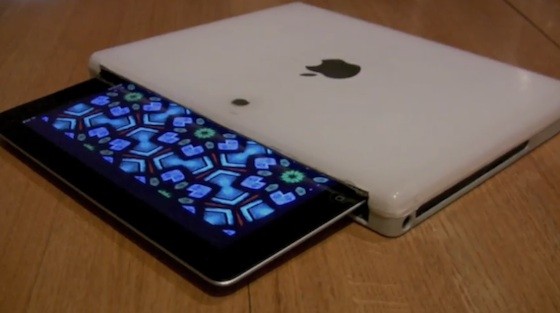
Many people with broken computers either throw them away, or send them to a recycling program. Why not keep your old iBook and use its shell to make a one-of-a-kind iPad case? Sounds difficult, right? Gary Katz, who created things such as the Personal Shoebox Apple Store and The Apple Museum - 30 Years in 2 Minutes, shows you how and it’s not that difficult. All you need is an old iBook, a Dremel tool and some free time.
We’ll tweet the daily deals at @MacStoriesDeals as well as exclusive weekend deals too, so please follow! Here are today’s deals on iOS, Mac, and Mac App Store apps that are on sale for a limited time, so get ‘em while they’re hot!
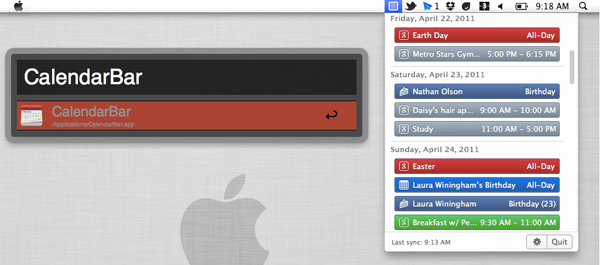
Clean Cut Code’s CalendarBar, a great menu bar app for OS X, lets you see events from iCal, Facebook and Google Calendar all inside one great looking app. We reviewed CalendarBar back in March and we really like it.
Today, Clean Cut Code has updated the app to version 1.1 with some very nice additions. iCal tasks/todos are now supported from the preferences pane and it now also supports Alfred / LaunchBar / QuickSilver quick launch applications. When CalendarBar is running, simply start typing “CalendarBar” into Alfred (LaunchBar or QuickSilver as well), and it forces the app to dropdown from the menu bar so you can access the app without using your mouse. (Thanks to Don Southard for helping us test multiple launch apps.)
The developers also added support for BusyCal and Google Calendar multiple sign-ins. You can now configure relative day formatting (today, tomorrow, etc) and make timed events not span multiple days. CalendarBar also received a new app icon along with some bug fixes. If you still haven’t picked up CalendarBar from the Mac App Store, maybe you should mark your calendar to do so. Check for updated via the Mac App Store or buy the app now for $2.99.
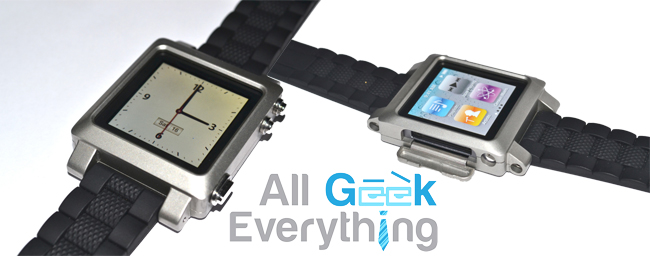
We really haven’t heard of any exciting iPod Nano watch kits in a while since the TikTok & LunaTik last year. They’re having huge success but there’s still plenty of room for new ones. Enter The Paradox - a contemporary/industrial designed conversion kit for the iPod Nano made from high-grade stainless steel with a patent pending enclosure design.
We’ll tweet the daily deals at @MacStoriesDeals as well as exclusive weekend deals too, so please follow! Here are today’s deals on iOS, Mac, and Mac App Store apps that are on sale for a limited time, so get ‘em while they’re hot!
We’ll tweet the daily deals at @MacStoriesDeals as well as exclusive weekend deals too, so please follow! Here are today’s deals on iOS, Mac, and Mac App Store apps that are on sale for a limited time, so get ‘em while they’re hot!
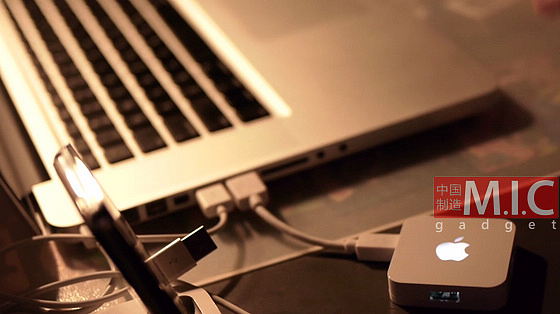
M.I.C. Gadget is now selling the second revision of their iHub; a small, 4-port USB hub with a bit of Apple branding on it. The iHub has a light-up Apple logo on top that’s reminscent of many Apple laptops. Version 2 of their iHub looks very nice and could almost pass for a legitimate Apple accessory, even the packaging looks familiar.
Video and another picture after the break. Read more
We’ll tweet the daily deals at @MacStoriesDeals as well as exclusive weekend deals too, so please follow! Here are today’s deals on iOS, Mac, and Mac App Store apps that are on sale for a limited time, so get ‘em while they’re hot!
We’ll tweet the daily deals at @MacStoriesDeals as well as exclusive weekend deals too, so please follow! Here are today’s deals on iOS, Mac, and Mac App Store apps that are on sale for a limited time, so get ‘em while they’re hot!