
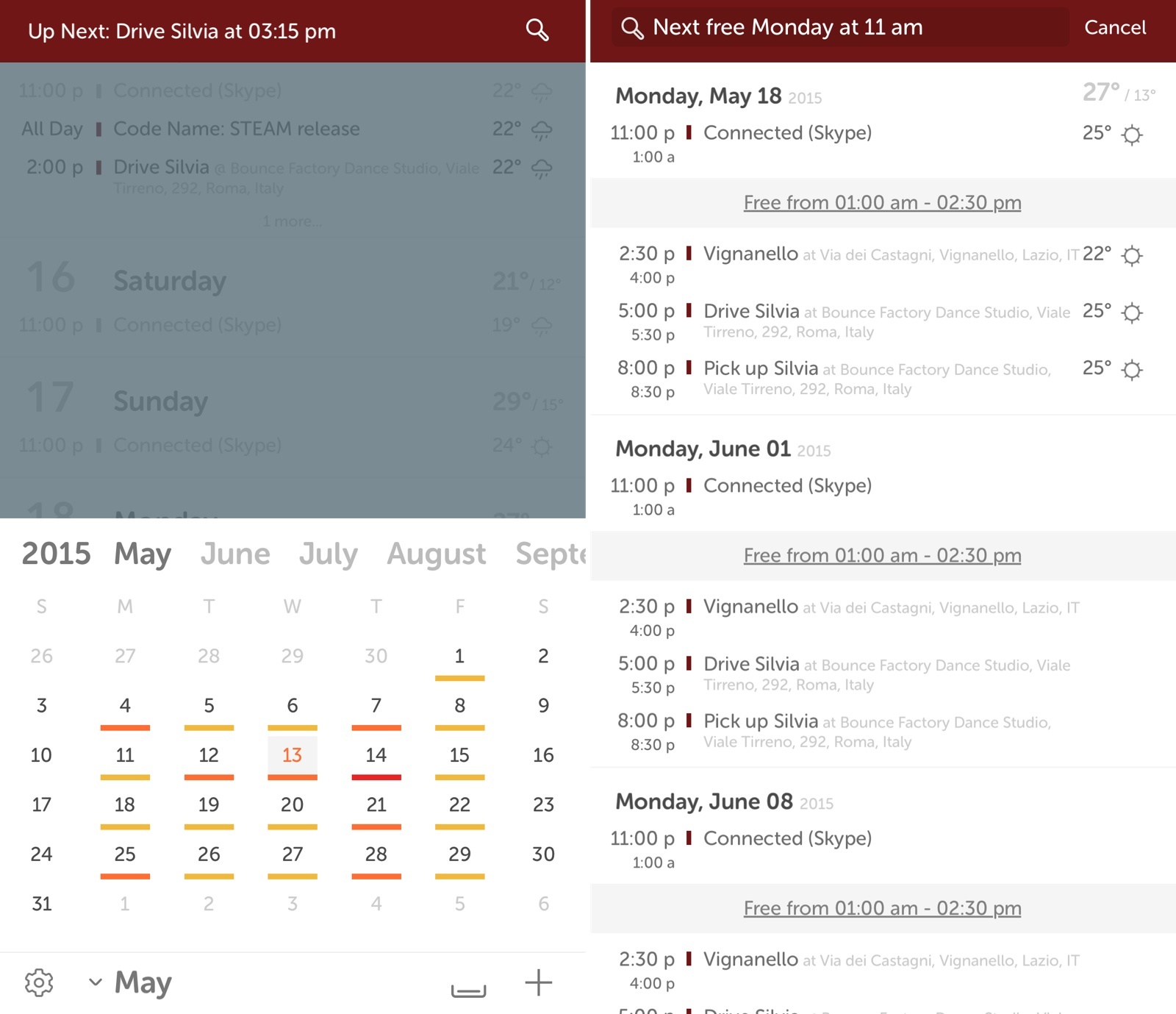
Originally released in early 2013, Horizon was a calendar app developed by Kyle Rosenbluth that integrated local weather forecasts with your calendar, giving you a more contextual representation of events that contained location information. Today, Horizon 3 has been released on the App Store with a brand new design, support for natural language searches, and a timeline view that still displays your upcoming events alongside weather conditions and locations.
Posts tagged with "weather"
Horizon 3: Calendar + Weather

Access Extra Content and Perks
Founded in 2015, Club MacStories has delivered exclusive content every week for nearly a decade.
What started with weekly and monthly email newsletters has blossomed into a family of memberships designed for every MacStories fan.
Club MacStories: Weekly and monthly newsletters via email and the web that are brimming with apps, tips, automation workflows, longform writing, early access to the MacStories Unwind podcast, periodic giveaways, and more;
Club MacStories+: Everything that Club MacStories offers, plus an active Discord community, advanced search and custom RSS features for exploring the Club’s entire back catalog, bonus columns, and dozens of app discounts;
Club Premier: All of the above and AppStories+, an extended version of our flagship podcast that’s delivered early, ad-free, and in high-bitrate audio.
Powered By Forecast.io, Wandering Weather Shows Forecasts for Your Trips
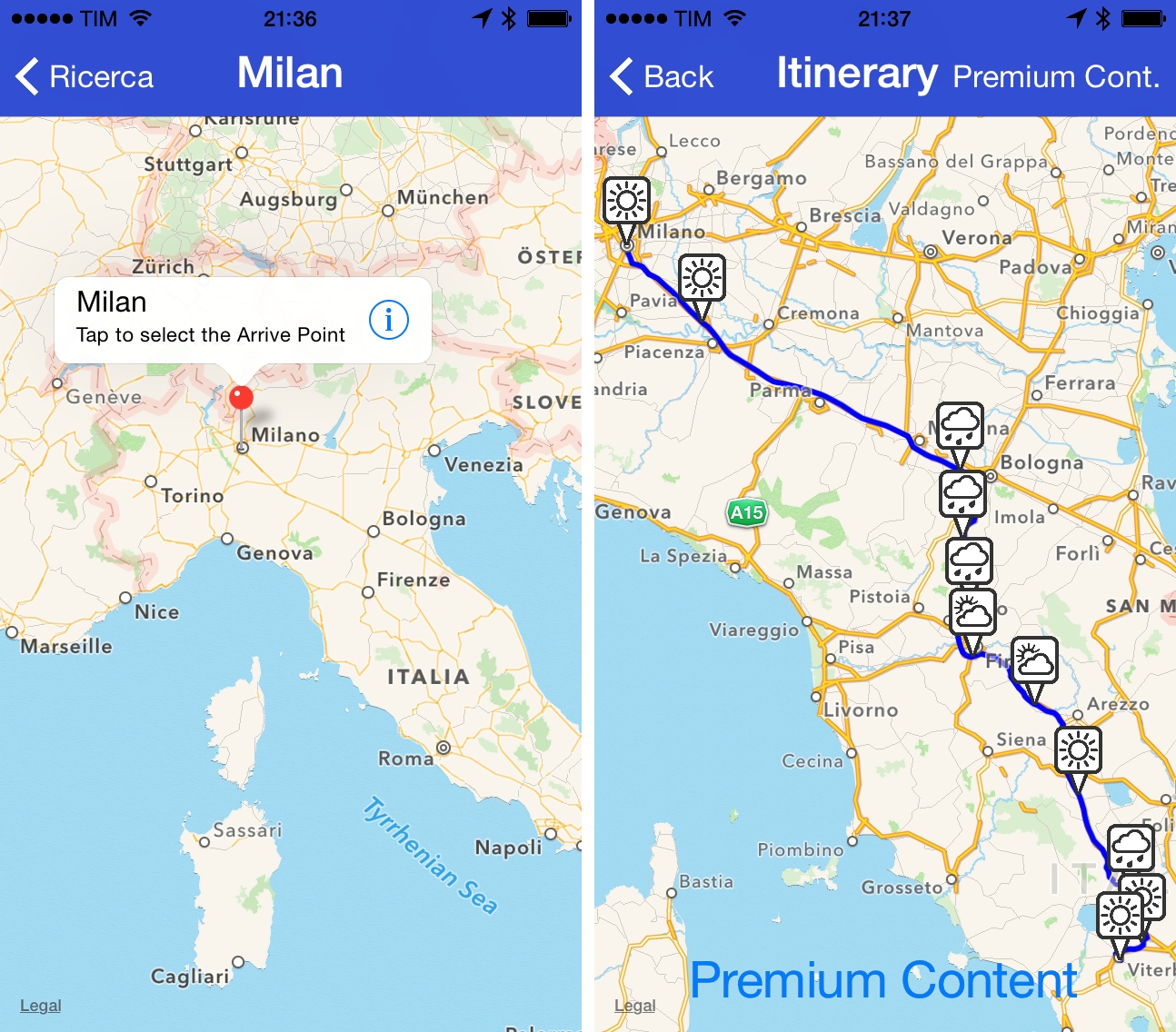
Created by Italian developer Cosimo Talò, Wandering Weather lets you check weather conditions for your car trips and plan accordingly.
Access Extra Content and Perks
Founded in 2015, Club MacStories has delivered exclusive content every week for nearly a decade.
What started with weekly and monthly email newsletters has blossomed into a family of memberships designed for every MacStories fan.
Club MacStories: Weekly and monthly newsletters via email and the web that are brimming with apps, tips, automation workflows, longform writing, early access to the MacStories Unwind podcast, periodic giveaways, and more;
Club MacStories+: Everything that Club MacStories offers, plus an active Discord community, advanced search and custom RSS features for exploring the Club’s entire back catalog, bonus columns, and dozens of app discounts;
Club Premier: All of the above and AppStories+, an extended version of our flagship podcast that’s delivered early, ad-free, and in high-bitrate audio.
iOS 8 and The Weather Channel→
Kara Swisher, writing at Re/Code about a data provider change in the Weather app for iOS 8:
To convince Apple to make the shift and cut Yahoo out of the middle, the Weather Channel added a lot more technology and information to the offering that it does not provide to Yahoo. That includes more weather specificity related to the location of a user, a nine-day forecast (up from five), a weather-conditions summary and more.
Over the past year, I’ve been using two weather apps on my iPhone: Weather Line and Apple’s Weather app. While I like Weather Line for its visualization of temperature changes, I find the default Weather app a good enough all-in-one solution (unlike others, I can’t enjoy the benefits of Dark Sky alerts here, otherwise I’d install it).
The changes provided by The Weather Channel appear to be ultimately best for the majority of iOS users, and, in my tests with the iOS 8 beta, the summary integrated in Notification Center has been accurate and useful. It seems that Apple is making a good move, and I’m also excited about the idea of third-party apps offering their own weather summary widgets for Notification Center (in my case, national and local services).
Yahoo Weather 1.5 Adds iPad Support→
Yahoo Weather, winner of an Apple Design Award at WWDC ‘13, has been updated today to version 1.5, which adds a native interface for the iPad, making the app Universal. I was a fan of the app before, and it’s good to see Yahoo releasing it on the iPad – a platform that Apple doesn’t think deserves its own built-in Weather app.
The iPad version is nothing revolutionary as it uses the same Flickr-powered photographic approach seen on the iPhone, making interface elements bigger and more spaced out. There are, however, some fun new transitions when scrolling through weather information on the iPad – such as columns of text sliding in from the sides of the screen and animated raindrop icons – that make the experience more fun on the iPad. These animations haven’t been enabled on the iPhone, likely due to screen constraints.
Yahoo Weather is free on the App Store.
Daily Weather Summaries with Weather Notifications
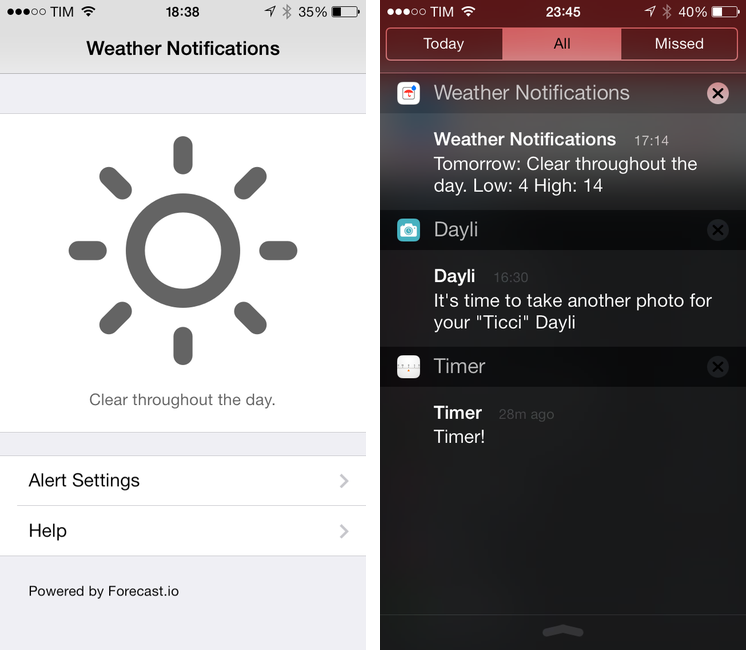
Weather Notifications, developed by Taco23, is a simple utility to get a daily notification with a weather summary on your iPhone. It’s not a weather app in the sense that it lets you browse forecasts, temperatures, or other weather data in a traditional way; instead, Weather Notifications is, as the name implies, a notification tool powered by Forecast.io.
Weather Notifications is, essentially, a Settings screen where you can configure the notifications you want to receive every day for your location. Alerts can be set to fire off at five different times: afternoon before, night before, morning, afternoon, or evening. You can only pick one, and, unfortunately, you’re also forced to pick one location; you can’t tell Weather Notifications to send you a notification the day before for Location A and in the morning for Location B. I set Weather Notifications to send me alerts for Rome the night before, so I’ll have an idea of the weather I’ll wake up to in the morning.
You can choose to receive a daily summary or condition-specific alerts for rain, snow, and fog. There are temperature, wind, and humidity thresholds that you can also optionally configure, but I’ve been enjoying the daily summary, which gives me a succinct recap of weather conditions for the following day.
And that’s it. Weather Notifications isn’t available on the iPad and it could use customizable alert sounds and support for multiple locations; Forecast.io’s accuracy may vary for your area, but it’s been fairly reliable for me in Italy.
Weather Notifications is $1.99 on the App Store.
Access Extra Content and Perks
Founded in 2015, Club MacStories has delivered exclusive content every week for nearly a decade.
What started with weekly and monthly email newsletters has blossomed into a family of memberships designed for every MacStories fan.
Club MacStories: Weekly and monthly newsletters via email and the web that are brimming with apps, tips, automation workflows, longform writing, early access to the MacStories Unwind podcast, periodic giveaways, and more;
Club MacStories+: Everything that Club MacStories offers, plus an active Discord community, advanced search and custom RSS features for exploring the Club’s entire back catalog, bonus columns, and dozens of app discounts;
Club Premier: All of the above and AppStories+, an extended version of our flagship podcast that’s delivered early, ad-free, and in high-bitrate audio.
Weather Line Review
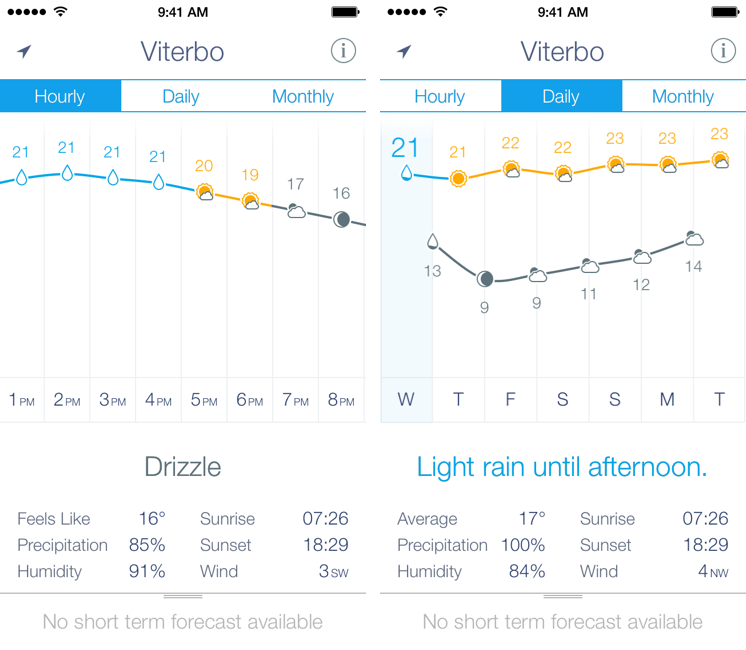
I am not a weather nerd. I don’t commute to work[1] and I don’t need to know the percentage of precipitation and humidity for the next three weeks. I spend most of my days in Viterbo and Rome, where the weather isn’t particularly crazy; I never get to try the fancy weather apps with Dark Sky integration and “radars” because those features don’t work here. You may argue that I’m forced to be a casual user of weather apps; I honestly believe that I don’t need to know everything about the weather to have a good day. I don’t travel much, and therefore I rarely need to plan my trips according to weather conditions. I enjoy simple weather apps like Today, Yahoo Weather, and even Apple’s built-in Weather app for iOS 7 because they display all the data I need without overwhelming me with terminology I don’t understand.
This is why I was curious to try Ryan Jones’ Weather Line when he emailed me a few weeks back. His pitch was simple: “I had this idea for a weather app, and I’m great at making charts”. Sure enough, I remembered Jones’ work on the iPad mini “price umbrella” chart from last year, and he seemed confident enough in his app to convince me to try it. Weather Line is available today at $2.99 on the App Store, it’s iPhone-only, and it is one of the nicest and most unique weather apps I’ve tried lately. Read more
Access Extra Content and Perks
Founded in 2015, Club MacStories has delivered exclusive content every week for nearly a decade.
What started with weekly and monthly email newsletters has blossomed into a family of memberships designed for every MacStories fan.
Club MacStories: Weekly and monthly newsletters via email and the web that are brimming with apps, tips, automation workflows, longform writing, early access to the MacStories Unwind podcast, periodic giveaways, and more;
Club MacStories+: Everything that Club MacStories offers, plus an active Discord community, advanced search and custom RSS features for exploring the Club’s entire back catalog, bonus columns, and dozens of app discounts;
Club Premier: All of the above and AppStories+, an extended version of our flagship podcast that’s delivered early, ad-free, and in high-bitrate audio.
Dark Sky 3.0→
Today, Dark Sky 3.0 has been released with much anticipation since the release of their own forecasting API / website forecast.io with incredibly accurate weather prediction packaged with an elegant, simple user experience.
Version 3.0 is now powered by the Forecast API and support for the UK and Ireland is now available. Gone are the brief text summaries which have been replaced by ‘intelligent’ ones that are more detailed with current conditions, next hour, and the rest of the day. They also include more than just precipitation, which is a big addition I have been waiting for.
Another new feature to Dark Sky 3.0 is the ‘Personal Weather Reporter’: any user can submit their own current conditions with a simple shake of the iPhone and then selecting conditions. You can even include a weather photo with your submission as well. The radar screen is still the same with the exception of a new magnifying glass icon in the upper left. I don’t plan on dumping the forecast.io web app or my other favorite, Today (which also uses the forecast.io API), but now that Dark Sky is more than just precipitation, I will use it for more than just alerts. It is awkward that notifications are still considered “beta”, but the Dark Sky team is still actively making changes to them.
The Dark Sky team has done a really great job with this update (and in the last few months) and they have proved their dedication to this genre of apps. Be sure to check out their other web app, Lines. Dark Sky 3.0 is $3.99 or a free update for existing users. The app is universal and available now on the App Store.
Horizon Calendar 2.0 Adds Natural Language Parsing, Check The Weather Integration
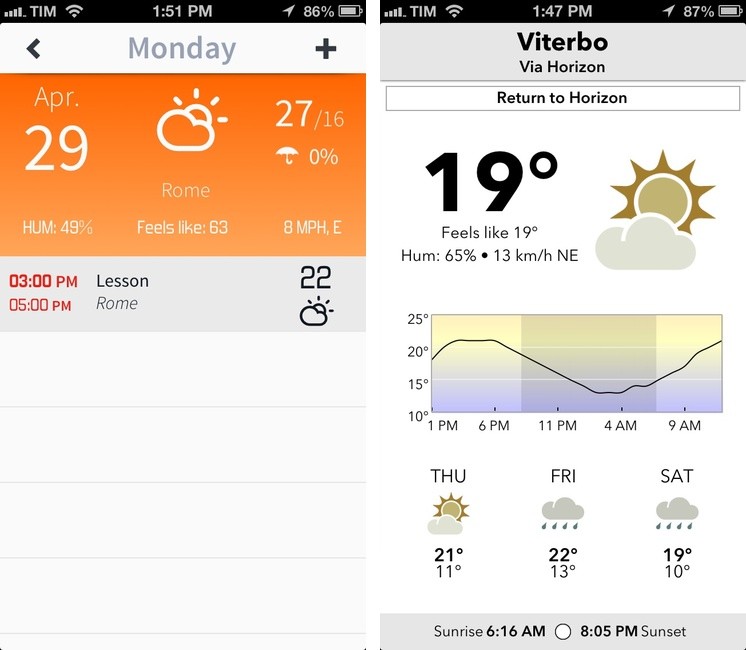
Back in February, I covered Horizon Calendar, an app developed by Kyle Rosenbluth that cleverly combined the classic aspects of a calendar with basic weather information:
The core aspect of Horizon is how it mixes weather with event information. When creating a new event, the app uses Google location data (which I found to be the best provider here in Italy) to show a list of suggestions in a bar above the keyboard; once you’ve chosen a location, Horizon will fetch a weather forecast (up to 14 days out). The app was created for people who deal with appointments in multiple locations on a daily basis: by entering a single day’s view, you’ll see a list of all your upcoming events alongside their respective locations and weather forecasts.
Horizon Calendar 2.0, released today, is a solid update that adds powerful functionality without sacrificing the app’s usability and ease of use. Following a trend established by apps like Fantastical and Due, Horizon now comes with natural language parsing for event creation: type something like “Skype call on Monday 5 PM until 7” and Horizon will correctly understand and parse your input automatically filling the necessary calendar fields for you.1
Access Extra Content and Perks
Founded in 2015, Club MacStories has delivered exclusive content every week for nearly a decade.
What started with weekly and monthly email newsletters has blossomed into a family of memberships designed for every MacStories fan.
Club MacStories: Weekly and monthly newsletters via email and the web that are brimming with apps, tips, automation workflows, longform writing, early access to the MacStories Unwind podcast, periodic giveaways, and more;
Club MacStories+: Everything that Club MacStories offers, plus an active Discord community, advanced search and custom RSS features for exploring the Club’s entire back catalog, bonus columns, and dozens of app discounts;
Club Premier: All of the above and AppStories+, an extended version of our flagship podcast that’s delivered early, ad-free, and in high-bitrate audio.
Sun: iPhone Weather Web App→
Sun: iPhone Weather Web App
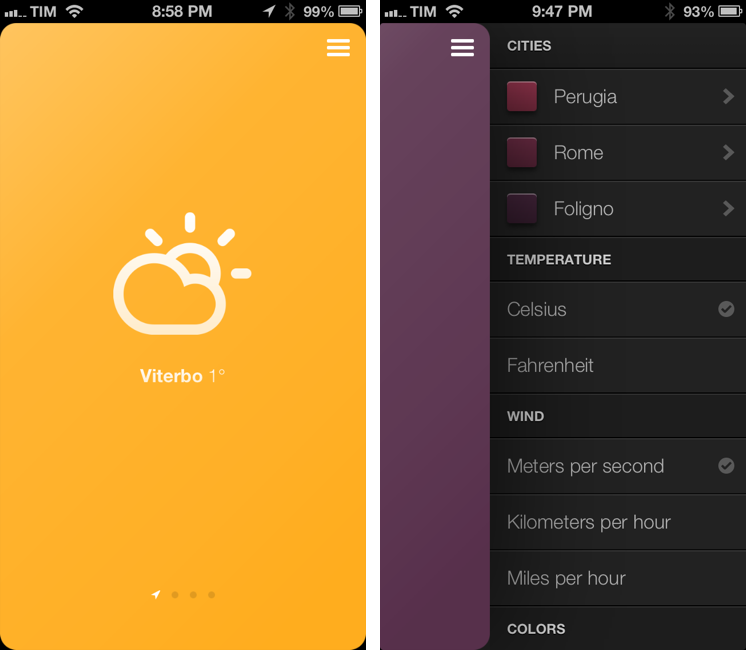
Sun is an impressive weather web app for the iPhone created by Jakob Henner. I don’t normally cover web apps on MacStories, but Sun almost feels like a native app and sports a clean and elegant interface reminiscent of the latest trends in UI design. I discovered it thanks to a tweet by Beautiful Pixels’ Preshit.
Sun has a 3D interface that lets you swipe between locations that you can add in a sidebar on the right. There are sound effects for when you open the sidebar or succesfully add a new location. You can even switch between Fahrenheit/Celsius and 9 different color schemes. Like a native app, Sun will request access to your location to display local weather without having to enter that one manually.
Another nice thing about Sun is how it dynamically changes its webclip icon depending on the latest weather information it fetched. As explained by the developer (and others on Twitter), this is possible by “drawing” the icon every time shortly after the app is launched.
There are some aspects of Sun that reveal its web origins. Animations are slower than what you’d expect from a native app; there are some random refreshes of the entire page; text selection can get funny in the sidebar.
Still, Sun is a great experiment and you should check it out here.