This Week's Sponsor:

Finalist

A paper-inspired daily planner with notes for iPhone, iPad, Mac, and now Apple Watch. A day you design your way.


Posts tagged with "iPhone"

Reeder for iPhone Adds Readability Support, Fullscreen Image Viewing

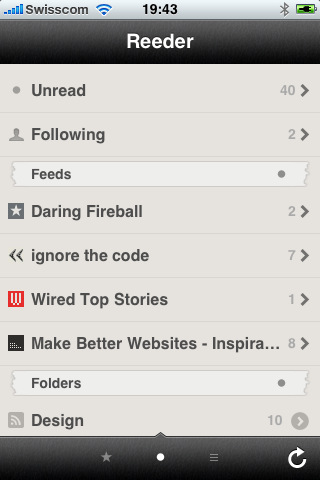
Reeder for iPhone, our favorite RSS client on iOS, was updated a few minutes ago to include features already seen in the iPad version. Reeder 2.3, available in the App Store at $2.99, now allows you to read full-length articles from any website thanks to Readability integration. Readability, also used by Apple in Safari Reader, can fetch text from articles on the web removing all the clutter such as unnecessary ads and banners. Reeder can now display this “elegant” content with the tap of a button while in reading mode. You can also pinch to open an article through Readability.

Another neat feature of this new version is fullscreen image viewing. Available only on iOS 4 and later, you can pinch on images to reveal them in fullscreen and tap to read an image’s description. Pinch out, and you go back to the standard article mode.

Last, the app can now load up to 5,000 unread items. This should be great news for those who daily skim through a huge list of unread feeds – personally, I never found myself in the situation of having to deal with thousands of articles waiting to be marked as read. Still, the functionality is in there now.

Reeder is a $2.99 purchase in the App Store and it’s an absolute must-have for iPhone owners.


Amazon Releases Deals App for iPhone

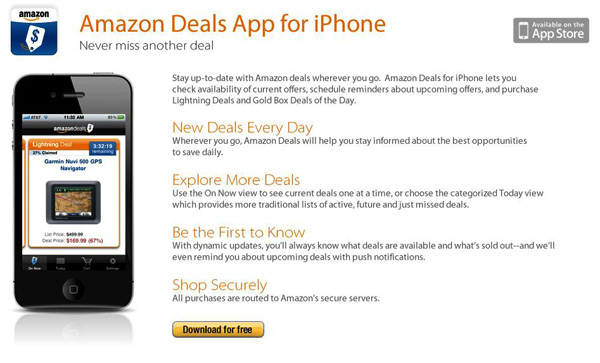
“Never miss another deal.” Amazon has released an official iOS app for their deals called Amazon Deals. I think it’s about time, there are tons of crazy deals that we miss every day until someone tweets about it. No more! The app lets you check availability of current offers, future offers and one you may have just missed (so you can cry over it). You can also schedule reminders for future offers and also purchase from within the app after signing into your account in the Settings tab. You can also share Deals from within the app. Click the ‘share’ icon in the upper right of the detail screen and send via E-mail, Twitter, Facebook or even SMS. Read more


VerizoniPhoneCaseGate - Or, Some Cases Won’t Fit

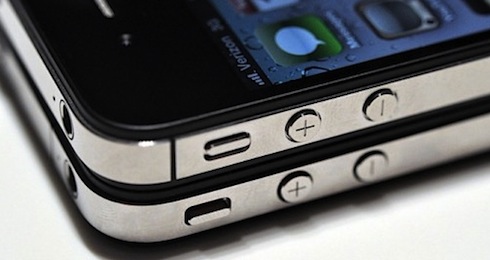
Amidst the excitement for the finally-announced iPhone 4 on Verizon, here come some interesting news for owners of an iPhone 4 on AT&T willing to switch to Big Red: some cases for the non-CDMA iPhone won’t fit with the new unit. The Verizon iPhone has, in fact, relocated buttons that will make it impossible for some accessories to fit in properly. Namely, the mute switch and volume buttons have been relocated to a lower position to make room for the new antenna design at the top.

Should you worry and start thinking about signing petitions online for Apple to revise its position on the buttons? Not really. While Apple’s own Bumpers may have problems to work with the slightly new design, it’s likely that Apple has already teamed up with accessory makers to provide a variety of CDMA iPhone-compatible cases at launch on February 10. Plus, many cases have a larger opening for the aforementioned buttons than necessary – meaning that even in the new “location”, the cases will be just fine.

So, the Verizon iPhone’s volume buttons and mute switch are in a different position than before. This, however, should not affect most of the cases currently on the market, and we’re sure Apple will provide CDMA-ready solution come the official launch.


#MacStoriesDeals - Tuesday

So are you loyal AT&T iPhone people switching over to Verizon after the big announcement today? I really doubt I leave AT&T. Anyway, here’s today’s deals on iOS & Mac (Store) apps that are on sale for a limited time, so get ‘em while they’re hot! Read more


iOS 4.2.5 To Be Released With Verizon iPhone?

Here’s another interesting tidbit coming from the first hands-on with the just announced Verizon iPhone, which, as you may know, happens to be a regular iPhone 4 running on CDMA.

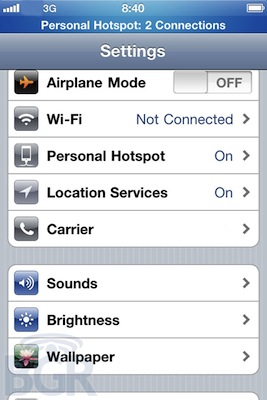
The Personal Hotspot functionality is located in the Settings app, as noted by Engadget. That lead the Engadget folks to wonder if the unit was running a new firmware and, indeed, the Verizon iPhone they’re testing now is running iOS 4.2.5. Probably, it’s a simple update to iOS 4.2 to make it compatible with Verizon’s chip and enable the hotspot functionality.

A major iOS update that includes the “iTunes app subscriptions” system is expected to be released soon together with Murdoch’s iPad app “The Daily”, but we really don’t know about this iOS 4.2.5. Guess it’ll just ship by default on every Verizon iPhone on February 10?


It’s Official: The iPhone 4 Comes to Verizon

After years of speculation, it’s now official. At the special media event in New York, Verizon has just announced that Apple’s iPhone is coming to their network. “If the press writes something long enough, eventually it comes true”, said Verizon’s Lowell MacAdam before the announcement. “Today we’re partnering with a giant of the industry, and that’s Apple.”

The iPhone 4 is coming to Verizon next month, as the rumors suggested. Apple and Verizon began testing CDMA iPhone in 2008, and Apple then released the iPad on Verizon in 2010. The iPhone is coming in February, it will be CDMA (no LTE) and it’s already listed on Verizon’s website. It’s the same iPhone 4 you know and love, only on Verizon and it connects to CDMA and EvDO networks. Read more


Official PlayStation App for iPhone Now Available

Announced by Sony in December, the official PlayStation app for iPhone is now available in the App Store. The app is propagating in iTunes as we speak, so if you can’t download it just yet – make sure to try again in a few hours. In the meantime, the app is now live in the French store.

The PlayStation app doesn’t let you play games, but it allows you to check on the PlayStation Network by signing in with your PSN account. In this first version of the app you can read your friends’ status updates and browse the games they own, check on the trophies you have collected and read the latest entries from the official PlayStation Blog. Last, you can also read the latest news of games available for all PlayStation devices directly in-app. The interface seems to be quite clean and polished, although far from being native on the iOS platform.

PlayStation app for iPhone is available for free here. Check out the full description below. Read more


iGotYa Takes Photos and GPS Location Of The Guy Who Stole Your iPhone

The iGotYa app is one those utilities you don’t know you need until you try it and see its potential. Available in the Cydia Store at $5.99 (Big Boss repo), iGotYa can take a picture of whoever tries to unlock your phone with the wrong passcode, using the front facing camera. We all want to keep an eye on our iPhones, right? iGotYa, combined with Apple’s Find My iPhone remote functionalities, is the ultimate tool to make sure you know who’s trying to mess with your iPhone.

The app requires a front facing camera, meaning that it will only run on the iPhone 4 and iPod touch 4th gen. As a picture is taken in the lockscreen, iGotYa can send it via WiFi or 3G to a specified email address, also attaching GPS information in the email message. So if you ended up losing your iPhone because of someone you took it, not only you’ll know where he is, you’ll also get to see his face. And he won’t know while attempting to unlock the stolen phone.

iGotYa will cost you 6 buck, but it’s that sort of investment you will not regret. Check out the demo video below. [Gizmodo via Redmond Pie] Read more