

Mitchell Allison created an Xcode plugin that flashes a set of Philips Hue light bulbs red in case of a failed build. I wish I used Xcode just to try this out.
Posts tagged with "developers"
Xcode WarningLights for Philips Hue→
OvershareKit→
Justin Williams:
A few weeks ago I was trading war stories with Jared Sinclair of Riposte fame as we were inching towards the finish line for our respective new apps. In Jared’s case, he is working on a new RSS client for iOS 7 called Unread and was mentioning how his biggest hurdle remaining was integrating a variety of sharing services for the posts in a user’s RSS feeds.
Luck would have it that I had been working on a similar feature already for my new app, so we decided to collaborate on something that would hopefully eliminate the need for anyone to write the same sharing code over and over again. The initial release is a pretty substantial rewrite of my initial code-base speerheaded by Jared to account for more than just image-based sharing. It’s a fantastic piece of code that I’m truly proud to be associated with.
It’s 2013 and we still have apps with archaic list-based sharing menus that were created in 2009 and barely updated for iOS 6. Developers, go check out the OvershareKit documentation on GitHub.
Justin Williams’ Ultimate Developer And Power Users Tool List For OS X→
This year’s edition of the list takes into account the new tools I am using as part of my transition to working exclusively on iOS 7 and OS X Mavericks, as well as an amateur designer.
Lots of good links in Justin’s annual list.
Lucius Kwok On The App Store’s Gold Rush→
Even after the gold rush is over, there’s still gold in the hills. It’s just harder to make a successful app that gets noticed, and requires teams with the specializations and experience to quickly and efficiently release one, the same way that the remaining gold requires geologists who know the land and heavy machinery to get to it.
And later in the same post:
Free with in-app purchase or subscription pricing looks more sustainable than paid apps. We may need to form ourselves into small teams, because being independent doesn’t mean you have to do everything yourself. I see this as a challenge to figure out what’s next.
I still think that In-App Purchases don’t work for some niches of the App Store, and I wouldn’t want to see developers switching to the IAP model in what may be a self-fulfilling prophecy. But with Apple leading by example, I believe we’ll see a lot of developers trying IAPs for productivity apps and utilities before next year’s WWDC.
How Australian Developers Are Dealing with iOS 7→
Alec Fraser has a good interview with some Australian app developers about iOS 7 and the new APIs. Many of my favorite apps and games have been created in Australia, and I love that these developers are getting more recognition with iOS 7.
Status Magic Adds Support for iOS 7 Status Bars
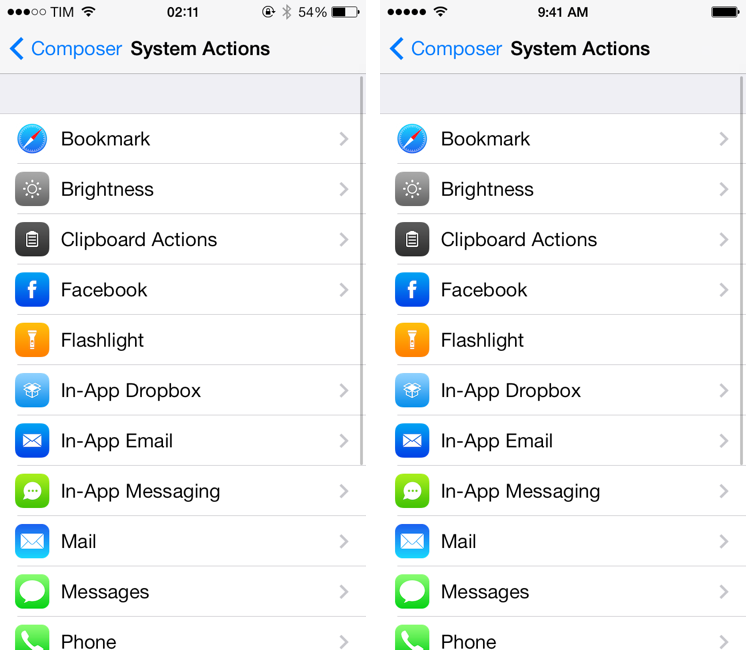
I don’t like screenshots of iOS apps that show status bars cluttered with icons for carriers and Bluetooth, or, worse, red battery indicators. While it’s generally not the most important aspect of an app review, I do think that using screenshots of iPhone and iPad apps with clean status bars shows a level of care that extends beyond the written text. For app developers who only have a few slots for screenshots in iTunes, screenshots that don’t have poor cellular reception and rotation lock or Bluetooth icons are essential for a non-sloppy, professional, thoughtful presentation of their product. It’s a little thing, but I care about it.
Fortunately, other people care about this minor aspect of iOS apps as well. Created by Shiny Development, Status Magic is one of my must-have Mac apps because it solves the status bar problem with ease and a good feature set: once you have the screenshots you need to “clean up”, you can drop them into Status Magic, tweak some options, and export the cleaned up, more professional-looking screenshots with status bar that don’t have six icons in them. Read more
Crunch Resource Extractor Updated with iOS 7 Support
In January 2012, I reviewed Crunch by Pragmatic Code, a Mac app to identify and extract icon and other resources from iOS apps:
Crunch is capable of automatically detecting apps from your iTunes library and filtering them by platform — iPhone, iPad, or Universal. Crunch will also install a QuickLook plugin, so you’ll be able to see each app’s icon overlaying the standard .ipa file preview in the Finder and QuickLook windows. Once you’ve selected an app, you can hit Export, and Crunch will ask you where you’d like to save an app’s resources, and if you’d like to keep all files with their existing folder hierarchy, or only Retina-ready @2x image files. The latter option can be particularly useful to pinpoint images ready for the rumored iPad 3′s Retina Display found inside several Apple apps for iOS.
Today, Pragmatic Code released version 1.5 of the app, which comes with support for iOS 7’s superellipse shape and a new Icon Composer tool to render icons from artwork.
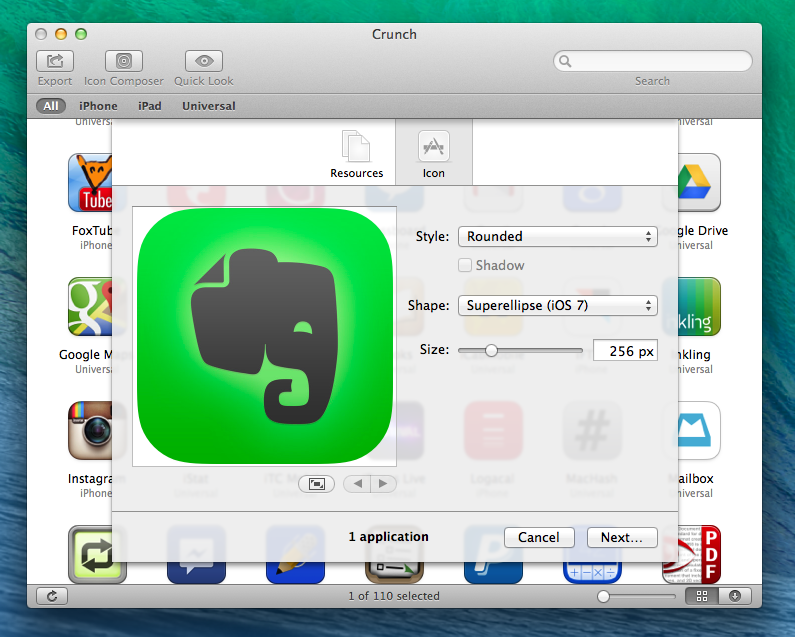
Support for iOS 7’s new icon shape has been enabled in the app’s browser (where Crunch automatically recognizes apps from your iTunes library), Quick Look panel, and Icon Export menu. I don’t think that Apple has published official specifications for the new shape, but the one in Crunch looks just like the real thing to my untrained designer eye. When you hit Export in the top toolbar, you can still find and export assets from inside an app’s bundle, but if you click on Icon you’ll now see options to choose Superellipse (iOS 7), Rounded (iOS 6), or Automatic. Additionally, you can choose to export an icon’s artwork with no shape or no border by clicking on the Style dropdown menu.
The new Icon Composer can be used to drop artwork into Crunch and export it with Apple’s icon shapes. There is a preview panel on the left, and a slider to tweak the size of the icon.
While extracting application assets could be done with built-in tools on a Mac, Crunch is a great utility that simplifies the process and lets you save time. Support for iOS 7 is welcome and handy if you want to take a look at how other developers are managing resources inside their apps – or, with the Icon Composer, if you just want to preview how artwork will look under the new OS. Crunch is $9, and a 15-day free trial is available.
NSHipster Book Available for Pre-Order→
Mattt Thompson:
Combining articles from NSHipster.com with over a dozen new essays, this book is the essential guide for modern iOS and Mac OS X developers.
I am not a developer but I know that, for many, Mattt’s contributions to the developer community are invaluable. Support his work and pre-order his book here.
Joe Cieplinski On App Pricing and App Store Customers→
A different and refreshing take on the recent discussions on app pricing and In-App Purchases by Joe Cieplinski:
If we were to convert Teleprompt+ to the free with in-app purchase model, for instance, the three of us at Bombing Brain would be out of business in a couple of weeks.
Our customers are primarily prosumers and pros—people who wouldn’t trust their business to a “free” app. Our high price is a large part of what has made us successful in this market. (Along with years of cultivating a reputation for being better than our competition.) Converting this particular app to free with in-app purchase now would likely be an unmitigated disaster. We know, because there have been free alternatives that have crashed and burned. Hard.
While In-App Purchases may work for some apps, I agree that developers shouldn’t follow other developers’ advice blindly without carefully considering their userbase and customers. The Omni Group, for instance, charges a “premium” for apps that they know their customers will be happily paying for because they trust the company.
Joe continues:
Users looking to pay a premium price may be few and far between, but each one is ten times more valuable than the “average” iOS user to a developer like me.
Again, it depends on whether you’re after market share or a subset of App Store customers who can sustain your business by paying for higher-priced apps. It’s a great perspective, so read Joe’s post here.