
Posts tagged with "automation"

Sidekick Automates Your Mac’s Settings Based On Your Location

Last week, I ordered a new MacBook Air from Apple’s website. My MacBook Pro was getting old, so I decided it was time for an upgrade – and the new MacBook Airs looked like a worthy upgrade. As with the Apple online store’s tradition, the computer showed up at my doorstep in roughly three days. As soon as I got it, I opened it up, set up my personal information, and connected it to the Internet to start downloading my first apps. I was at my office, and in less than two hours I had my new MacBook Air up and running with my favorite applications, Dropbox, work documents, and so forth. A few hours later, when it was time to go home for dinner, I took my MacBook Air, got home, and placed it on the desk in my room. Thirty minutes later, I opened the MacBook’s lid again, fired up Spotify and Google Chrome, launched MacStories’ internal chat URL, and opened iTunes to check for app updates. Sure, the computer was new, but the pattern of actions that followed the opening of the lid wasn’t uncommon: this is what I do every day after dinner. I fire up some music, talk to my co-workers overseas, and browse iTunes. My laptop may be changing location travelling from my office to my house and everything in between (usually a coffee shop downtown), but the workflow is the same.

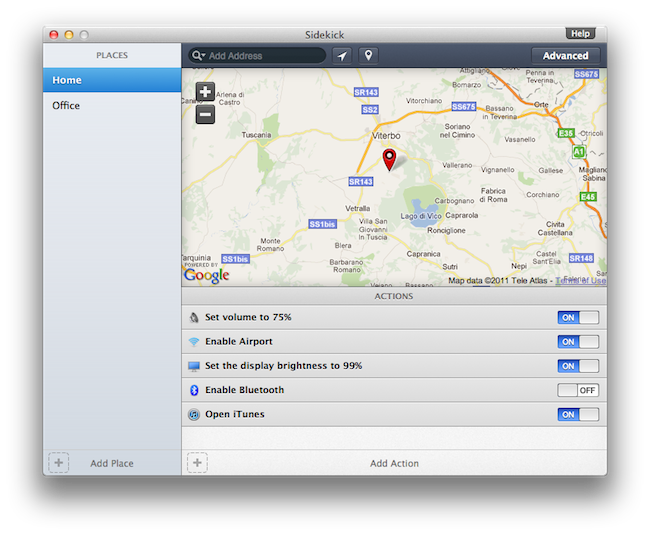
Sidekick, a new app by Oomph, aims at automating the tedious process of changing your Mac’s settings basing on the location of your computer. Read more

Access Extra Content and Perks

Founded in 2015, Club MacStories has delivered exclusive content every week for nearly a decade.

What started with weekly and monthly email newsletters has blossomed into a family of memberships designed for every MacStories fan.

Learn more here and from our Club FAQs.

Club MacStories: Weekly and monthly newsletters via email and the web that are brimming with apps, tips, automation workflows, longform writing, early access to the MacStories Unwind podcast, periodic giveaways, and more;

Club MacStories+: Everything that Club MacStories offers, plus an active Discord community, advanced search and custom RSS features for exploring the Club’s entire back catalog, bonus columns, and dozens of app discounts;

Club Premier: All of the above and AppStories+, an extended version of our flagship podcast that’s delivered early, ad-free, and in high-bitrate audio.

Learn more here and from our Club FAQs.


Company Promises To Automate Your Home Using iPads

How great would it be to control everything in our homes using only iOS devices? I’ve always dreamed to fire up my Espresso machine remotely using an iPhone app, or being able to close all my windows from an iPad with live webcam feeds. I know, crazy futuristic stuff that current home automation techniques haven’t fully addressed yet, especially when it comes to security concerns and reliability. But ask Solstice Multimedia about it: the Denver-based company with a decade-long experience in telecommunications and residential services thinks that turning your house into a full-featured iPad-controlled system is totally possible. They even promote a 3,400-square- foot model home with two iPads built-in at $718,000. Okay.

Price of the model home itself aside, the iOS-based system relies on a dual-iPad setup that will cost you roughly $5,000. Optional audio, video and security equipment will take the cost to $60,000 – that’s a whole lot of equipment, right? I assume so. Apparently the system’s “brain” is built into the home’s “mechanical room” with WiFi connection to the 2 iPads, but a third device can be used to control everything without having to touch a screen on your wall. So, basically, the iPad is the engine, and mechanical parts take care of lights, motorized blinds, cameras, and other stuff. The Denver Post reports:

A model home in the Overlook neighborhood in Lone Tree’s Heritage Hills is equipped with two built- in iPads that can control all of the electronic systems in the home, including lights, motorized shades, music and television systems, baby monitors and closed-circuit cameras.

“The iPad has brought the entry-level price point down significantly, because an 8-inch in-wall touch screen before cost upwards of $3,000 or more,” Deatherage said. “Now we can get a $500 iPad and still provide most of the functionality that an in-wall touch panel can give.

I’m pretty sure Apple won’t release an iHome anytime soon, so if you’re willing to automate your living room using iPhones and iPads this might be your best chance yet. Go take a look on Solstice Multimedia’s website. [via Cult of Mac]

Access Extra Content and Perks

Founded in 2015, Club MacStories has delivered exclusive content every week for nearly a decade.

What started with weekly and monthly email newsletters has blossomed into a family of memberships designed for every MacStories fan.

Learn more here and from our Club FAQs.

Club MacStories: Weekly and monthly newsletters via email and the web that are brimming with apps, tips, automation workflows, longform writing, early access to the MacStories Unwind podcast, periodic giveaways, and more;

Club MacStories+: Everything that Club MacStories offers, plus an active Discord community, advanced search and custom RSS features for exploring the Club’s entire back catalog, bonus columns, and dozens of app discounts;

Club Premier: All of the above and AppStories+, an extended version of our flagship podcast that’s delivered early, ad-free, and in high-bitrate audio.

Learn more here and from our Club FAQs.


AppleScriptObjC Explored by Shane Stanley

AppleScriptObjC Explored by Shane Stanley

AppleScriptObjC Explored by Shane Stanley is the most advanced, thorough, and in-depth documentation for the creation of AppleScript Objective-C applications. Utilizing a hands-on approach, the book guides you step-by-step through the process of integrating the power of Cocoa into your AppleScript applets and applications, demonstrating each concept and technique in fully editable and annotated example projects.

Recommended. [via DF]

Permalink