
Email Backup Pro: The Best Mac App for Mail Backups.

Having your data backed up at a regular schedule is something everyone should seriously consider. Especially if you work with your Mac, you should start thinking about start using Dropbox or SugarSync, two amazing online services that allow you store up to 2 GB of stuff for free. Now, many Mac users use Dropbox to backup and save copies of “stuff that matters” like applications’ libraries or databases. For example, I’ve set up an Automator workflow that together with an iCal event daily backs up my Yojimbo database into a Dropbox folder.

But what about more complex and structured applications, like Mail.app? Mail doesn’t have a simple and linear database structure like Yojimbo does, so backing it up manually could be a little difficult. I reviewed this app called MaBuRe a while ago, but many people told me it wasn’t working for them, and the overall backup time was pretty long, even for not-so-huge mail libraries.

Today I’d like to talk about EmailBackup Pro, the ultimate application for mail backups.
Read more


News From the Simplenote Private Beta

I’ve been testing the private beta of the next Simplenote update for a few weeks, and I really would like to tell you what’s coming in a matter of a few days. But I can’t. Anyway, Mike and Fred from the Simplenote have been so kind to let me reveal some info about the upcoming update, which will bring a lot of new stuff, improvements and fixes. Among these things:

  • faster startup time;
  • faster scrolling;

  • faster syncing.

But there’s one thing which will revolutionize the whole Simplenote experience I can’t tell you yet. Trust me, it’s gonna be great. Be sure to follow @simplenoteapp on Twitter to stay updated.


Minim 2: The Anything Bucket for Musicians and Podcasters

When I purchased my Macbook, I partially did it because I knew Mac OS X was the operating system of choice of many musicians. Many friends of mine kept talking about how GarageBand, Logic and ProTools were so great, stable and useful on Mac OS so, together with many other motivations, I decided to make the big switch. I couldn’t have made a better choice in my entire life, but this is my personal story. The story of every artist and band out there is that Mac OS provides a huge amount of awesome tools and apps to record songs, annotate ideas, store files and manage the whole music experience. There’s no arguing about that.

Now, what if there was a single application that combined all of these things into one, simple, powerful package? Wouldn’t it be amazing to have all your recordings, collaborators, lyrics drafts, podcasts and ideas in one application? It’s not iTunes guys.

Meet Minim 2.

Read more


Mac OS X Finder Now Saves Open Windows in Real Time

Via Betalogue

“I don’t know exactly when this improvement was introduced. I don’t remember noticing it before today, and I have had crashes in Snow Leopard before, so it cannot have been in Snow Leopard itself, i.e. in Mac OS X 10.6.0. It might have been introduced in Mac OS X 10.6.1 or Mac OS X 10.6.2. I also need to experience a few more crashes in order to confirm that it does indeed happen every time.

Out of curiosity, I just made a slight change in my window setup and then option-clicked on the Finder’s Dock icon and chose “Relaunch,” and the slight change that I had just made was not preserved when the Finder was relaunched. It returned to the previous state, i.e. the state that was correctly preserved when the kernel panic happened.

As far as I can tell, using this “Relaunch” command is the equivalent of force-quitting the Finder, which should mimic what happens in the event of a crash.”

They say sometimes you have to actually notice things to appreciate them. It felt so natural I didn’t even notice it.


Keep Track of Your Bills with Chronicle 3. Review and Giveaway!

I’ve never used financial apps that much. Maybe ‘cause I don’t have a good relationship with numbers at all, maybe because I just didn’t find the right app for me. The truth is, I never felt the need of having a financial manager anyway. Then I realized that keeping track of my expenses was actually an important thing, so I decided that I should start using some software to help me track my budget and some other stuff. I started using MoneyBook, and I’m still using it right now: awesome interface, easy to use, feature rich. It’s just perfect to me.

But what about the Mac? I heard that are a lot of different financial apps out there, some of them even support online banking, some have a stunning UI, but - seriously - none of them really suited to my needs. Guess I just wanted the perfect Mac version of MoneyBook, but don’t tell this to Silvio Rizzi or he’ll drop the iPhone development scene to create Mac apps. But finally - just like happened with MoneyBook - I found the app that works for me. It’s simple yet powerful, with all the features that I need and a very good interface.

It’s called Chronicle 3.

Read more


Apps for Fuels, Not Fools.

The simple, single-purpose app is the iPhone at its most handy: even better when there’s competition between apps to do “that one task I need”. What we’re looking for today is the app that can track how much petrol my car uses, how much it cost, and then how far I managed to drive on that fill up. I’m looking for something that’s quick and simple to use, looks and feels like an iPhone app should, and if it can draw me a graph, even better.

Regardless of whether you’re a hypermiling windows-up A/C off kind of driver or not, it’s good to keep track of your fuel use - is your awesome new route to work costing you more, or less; and IS your car running worse than 6 months ago? With 30 seconds of data collection each time you fill up, you’ll know.

Read more


Tweet What You’re Listening To With PodTweet

While it’s true that I daily discover new stuff like Mac and iPhone apps with Twitter, I can’t say the same for new music. If I want to listen to new bands or interesting albums I still have to read dozens of music blogs and magazines, because people don’t seem to share their music discoveries on Twitter. And that’s pretty weird actually, ‘cause we share almost everything that happens to us on Twitter. God knows. Anyway, if you have an iPhone / iPod Touch and you use it to both tweet and listen to your music - have you ever thought of combining these two things into one?

Here comes PodTweet.

Read more


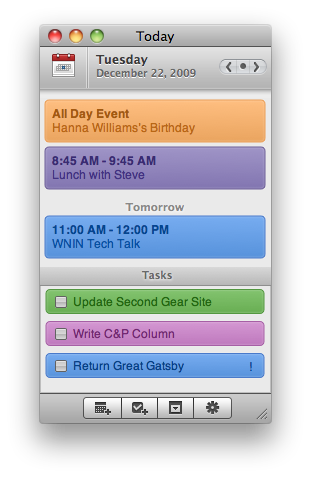
Today 2.0 Is Out

“With Today you can keep track of what’s on your plate for any given day without keeping iCal open all the time. Today syncs with iCal and your life’s agenda so daily events & tasks are always available via one, convenient little interface.”

Seems delicious. I’ll give it a try.