Right after Steve unveiled the iPad yesterday, I started wondering what was the developers’ reaction to the product. I had the chance to chat with Michael Flarup, a graphic designer who’s currently working at Robocat. We reviewed Robocat’s first application, Outside, and we loved it.
Enough for the presentations, let’s see what Michael thinks about the iPad.
“As a creator, part of what I seek is recognition, immortality. I don’t work for Apple, or Google (I’ve been offered jobs & buyouts) because I want the fame myself. It’s my shot at immortality. My designs are my children. So it stinks when I feel like Steve might get the fame for my innovation. I lose my children, as it were.”
But your children aren’t really yours. They have lives of their own. So when your designs do change the world, you have to accept it. You have to say, ‘Ok, this was such a good idea, other people took it and ran with it. I win.”
So, we decided to avoid the usual “specs & features” post and start writing an in-depth post for tomorrow. In the meantime, I aggregated some of the best videos from the web and embedded right into this post, so that you can watch them before the keynote videos goes online.
Technology moves forward everyday, but good ideas stay. That’s what I think everyday when I review a good application, and when I see the effort a developer puts in creating something good for the users. Now, what could ever happen if a good idea meets the technology of the future and even brings some eye candy to it?
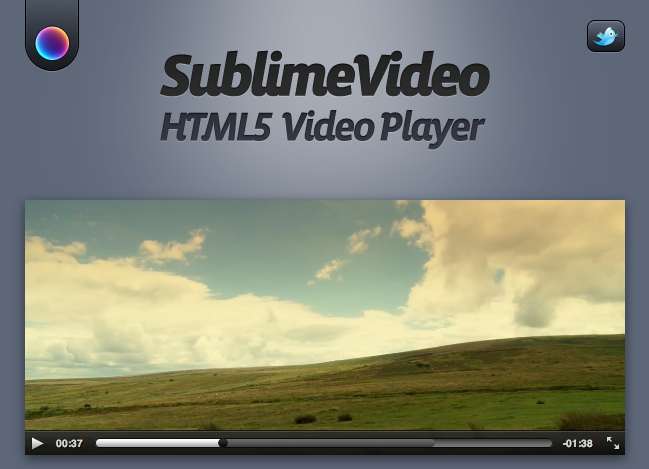
SublimeVideo is the greatest example of what I’m talking about. It’s a video player, based on HTML5 that shows an amazing attention to the user interface design and even brings a lot of innovations. Developed by Jilion, SublimeVideo it’s currently a demo, but it already allows you to watch the video in full window mode: Vimeo and Youtube don’t let you do that, and their HTML5 video players are slow and buggy. Also, the Jilion guys promise to implement the full screen mode with the next releases (by alt-clicking the video, only available in the WebKit Nightlies now).
SublimeVideo
But Sublime doesn’t stop at full screen goodness: it’s got sleek in / out transitions, gorgeous controllers (even more beautiful than QuickTime’s ones), live resizing and a draggable. It’s basically a sexier QuickTime that uses HTML5.
Be sure to check it out, and follow the updates from the Jilion guys. This is going to be awesome.
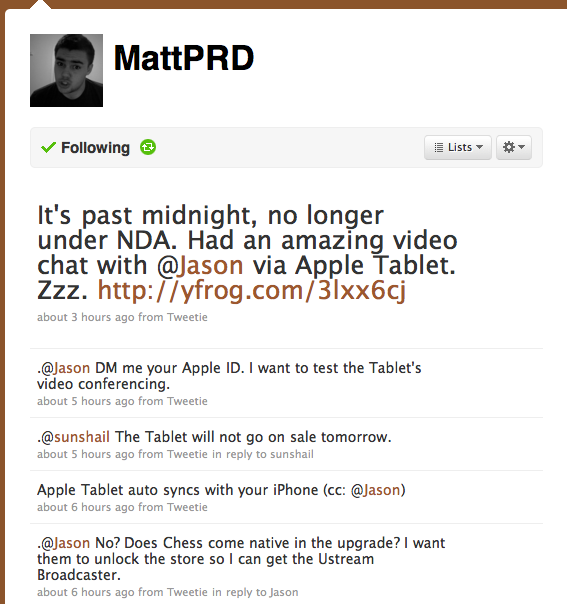
Some weird things happened tonight. If you’ve been following @Jason on Twitter you might have noticed that he posted a lot of tweets regarding the Tablet, saying that he’s been under NDA until midnight, but that the agreement was over and he could talk. Unfortunately he didn’t post any pic. But checking Jason’s timeline I noticed he was talking with @MattPRD about tablet upgrades, builds and apps: specific stuff.
Here are some tweets:
“@Jason DM me your Apple ID. I want to test the Tablet’s video conferencing.” Link
“@Jason No? Does Chess come native in the upgrade? I want them to unlock the store so I can get the Ustream Broadcaster.” Link
“@MattPRD I got chess in build 1.02b – did u upgrade?” Link
Turns out this Matt Schlicht guy (@MattPRD) was in the same “beta testing” group of @Jason, and he has been testing the device for the device. And tonight he posted a photo of the tablet saying:
“It’s past midnight, no longer under NDA. Had an amazing video chat with @Jason via Apple Tablet.” Link
What really makes me think is that these two people are well known enterpreneurs, so I don’t see the reason they should be creating fake rumors and photos.
But at least, this time we’ve got 4 hours left to find out the truth.
Have you ever wished to type faster on your keyboard? I bet you have. Well, Snow Leopard comes with a very powerful built-in tool a not so many people know, and it’s called Text Substitutions. Pretty much what TextExpander offers at $30 comes built-in for free into Mac OS X. Maybe Snow Leopard’s text substitutions aren’t as customizable as TextExpander ones, but sure they get the job done. Setting them up it’s easy and fast, but the menu is hidden into System Preferences app. Also, you have to be sure that the application you’d like to use text replacements with supports that feature (just take a look at the contextual menu of the app).
Do you know which Mail.app’s features I use more? Search and mailboxes. The basic functions, yet the most powerful I could ever ask for to get things done with my messages. Pretty much as if someone tells you he loves folders and Spotlight, I can’t live without these two simple things. But good things can always get better. What’s simple can be evolved, refined, made more powerful while still maintaining its original simplicity at the core. Take a look at your running machine, because its operating system is the best example of what I’m talking about.
I’ve already written about a great plugin for Mail I’ve recently discovered, it’s called MsgFiler and it lets me quickly move messages around withoutleaving my keyboard. And that’s for mailboxes. Now, what about the search function? While smart collections are indeed a great way to easily retrieve messages based on some user-assigned criteria, still I can’t find a better solution than the classic search bar when it comes to find messages. Either by content or original author, it usually takes between 10 and 20 seconds for me to find the information I’m looking for (an email address, a name, a macro) and use it somewhere else. I wish there was another way that combined with the simplicity of ⌘ + F and more advanced features like boolean operators and filters, as I really can’t stand clicking on those buttons in the toolbar. Turns out the in the same moment I was thinking about this stuff a rocket was launching.
It’s called Rocketbox, and brings email searching to a new level.
I told you on Twitter we were organizing something great for the event, and here it is. MacStories will offer a live chat for the Apple event, starting 60 minutes before the event. So it will be 9 am Pacific Time, or 6 pm GMT+1.
Why should you follow MacStories live coverage anyway, instead of - say - Gizmodo’s one?
I think you should follow both, actually. Sure, we’ll take care of posting the live updates and pictures, but we’ve got some special stuff you won’t find anywhere else. First, famous developers and designers will contribute to the live chat. I’m talking about people like Tim Davies, Matthew Rex and Max Schoening from Cloud.app, just to name a few. Then, some promo codes of awesome iPhone apps will be given away during the live session, so you’ll have to tune in ;)