TaskMate: Minimal, Simple, Uncluttered To-Do List

You hate Things, you can’t stand The Hit List, you don’t want to use a web based application. You want minimalism in your GTD app. Or maybe, you just want a simple to-do list application, because that’s how you get things done.

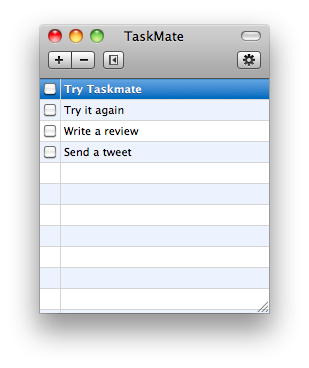
TaskMate by Ryan Conway is a straightforward Mac app that lets you enter tasks, delete them and mark them as complete. Nothing more, just checkboxes.

TaskMate Mac

TaskMate Mac

When Apple will bundle a Tasks.app with Mac OS X I’m sure it will be something like this.

Also, it’s free.


When the PC is a Toaster

Link

“Lots of the criticism around the iPad mimics the same criticism that Apple faced with the introduction of Macintosh. Macintosh was the first computer of the era to not ship with a programming language. For the enthusiast of the time, it was a huge issue. For the consumers, the inclusion of MacWrite and MacPaint was far more valuable and useful.”


iDocument: A Better Way To Organize Your Documents

Have you ever felt the need of collecting data into one single application? I have. To tell the truth, sometimes I wish there was an application that could collect everything (links,images, videos, music, documents) into a single interface, but I recognize that might end up being a nothing more than HD.app. So, here come database driven applications like iPhoto for images, iTunes for music or Yojimbo for..anything else. You should how much I love Yojimbo (here’s my post of some months ago about it) and you should also know how much I wish the developers of Yojimbo listened to the users. Yojimbo it’s great, but as you keep using it you realize it’s somehow outdated. Bookmarklets work fine, the Quick Input panel is useful, same applies for the Drop Dock…but it’s not fluid. Particularly after many months of serious usage, my installation of Yojimbo is starting to fall under the huge amount of data I’ve put into it. So I’ve come to a conclusion: certain file types must go elsewhere. I hence decided that documents, in the form of .PDFs and iWork files, should have been stored into another app. But that wasn’t easy you know: I wasn’t able to find an app that was exactly meant for collecting documents or at least, I wasn’t able to find the right app for me.

fast forward 30 days

iDocument totally came out of nothing. A follower of mine replied to me on Twitter saying “Hey, check out this app!”, and there I opened the link. Is iDocument really worth your money? Or, can iDocument really save you from those hundreds of documents cluttering you hard drive?

Read more


Firefox 3.7/4.0 Alpha Available for Testing

From Mozilla.org: (via Neowin)

“Gecko 1.9.3 Alpha 1 introduces several new features which can be tested by using this Mozilla Developer Preview. Many of these features are still in development, and while they will likely appear in some future version of Mozilla Firefox, some may be in earlier versions than others.

- Support for CSS Transitions. This support is not quite complete: support for animation of transforms and gradients has not yet been implemented;

- Support for SMIL Animation in SVG. Support for animating some SVG attributes is still under development and the animateMotion element isn’t supported yet;

- Support for WebGL, which is disabled by default but can be enabled by changing a preference;

- Support for the getClientRects and getBoundingClientRect methods on Range objects. See bug 396392 for details;

- Support for the setCapture and releaseCapture methods on DOM elements

- Support for the HTML5 History.pushState() and History.replaceState() methods and the popstate event;

- Support for the -moz-image-rect() value for background-image.

It also contains several other significant changes:

On Mac OS X, we render text using Core Text rather than ATSUI.

We rewrote major parts of the code for handling scrolling.

We made various architectural changes to improve Web page performance.”

Finally?


Office 2011 for Mac Announced

Link

“The software—not surprisingly, given the sudden ubiquity of sites like Facebook and Twitter—is big on collaboration and social networking tools.

Mac Office 2011 also offers a direct connection to Microsoft Office Web Apps, the company’s cloud-based version of the desktop suite. Users can store and access documents created on their desktop from any location with an Internet connection by uploading them to Web Apps.

Web Apps will debut alongside Office 2010, the next Windows version of the product. Office 2010 is scheduled to ship in June.

Mac Office 2011 will also feature a revamped interface. The company’s frequent GUI redesigns are often a source of frustration for customers who’ve mastered previous versions, but the software maker insists the new changes are subtle and worthwhile.

Microsoft said Mac Office 2011 “will be available later this year,” but did not provide a more specific release timetable.”

Subtle and worthwhile. Microsoft style.


Today 2.1 Available - Adds BusyCal Support

Today, which we reviewed some days ago here, has been updated to the 2.1 version. The updates introduces support of BusyCal, the popular calendaring application. Here’s the full changelog:

  • Added support for opening events and tasks externally in BusyCal;
  • Added support for Mac OS X 10.5 / Leopard;

  • Darker events should be more legible now;

  • Pressing enter in the notes field on a new event or task no longer creates the event or task;

  • Resolved issue where new event and task windows wouldn’t pop to the top;

  • Resolved issue where registration fields were editable after licensing;

  • Resolved some unsightly default layout issues in a few windows;

  • Updated the localization of each xib to hopefully have a nicer layout;

  • Resolved issue where toggling the splitview would clip the tasks lists in some instances;

  • Added x-today2-reg:// URL scheme for handling registrations;

  • Added newsletter signup prompt.

In case you haven’t yet, go download Today. A great app.