
Scrup, Free and Open Source Alternative to Tinygrab and Droplr

Sharing picture across the internet could be a real problem sometimes. Not because there’s a lack of tools to do it, no - that is the real problem: there are too many apps that enable you to take a screenshot and upload it somewhere, and people don’t know anymore which app to use. We reviewed apps such as Tinygrab and Droplr before, but the one we’re talking about today is quite awesome and surely different from those ones.

Scrup by Rasmus Andersson (designer at Spotify) is simple and open source utility that, once installed and running on your Mac, can upload screenshots to your own webserver and automatically paste the url into the clipboard for easy sharing. You just have to upload a .php file to your server, insert some credentials in the Preferences of the app and you’ll be all set. Scrup runs in the menubar, it shows nice thumbnail previews of your “scrups” together with date and time.
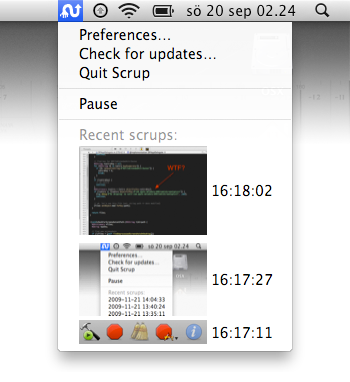
It works just as good as many other paid and famous apps. Scrup is free and available over at GitHub’s official project page here. Also, be sure to check out Django Scrup, a django-based web receiver for Scrup that forwards the screenshots to Amazon S3.


Being Flash Free

Link

Interesting post over at Cocoia’s blog. It’s true, uninstalling flash precludes you to a lot of content on the current web - so you keep it installed on your computer.

And that’s exactly Adobe’s strongest point in why you shouldn’t uninstall Flash.


Ballmer Praises Apple’s AppStore, “A Very Nice Job”

Seems like the days of the cold war between Microsoft and Apple have come to an end. Or at least, that’s what we should assume reading this article from The Seattle Times which reports that Steve Ballmer, chief executive of Microsoft, called out the great work Apple has done so far with the App Store during a speeck at the University of Washington’s computer-science building.

Could this be a sign of Apple and Microsoft finalizing the details about Bing coming to the iPhone as default’s search engine? Or is Ballmer just getting older and putting the old contrasts away

I bet on Bing.


Put Core Location to use with NetworkLocation

One feature that people are often unaware of in their Macs is something called Core Location. Core Location is what automatically sets the time zones on your Mac for you when traveling around the world by looking for nearby WiFi hotspots and gathering local intel. In conjunction with Google Maps and NetworkLocation, you can establish rules that aid in automatically performing tasks when you reach your daily destinations.

Read more


Taptu, Search by Touch

Mobile browsers are usually of one breed on the iPhone. All browsers normally have an address bar, a search bar, and perhaps tabs. But asides from accessing search engines, none of them make looking for information too convenient. Taptu Search makes finding information easy because of interactive contextual touch elements.

Read more


Bills 1.1 Hits the App Store, Brings Stats and Fixes

Bills, the great financial utility from Powerybase we reviewed here, has been updated to the 1.1 version which brings many requested features. First, the stats and totals section summarizes bills by date range, currency and categories. Also, the autopay can now be turned off for repeating bills and there’s the possibility to increase the pre-alert range to 30 days. Various fixes include UI and currency bugs.

Go download.


Make your Grade with Grades. Exclusive Preview and Giveaway.

This afternoon was full of mystery and intrigue. Adventure and possibilities. Mexican and and iPhone-app’ness. Over fine Spanish cuisine, I met with iPhone developer Jeremy Olson (@jerols on Twitter – if you aren’t following him you should) who runs a great blog over at Tapity.

For a few hours, we discussed all things iPhone and iPad, covering everything from marketing, to design, to an app I’d like to share with you all today. Students rejoice, because the age old question of, “What do I need to make on my test to get an A?” has finally ben answered.

Meet Grades.

Read more