Trimensional - An iPhone App That Does 3D Scanning

Rank this one under the ‘how the eff did they do that’ apps, right up there with Word Lens. Trimensional, from Grant Schindler, is a 3D scanner for your iPhone 4 or iPod Touch (requires front-facing camera). It detects patterns of light reflected off your face to build a true 3D model. Here’s how - it models images in 3D simply by turning down the lights, turning up your iPhone screen’s brightness and holding close to an object, like your own face.
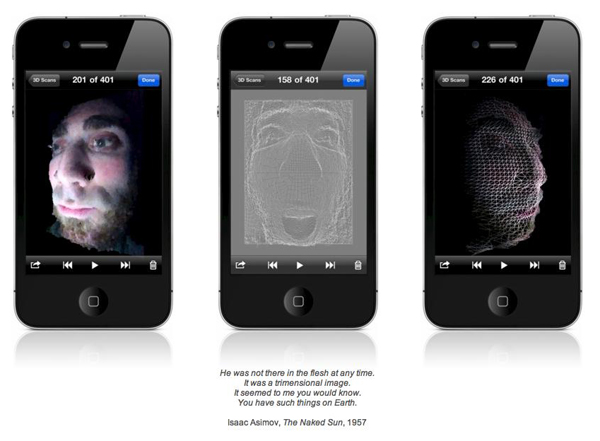
When you’re done with your 3D image, you can view a 3D slideshow, email or save tehm to your camera roll. Trimensional averages 4 out of 5 stars in the App Store and was released January 5, 2011.

Video after the break. Read more


Mac App Store’s First 24 Hours: Developers Post Sales Numbers

The Mac App Store was released as part of the Mac OS X 10.6.6 update earlier than expected. The new Store to discover and download Mac software opened its doors a few hours earlier than many initially thought, which means it’s been out for more than 24 hours now. Still, several developers were waiting anxiously this morning to check the sales numbers of their apps in the first day of the Mac App Store, as provided by Apple’s iTunes Connect service. And while many are still experiencing issues when trying to generate reports from IC’s “Sales & Trends” section, the first numbers are in. And they’re pretty interesting. Read more


iPhone 3G Runs Android Gingerbread

A group of hackers managed to successfully install and run the latest version of the Android operating system, version 2.3 labelled “Gingerbread”, on an old iPhone 3G. This is not the first time the 2008 iPhone gets Android and Linux ports, as the OpeniBoot software tool allows hackers and developers to inject any other OS into the device’s memory and execute it.

As you can see in the video below, it all looks pretty slow and definitely not ready for a public release – we’re not even sure actual functionalities such as Bluetooth or WiFi are working on that. Still, if you have the required patience to install it, wait for it to boot and use it with laggy multitouch gestures, you can show your non-geek friends that you have an iPhone that runs Google’s Android.

Because you’ve always wanted to do that, right? [via Covering Web] Read more


Mac App Store Review: DropBook, Desktop Facebook Uploader

I’m not that kind of user who heavily relies on Facebook on a daily basis, but I can spot a good Facebook app when I see one. I may not be the guy who uploads hundreds of pictures every week and posts just about any thought on world’s most crowded social network, yet I don’t mind trying iOS apps that integrates with the platform from time to time. With the release of the Mac App Store, I expected to see some Facebook apps for the Mac to show up; new apps, software we haven’t seen before. After all, a platform like the Mac App Store seems to be meant for the average user who depends on another platform, Facebook.

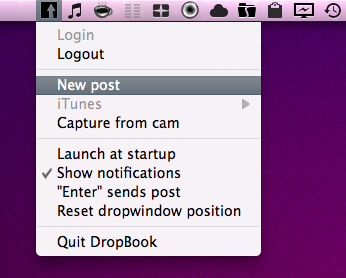
DropBook is a new app developed by i-NOVATION and released in the Mac App Store at $2.99. It looks like a simple Facebook uploader that’s actually packed with functionalities, but still manages to let users access these features with ease and a few clicks. Read more


OWC Aura Pro Express: MacBook Air SSD’s Get Faster

If the blazing speed of Apple’s built in SSD for the MacBook Air isn’t fast enough, head over to OWC and check out their Aura Pro Express. Featuring write speeds up to 275 MB/s over Apple’s factory 215MB/s, you’re looking at a 15% increase in face melting performance. At the top of the line, you can nab yourself a 360 GB Express SSD if you still can’t live out of the cloud, though that’ll set you back an easy $1,180. You can nab a 180 GB model at a cooler $500, and you’ll still get OWC’s chip based encryption, RAID-like data protection, and ultra-efficient wear leveling that any good SSD drive should have. I don’t know if I’ll pick one of these bad boys up any time soon, but we’re sure there will be plenty who are willing to grab their torx screwdrivers and empty their pockets for one of these.

OWC Mercury Aura Pro Express SSD


Rovio Releases Angry Birds Free with 12 Exclusive Levels

While we were all waiting for the OS X 10.6.6 and the Mac App Store to show up in Software Update, Rovio released a new version of Angry Birds in the App Store, for free. The app is called “Angry Birds Free” and must not be confused with “Angry Birds Lite”, which wasn’t updated since last April. This new version of the popular iOS (and now Mac, too) game contains 12 exclusive levels specifically built for users who want to try a free version before a paid upgrade.

But Angry Birds Free doesn’t stop at new levels not accessible in the paid counterparts. It’s also got Game Center integration with leaderboards and achievements, plus 4 new mini episodes that should keep you entertained before considering going paid. Two weeks ago, Rovio added 15 new levels, Game Center support and the Mighty Eagle to Angry Birds HD for iPad.

Angry Birds Free is available here, well, for free.


A Paintbrush Stylus for iPad Is What Every iArtist Needs

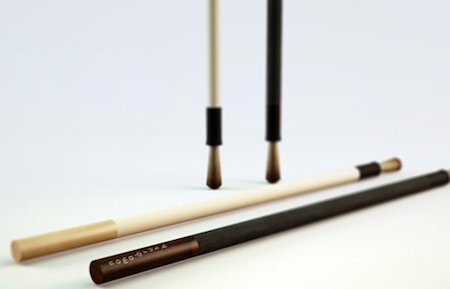
Realized by NomadBrush and made “with a long handle and soft bristles”, this paintbrush stylus looks like a first on the iPad. It’s coming in February, “patent is pending” according to the official teaser website and with this, you should be able to come up with original digital creations like the ones we’ve seen before.

Well, here’s your chance to become an iArtist. Check out the promo video below. [Gizmodo via NomadBrush] Read more


Mac App Store Review: Unretina, Simple Utility for iOS Designers

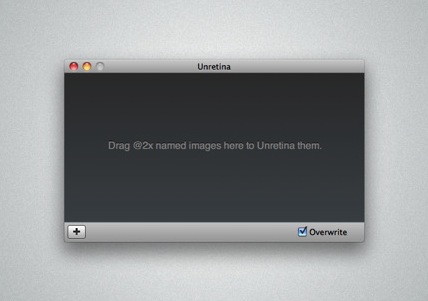
Released for free in the Mac App Store and developed by Bonobo Labs, Unretina is an OS X utility specifically geared towards iOS designers and developers. What this app does is very simple: it provides a way to easily resize “2x” images built for the Retina Display in order to make them compatible for artworks on older Apple devices.

Unretina takes graphic files designed for the iPhone 4 and iPod touch 4th gen and resizes them to a resolution compatible with, say, the iPhone 3GS and older iPod touches. It should work for all devices that don’t come with a Retina Display. Through a simple drag & drop interface, Unretina looks like a straightforward utility for designers that does one thing well.

Looking at the reviews in the Mac App Store description page, it appears that the app uses Bicubic resampling to resize graphic files. This may lead to a tiny sharpness loss, and a few pixels off. Something that, apparently, most designers won’t care about.

Unretina is available for free in the Mac App Store.