OnLive Gaming Service Launching on iOS and Android

OnLive has announced that its brining its streaming online gaming service to tablets and mobile phones via a playable client that will soon be available in the App Store. The OnLive app will make available console games previously unavailable to the iPhone and iPad, as digital gaming content is streamed over the Internet from a central location (processing and gameplay is done “in the cloud”). Those that have the bandwidth available can instantly pick up and play new titles without having to consume local storage or wait for the game to download. As games are played in the cloud, all save data is completely mobile and can be accessed from any device.

From the press release:

Over 25 OnLive titles, including L.A. Noire, family titles like LEGO Harry Potter: Years 1-4 and 5-7, and indies like Defense Grid Gold, will work with touch control on tablets and smartphones. And most of the nearly 200 games in OnLive’s growing library, including recent top-tier releases like Batman: Arkham CityAssassin’s Creed: Revelations and Lord of the Rings: War in the North, are immediately playable on virtually any device with the Universal OnLive Wireless Controller, which utilizes OnLive’s exclusive adaptive wireless technology to automatically find an optimal wireless connection for a given tablet, smartphone, PC, Mac, TV or Blu-ray player. The Universal OnLive Wireless Controller will be available soon for purchase in the US and the UK, for $49.99 and £39.99 respectively.

The OnLive app will make use of OnLive Cloud Touch controls so you can manipulate the game on a touchscreen, but an optional controller is available for an additional fifty dollars that should seamlessly work with your iPad or Android tablet. OnLive says the iPad version should be available soon. TechCrunch notes than an iPhone version of the OnLive app is planned, but won’t be immediately available for the mobile launch. While the app itself will be free, you still have to pay to play games per title through OnLive’s PlayBack Bundle. Anyone who downloads the OnLive app will be able to play LEGO Batman free of charge.


[OnLive via MacRumors]


New Revisions for Apple’s Spaceship-Campus Reveal New Solar Roof and Renderings

It was back in June when we last talked about Apple’s 2nd mothership, or the proposed circular spaceship-like campus that’s currently planned to occupy a 98-acre plot of land purchased from Hewlett Packard (the total campus area includes 175 acres of land). On Wednesday, new revisions surfaced from the City of Cupertino detailing the new campus submissions from Apple, which includes new renderings and details about the structure’s massive size.

Read more


Game On With the Official Xbox LIVE App for iOS

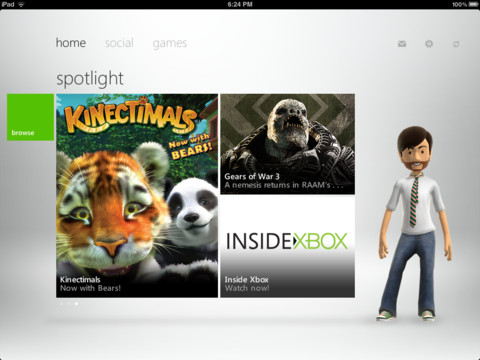
Microsoft has released the official Xbox LIVE app for iPhone and iPad users, dubbed My Xbox Live, allowing you to read and send messages to friends, manage your friends list and accept invitations, edit your Xbox LIVE profile, change and customize your avatar with new clothing and items, and view the achievements you’ve been awarded through the metro-like interface. Resembling the recent Dashboard update the Xbox 360 received as Microsoft brings UI parity with Metro, the Xbox LIVE app can be downloaded for free on the iTunes App Store.

Screenshots past the break!

[via Major Nelson]

Read more


Instagram Now Boasts 15 Million Users

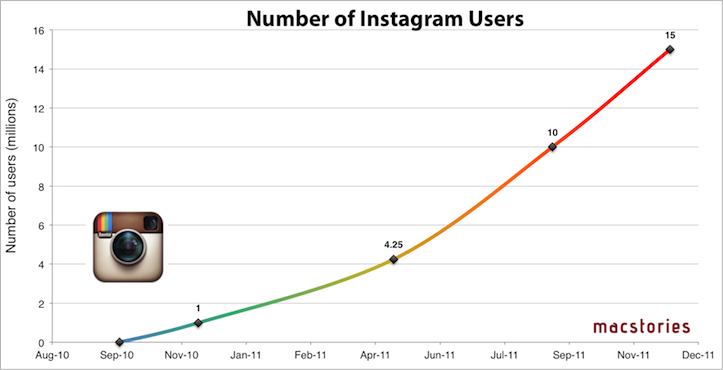
Just a little over 2 months since it celebrated its 1 year anniversary and milestone of 10 million users, Instagram has today revealed that they now have 15 million users. The announcement was made by Kevin Systrom during his speech at LeWeb ‘11 today.

As the above graph demonstrates, Instagram has grown at a stunning pace, and continues to do so at an even more rapid rate. Systrom only recently revealed that Instagram had gained an additional 2 million members in the month of November alone.

Instagram is still a small operation with staff of only 10 people - but Systrom has revealed that they do have 2 staff members working on a (much anticipated) Android version of the app.

[Via The Next Web]


Flud 2.0 Brings Social Interaction with a Revamped Interface

While I’ve taken a look at Flud before, its initial resemblance to Pulse left me uninterested. Flud, in their attempt to meld the news you were interested in with social media, never quite stood out enough from the competition or encouraged me to actively share articles with my friends. That was the case, but like Flipboard, Flud has a substantial update with a second version of their social news reader.

Flud 2.0 throws out its sharp-edged interface for an elegant carousel, containing the subscription’s headlines which scroll vertically to reveal more content. The interface, fluid and responsive when article images don’t need to be cached, differentiates itself from the likes of Flipboard and Pulse — sidestepping a magazine or traditional RSS-like experience — by presenting an open canvas (or in other words a very fancy grid) to discover content. There are some similarities with services like News.me in the updated Flud, with the main focus revolving around following your friends or idols who will curate interesting content.

Read more


Apple Begins Preparing For Its 12 Days Of Christmas Promotion

Update: The app has made its way onto a number of European stores including the British and German app stores.

Apple will this year again run its ‘12 Days of Christmas’ promotion after releasing the companion iOS app a few days ago.  The promotion will run between December 26 and January 6, with each day featuring different music, videos, apps and books available for free for 24 hours.

Apple has not yet revealed what content will be offered for free — but if they follow the promotion that they did last year it will see the app update each day, displaying that day’s offering for the respective region (it changes based on the country). The app is not yet available in all countries, but included below is Apple’s description of the app. It should be expected that Apple will soon start marketing the promotion through iTunes and through their website.

You and your friends can download a fantastic selection of songs, music videos, apps and books for free. Each download will only be available for 24 hours. Get our special 12 Days of Christmas app to make it even easier to access your gifts while you’re on the go.

Don’t have an iPhone, iPad or iPod touch? Don’t worry. Come back 26 December to download gifts from your computer.

If the companion app is available in your region, you can download it for free on the App Store.


Evernote Introduces Two New iPhone Apps To Help Remember People & Meals

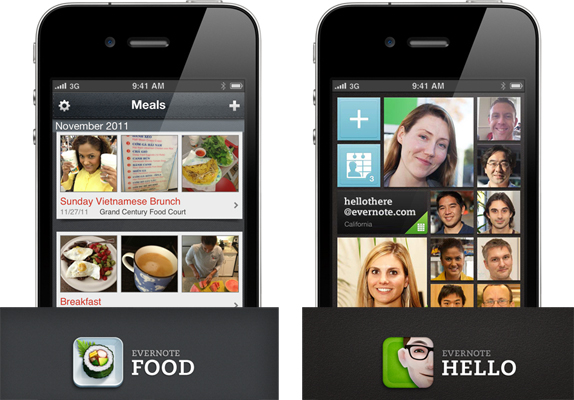
Today, Evernote has introduced two new iPhone apps that tie into the Evernote service but are designed for a specific purpose. Evernote Hello is an app that is all about remembering people, whilst Evernote Food is designed to preserve the “experiences, thoughts and memories” that might be attatched to a meal.

Evernote Hello is designed to help users remember people they meet by asking for a picture, a time of when they met and a context for the meet. The app is constructed so that users can simply hand over their phones (if they are comfortable with that) so that the person they are meeting can easily enter their name, contact details and take a quick picture of themselves. An interesting addition to the app is the ‘Encounters’ feature, this allows you to add details of the meetings - from location, photos and any notes.

All of your Evernote Hello entries are synchronized with Evernote so that you can view them from any device or computer. This means that you can search for people inside of Evernote. When you’re trying to find a particular note that you created during a meeting with someone, you can search for them and then look for notes created around the same time. More context!

Evernote Food isn’t just about taking photos of your meals, it’s about remembering restaurants, remembering meals with friends and family and remembering that great meal you made yourself. You’ll be able to store photos, photo captions, venues, notes and tags about any meals and then share them with Twitter, Facebook or email.

The Evernote Hello approach is focused on visuals and narrative. For example, if you’re trying to remember the name of someone you met at a big company meeting, tap on the face of anyone else you met at the same time. That will show you the encounter along with all the other people that you met together. By exploring these shared experiences, you’re able to find the people you want and strengthen your own memory.

Evernote Food and Evernote Hello are both available for free on the App Store.