


Here are today’s @MacStoriesDeals on iOS, Mac, and Mac App Store apps that are on sale for a limited time, so get them before they end!
#MacStoriesDeals - Thursday
Considering iBooks Author For Your Next Book Project→
Considering iBooks Author For Your Next Book Project
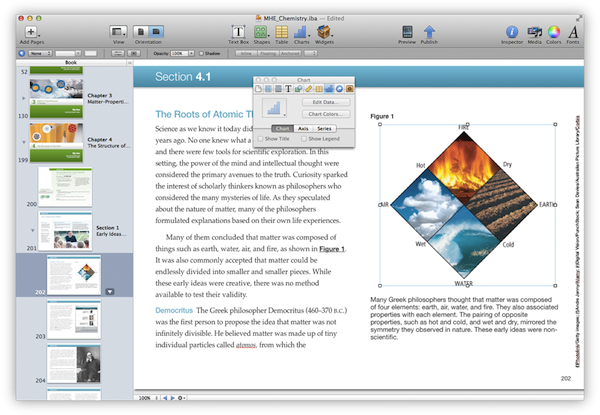
Matt Gemmell has put together a nice overview of what it’ll be like to work with Apple’s new authoring tool. To sum up: you can sell iBooks only through the iBookstore with a maximum price of $14.99, but you can also give them away for free elsewhere. iBooks 2.0 is required, as well as an iPad. iBooks Author is Mac-only and it doesn’t have any collaborative features yet.
But here’s the most important part, which I think Apple could have explained a little better: iBooks Author-created book files can be sold through iBookstore and Apple takes a 30% cut. iBooks Author-created files can be given away elsewhere, for free. Content from an iBooks Author file (read: your actual text and images) can be-repackaged in another authoring environment. Lex Friedman pointed out in a Twitter conversation that the model is similar to apps but misguided because apps can’t be given away for free, whereas iBooks when sold must go through Apple’s Store. Again, we’ll see how authors will respond in the next months.
Also keep in mind this observation from Gemmell:
Naturally, once your text is in iBooks Author, you’re essentially writing and editing within a page-layout application, rather than a word processor or text editor. As with any publishing workflow, you will want to do the writing and editing first, and then put the book together (as much as possible). iBooks Author is resolutely not a writing environment.
Question now remains as to whether the iBooks Author EULA is something that will stick around, will be clarified, or if it’s simply the work of an overzealous lawyer. Dan Wineman writes:
In other words: Apple is trying to enforce a rule that whatever I create with this application, if I sell it, I have to give them a cut. And iBooks Author is free, so this arrangement sounds pretty reasonable.
[…]
When I make something myself, no matter what software I use to make it, then — assuming it doesn’t infringe any copyrights — it’s my right to distribute it however I want, in whatever format I choose, for free or not. I don’t lose the right to publish my novel if Microsoft determines that I wrote it using a pirated copy of Word. Would I lose that right if I tried to sell my iBook outside of the iBookstore and Apple got wind of it? I don’t know; we’re in uncharted waters here. Or how about this: for a moment I’ll stipulate that Apple’s EULA is valid and I’ve agreed to it implicitly by using the software. Now suppose I create an iBook and give it to someone else who has never downloaded iBooks Author and is not party to the EULA, and that person sells it on their own website. What happens now?
Hopefully an online turmoil will force Apple to clarify this.
iBooks Textbooks Commentary
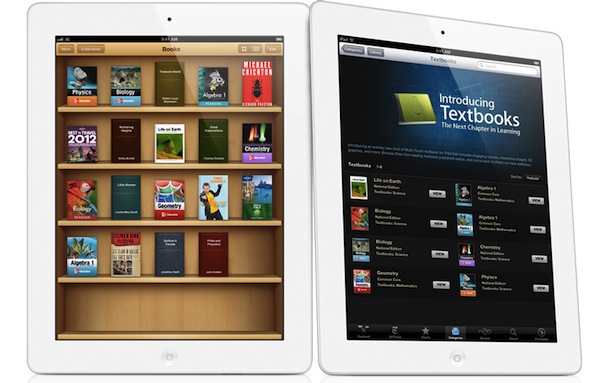
Following the announcements Apple made this morning about iBooks 2.0, textbooks and iTunes U, some interesting discussions have surfaced online in regards to Apple’s willingness to improve the education system – and reinvent textbooks – using iBooks and the iPad. Being based in Italy, I can’t comment specifically on the U.S. school system and what these new products mean for students, school districts and educational institutions, but I do have a few ideas and links to share.
iBooks has turned into a platform. No more just an e-Reader, with the addition of textbooks and books created through iBooks Author Apple seems to be betting on iBooks as a platform that stands on its own, just like iTunes and the App Store. You could argue that this was already clear from the start with the dedicated iBooks app and iBookstore within iOS, but it’s even more relevant now because of one key factor: content creation. Provided you have an iBookstore account, you can now create content-rich books on your Mac and sell them through the iBookstore. You can also export them locally, and preview them on your iPad. I have no idea how smaller, independent publishers and authors will respond to iBooks Author in the long term, but as far as creating content goes, Apple’s latest desktop app looks fantastic. The double nature of this announcement (rich textbooks, books by authors) combined with the existing features of iBooks has a real chance of creating “an iBooks ecosystem”.
Software sells the hardware. Obvious consequence: books created with iBooks Author (packages, not the actual content) can only be sold through the iBookstore. Now, assuming authors like the functionalities and workflow enabled by iBooks Author and assuming they also like money, if this initiative proves successful in the long term, what devices are authors going to recommend?
…It depends. iBooks Author looks like a great eBook creation app, but some authors are skeptical. We will have to wait and see if authors will adopt the software, if Apple will provide continued support with updates and, ultimately, if iBooks Author can be used effectively for all kinds of eBooks, not just those heavy on media and fancy effects. For instance, it doesn’t look like EPUB is supported right now as the format seems to be different. Ben Brooks is right: Apple seems to be targeting Kindle Singles directly with iBooks Author.
Rich content made simple. iBooks Author simplifies the process of creating content-rich books with drag & drop, pop-out menus, auto-align controls, and more. From iBooks Author’s Help section:
- Gallery: Add a sequence of images your readers can swipe through, each with its own custom caption.
- Media: Add a movie or audio file readers can play.
- Review: Add a sequence of interactive multiple-choice or drag-to-target questions.
- Keynote: Add a Keynote presentation (exported as HTML).
- Interactive image: Use labels (sometimes called callouts), panning, and zooming to provide detailed information about specific parts of a graphic.
- 3D: Add a 3D COLLADA (.dae) file readers can rotate.
- HTML: Add a Dashboard widget (.wdgt).
By using web technologies, desktop-class content creation software and an iWork-like interface, with iBooks Author Apple is offering what Xcode is to the App Store. For free.
Accessibility. iBooks Author fully takes advantage of VoiceOver and other Accessibility technologies to let people with disabilities read and experience books. Apple takes Accessibility seriously, and it shows.
Other uses for iBooks Author? I haven’t played with it yet, but I wouldn’t be surprised to see iBooks Author being used for other purposes.
iBooks Textbooks remind me of Push Pop Press. And guess what, the folks behind PPP (acquired by Facebook earlier this year – coincidence?) sound pretty pissed off.
Prices. iPads are expensive! But so were PCs and Macs. As Stephen Hackett correctly points out, Apple doesn’t disclose educational pricing, and several schools already have leased Macs in the classrooms. Will Apple provide a 1-1 “switching program” for schools that don’t need Macs anymore? And what will base pricing of leased iPads look like? The Verge spoke to Apple’s Phil Schiller, who told them “he thinks the numbers work out favorably for school districts if you weigh the costs of textbooks and classroom computers against iBooks content and iPads”. Joshua Schnell has a slightly different take and suggests that iPads may only end up being used in ”rich white kid schools”. I think we don’t have enough details to speculate on Apple’s educational pricing right now (as usual, a Volume Purchase Program for apps and books is available). The only data point we have is that iBooks Textbooks will be cheaper than physical textbooks…if publishers don’t change their minds.
Yes, physical books are more “durable” if you drop them. But what do you use today, an encyclopedia with a typewriter or a PC? Time to move on.
Other devices. I’m hearing reports of iBooks 2.0 and iTunes U not running smoothly on the original iPad and older iPhones, confirming my theory that textbooks seem to be heavily targeting the speedy A5 processor of the iPad 2 (I have no idea why would iTunes U and regular books run slower on older-gen devices though). Let’s not forget that an A6-enabled iPad 3 is rumored to land soon, and Apple may keep the iPad 2 around at a lower price.
Digital books are still heavy. Pearson’s Biology textbook is a 2.77 GB download. We complained about iPad magazines and their absurd download sizes, but it looks like there isn’t much you can do about heavy content like images and video. When I was a kid, I often needed a bigger backpack for textbooks. Now kids will need bigger flash memory.
It’s up to schools and teachers. Pricing issue aside (and that is a huge “aside” for now), schools and teachers will obviously have to learn how to deploy and manage iPads, as well as integrate textbooks and new learning experiences into their curricula. In the current scenario, it’s very likely that kids already know how to use iPads, and their teachers will have to play catch up. On the technical side, I’d suggest schools to look for inspiration in Fraser Speirs’ experiences.
Apple doesn’t want to fix textbooks. They want to improve learning. The underlying message of today’s announcements isn’t strictly about textbooks – surely they play a big role in education, but the scope of Apple’s mission is much broader. Apple wants to re-imagine learning and improve current standards with new technologies: content management systems for classes are nothing new, but iTunes U takes it to a whole new level with a beautiful, always-connected, interactive application. There are big corporations that control the education/textbook market and who knows if they’re really willing to give Apple the leading role in this game with distribution, standardization of technologies and guidance. As Dan Frommer notes, change is not going to happen overnight but you can’t believe in paper textbooks as “the future”.
Apple’s revamped education strategy will be interesting to follow.
Apple Posts Education Event Video→
Apple Posts Education Event Video
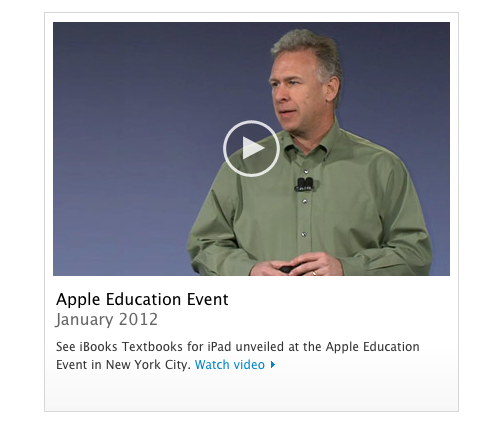
Apple has posted a video for its Education event that took place in New York City earlier today. The video can be streamed here, and a higher quality version should be made available in a few hours through iTunes.
Update: Apple has already uploaded the Education Event video to iTunes. Find the direct links below.
Download: Education Event on Apple Keynotes
Streaming: Apple Events
Also, here’s a recap of our coverage for today’s event:
- Apple Unveils iBooks 2.0 and iBooks Textbooks
-
Apple Announces “iBooks Author” Mac App, Available For Free Today
We will post additional news on the site’s homepage, or tweet as @MacStoriesNet throughout the day.
Apple Releases iTunes 10.5.3
Following iBooks 2.0, iBooks Author and iTunes U for iOS, Apple just released a new version of iTunes, 10.5.3. We’re downloading the update to get our hands on a proper changelog but it’s likely that this new version will simply bring support for textbooks and, perhaps, manual syncing of books created through iBooks Author.
Update: iTunes 10.5.3 does indeed enable textbook syncing to iPads.
iTunes 10.5.3 allows you to sync interactive iBooks textbooks to your iPad. These Multi-Touch textbooks are available for purchase from the iTunes Store on your Mac or from the iBookstore included with iBooks 2 on your iPad.
iBooks textbooks are created with iBooks Author — now available as a free download on the Mac App Store.
iTunes 10.5.3 should hit Software Update shortly; a direct download is available on Apple’s website here.
Apple Releases An iTunes U App
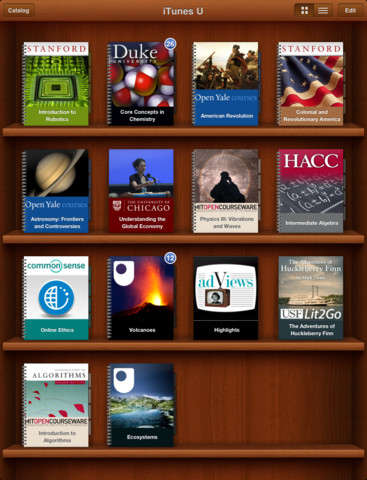
Apple has just announced and released the iTunes U App for iPhone and iPad. It’s a new app that lets teachers manage their iTunes U course and an app that helps students track all the content, assignments and messages from the courses that they study. iTunes U gives teachers the ability to customise their topics that they teach, give students information about office hours, post messages to their class and give students assignments.
The all-new iTunes U app enables students anywhere to tap into entire courses from the world’s most prestigious universities. -Eddy Cue
Effectively this new iTunes U app is similar to the various content management systems that are available for universities and other educational institutions. It’s fully featured with all the various video lectures, documents, apps and books available from within the app along with messages from teachers, the syllabus and even iBooks integration. In effect, it could be a great companion for any teacher or student. Over 100 courses have currently been created with the new iTunes U app from various universities and colleges across the US and further to that iTunes U is now available for K-12 institutions as well.
With the iTunes U app for iPad, iPhone and iPod touch, those barriers no longer exist. Students anywhere can take an entire course with complete access to all course materials right at their fingertips. With the iTunes U app, students are able to access new books right from within the app, and any notes taken in iBooks® are consolidated for easy reviewing.
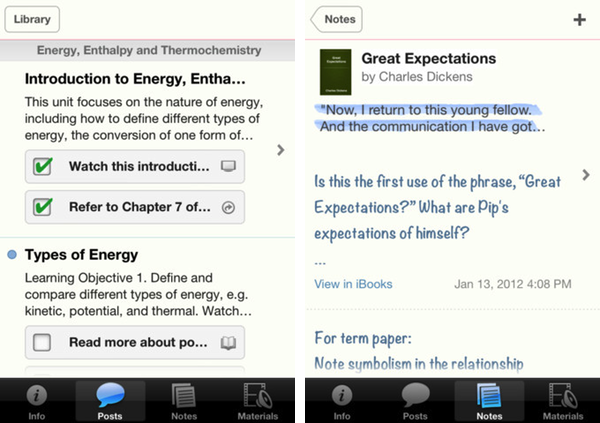
Jump the break to view Apple’s press release on iTunes U for iOS. iTunes U for iOS is available here.
iBooks 2.0 Now Available
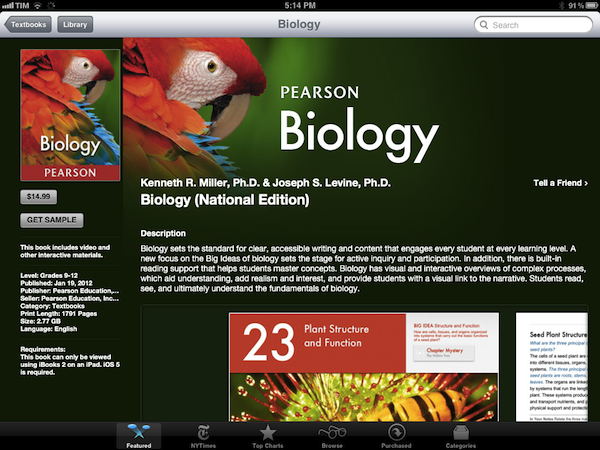
Following the announcement at the media event in New York City, Apple just released a major new version of iBooks, iBooks 2.0. As we detailed in our overview, iBooks 2.0 is mainly focused on enabling textbook support - Apple has cut deals with a series of publishers to bring iBookstore-based textbooks to the United States, and iBooks 2.0 brings full support for books created through the new Mac app, also coming today, iBooks Author.
From the changelog:
- Experience gorgeous Multi-Touch textbooks designed for iPad
- iBooks textbooks are filled with interactive features, diagrams, photos, and videos
- Tap to dive into images with interactive captions, rotate 3D objects, swipe through image galleries, watch videos in full screen, and more
- Use a finger as a highlighter when swiping over text in a textbook
- Take advantage of Study Cards to help you memorize important highlights, notes, and glossary terms
- Tap glossary terms to see definitions of key topics and concepts without leaving the page
It doesn’t look like iBooks’ original book and PDF reading functionalities have gone through any changes in this version. Textbooks downloaded from the iBookstore are placed in the same “Books” collection as regular titles; upon downloading a textbook on iBooks 1.5, the app will ask you to update to the latest version. Read more
Apple Announces “iBooks Author” Mac App, Available For Free Today
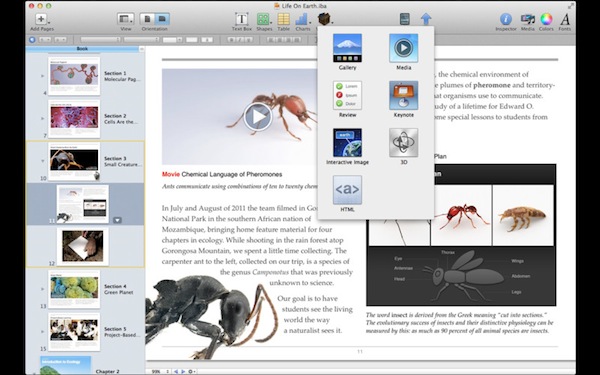
At its education media event in New York, Apple’s Phil Schiller just announced iBooks Author, a new Mac app for authoring books. From an intuitive interface that takes advantage of the desktop’s real screen estate, authors will be able to create and manage interactive books to use in the new iBooks 2, also announced and released today.
iBooks Author falls in line with previous speculation on a “GarageBand for eBooks”, and we’ll update this story with more details as we get them. From a demo offered on stage at the Guggenheim Museum, iBooks Author looked fairly impressive. Described by attendees as a “WYSIWYG application for building eBooks”, iBooks Author comes with a template chooser that makes it easy to get started on a new book project. Authors will then get access to a variety of tools in an interface that resembles Pages and Keynote with various controls to manage media, lay out text with drag & drop controls, and more. The automatic lay out of text seemed especially reliable from the first demo, with Apple noting that the experience they formed in making interactive animations in Keynote served as a foundation for making beautiful, interactive books without programming. Those in audience noted a few similarities to Push Pop Press’ one and only eBook experiment, released earlier this year on the iPad.
Now anyone can create stunning iBooks textbooks, cookbooks, history books, picture books, and more for iPad. All you need is an idea and a Mac. Start with one of the Apple-designed templates that feature a wide variety of page layouts. Add your own text and images with drag-and-drop ease. Use Multi-Touch widgets to include interactive photo galleries, movies, Keynote presentations, 3D objects, and more. Preview your book on your iPad at any time. Then submit your finished work to the iBookstore with a few simple steps. And before you know it, you’re a published author.
iBooks Author is rich on content. Authors can drag & drop Keynote presentations onto the main window and have the animation load inline, or embed web content via HTML5 and JavaScript. With glossaries, images, video and an overall focus on clean, easy-to-use management of interactive content, Apple described iBooks Author as a “miracle” compared to old eBook authoring tools. iBooks Author even iBookstore support built-in, and a preview function to quickly send a work-in-progress file to an iPad for instant preview. Read more
Apple Unveils iBooks 2.0 and iBooks Textbooks
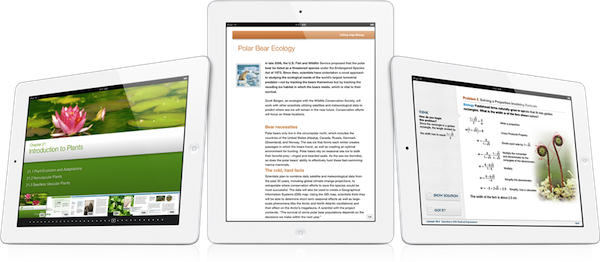
Apple has just announced iBooks 2 at its education themed event in New York. It’s the next evolution of eBooks for the iPad that Phil Schiller calls “amazing — graphic, fun, engaging”. Apple also announced iBooks Textbooks, a new initiative to bring digital textbooks to students thanks to content deals with publishers, starting with the United States.
The new iBooks will support multitouch gestures to move throughout an iBook which can be full of “rich, engaging interactive experiences” — even featuring 3D models so a student can see, for example, inside a cell. In the demo iBook, switching the iPad to portrait re-orientated the content so that the student could focus on reading the text. That way, books can have two completely different experiences, simply by re-orientating the iPad.
As you can see, authors have total freedom in terms of laying out text and graphics.
The iBooks can also bring up definitions that can include images; there is search within the book, links between pages, pages can have slideshows and more. As for those end of chapter review questions that are so common in textbooks, iBooks can now feature ”visual, interactive Q&A sections” that are much more engaging than the typical, long list of unengaging questions.
Note Taking
Another super critical study tool is highlighting and notetaking — your finger is always a highlighter. You just swipe. You can change the color. If you want to leave a note just tap.
With iBooks 2.0, Apple has brought a range of note taking features to help students with their study routine. There is everything from the traditional highlighting (just drag your finger over the desired text) to adding notes by tapping and then typing. An awesome feature here is that iBooks automatically takes all of your notes and highlights, chucks in any glossary terms and creates some study cards for revision.
I don’t think there’s ever been a textbook that made it this easy to be a good student.

Textbook Section in the iBookstore
These new textbook iBooks are now all available in a new ‘Textbook’ section that is on the iBookstore - all collated in one section. As is standard with iBooks, you can even get a free sample to see what the textbook is like.
These are stunning books. They take full advantage of what can be created.
Apple has worked with some partners and has brought some high school textbooks to the iBookstore and they’ll be available for $14.99 or less. Some of the publishers that have begun creating textbook iBooks includes Pearson, McGrawHill and Houghton Mifflin Harcourt - the three publishers that make 90% of textbooks. DK Publishing is also on board with four iBooks – they’re publishers of educational books for younger children. Finally, the E.O. Wilson Foundation is also on board, bringing the book ‘Life on Earth’ exclusively to the iBookstore - the first two chapters are available for free with the rest coming as they are completed for a “reasonable price”.
Of course, the authors can make these books and keep them up to date. But what’s most exciting is that it’s their book, for students. They keep it.
iBooks 2.0 will be available as a free update to the iBooks app today. Jump the break for Apple’s full Press Release.