Some of you may have noticed a new feature in your Rovio games called Rovio Account. Our fans have been asking for a way to play their game on different phones or tablets without losing their progress when changing the device. This is exactly what Rovio Account lets you do!
Another developer who ends up shipping an in-house implementation that doesn’t rely on iCloud or Game Center. For Rovio, I guess that cross-platform syncing was also an important factor to consider.
Adobe’s Creative Cloud launched a year ago as a subscription-based alternative to the traditional licensing model that went with the Creative Suites, offering access to the full Adobe Creative Suite 6 suite of software, services such as Adobe’s Digital Publishing Suite, Adobe Touch Apps for mobile devices, and online syncing and storage for a membership fee. Today during Adobe’s MAX, The Creativity Conference keynote in Los Angeles, California, Adobe announced that they would be phasing out the licensing model altogether, launching updated CS6 applications through Creative Cloud. This means that instead of purchasing an expensive Creative Suite, you’ll have to pay a monthly fee to use apps like Photoshop and Illustrator.
Creative Cloud
Adobe’s Creative Cloud can be thought of as the company’s own version of Microsoft’s Office 365. Next to Adobe’s library of applications, Creative Cloud gives customers a way to connect with others, share files, and build their creative portfolios through Behance to showcase projects and get feedback. Plus Adobe offers 20 GB of cloud storage (100 GB for teams) for storing files and syncing assets between desktops, laptops, and mobile devices like the iPad. In addition to having access to services such as those listed above, customers can take advantage of the entire catalogue of Typekit fonts for use on websites or in desktop applications.
Many of Adobe’s desktop applications will be updated and branded with CC to designate their integration with Creative Cloud. Photoshop CC, InDesign CC, Illustrator CC, Dreamweaver CC, and Premier Pro CC are the big highlights amongst HTML5 oriented Edge apps or video tools like After Effects. Lightroom is an exception as it will be both available with a Creative Cloud membership and with an individual license. Unfortunately, Adobe has said they are discontinuing development of Fireworks due to product overlap. For those who wish to continue using Fireworks, Fireworks CS6 will continue to be supported through the next major updates for OS X and Windows. CS6 itself will also remain available for purchase (and volume licensing) outside of the Creative Cloud, although you won’t have the latest features that are being introduced with Creative Cloud.
Photoshop CC
Photoshop in particular is receiving some wonderful new features with the upcoming Creative Cloud update. Photoshop CC includes an all-new Smart Sharpen tool for bringing out more detail while reducing noise and halo effects, intelligent up-sampling for scaling images with reduced artifacts, and camera shake reduction for restoring sharpness to blurry photos. The latter technology is the most impressive, as it lets anyone restore clarity to lost photos with a simple wave of the wand tool.
Mighty and Napoleon
Projects Mighty and Napoleon are announced hardware offerings from Adobe XD, which consist of a Wacom-like pen stylus and a digital ruler. The devices are cloud connected, interfacing with your Creative Cloud account. For example and as shown in the video above, the pen allows artists to copy and paste snippets between Adobe’s suite of touch apps for mobile devices. The digital ruler is also interesting as it projects shapes to trace on the screen, acting as pocket-able replacement for a large variety of traditional pen and paper tools.
Creative Cloud Pricing
Creative Cloud costs $19.99 a month for a single application, and $49.99 a month for access to every application and service Adobe provides. For the first year, previous Creative Suite customers will only have to pay $19.99 a month if they have Creative Suite 6, and only $29.99 if they have a license for a previous Creative Suite. Students can also get promotional pricing for their first year, paying only $19.99 a month after proving their institutional affiliation. Students should apply by June 25th.
Teams, or small businesses, will have to pay $69.99 per month per user, or $39.99 per month for the first year for previous Creative Suite owners. Teams should sign-up and add users by August 31st. Educational pricing for teams is also set at $39.99 per month per user.
Moving forward, Adobe will only be offering their latest desktop applications through the Creative Cloud. The CC updates for Adobe’s desktop applications will go live on June 17th, but you can join Creative Cloud at any time to take advantage of previously-mentioned services.
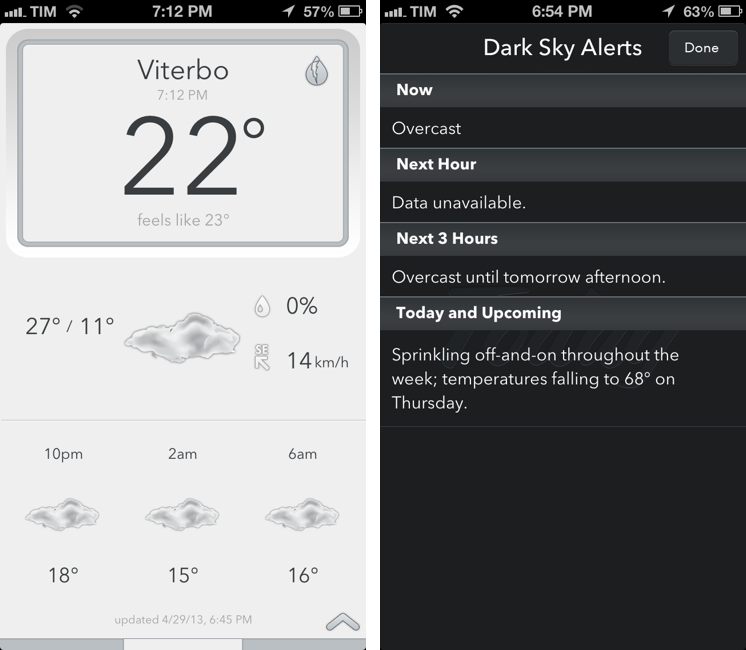
Savvy Apps’ Today Weather, my favorite iOS weather app, has been updated today to include support for Dark Sky alerts and Forecast.io, the Dark Sky Company’s recently launched weather service that comes with an API for third-party developers. Available as a $0.99 In-App Purchase, support for Forecast won’t turn Today Weather into an interface for Forecast Lines (another product from the Dark Sky Company, focused on displaying weather trends), but instead it’ll simply enable Forecast.io as a new weather source alongside Weather Underground.
While the Dark Sky iPhone app is primarily limited to North America, Forecast.io is a global weather service that aggregates data (temperature, pressure, forecasts, etc.) from various sources, statistically providing “the most accurate forecast possible for a given location”. I have been testing Today Weather with Forecast.io for the past month, and results were more accurate than Weather Underground for the Italian locations I tried: Viterbo (where I live), Montalto di Castro, and Rome. Weather Underground has been reliable in the past, but Forecast.io data had a series of minor differences that, eventually, proved to be true; admittedly, it wasn’t a major divergence in terms of temperatures and forecasts, but still accurate.
Dark Sky alerts are equally interesting: sitting in the top right corner of a location’s summary veiw, they provide a handy summary for Now, Next Hour, Next 3 Hours, and “Today and Upcoming” forecasts. I am a fan of Dark Sky’s human-readable text summaries, but, alas, temperatures haven’t been localized to Celsius (I believe this is a Dark Sky API limitation), and, at least for my saved locations, there’s not much information available for Next Hour and Next 3 Hours. I am sure that, for countries with better availability of weather tracking services and data providers, Today Weather’s Dark Sky alerts will offer even better summaries.
I like Today Weather and I’m a fan of The Dark Sky Company’s work on Dark Sky and Forecast. The $0.99 In-App Purchase is a no-brainer if you want to try Forecast.io’s data into Savvy Apps’ solid weather client.
After an update that added support for Quotebook, Pocket for iOS has been updated today to let users send text to Agile Tortoise’s Drafts.
In the current implementation, the app will send an article’s title and shortened URL if no text is selected; if there is a text selection, Pocket will send quoted text and shortened URL to Drafts. I like it, but I wish there was a setting to send the shared link with its original, non-shortened URL.
I’m very glad Pocket added Drafts integration. In this way, you can tweak my Evernote workflows to, say, append bits of text to a single note.
An update to the official Gmail app for iOS released today brings a series of welcome improvements that users had been requesting since the (re)launch of the client last year.
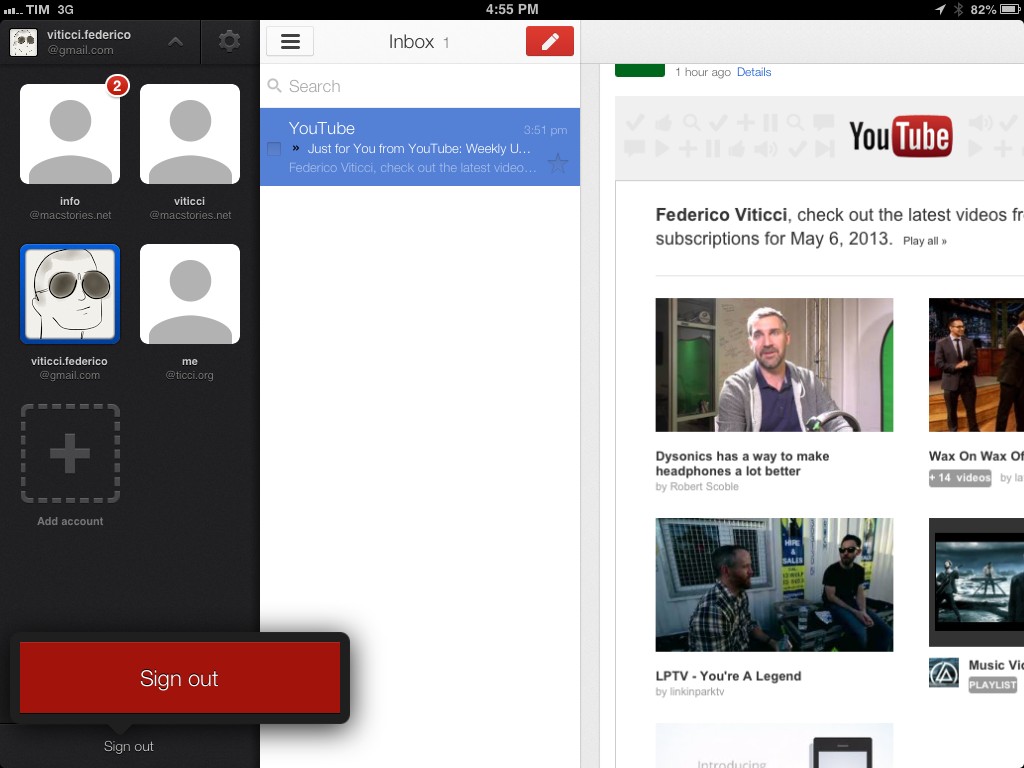
The first notable addition is support for signing out of individual accounts. In older versions of the app, users were forced to sign out of all accounts at once, a tedious process that didn’t make much sense considering the app had a dedicated section for accounts that could use better sign out options. In today’s update, you can tap & hold an account’s avatar in the sidebar to bring up a Sign Out button in a popover at the bottom.
The new version of Gmail also works nicely with Google’s other apps for iOS: from the Settings, you can now specify whether YouTube, Google Maps, and web links should directly open in Google’s native app replacements or a mobile web view. These options are available in the Settings screen for each account, but they will be enabled for the entire app, not single accounts.
The last new feature, also shown in the app’s updated walkthrough, are search suggestions as you type. While Gmail has always been able to search across all your mail, today’s version brings suggestions that (based on initial tests) should match addresses and subject lines found in your account.
A useful collection of tips for Messages for Mac by Amit Jain. I’ve always thought there wasn’t a way to add new lines or switch between conversations, so I’m glad Amit put together this post.
Unfortunately, these tips don’t fix Messages’ problems with memory usage and out-of-sync conversations – which I have been experiencing since the app’s first release.
A great episode by David and Katie on a topic that I cover frequently here at MacStories. I especially liked the focus on Drafts, which has become an essential part of my workflow thanks to the addition of Evernote actions.
BerlinSidewalk has a large collection of beautiful opening day photos of Apple’s latest retail store in Berlin, highlighting the launch event amongst cheering employees and long lines. Rumors of Berlin’s Apple Store can be dated back to 2005, and the ifoAppleStore has an early picture of the building before it underwent renovation in 2011.
Also at the store’s opening was Macerkopf, whom collected a series of photos and videos amongst a brief of the store’s opening hours and weekend schedule. Opening yesterday evening at 5:00pm to a crowd of thousands, 200 staffers at the 5000 square meter retail space handed out 4,500 commemorative shirts to the first visitors. The store is Germany’s biggest amongst the eleven stores, as well as the European region’s largest, featuring a conference room and an auditorium on the second floor to showcase film, music, and photography. The store also offers expeditions for children, who are encouraged to create and share creative projects to parents and teachers. The employees at the store can speak 12 languages between them as the store is expected to be a popular attraction and showcase for Apple in Europe.
Apple has a history of both repurposing and maintaining the structural integrity of historic sites for many of their retail locations, and this store is no different. The retail store sits along the Kurfürstendamm, known locally as Ku’damm, a long boulevard in West Berlin home to many luxury fashion boutiques and businesses. Open at Ku’damm 26, the Apple Retail Store is a renovation of the Union Palast, a historic theater that’s known as one of Berlin’s first, opening in 1913.


 Apple’s New Retail Store in Berlin