

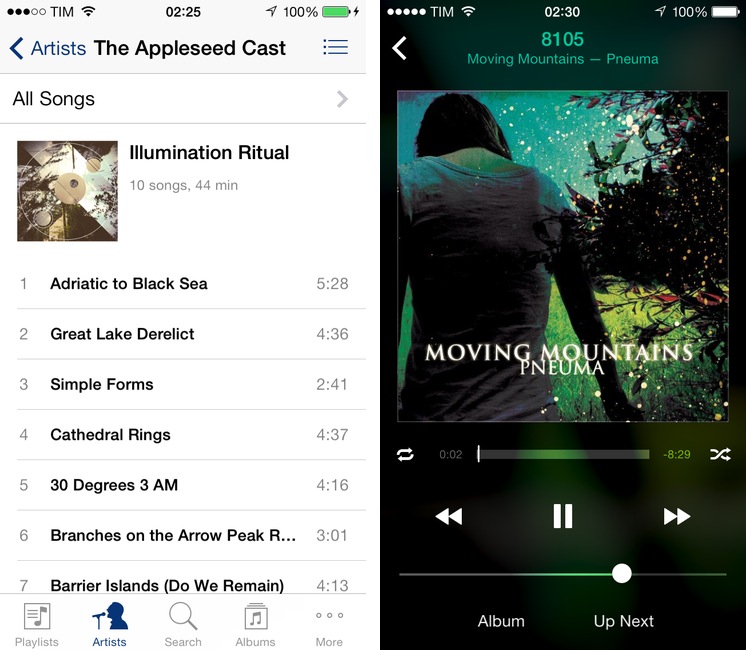
Earlier today, Apple released an update to the official Remote app for iPhone and iPad that brings an iOS 7 redesign and support for the latest version of iTunes. While I wouldn’t consider myself a heavy user of Remote, I like to keep it on my iPhone for those times when I have friends over for dinner and my MacBook is playing music in the background. The new app doesn’t come with groundbreaking new features but it’s got some iOS 7 design decisions worth pointing out.
Apple’s Remote and iOS 7 Design
Interesting for iOS 7
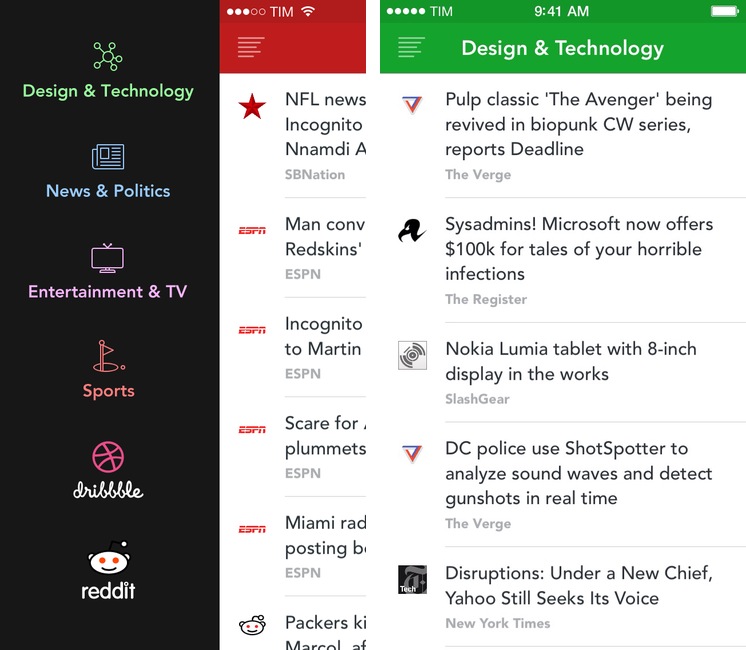
Back in December 2012 I linked to Interesting, an iPhone news aggregator developed by Mike Rundle that was focused on providing simple access to tech and entertainment news in a delightful design. I wrote:
Interesting collects new articles from a variety of sources and displays a list of entries in reverse chronological order. Tapping on an item opens an embedded web view, which has a toolbar for navigation, refresh, and sharing options. Sharing includes Pocket and Twitter integration, Copy Link, Open in Safari, and Mail Link. Interesting has four sections: Design & Technology; News & Politics; Entertainment & TV; and Sports. The built-in list of sources includes websites like The Next Web, Wired, SBNation, CNN, SPIN, and various sub-reddits.
Released today, Interesting 2.0 is a major update to the original app that introduces a new interface for iOS 7 and adds more content sources to allow users to fetch even more articles to preview in the app or open in Safari.
Mavericks Tags with Alfred 2→
I was really excited when Apple announced to add tag support to Finder with OS X 10.9 Mavericks. But after installing the OS update and playing with the new tag feature, I was a bit disappointed on how the feature was implemented. There was neither a command line utility to manage tags nor was there a way to do this with AppleScript. – At least, I did not find a proper solution. So, to add/remove tags to/from a file or folder one had to open the info dialog (⌘+I) and modify the tags in the new input field at the top.
Good work by Marko Kästner. Mavericks’ Finder can be slow at searching or adding tags for power users; Marko’s workflow is nicely integrated with Alfred and it can be activated with a keyboard shortcut.
Fixing iOS Screenshot Status Bars with Python→
On last week’s episode of The Prompt, Federico went off on a rant about ugly iOS screenshots. He wasn’t complaining about the apps themselves being ugly, he was chastising those of us who post screenshots with status bars showing inconsistent times, signal strengths, and battery levels. And Lord help you if your battery icon is in the red.
His recommendation was Status Magic, a Mac app that cleans up the status bars in your iOS screenshots and makes them uniform. It looks like a nice app, but my thoughts gravitated toward a script using the Python Imaging Library. Why would I write a script when an inexpensive app is available?
Fixing iOS status bars is one of the reasons I need to use my Mac with Status Magic because there is no similar app on iOS. I am playing around with Dr. Drang’s script, which can be easily adapted to Pythonista and integrated with the app’s photos module for Camera Roll integration. Putting together status bar replacement images that match Apple’s ones is a bit of work (it’s tricky to get the fonts right, but now I’m trying this) and they won’t produce good results with blurred status bars, but those are the same inconveniences that iOS 7 brought to Status Magic anyway.
I’m looking forward to seeing what tweaks and improvements the Doctor will make to his script. Once I have a good solution for Pythonista (which I already use to combine screenshots on iOS), my iOS writing and editing workflow for text and screenshots will be largely similar to the OS X one (I still need a good uploader for Cloud Files and an iOS version of this).
Xcode WarningLights for Philips Hue→
Mitchell Allison created an Xcode plugin that flashes a set of Philips Hue light bulbs red in case of a failed build. I wish I used Xcode just to try this out.
Retiring Fontcase→
Bohemian Coding:
Fontcase saw its first light in 2009, and the Mac landscape has changed a lot since.
The App Store came along and we jumped in enthusiastically, but with the advent of enforced sandboxing, and the tightening up that every OS release brings, things have become rather difficult.
Fontcase was one of my first app reviews for MacStories in 2009 and we even had a “behind the scenes” look at Fontcase 1.0 with prototypes and mockups shared by lead developer Pieter Omvlee. Retiring Fontcase allows Omvlee and his team to focus on Sketch, which is great news.
Poster Updated for iOS 7
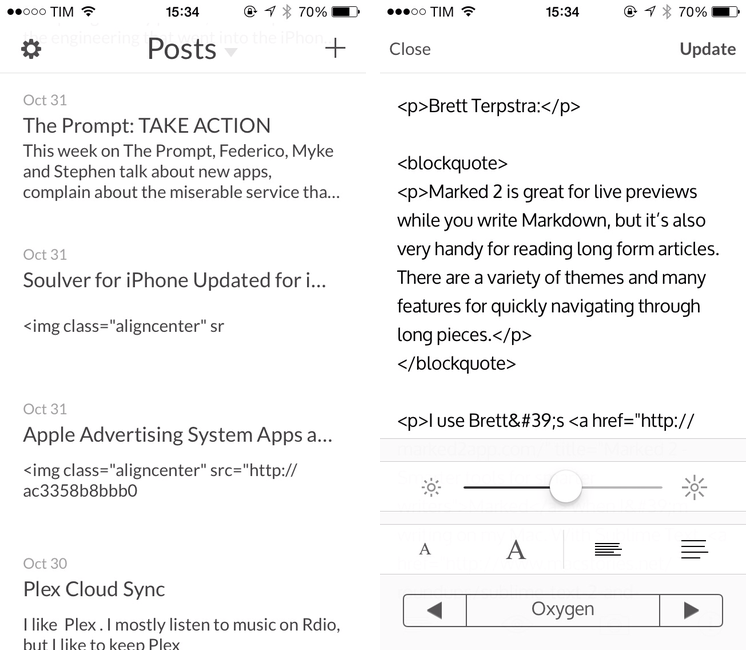
In June, Automattic acquired Poster, a popular WordPress client for iPhone and iPad that featured Dropbox integration, Markdown support, and advanced actions for power users. Poster was, before Editorial, the app that I used to write articles from my iPad and iPhone, and I wasn’t thrilled when developer Tom Witkin announced the app would be discontinued.
To my surprise, the app – which was pulled from the App Store after the acquisition – has been updated to version 3.0 this week, adding iOS 7 compatibility and fixes. There are no new notable additions, but the entire Poster UI has been updated for iOS 7 and there is a new line height option in the preview menu; Witkin got rid of textures and iOS 6-style buttons, adding subtle animations for navigation and other menus. It’s still the same Poster, only with an iOS 7 interface and less crashes.
However, the bad news is that, because the app isn’t available on the App Store anymore, only old customers can download the updated version. If you bought Poster in the past, open the App Store, find the Purchased section, and look for Poster; tap Open/Download, and the app should be reinstalled with the new version 3.0 that Witkin made for iOS 7.
Witkin figured out a way to update Poster for old customers who don’t want to switch to the official WordPress client, and I’m glad he did because some of Poster’s more advanced functionalities are still nowhere to be seen in WordPress for iOS or other text editors. I don’t know if Witkin will keep on releasing compatibility updates in this way, and, unless major changes are made, Poster will eventually stop working with future versions of iOS or WordPress – but until that day, you can enjoy Poster 3 for iOS 7. It’s still a great app.
Marked 2 Tips for Long-Form Reading→
Brett Terpstra:
Marked 2 is great for live previews while you write Markdown, but it’s also very handy for reading long form articles. There are a variety of themes and many features for quickly navigating through long pieces.
I use Brett’s Marked when I’m writing on my Mac. With Sublime Text, it’s easy to run a custom build command (preview) for Marked and I love that the app (unlike many others) supports header IDs when it converts Markdown to HTML. When I was working on my Editorial review, Marked was essential in the editing process to preview images, code blocks, and navigate through the final 25,000-word document.
Nothing beats Marked’s Markdown preview tools. It turns out, it’s pretty great at enhancing long-form web reading too. Who else thinks this would be fantastic on an iPad?
OvershareKit→
Justin Williams:
A few weeks ago I was trading war stories with Jared Sinclair of Riposte fame as we were inching towards the finish line for our respective new apps. In Jared’s case, he is working on a new RSS client for iOS 7 called Unread and was mentioning how his biggest hurdle remaining was integrating a variety of sharing services for the posts in a user’s RSS feeds.
Luck would have it that I had been working on a similar feature already for my new app, so we decided to collaborate on something that would hopefully eliminate the need for anyone to write the same sharing code over and over again. The initial release is a pretty substantial rewrite of my initial code-base speerheaded by Jared to account for more than just image-based sharing. It’s a fantastic piece of code that I’m truly proud to be associated with.
It’s 2013 and we still have apps with archaic list-based sharing menus that were created in 2009 and barely updated for iOS 6. Developers, go check out the OvershareKit documentation on GitHub.