Posts in reviews

Punish Website Is a Blacklist-Only iOS Content Blocker

Several weeks ago we got a question from a Club MacStories member wanting to know if any of us had come across a blacklist-only content blocker. We hadn’t. We did some research and still came up empty, which we reported back to MacStories Weekly readers. That prompted developer Salavat Khanov to step in and fill the gap with a new app called Punish Website.

Khanov is the developer behind 1Blocker, a popular iOS content blocker that we’ve covered in the past. However 1Blocker, like its competitors, blocks ads, comments, and other content based on an elaborate system of rules. You can whitelist sites, but the default behavior is to block content unless instructed otherwise. Our reader wanted to come at the problem from the other direction with a content blocker that only blocks elements on blacklisted sites.

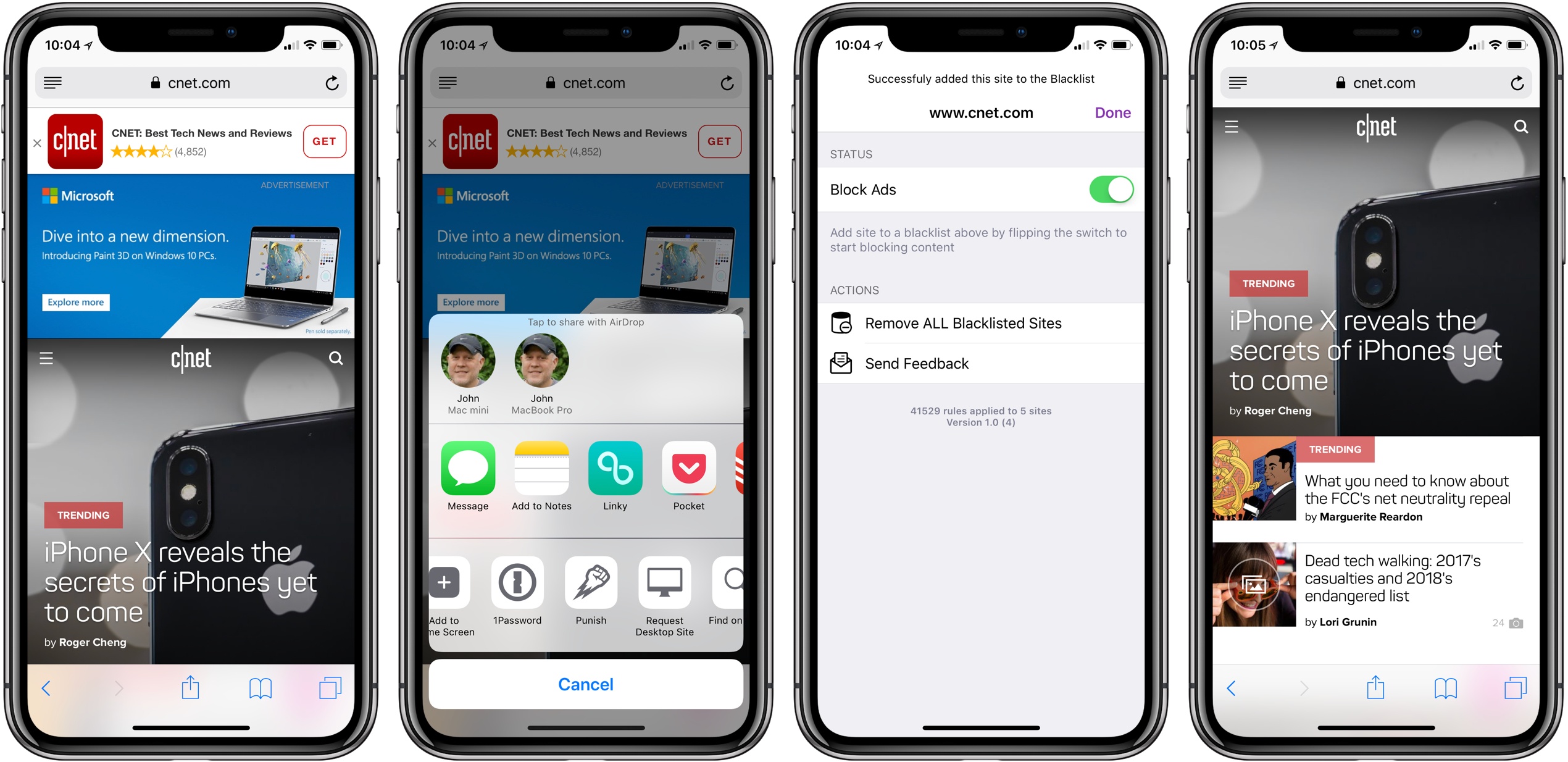
That’s exactly what Punish does. It’s primarily an action extension that’s invoked from the system share sheet. When you come across a site that crosses your tolerance line for website clutter, all you need to do is tap the share icon in Safari and pick Punish. The extension UI will appear to confirm you want to add the site to your blacklist. After you tap the Done button, the site reloads free of distractions.

To take a site off your blacklist, simply open the app and swipe left to reveal a delete button or use the Edit button. Managing your list is simple, but I’d also like to see a Cancel button added to the extension for those circumstances where you have second thoughts about invoking the blocker.

I’m glad to see that Khanov developed Punish. It’s easy to paint all websites with the same anti-advertising brush, but the reality is that advertising is still a big part of how sites earn money and there’s a strong case for a more considered and deliberate approach, which Punish enables.

Punish Website is available on the App Store for $2.99.
Access Extra Content and Perks

Founded in 2015, Club MacStories has delivered exclusive content every week for nearly a decade.

What started with weekly and monthly email newsletters has blossomed into a family of memberships designed for every MacStories fan.

Learn more here and from our Club FAQs.

Club MacStories: Weekly and monthly newsletters via email and the web that are brimming with apps, tips, automation workflows, longform writing, early access to the MacStories Unwind podcast, periodic giveaways, and more;

Club MacStories+: Everything that Club MacStories offers, plus an active Discord community, advanced search and custom RSS features for exploring the Club’s entire back catalog, bonus columns, and dozens of app discounts;

Club Premier: All of the above and AppStories+, an extended version of our flagship podcast that’s delivered early, ad-free, and in high-bitrate audio.

Learn more here and from our Club FAQs.


Game Day: Reigns: Her Majesty

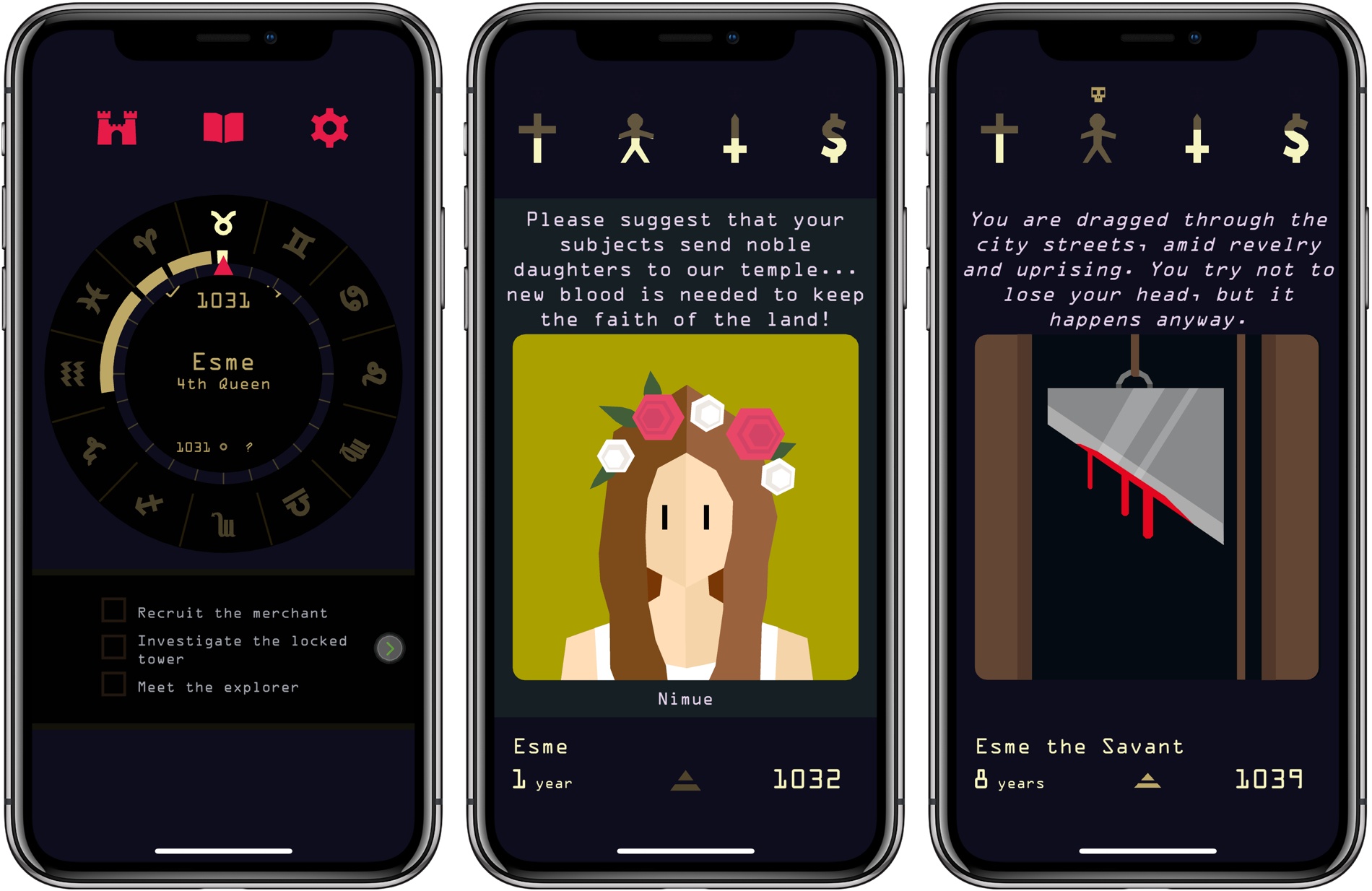
Nerial undoubtedly has another hit on its hands with Reigns: Her Majesty. The iOS game, which is published by Devolver Digital, will be familiar to anyone who played its forerunner, Reigns. The game mechanics and art style are largely the same, but there’s greater depth and nuance to Her Majesty, which takes it beyond a dull retread of a hit formula.

Read more

Access Extra Content and Perks

Founded in 2015, Club MacStories has delivered exclusive content every week for nearly a decade.

What started with weekly and monthly email newsletters has blossomed into a family of memberships designed for every MacStories fan.

Learn more here and from our Club FAQs.

Club MacStories: Weekly and monthly newsletters via email and the web that are brimming with apps, tips, automation workflows, longform writing, early access to the MacStories Unwind podcast, periodic giveaways, and more;

Club MacStories+: Everything that Club MacStories offers, plus an active Discord community, advanced search and custom RSS features for exploring the Club’s entire back catalog, bonus columns, and dozens of app discounts;

Club Premier: All of the above and AppStories+, an extended version of our flagship podcast that’s delivered early, ad-free, and in high-bitrate audio.

Learn more here and from our Club FAQs.


CARROT Weather Adds Powerful, Redesigned Apple Watch App

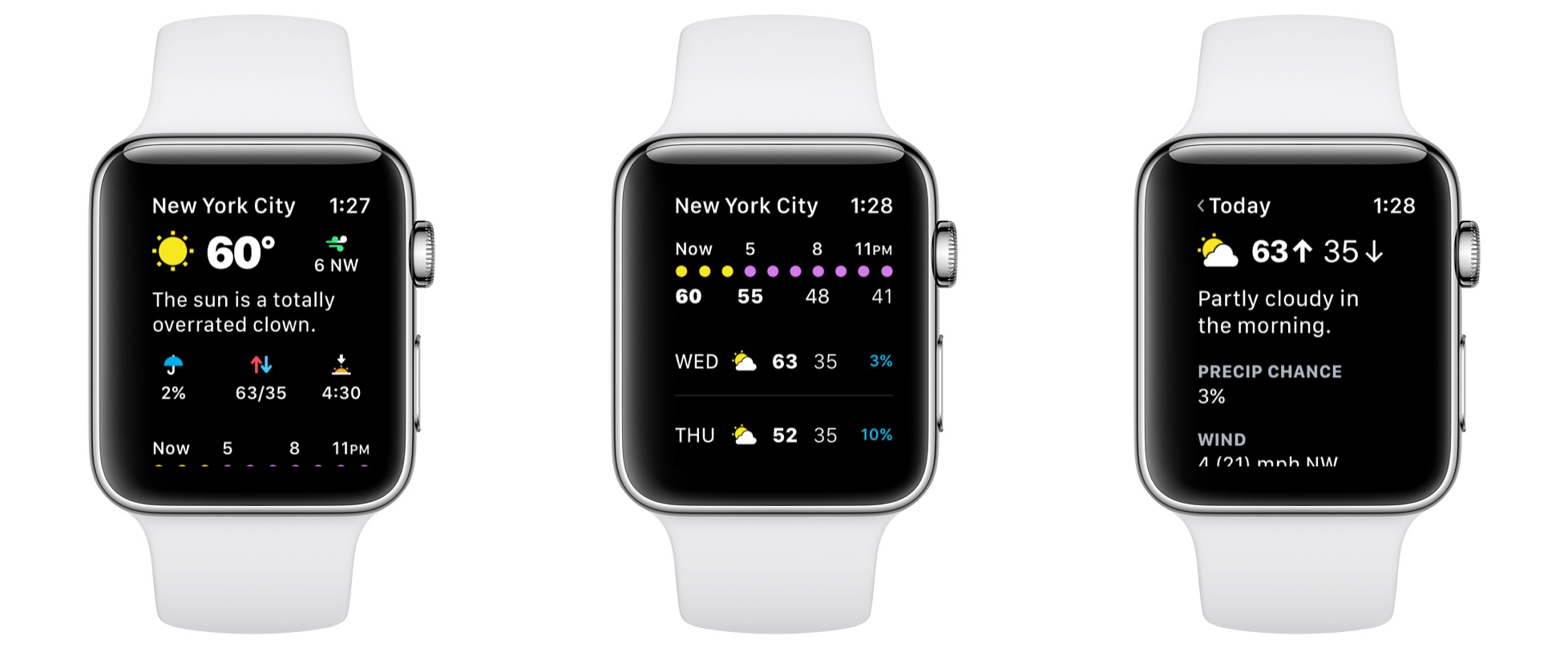
Version 4.3 of CARROT Weather for iOS launched today, bringing a ground-up redesign of its Apple Watch app that offers power and flexibility in a beautifully designed package.

CARROT Weather’s story isn’t that it had an old, out-dated Apple Watch app that’s now finally become modern. Instead, today’s update takes what was already a very good Watch app and replaces it with a great one.

Before this big redesign, CARROT’s Watch app was already fast and flexible, with an assortment of customization options for things like complications. It even worked well when your Watch was running solo; by contrast, most third-party Watch apps depend entirely on a paired iPhone and can’t function at all when untethered from the device. CARROT’s new Watch app keeps all these positives, improves upon them, and adds a lot more to the package.

Read more

Access Extra Content and Perks

Founded in 2015, Club MacStories has delivered exclusive content every week for nearly a decade.

What started with weekly and monthly email newsletters has blossomed into a family of memberships designed for every MacStories fan.

Learn more here and from our Club FAQs.

Club MacStories: Weekly and monthly newsletters via email and the web that are brimming with apps, tips, automation workflows, longform writing, early access to the MacStories Unwind podcast, periodic giveaways, and more;

Club MacStories+: Everything that Club MacStories offers, plus an active Discord community, advanced search and custom RSS features for exploring the Club’s entire back catalog, bonus columns, and dozens of app discounts;

Club Premier: All of the above and AppStories+, an extended version of our flagship podcast that’s delivered early, ad-free, and in high-bitrate audio.

Learn more here and from our Club FAQs.


Pixelmator Pro First Impressions: A Beautiful Modern Interface with Advanced Image Editing Tools

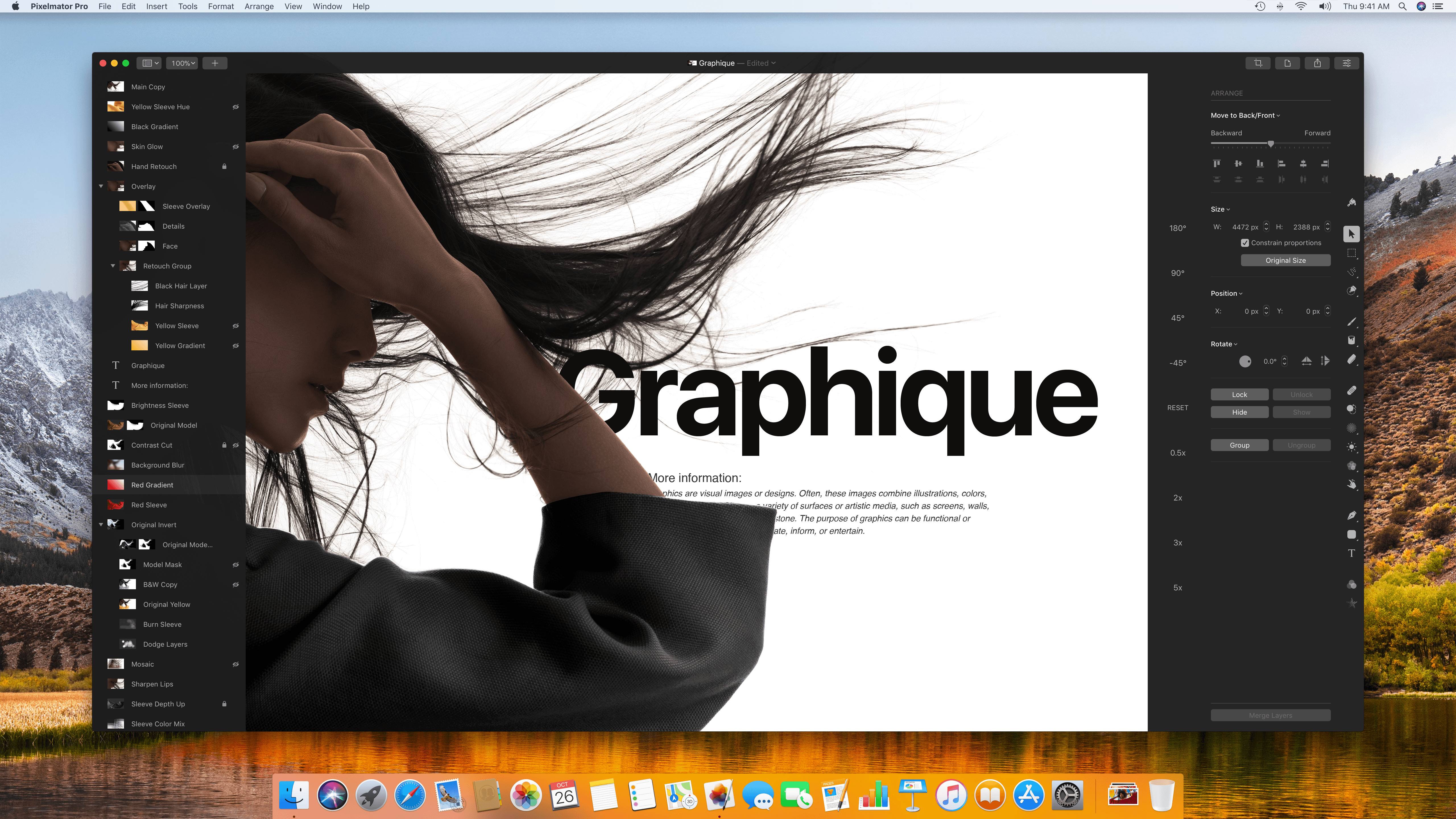
Five years in the making, Pixelmator Pro debuted today with an all-new look and host of new features. The new interface eliminates visual clutter and anchors tools in side panels, so you always know where they are. Much of the app’s chrome has been eliminated too, putting your project in the spotlight where you can focus on it and not the app. It’s a modern, clean style that makes the app feel spacious and professional.

Pixelmator Pro adds a raft of features as well. Layer styles, color adjustments, and effects are all highly customizable, can be saved as presets, and shared. I’ve only had a little over 24 hours to put Pixelmator Pro through its paces, but based on my first impressions, it’s an impressive debut that I expect will replace the original version of the app as my go-to image editor.

Read more

Access Extra Content and Perks

Founded in 2015, Club MacStories has delivered exclusive content every week for nearly a decade.

What started with weekly and monthly email newsletters has blossomed into a family of memberships designed for every MacStories fan.

Learn more here and from our Club FAQs.

Club MacStories: Weekly and monthly newsletters via email and the web that are brimming with apps, tips, automation workflows, longform writing, early access to the MacStories Unwind podcast, periodic giveaways, and more;

Club MacStories+: Everything that Club MacStories offers, plus an active Discord community, advanced search and custom RSS features for exploring the Club’s entire back catalog, bonus columns, and dozens of app discounts;

Club Premier: All of the above and AppStories+, an extended version of our flagship podcast that’s delivered early, ad-free, and in high-bitrate audio.

Learn more here and from our Club FAQs.


MindNode 5: Digital Mind Mapping Finally Clicked for Me

I have a confession: I’m not a big mind map guy. I know Federico uses a mind map for his iOS review each year, and lots of other people love visualizing their thoughts that way too, but mind maps have never really clicked for me – at least not on computers.

Up until recently, whenever I needed to do a brain dump and get my thoughts better organized, I would often turn to pen, paper, and a hand-drawn mind map. It’s an odd habit, since I shun paper for digital tools in every other case I can think of. Yet this one holdout remained.

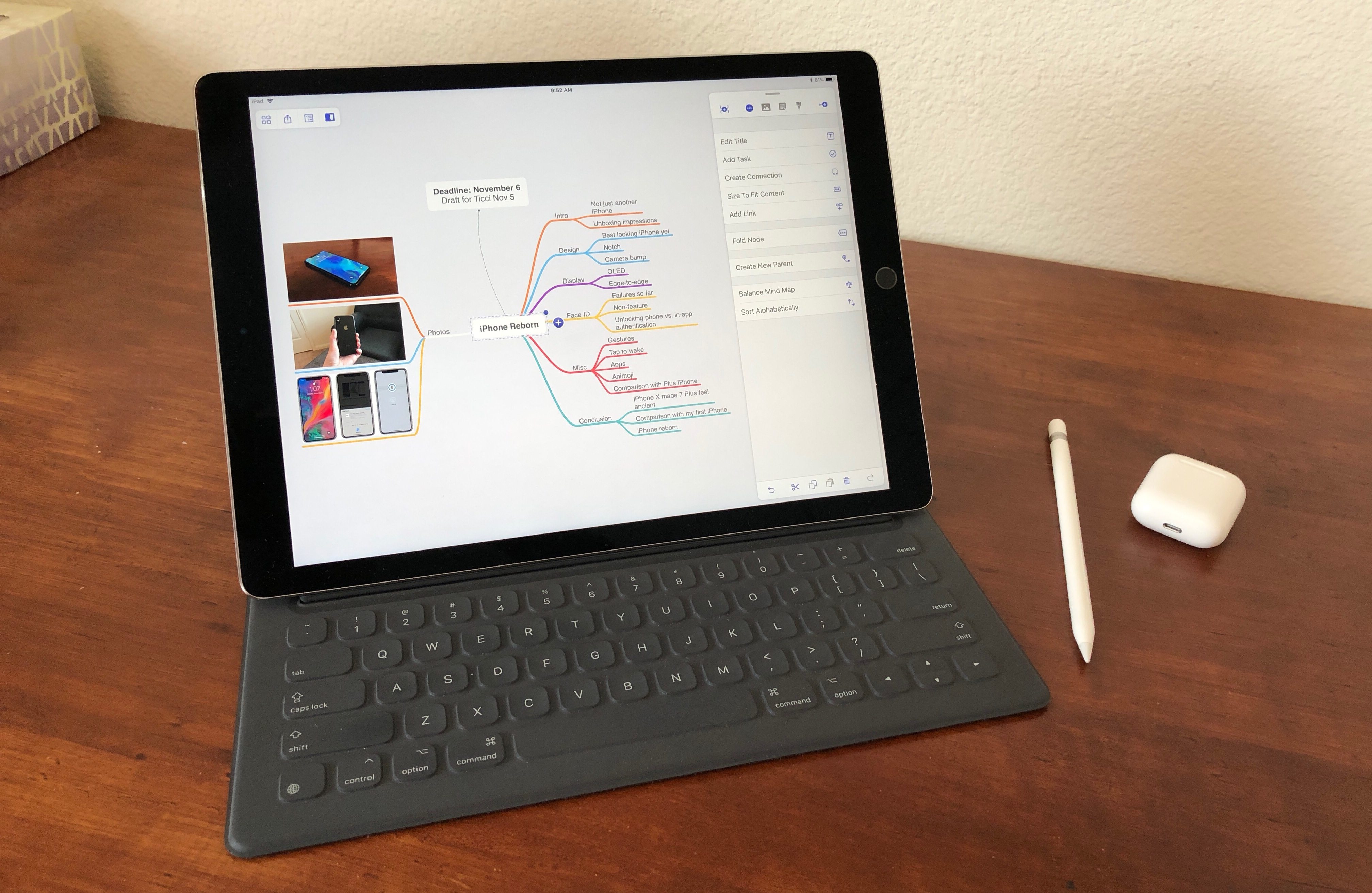
My main problem with digital mind maps is that they have always felt unnatural. When using a traditional computer, moving and clicking via trackpad was cumbersome for me; with a format as creatively freeing as a mind map, it seems especially important to have freeform input methods. Even on devices like the iPad though, while touch input certainly helped remove a barrier, there was still always something missing in my view. Digital mind mapping still wasn’t quite right.

MindNode 5 on iOS fixes that.

MindNode has long been one of the premier mind mapping apps for Mac and iOS, and its version 5 is a huge update that, for me at least, centers around two main changes: a streamlined, intuitive user interface, and the adoption of drag and drop support. There’s a lot more to this update than those two things, with plenty of goodies that die-hard MindNode fans will appreciate, but for users like me – those dissatisfied with digital mind mapping, or even inexperienced at it altogether – the most important changes are those that make the app more approachable, and the new UI and drag and drop certainly do that.

Read more

Access Extra Content and Perks

Founded in 2015, Club MacStories has delivered exclusive content every week for nearly a decade.

What started with weekly and monthly email newsletters has blossomed into a family of memberships designed for every MacStories fan.

Learn more here and from our Club FAQs.

Club MacStories: Weekly and monthly newsletters via email and the web that are brimming with apps, tips, automation workflows, longform writing, early access to the MacStories Unwind podcast, periodic giveaways, and more;

Club MacStories+: Everything that Club MacStories offers, plus an active Discord community, advanced search and custom RSS features for exploring the Club’s entire back catalog, bonus columns, and dozens of app discounts;

Club Premier: All of the above and AppStories+, an extended version of our flagship podcast that’s delivered early, ad-free, and in high-bitrate audio.

Learn more here and from our Club FAQs.


Game Day: GRID Autosport

Feral Interactive has brought Codemasters’ GRID Autosport to iOS, and it’s gorgeous. Codemasters is no stranger to racing games. The developer’s F1 2016 game was featured during Apple’s iPhone 7 keynote in 2016 and set a new standard for racing games on iOS when it debuted in November that year. Just over one year later, GRID Autosport is pushing those boundaries again.

Read more

Access Extra Content and Perks

Founded in 2015, Club MacStories has delivered exclusive content every week for nearly a decade.

What started with weekly and monthly email newsletters has blossomed into a family of memberships designed for every MacStories fan.

Learn more here and from our Club FAQs.

Club MacStories: Weekly and monthly newsletters via email and the web that are brimming with apps, tips, automation workflows, longform writing, early access to the MacStories Unwind podcast, periodic giveaways, and more;

Club MacStories+: Everything that Club MacStories offers, plus an active Discord community, advanced search and custom RSS features for exploring the Club’s entire back catalog, bonus columns, and dozens of app discounts;

Club Premier: All of the above and AppStories+, an extended version of our flagship podcast that’s delivered early, ad-free, and in high-bitrate audio.

Learn more here and from our Club FAQs.


Scrivener 3 for macOS Is More Flexible and Powerful Than Ever for Long-Form Writing

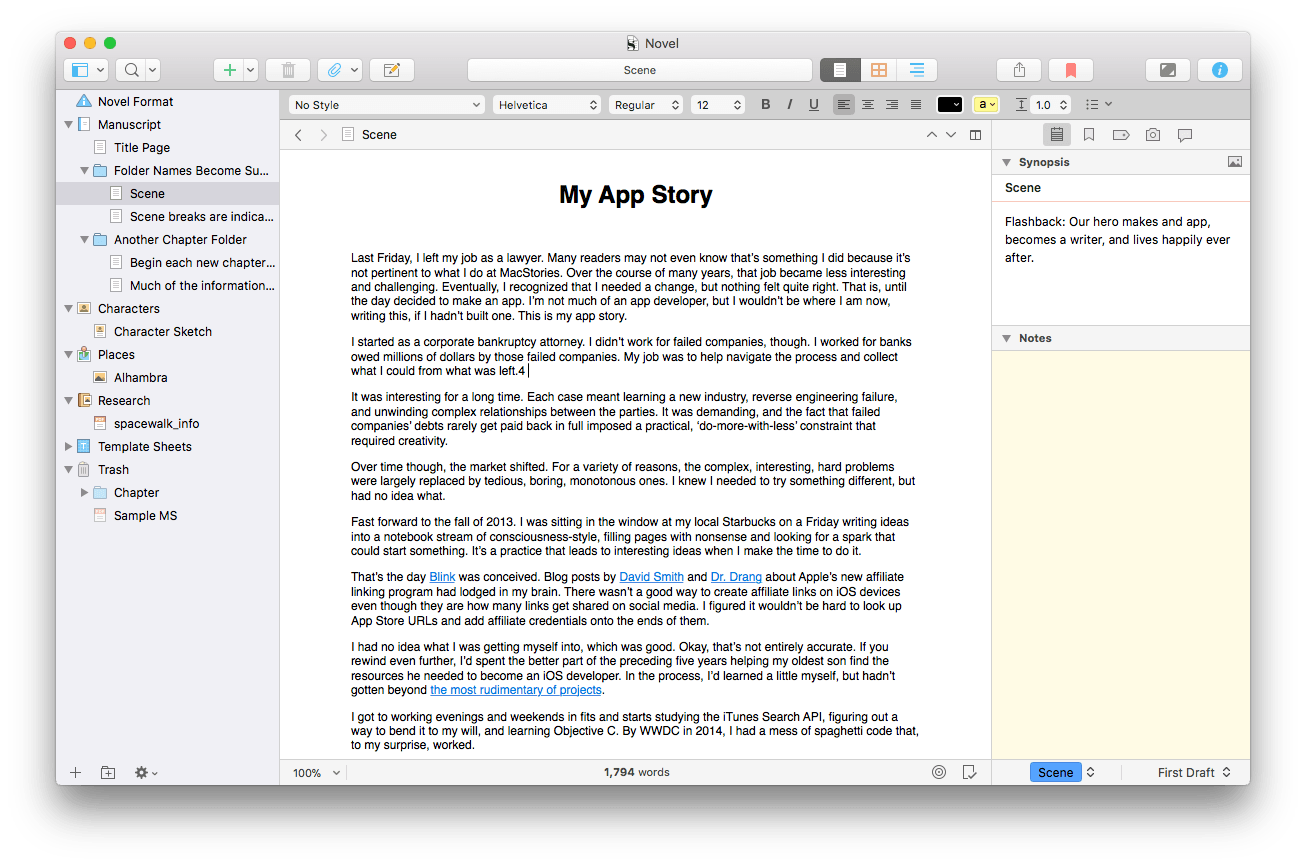
Many text editors are just that – text editors. They take a document-focused approach to writing that centers on creating text. It’s an approach that works for most kinds of writing. However, long-form writing is a different animal altogether that benefits from a project-based approach that also includes tools for planning, organizing, researching, and tracking. Today, Literature and Latte released version 3.0 of Scrivener for macOS with a long list of new features that cements its spot as one of the premier project-focused apps available on the Mac for long-form writing.

Read more

Access Extra Content and Perks

Founded in 2015, Club MacStories has delivered exclusive content every week for nearly a decade.

What started with weekly and monthly email newsletters has blossomed into a family of memberships designed for every MacStories fan.

Learn more here and from our Club FAQs.

Club MacStories: Weekly and monthly newsletters via email and the web that are brimming with apps, tips, automation workflows, longform writing, early access to the MacStories Unwind podcast, periodic giveaways, and more;

Club MacStories+: Everything that Club MacStories offers, plus an active Discord community, advanced search and custom RSS features for exploring the Club’s entire back catalog, bonus columns, and dozens of app discounts;

Club Premier: All of the above and AppStories+, an extended version of our flagship podcast that’s delivered early, ad-free, and in high-bitrate audio.

Learn more here and from our Club FAQs.


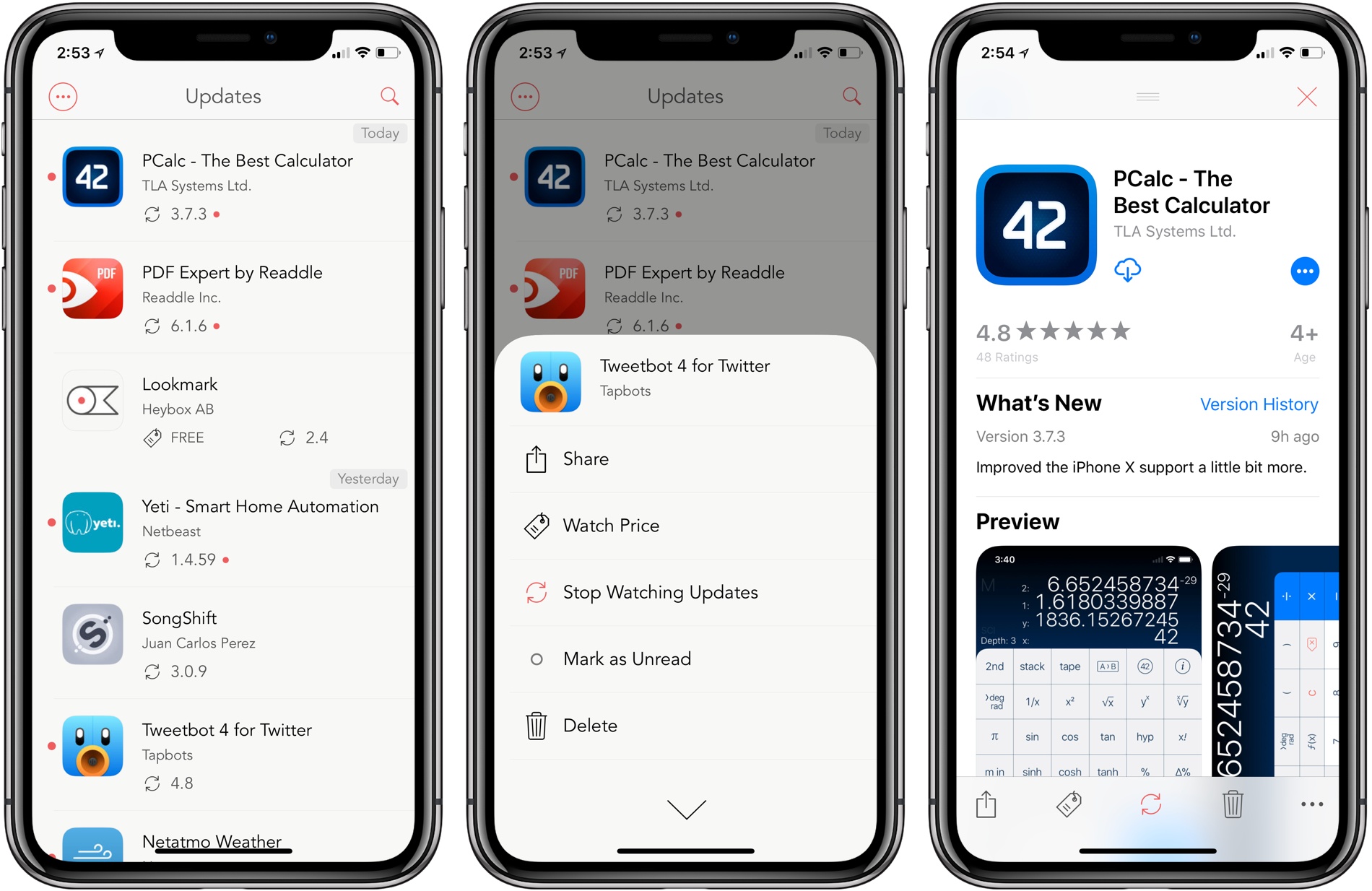
Lookmark Now Tracks App Updates

Lookmark is a bookmarking and monitoring service for iTunes content. It’s an excellent way to save apps, movies, books, and other media for later. Users who purchase a subscription can also use Lookmark to track price changes for apps, which is useful for bargain hunters. Today, Lookmark released an update that pushes the app further into the realm of app monitoring that started with price tracking. Now, users can also track when iOS and macOS apps are updated on the App Store and Mac App Store.

Read more

Access Extra Content and Perks

Founded in 2015, Club MacStories has delivered exclusive content every week for nearly a decade.

What started with weekly and monthly email newsletters has blossomed into a family of memberships designed for every MacStories fan.

Learn more here and from our Club FAQs.

Club MacStories: Weekly and monthly newsletters via email and the web that are brimming with apps, tips, automation workflows, longform writing, early access to the MacStories Unwind podcast, periodic giveaways, and more;

Club MacStories+: Everything that Club MacStories offers, plus an active Discord community, advanced search and custom RSS features for exploring the Club’s entire back catalog, bonus columns, and dozens of app discounts;

Club Premier: All of the above and AppStories+, an extended version of our flagship podcast that’s delivered early, ad-free, and in high-bitrate audio.

Learn more here and from our Club FAQs.


Focos: Powerful Depth Image Controls in a Fun Package

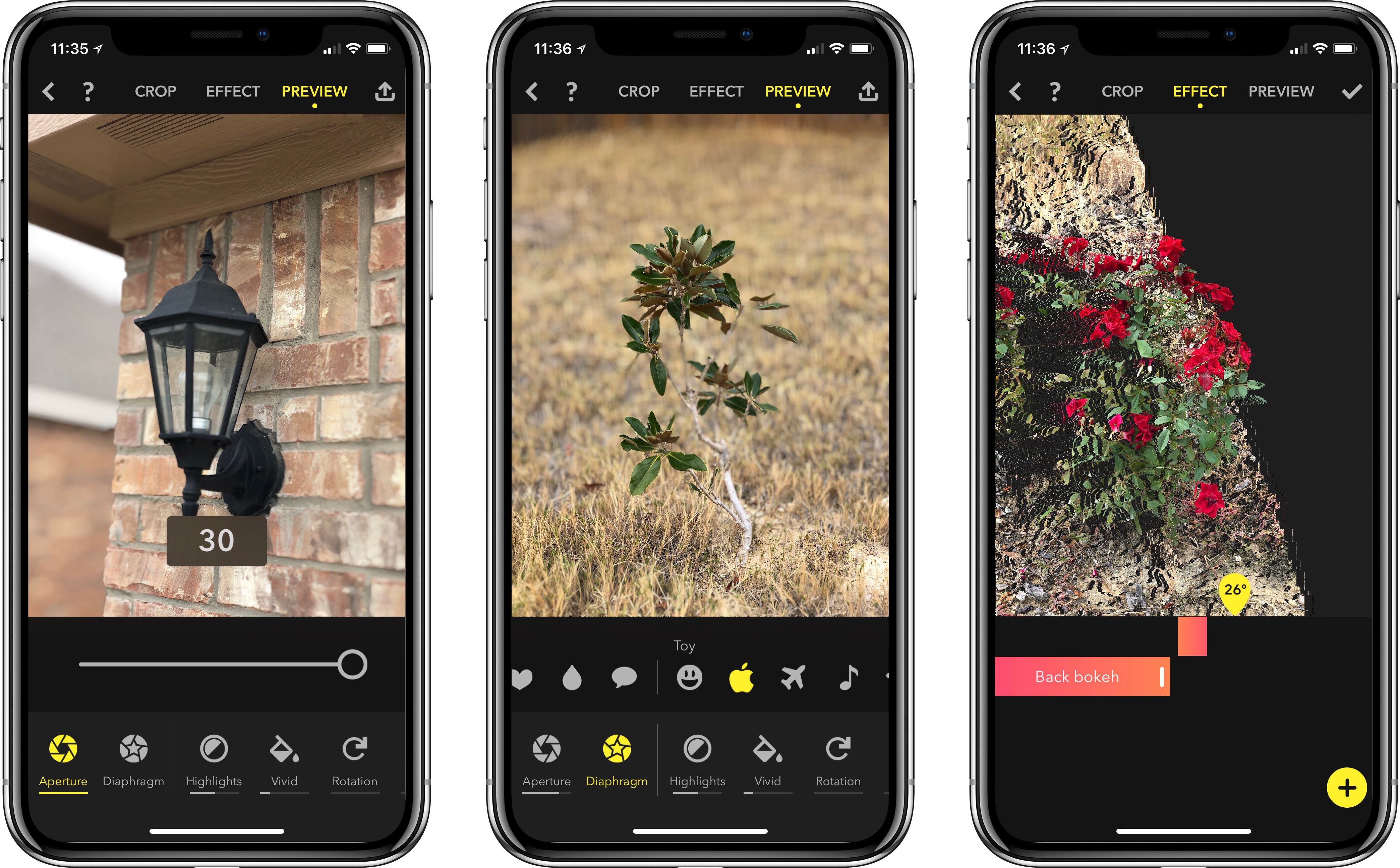
The iPhone’s camera has long been one of its most important features. Every year when new models are introduced, it’s a sure bet that camera improvements are part of the package. Last year that remained true, but it also proved an even more special year for the iPhone’s camera setup. The introduction of dual rear-facing cameras with Portrait mode was something different – pictures no longer just looked a little better than on older iPhone models, they looked almost professional-quality.

This year, whether you picked up a new iPhone or not, Portrait mode is a better feature than before. Part of this is due to software improvements in iOS 11, but another key benefit is that third-party developers now have access to the depth information in Portrait photos. For the first time, Portrait images taken with the iPhone can be edited and enhanced in unique ways, and Focos is a new app that takes full advantage of that opportunity.

Read more

Access Extra Content and Perks

Founded in 2015, Club MacStories has delivered exclusive content every week for nearly a decade.

What started with weekly and monthly email newsletters has blossomed into a family of memberships designed for every MacStories fan.

Learn more here and from our Club FAQs.

Club MacStories: Weekly and monthly newsletters via email and the web that are brimming with apps, tips, automation workflows, longform writing, early access to the MacStories Unwind podcast, periodic giveaways, and more;

Club MacStories+: Everything that Club MacStories offers, plus an active Discord community, advanced search and custom RSS features for exploring the Club’s entire back catalog, bonus columns, and dozens of app discounts;

Club Premier: All of the above and AppStories+, an extended version of our flagship podcast that’s delivered early, ad-free, and in high-bitrate audio.

Learn more here and from our Club FAQs.