Posts in news

Apple Reveals A Partial Timeline for the Rollout of More Apple Intelligence Features

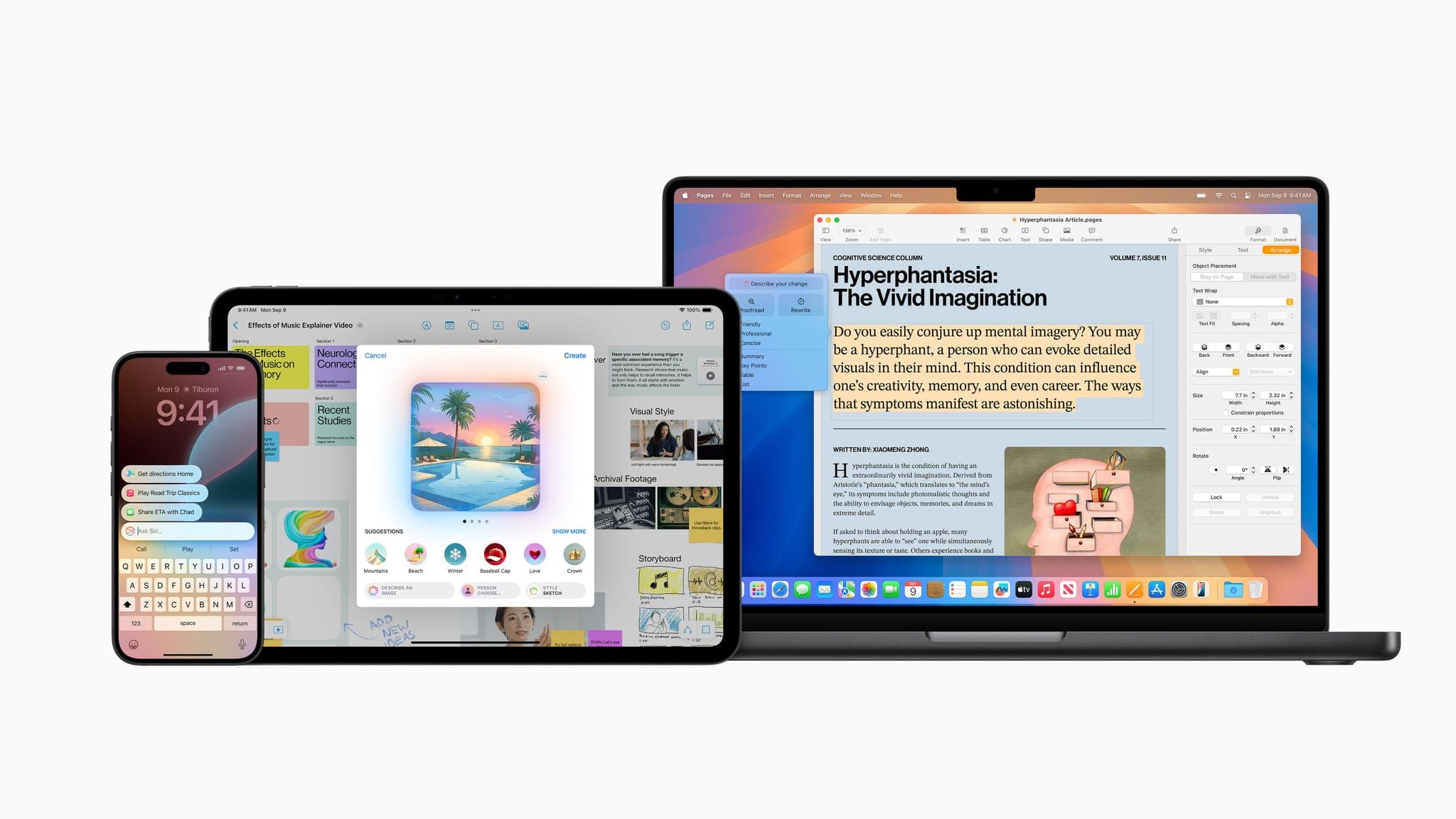
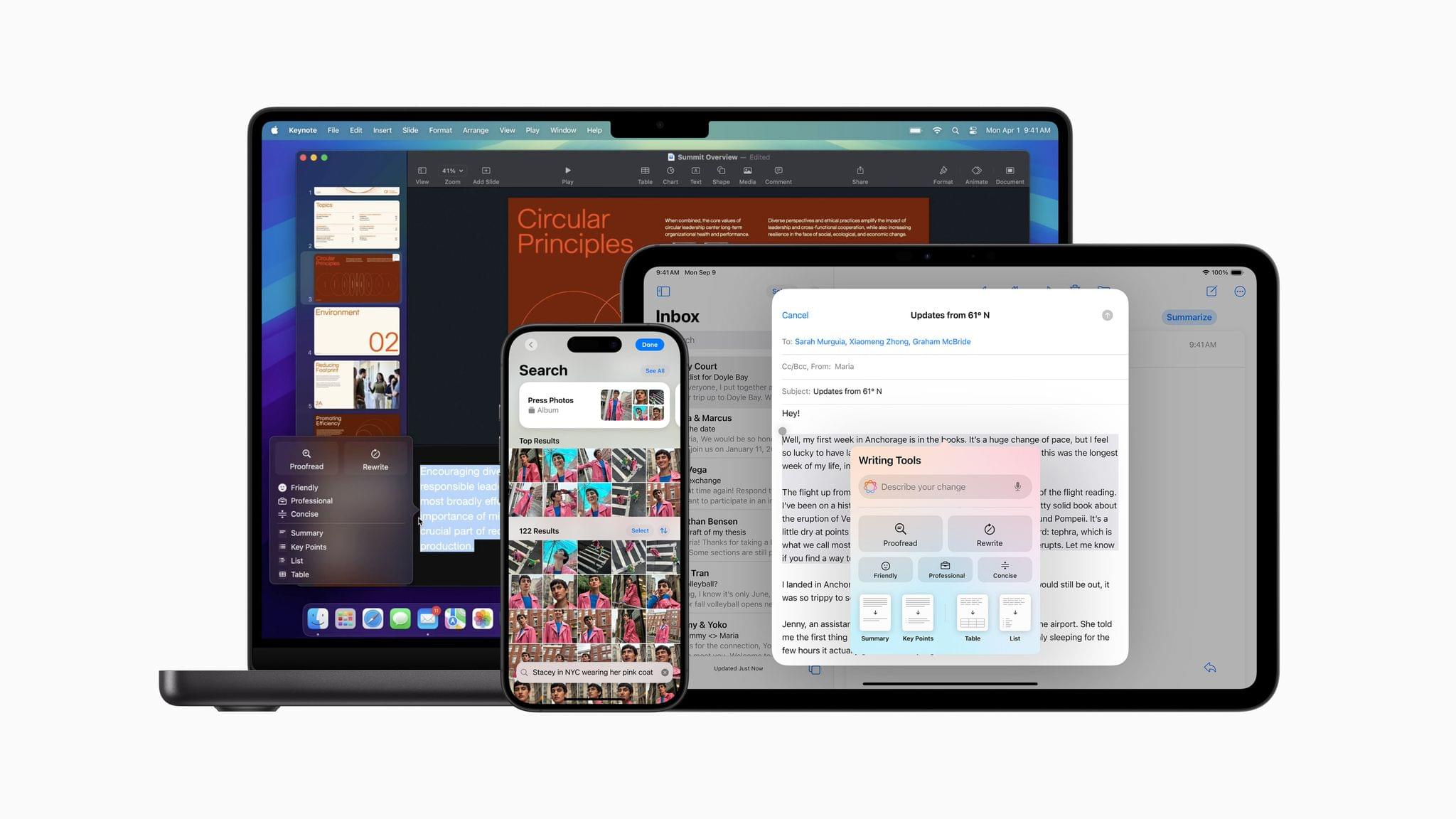
Last week, Apple released the first developer betas of iOS 18.2, iPadOS 18.2, and macOS 15.2, which the press speculated would be out by the end of the year. It turns out that was a good call because today, Apple confirmed that timing. In its press release about the Apple Intelligence features released today, Apple revealed that the next round is coming in December and will include the following:

  • Users will be able to describe changes they want made to text using Writing Tools. For example, you can have text rewritten with a certain tone or in the form of a poem.
  • ChatGPT will be available in Writing Tools and when using Siri.
  • Image Playground will allow users to create images with Apple’s generative AI model.
  • Users will be able to use prompts to create Genmoji, custom emoji-style images that can be sent to friends in iMessage and used as stickers.
  • Visual intelligence will be available via the Camera Control on the iPhone 16 and iPhone 16 Pro. The feature will allow users to point the iPhone’s camera at something and learn about it from Google or ChatGPT. Apple also mentions that visual intelligence will work with other unspecified “third-party tools.”
  • Apple Intelligence will be available in localized English in Australia, Canada, Ireland, New Zealand, South Africa, and the U.K.

Apple’s press release also explains when other languages are coming:

…in April, a software update will deliver expanded language support, with more coming throughout the year. Chinese, English (India), English (Singapore), French, German, Italian, Japanese, Korean, Portuguese, Spanish, Vietnamese, and other languages will be supported.

And Apple’s Newsroom in Ireland offers information on the Apple Intelligence rollout in the EU:

Mac users in the EU can access Apple Intelligence in U.S. English with macOS Sequoia 15.1. This April, Apple Intelligence features will start to roll out to iPhone and iPad users in the EU. This will include many of the core features of Apple Intelligence, including Writing Tools, Genmoji, a redesigned Siri with richer language understanding, ChatGPT integration, and more.

It’s a shame it’s going to be another six months before EU customers can take advantage of Apple Intelligence features on their iPhones and iPads, but it’s nonetheless good to hear when it will happen.

It’s also worth noting that the timing of other pieces of Apple Intelligence is unclear. There is still no word on precisely when Siri will gain knowledge of your personal context or perform actions in apps on your behalf, for instance. Even so, today’s reveal is more than Apple usually shares, which is both nice and a sign of the importance the company places on these features.

Access Extra Content and Perks

Founded in 2015, Club MacStories has delivered exclusive content every week for nearly a decade.

What started with weekly and monthly email newsletters has blossomed into a family of memberships designed for every MacStories fan.

Learn more here and from our Club FAQs.

Club MacStories: Weekly and monthly newsletters via email and the web that are brimming with apps, tips, automation workflows, longform writing, early access to the MacStories Unwind podcast, periodic giveaways, and more;

Club MacStories+: Everything that Club MacStories offers, plus an active Discord community, advanced search and custom RSS features for exploring the Club’s entire back catalog, bonus columns, and dozens of app discounts;

Club Premier: All of the above and AppStories+, an extended version of our flagship podcast that’s delivered early, ad-free, and in high-bitrate audio.

Learn more here and from our Club FAQs.


Apple Releases Magic Keyboard, Trackpad, and Mouse with USB-C

Source: Apple.

Source: Apple.

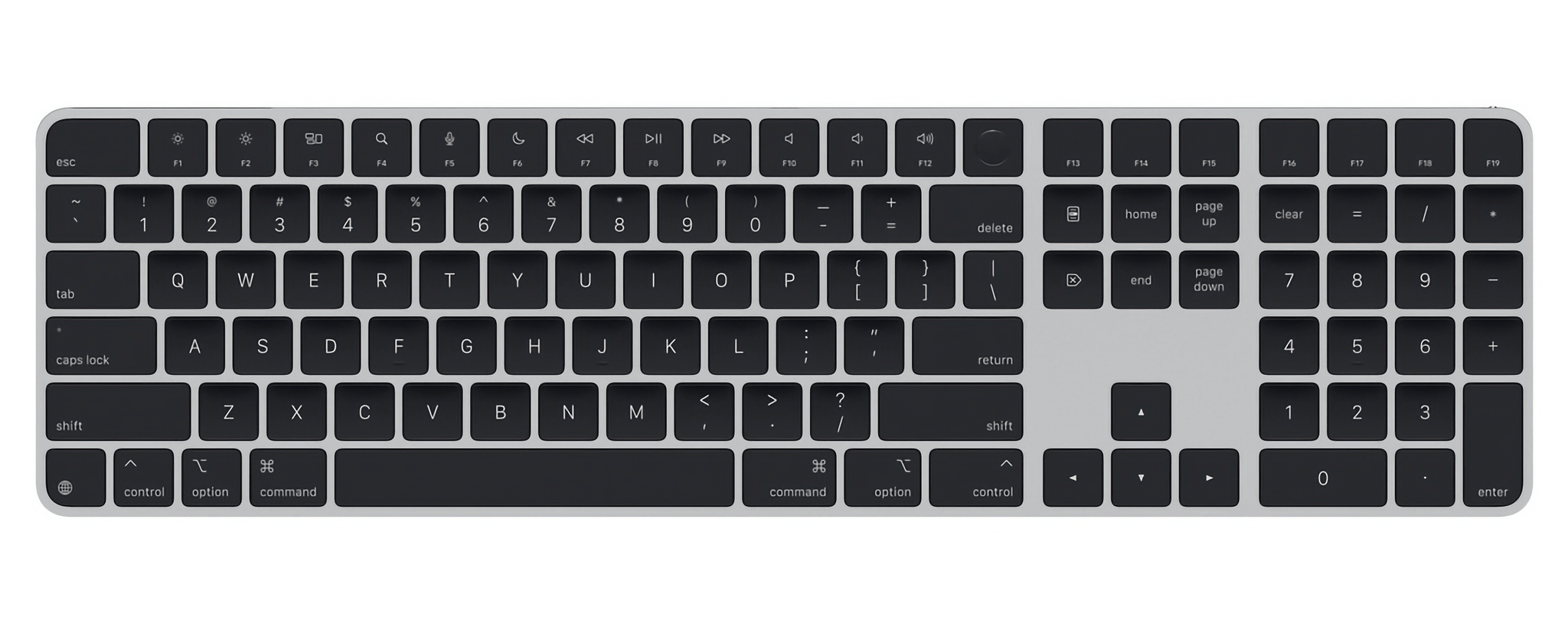
Today, Apple finally released USB-C versions of the Magic Keyboard, Magic Mouse, and Magic Trackpad in white and black. The accessories don’t appear to have changed substantially from the models they replace, except for the fact that they can be connected to a Mac and charged using a standard USB-C cable instead of a Lightning cable.

Source: Apple.

Source: Apple.

That’s a big win and a change I’ve been waiting for, but there appears to be one big problem with the peripheral update: as of publication, there no longer seems to be a Magic Keyboard available without a numeric keypad. I hope that changes, because I greatly prefer the more compact version.

The new accessories are available to order now from Apple’s Online Store. The Magic Keyboard starts at $179, the Magic Mouse starts at $79, and the Magic Trackpad starts at $129, with a $20 markup to get each accessory in black.

Update: The smaller Magic Keyboard is now available with a USB-C connector for $149.

Access Extra Content and Perks

Founded in 2015, Club MacStories has delivered exclusive content every week for nearly a decade.

What started with weekly and monthly email newsletters has blossomed into a family of memberships designed for every MacStories fan.

Learn more here and from our Club FAQs.

Club MacStories: Weekly and monthly newsletters via email and the web that are brimming with apps, tips, automation workflows, longform writing, early access to the MacStories Unwind podcast, periodic giveaways, and more;

Club MacStories+: Everything that Club MacStories offers, plus an active Discord community, advanced search and custom RSS features for exploring the Club’s entire back catalog, bonus columns, and dozens of app discounts;

Club Premier: All of the above and AppStories+, an extended version of our flagship podcast that’s delivered early, ad-free, and in high-bitrate audio.

Learn more here and from our Club FAQs.


Apple Announces New iMac with the M4 Chip, a Nano-Texture Option, and USB-C Accessories

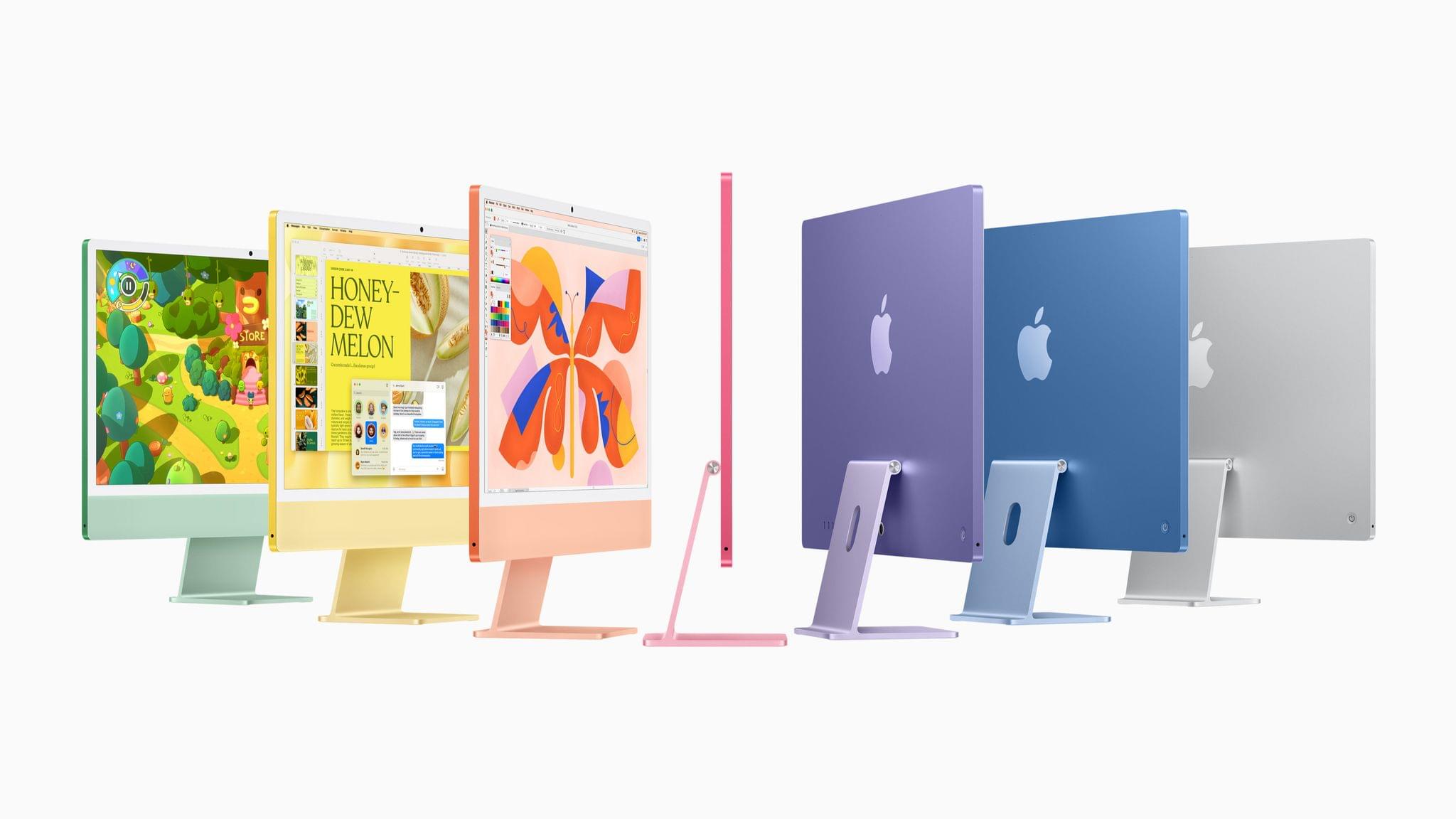
Today, to kick off what Apple-watchers anticipate will be a string of daily announcements, Apple announced a brand-new iMac. Highlights of the update include the M4 system-on-a-chip, a nano-texture display option, a 12MP Center Stage camera, Thunderbolt 4 ports, and new colors.

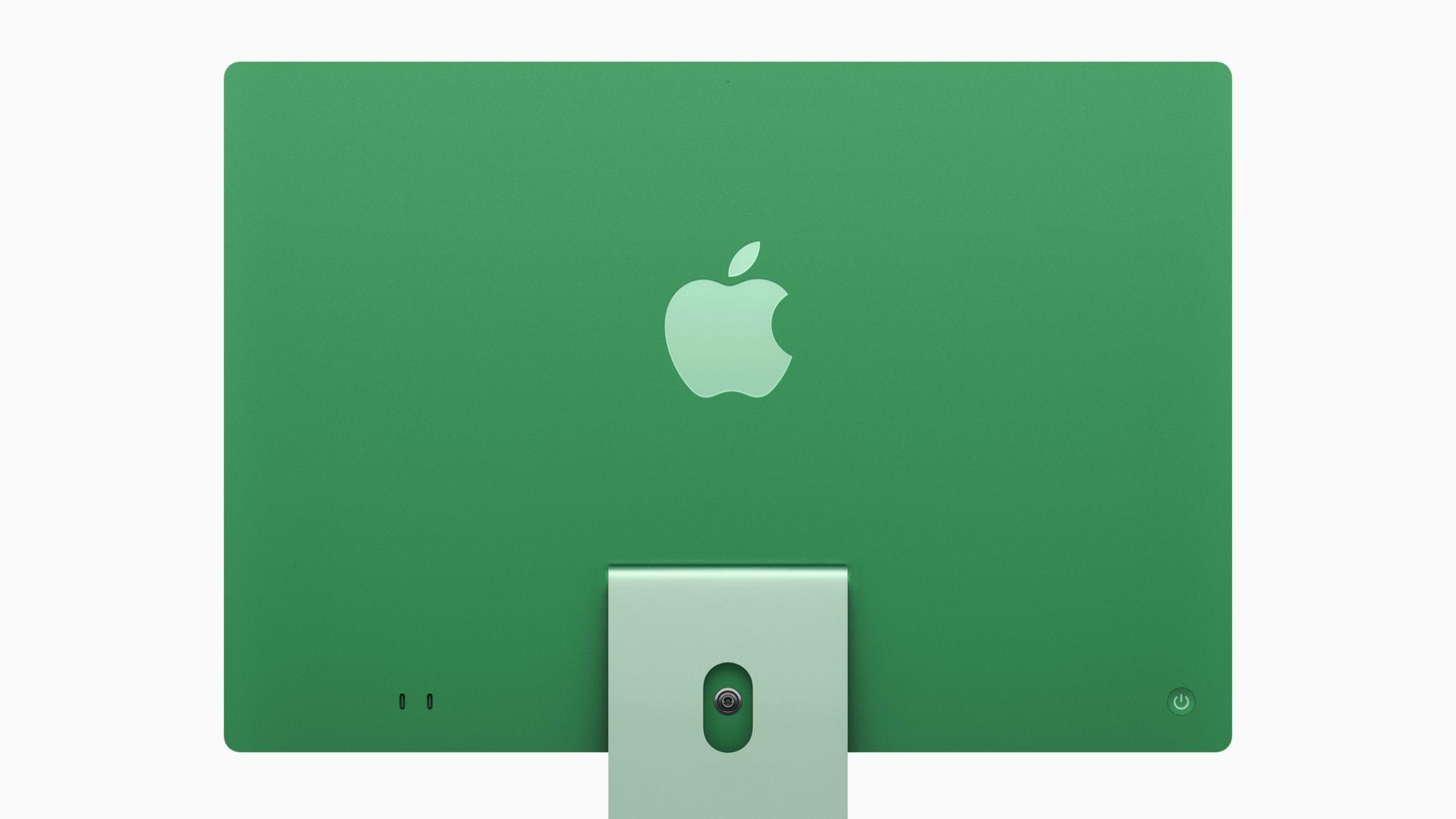
The new iMac, which comes in green, yellow, orange, pink, purple, blue, and silver, retains its iconic design and 24” 4.5K Retina display, but new with this model is a nano-texture display option that we saw come to the iPad Pro line earlier this year. The camera is new, too. The old 1080p camera has been replaced with a 12MP wide-angle camera with Center Stage, and there are four Thunderbolt 4 ports, replacing the Thunderbolt 3 ports on the previous model. The base model iMac comes with 16GB of memory, which can be upgraded up to 32GB, and 256GB of storage, which can be upgraded up to 2TB. And the color-matched Magic Keyboard, Magic Trackpad, and Magic Mouse finally connect and charge via USB-C.

John Ternus, Apple’s senior vice president of Hardware Engineering, had this to say about the new model:

iMac is beloved by millions of users, from families at home to entrepreneurs hard at work. With the incredible features of Apple Intelligence and the powerful performance of Apple silicon, the new iMac changes the game once again. With M4 and Apple Intelligence, gorgeous new colors that pop in any space, an advanced 12MP Center Stage camera, and a new nano-texture glass display option, it’s a whole new era for iMac.

It should come as no surprise that the M4 iMac is substantially faster than the M1 model Apple compares it to in its press release. Other updates include the addition of Wi-Fi 6E and Bluetooth 5.3, which were recently added to the iPad mini, too.

The new iMac starts at $1,299, or $1,249 for education customers. It’s available for pre-order today, with deliveries and in-store availability starting on Friday, November 8.

Access Extra Content and Perks

Founded in 2015, Club MacStories has delivered exclusive content every week for nearly a decade.

What started with weekly and monthly email newsletters has blossomed into a family of memberships designed for every MacStories fan.

Learn more here and from our Club FAQs.

Club MacStories: Weekly and monthly newsletters via email and the web that are brimming with apps, tips, automation workflows, longform writing, early access to the MacStories Unwind podcast, periodic giveaways, and more;

Club MacStories+: Everything that Club MacStories offers, plus an active Discord community, advanced search and custom RSS features for exploring the Club’s entire back catalog, bonus columns, and dozens of app discounts;

Club Premier: All of the above and AppStories+, an extended version of our flagship podcast that’s delivered early, ad-free, and in high-bitrate audio.

Learn more here and from our Club FAQs.


The Latest from Comfort Zone, Magic Rays of Light, and MacStories Unwind

Enjoy the latest episodes from MacStories’ family of podcasts:

Comfort Zone

Chris has the brand new iPad mini, Matt made a big change to his RSS, and Niléane introduces a new segment: Our Tech Stories. Then the gang gets fun, weird, and thirsty in the game picks.


Magic Rays of Light

Sigmund and Devon predict Apple’s M4 Mac announcements and recap the second season of Pachinko.


MacStories Unwind

This week, Federico and I share how we use our iPad minis along with a couple of TV shows.

Read more

Access Extra Content and Perks

Founded in 2015, Club MacStories has delivered exclusive content every week for nearly a decade.

What started with weekly and monthly email newsletters has blossomed into a family of memberships designed for every MacStories fan.

Learn more here and from our Club FAQs.

Club MacStories: Weekly and monthly newsletters via email and the web that are brimming with apps, tips, automation workflows, longform writing, early access to the MacStories Unwind podcast, periodic giveaways, and more;

Club MacStories+: Everything that Club MacStories offers, plus an active Discord community, advanced search and custom RSS features for exploring the Club’s entire back catalog, bonus columns, and dozens of app discounts;

Club Premier: All of the above and AppStories+, an extended version of our flagship podcast that’s delivered early, ad-free, and in high-bitrate audio.

Learn more here and from our Club FAQs.


The Latest from AppStories and NPC: Next Portable Console

Enjoy the latest episodes from MacStories’ family of podcasts:

AppStories

Federico and John announce that AppStories is now on YouTube and discuss the Club MacStories Fall Membership Drive and listener follow-up before digging into Federico’s iPad mini review and the concept of “The Third Place.”

On AppStories+, Federico explains how he’s been revisiting and using the Apple Vision Pro.


NPC: Next Portable Console

This week, Federico and John carry on without Brendon and profess their love of all things OLED. Plus, Federico shares a shopping confession, Anbernic is back to its bi-weekly ways, we explore inventive controllers and answer a listener question about the Ayn Odin 2, before Federico tells the origin story of his Wii, which he modded to offload his game library to his collection of handhelds.

Read more

Access Extra Content and Perks

Founded in 2015, Club MacStories has delivered exclusive content every week for nearly a decade.

What started with weekly and monthly email newsletters has blossomed into a family of memberships designed for every MacStories fan.

Learn more here and from our Club FAQs.

Club MacStories: Weekly and monthly newsletters via email and the web that are brimming with apps, tips, automation workflows, longform writing, early access to the MacStories Unwind podcast, periodic giveaways, and more;

Club MacStories+: Everything that Club MacStories offers, plus an active Discord community, advanced search and custom RSS features for exploring the Club’s entire back catalog, bonus columns, and dozens of app discounts;

Club Premier: All of the above and AppStories+, an extended version of our flagship podcast that’s delivered early, ad-free, and in high-bitrate audio.

Learn more here and from our Club FAQs.


New Developer Betas Released for iOS, iPadOS, and macOS with Image Playground, ChatGPT Integration, and More Apple Intelligence Features

iOS 18.1, iPadOS 18.1, and macOS 15.1 aren’t quite out the door, but Apple has already updated its developer betas with the next round of upcoming Apple Intelligence features. Developer betas of iOS 18.2, iPadOS 18.2, and macOS 15.2 are now available for download and include the following:

  • image generation in the form of Image Playground and Image Wand;
  • Genmoji (iOS and iPadOS only)
  • Visual Intelligence (iPhone 16 line only)
  • ChatGPT integration with Siri; and
  • new text manipulation features.
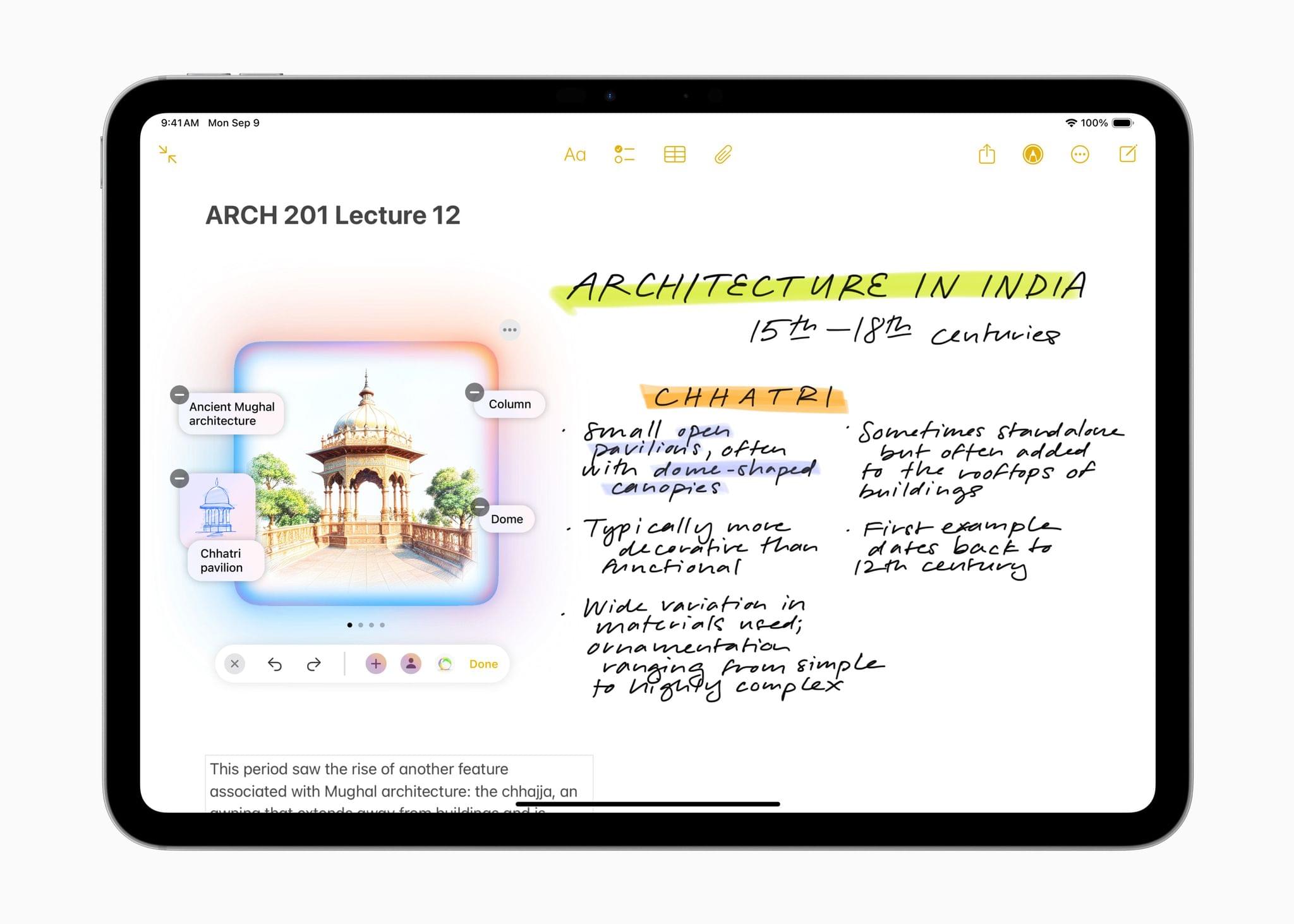
Image Playground. Source: Apple.

Image Playground. Source: Apple.

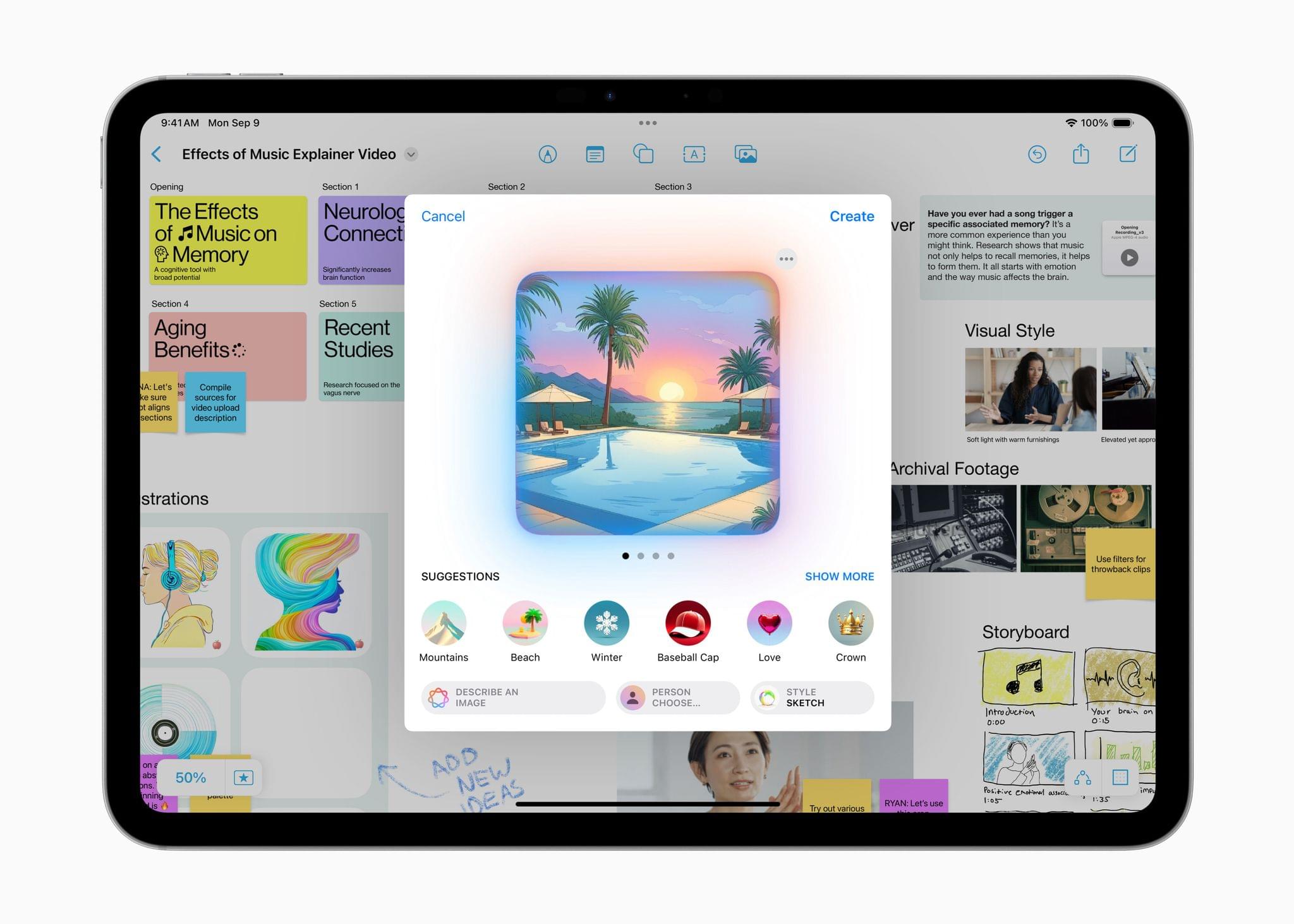
Image Playground is a feature that allows you to create images in two styles using in-app themes and other tools. Image Playground is available in apps like Messages, Freeform, Pages, and Keynote, but it’s also a standalone app. Regardless of where you use it, Image Playground looks like it’s designed to make it easy to create animated and sketch-style images using a variety of tools such as suggested concepts that pull from the context the image is created in, like a Messages thread. Creations can be previewed, there’s a history feature that allows you to undo changes made to images, and images are saved to an Image Playground Library that syncs across devices via iCloud.

Image Wand. Source: Apple.

Image Wand. Source: Apple.

Image Wand, which appears in the Apple Pencil tool palette, takes a rough hand-drawn sketch, photo, or note and turns any of them into an image similar to one created by Image Playground. Image Wand can be further refined by adding text, and if you circle a blank space, it will use surrounding text to build an image.

Also, Genmoji – which is only in the iOS and iPadOS betas for now – allows you to create emoji-style images that can be used in Messages and other apps as decorative stickers. Inputs can include a text description, people in your contacts, friends and family recognized in Photos, and characters created from whole cloth.

Visual Intelligence has been added to the Camera Control on the iPhone 16 line too. The feature lets you look up details about a place and work with text, copying, reading, summarizing, and translating it.

The next betas also integrate ChatGPT into Siri. As demoed at WWDC, you can opt to pose queries to ChatGPT without disclosing you identity or IP address and without the prompts being used to train OpenAI’s large language models. The ChatGPT integration is free and does not require an account with OpenAI either.

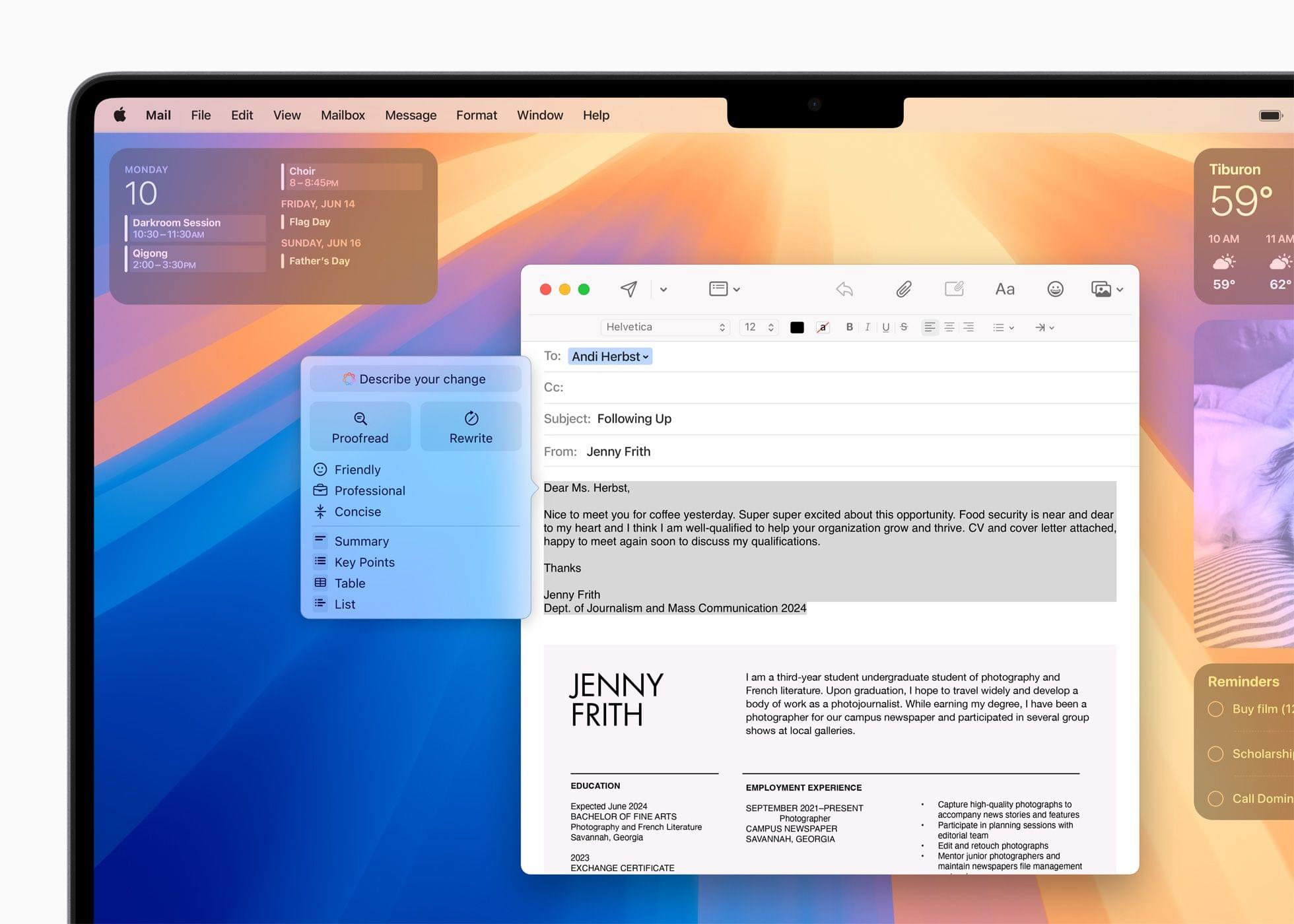
Writing Tools lets you describe your text changes in iOS 18.2, iPadOS 18.2, and macOS 15.2.

Writing Tools lets you describe your text changes in iOS 18.2, iPadOS 18.2, and macOS 15.2.

Finally, Apple has built a new Writing Tool that provides additional flexibility when manipulating text. From the Writing Tools UI, you’ll be able to submit a prompt to alter any text you’ve written. For instance, you could have Apple Intelligence make you sound more excited in your message or rewrite it in the form of a poem, neither of which is possible with the Writing Tools found in iOS and iPadOS 18.1 or macOS 15.1.

For developers, there are also new APIs for Writing Tools, Genmoji, and Image Playground.

As we’ve covered before, Apple’s AI models have been trained on a mix of licensed data and content from the web. If you’re a publisher or a creator who doesn’t want to be part of those models, you can opt out, but it doesn’t work retroactively. In other words, opting out won’t remove any data already ingested by Apple’s web crawlers, but it will work going forward.

I’m not a fan of generative AI tools, but I am looking forward to finally going beyond tightly controlled demos of these features. I want to see how well they work in practice and compare them to other AI tools. Apple appears to have put a lot of guardrails in place to avoid some of the disasters that have befallen other tech companies, but I’m pretty good at breaking software. It will be interesting to see how well these tools hold up under pressure.

Access Extra Content and Perks

Founded in 2015, Club MacStories has delivered exclusive content every week for nearly a decade.

What started with weekly and monthly email newsletters has blossomed into a family of memberships designed for every MacStories fan.

Learn more here and from our Club FAQs.

Club MacStories: Weekly and monthly newsletters via email and the web that are brimming with apps, tips, automation workflows, longform writing, early access to the MacStories Unwind podcast, periodic giveaways, and more;

Club MacStories+: Everything that Club MacStories offers, plus an active Discord community, advanced search and custom RSS features for exploring the Club’s entire back catalog, bonus columns, and dozens of app discounts;

Club Premier: All of the above and AppStories+, an extended version of our flagship podcast that’s delivered early, ad-free, and in high-bitrate audio.

Learn more here and from our Club FAQs.


A Video Version of AppStories Debuts Today on the MacStories YouTube Channel

Today, we’re expanding our podcast AppStories to include video on YouTube. AppStories debuted in 2017, and with over 400 episodes recorded, it’s long past due for a video version.

So beginning today, you can watch AppStories on the MacStories YouTube channel:

Today’s episode was a great place to start because Federico and I discussed his iPad mini review, and in the video version, he was able to show off the hardware in a way that isn’t possible in the audio-only version.

It’s safe to say that bringing AppStories to YouTube is a good sign that our YouTube channel has graduated from an experiment to a full-fledged component of MacStories. If you haven’t subscribed to the channel yet, you can check it out and subscribe here.

It’s not a conventional YouTube channel by any stretch, and as I recently discussed with Robb on Ruminate, it’s not meant to be. The purpose of the channel is to reach podcast listeners we wouldn’t have otherwise, enhance the experience for listeners of our shows, and add a new dimension to what we do on MacStories.net – and soon, Club MacStories – which it has accomplished more and more with each passing week.

If you’re curious about AppStories on YouTube, you can subscribe to just the show or the whole channel, which also includes

  • the video versions of Comfort Zone and NPC: Next Portable Console;
  • podcast bonus material for NPC;
  • audio versions of Ruminate, Magic Rays of Light, and MacStories Unwind;
  • playlists of classic AppStories episodes; and
  • a growing collection of MacStories videos.

It should go without saying that the audio versions of our podcasts aren’t going anywhere, but I always hear concerns that the video version of a show will wreck the audio-only version. It won’t. AppStories in particular has been an audio-first podcast for seven years, so that’s not changing; but if you want to watch AppStories, now you can.

Thanks to everyone who has subscribed to the MacStories YouTube channel and tried our podcasts there. If you haven’t checked out the channel in a while, stop by sometime. It’s changed a lot since we launched it in June, and we’re not finished building it out yet. We have plenty of plans yet to come, including a little bonus for Club members later this week.

Access Extra Content and Perks

Founded in 2015, Club MacStories has delivered exclusive content every week for nearly a decade.

What started with weekly and monthly email newsletters has blossomed into a family of memberships designed for every MacStories fan.

Learn more here and from our Club FAQs.

Club MacStories: Weekly and monthly newsletters via email and the web that are brimming with apps, tips, automation workflows, longform writing, early access to the MacStories Unwind podcast, periodic giveaways, and more;

Club MacStories+: Everything that Club MacStories offers, plus an active Discord community, advanced search and custom RSS features for exploring the Club’s entire back catalog, bonus columns, and dozens of app discounts;

Club Premier: All of the above and AppStories+, an extended version of our flagship podcast that’s delivered early, ad-free, and in high-bitrate audio.

Learn more here and from our Club FAQs.


Kicking Off Club MacStories’ Fall Membership Drive with Deals and Perks

Last year’s Club MacStories Fall Membership Drive was a big success, so we’re doing it again. There are more details below, but from now through November 1st, we’re offering 20% off on all annual Club MacStories plans plus special columns, a live Discord event, giveaways, deals, and more throughout the event. There’s a lot going on, so let’s look at the details.

To take advantage of the discounted plans, please use the coupon code CLUB2024 at checkout or click on one of the buttons below.

Join Club MacStories:

Join Club MacStories+:

Join Club Premier:

Visit our [Plans page](https://www.macstories.net/club/plans) for more details on each Club option.

Visit our Plans page for more details on each Club option.

Club MacStories is a bigger part of MacStories that ever before. The Club has grown steadily every year since it was started in 2015, and every plan is packed with more of what you love about MacStories. With this month’s event, we want to accomplish three things:

  • Thank our current members with two weeks of what makes the Club special;
  • Offer a special 20% off on annual plans to grow the Club further; and
  • Make switching to a higher-tier membership more affordable for existing members.

The support of Club MacStories members is the foundation of MacStories. It’s given us the freedom to expand, focus on our in-depth stories and reviews, and build a closer relationship with readers. And most recently, while ad dollars have dried up and websites are shutting down and laying off staff due to plummeting ad revenue, we’re still growing and have plans to do even more in the coming year. That wouldn’t have been possible without the Club.

What’s unique about Club MacStories is that it’s the perfect complement to MacStories. If you’re a fan of the site and our podcasts, you’ll find that the Club is a natural extension of what you already love, with more of everything.

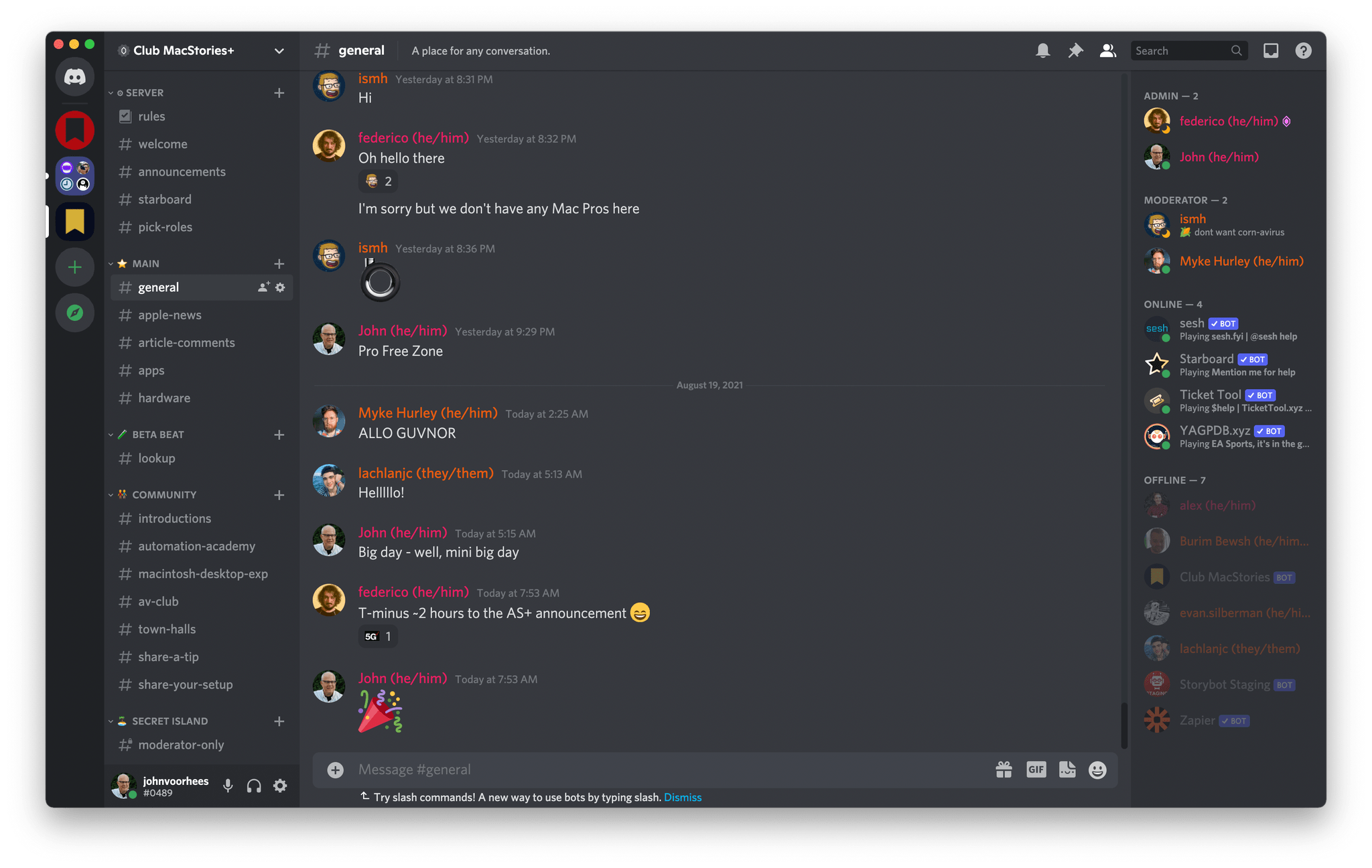
Our Club Discord community has become a fantastic resource for Club MacStories+ and Premier members.

Our Club Discord community has become a fantastic resource for Club MacStories+ and Premier members.

That’s been the case since the Club launched over eight years ago. We didn’t hide MacStories content behind a paywall when the Club was started. Instead, the Club has always been designed to supplement MacStories with more app coverage, complex automations, longer podcast episodes, and more. Then, with the introduction of Club MacStories+ and Club Premier, we built on that model further with a vibrant, respectful Discord community of app and automation fans who help each other get the most out of their technology.

Club newsletters are available in our fully-searchable web app for Club MacStories+ and Premier members.

Club newsletters are available in our fully-searchable web app for Club MacStories+ and Premier members.

We know that folks are inundated with subscriptions these days, which is why we work hard to offer what we think is a great value at every tier of the Club. Our nine-year track record of consistency and content, which includes over 500 issues of our newsletters, speaks for itself, but we also realize that committing to an annual plan is still a lot. So that is why we’re excited to offer a big discount during our fall membership drive. Here’s a breakdown of each tier and the discounts we’re offering through November 1, 2024:

Normally Through Nov. 1
Club MacStories $50/year $40
Club MacStories+ $100/year $80
Club Premier $120/year $96

If you’re not familiar with the Club, you can learn more and compare plans side-by-side here and read our FAQ page.

These discounts are available to anyone signing up for an annual Club membership for the first time, reactivating an expired plan, or upgrading a current plan.

To take advantage of the discounted plans, please use the coupon code CLUB2024 at checkout or click on one of the buttons below.

When you change a monthly plan to an annual one, you'll get credit for the remainder of your current month's subscription.

When you change a monthly plan to an annual one, you’ll get credit for the remainder of your current month’s subscription.

Join Club MacStories:

Join Club MacStories+:

Join Club Premier:

As a thank you to members, we’re also rolling out loads of extra content, giveaways, deals, and more this week and next, starting with new additions to our Club MacStories+ and Club Premier app discounts page, which we’ll begin revealing tomorrow on Mastodon and Threads. Then, through Nov. 1st, we’ll have columns, giveaways, a special Discord audio event tomorrow, and more, so keep an eye on the MacStories and Club MacStories Mastodon accounts and the MacStories Threads account every day to hear what’s coming next. We’ll be sure to keep any giveaway entries open throughout the fall Membership Event, too, so no matter when you join, they’ll be available.

Thanks again to our many loyal Club MacStories members, and welcome to everyone joining for the first time. You’ve all helped us grow MacStories, launch new projects, and build MacStories on a strong foundation while staying independent and true to our editorial values. We look forward to bringing you even more of what makes MacStories special for many years to come.

Access Extra Content and Perks

Founded in 2015, Club MacStories has delivered exclusive content every week for nearly a decade.

What started with weekly and monthly email newsletters has blossomed into a family of memberships designed for every MacStories fan.

Learn more here and from our Club FAQs.

Club MacStories: Weekly and monthly newsletters via email and the web that are brimming with apps, tips, automation workflows, longform writing, early access to the MacStories Unwind podcast, periodic giveaways, and more;

Club MacStories+: Everything that Club MacStories offers, plus an active Discord community, advanced search and custom RSS features for exploring the Club’s entire back catalog, bonus columns, and dozens of app discounts;

Club Premier: All of the above and AppStories+, an extended version of our flagship podcast that’s delivered early, ad-free, and in high-bitrate audio.

Learn more here and from our Club FAQs.


The Latest from Comfort Zone, Magic Rays of Light, and MacStories Unwind

Enjoy the latest episodes from MacStories’ family of podcasts:

Comfort Zone

Niléane is fired up about the state of tech, Chris is enjoying the sweet, sweet sounds of a V12 engine, and Matt is really into a new web browser.


Magic Rays of Light

Sigmund and Devon highlight Shrinking season two and the debut of NBA All-Star Weekend in Immersive Video. Then they recap Bad Monkey and Slow Horses season four.


MacStories Unwind

This week, Federico suspects his new vacuum cleaner is the victim of corporate foul play, and I am denied a donut and apple cider slushie thanks to my reliance on technology.

Read more

Access Extra Content and Perks

Founded in 2015, Club MacStories has delivered exclusive content every week for nearly a decade.

What started with weekly and monthly email newsletters has blossomed into a family of memberships designed for every MacStories fan.

Learn more here and from our Club FAQs.

Club MacStories: Weekly and monthly newsletters via email and the web that are brimming with apps, tips, automation workflows, longform writing, early access to the MacStories Unwind podcast, periodic giveaways, and more;

Club MacStories+: Everything that Club MacStories offers, plus an active Discord community, advanced search and custom RSS features for exploring the Club’s entire back catalog, bonus columns, and dozens of app discounts;

Club Premier: All of the above and AppStories+, an extended version of our flagship podcast that’s delivered early, ad-free, and in high-bitrate audio.

Learn more here and from our Club FAQs.