Posts in mac

Zune HD Can Sync To Mac While Windows Phone 7 Controls iTunes

While Microsoft isn’t officially advocating the Zune HD march onto OS X, a simple tweak to your Windows Phone 7 Connector software for OS X can add syncing capability in no time. With a little tweak of the .plist file, nate8nate over at Zuneboards discovered this terminal trick:

defaults write com.microsoft.Windows-Phone-7-Connector ZuneEnabled -bool YES

Nate was able to sync pictures and movies to his Zune HD – you might want to give it a try if you’re tired of syncing to that unused Windows box.

If you’ve upgraded to a Windows Phone 7 device, you might be happy knowing your iTunes playlists are now controllable over wifi. This isn’t an official Microsoft implementation, bur rather something you can add for $1.99 on the Marketplace. The WP7 Remote app not only has a pretty nice icon, but also turns your iTunes library into something terrible unique (or dare I say, Zune like?).


[via Engadget 1, 2]


Mac App Store Review: DropBook, Desktop Facebook Uploader

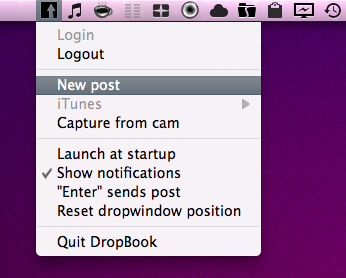
I’m not that kind of user who heavily relies on Facebook on a daily basis, but I can spot a good Facebook app when I see one. I may not be the guy who uploads hundreds of pictures every week and posts just about any thought on world’s most crowded social network, yet I don’t mind trying iOS apps that integrates with the platform from time to time. With the release of the Mac App Store, I expected to see some Facebook apps for the Mac to show up; new apps, software we haven’t seen before. After all, a platform like the Mac App Store seems to be meant for the average user who depends on another platform, Facebook.

DropBook is a new app developed by i-NOVATION and released in the Mac App Store at $2.99. It looks like a simple Facebook uploader that’s actually packed with functionalities, but still manages to let users access these features with ease and a few clicks. Read more


Mac App Store Review: Unretina, Simple Utility for iOS Designers

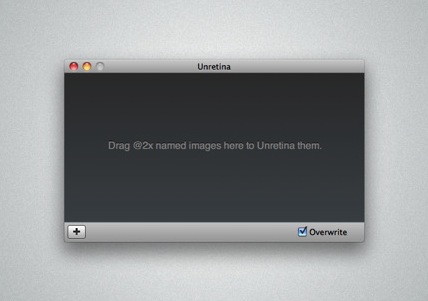
Released for free in the Mac App Store and developed by Bonobo Labs, Unretina is an OS X utility specifically geared towards iOS designers and developers. What this app does is very simple: it provides a way to easily resize “2x” images built for the Retina Display in order to make them compatible for artworks on older Apple devices.

Unretina takes graphic files designed for the iPhone 4 and iPod touch 4th gen and resizes them to a resolution compatible with, say, the iPhone 3GS and older iPod touches. It should work for all devices that don’t come with a Retina Display. Through a simple drag & drop interface, Unretina looks like a straightforward utility for designers that does one thing well.

Looking at the reviews in the Mac App Store description page, it appears that the app uses Bicubic resampling to resize graphic files. This may lead to a tiny sharpness loss, and a few pixels off. Something that, apparently, most designers won’t care about.

Unretina is available for free in the Mac App Store.


Weather HD by Vimov Victim of Name Squatting in Mac App Store

iOS and Mac development studio Vimov saw an unpleasant surprise yesterday in the Mac App Store: another developer, Presselite, is selling an application called “Weather HD” in the Mac App Store. The problem is, Weather HD is the popular application the Vimov guys released for the iPhone and iPad, featured multiple times by Apple in the App Store homepage and covered by all the major tech blogs.

The “Weather HD” that’s being sold in the Mac App Store is not affiliated with Vimov in any way – actually, Presselite “stole” the name from Vimov when registering the app’s name in iTunes Connect. This practice is known as name squatting. Read more


CoverSutra 2.5 Released, Exclusive to Mac App Store

A major new version of popular music controller CoverSutra by Sophiestication was released today, and it’s available exclusively on the Mac App Store at $4.99. For those who are not familiar with the app (which we last reviewed here in January 2009), CoverSutra is a desktop controller for music coming from iTunes. Unlike Ecoute, which is more like a lightweight music player, CoverSutra only display songs information by plugging directly into Apple’s software.

CoverSutra, however, doesn’t only come with a neat desktop widget that displays the artwork for the album that’s playing. Although that option got even bigger with the latest 2.5 update (it now supports artworks up to 256px on the desktop), what’s cool about the app is that you can assign keyboard shortcuts to almost any function supported by CoverSutra. You can choose to invoke a heads-up display window with music control through a hotkey, or assign multiple shortcuts to dozens of commands like volume up and down, next track, search and so forth. Search, for instance, happens in a popup coming down from CoverSutra’s menubar icon; you can search for any song, album or artist you want and navigate with the keyboard through the results to start playing.

The Mac App Store 2.5 also includes a new keyboard bezel display style, and an option to let the app automatically start and quit with iTunes. Now this is nice, as it’s an iTunes controller and it depends on it. CoverSutra 2.5 is available as Mac App Store-only here.


Mac App Store Now Open On The Web

Remember how Mac App Store links wouldn’t redirect to the web, instead opening the app? Now they do. It’s official folks: You can share links with your friends without having them worry about whether they have a Mac or a PC. Just in case the web preview annoys you by opening the actual app, you download the NoMoreiTunes Safari extension. On Google Chrome, just deny the pop-up message.