This Week's Sponsor:

Dropzone 5

Improve your Drag-and-Drop Workflow


Posts in mac

Put Screenshots In Your Sights With Crosshairs For Mac

Want to take screenshots with precision and adjustable controls? Crosshairs for Mac is what you’ll need if you want a friendly menubar utility that slaps screenshots right onto the desktop. Crosshairs is really simple to use:

  1. Click on the menubar icon to activate Crosshairs
  2. Drag the overlay anywhere and achieve a pixel-perfect with the graphic counter
  3. Press the spacebar to take the screenshot
  4. Press the escape key to deactivate Crosshairs

Simple, no? You might be wondering why you’d use Crosshairs over Snow Leopard’s built in screenshot utility, and the answer is simple. With Crosshairs, you can readjust and take multiple snaps consecutively in one row, making readjustments as needed.

There’s quite a few keyboard commands for Crosshairs, and its main purpose is to get dimensions of anything on screen. For pixel pushers measuring apps or windows for Photoshop, Crosshairs conveniently sits above your workspace so you can quickly rule what you need. If you’re working with a dark background, you could always change that overlay from black to white.

You’ll be set back a meager $4.99 in the Mac App Store for an aiming cursor with mad screenshot & measuring skills. Check it out at Giant Comet for more information.


BIT.TRIP BEAT For Mac Is Trip-Tastic

CommanderVideo has given you a paddle, and you’ll have to keep up with the beat in order to succeed in BIT.TRIP BEAT on the Mac App Store. It’s like pong and maybe like brick breaker, where you bounce back various “beats” that are streamed across your display in conjunction with the level’s vibe. These aren’t your traditional ping pong bits either – they’re high intensity, moving bullets that bounce and force players to return a variety of patterns without missing. The more beats you return consecutively, the more rewarding the game gets with higher intensity tunes and occasionally trippier visuals. But like Guitar Hero, if you miss a beat, you’ll face the bleak reality of failure. Color fades into monochrome, and the screen beat is reduced to mere 8-bit blips. If you’re not getting those additional bonus points by chaining those high-pitched returns, it’s game over for CommanderVideo.

Read more


CalendarBar Tucks Event Reminders In Your Menubar

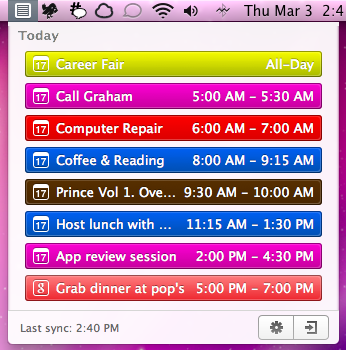
Clean Cut Code is known for making beautiful apps like Cloud Calendar, and it was only a matter of time before they brought some of their talent to the OS X desktop. CalendarBar takes on the inefficiencies of a traditional calendar client by providing a quick list of events in a beautiful timeline that can grab events from iCal, Google Calendar, and Facebook. Clicking on an event takes you to the event listing in its parent application – CalendarBar removes the distraction of busy calendar utilities, but provides shortcuts so you can add entries and gather additional information. The app features a some iOS overtones in its design, most obviously via the settings and exit button that adorn the bottom of the pop-up panel. Launching yesterday, the app is only $1.99 in the Mac App Store.


Mac App Store Adds NetNewsWire Lite To Its Catalogue Of Apps

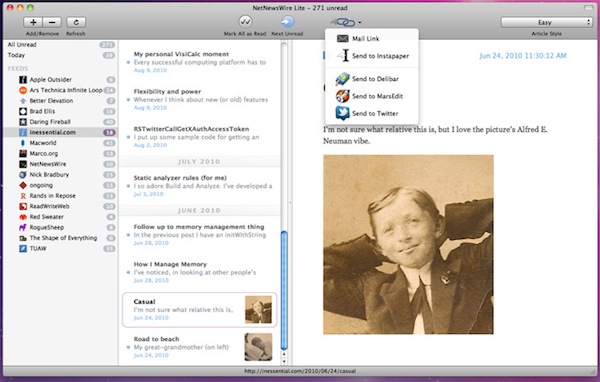
NetNewsWire, one of the best Mac RSS readers has reached version 4.0 and before a full version is completed, a new ‘lite’ edition has been released on to the Mac App Store. Whilst it is limited in a number of respects, it has an improved and refined UI, is free and remains of the better RSS readers on the Mac.

The biggest limitation is that it doesn’t support syncing, that’ll be a big bummer for many of you, but it’s developer Brent Simmons says that will be coming soon in the full edition of NetNewsWire. The other limitations are the lack of starred items, AppleScript support and searching amongst other more minor ones. Simmons does provide users some comfort in saying “That it supports gestures. That you can edit feed names inline. That it launches and quits very fast.

Read more


New iOS 4.3 Feature: iTunes Home Sharing

At today’s iPad 2 event, Apple said iOS 4.3 will be available next Friday, March 11. A new feature mentioned was iTunes Home Sharing, so let’s dig in.

iTunes currently has Home Sharing between Macs or PCs on the same Wi-Fi network, but now iOS 4.3 is letting you stream all your music, movies and TV shows from your Mac or PC to any iPad, iPhone or iPod Touch. After installing iTunes 10.2, tap and enjoy all your media in your iTunes library anywhere in your home. Imagine, you can stream a movie from your Mac to your iPad anywhere your Wi-Fi range can reach. Want to listen to an excellent new podcast, connect and go!

Current iOS 4.3 GM users, the iTunes Home Sharing feature is now in the beta. Others, it will definitely be in the public release on March 11.

UPDATED WITH SCREENSHOTS BELOW: Read more


Instacast Is The Twitter Of Podcast Apps

A title comparing a podcast player to one of the most influential iPhone apps isn’t given lightly. The incredible friendliness of Twitter, combined with some inspiration from Silvio Rizzi of Reeder, has been crafted by Vemedio into what may simply be the best podcast app available for your iPhone. The features are all beautifully implemented, the interface is a score above the rest, and might I add that it’s become a mainstay on my homescreen?

Read more