Posts in mac

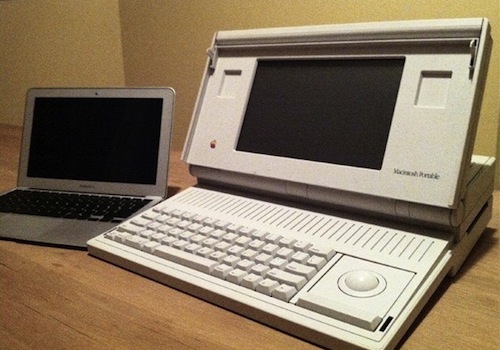
Mac Portable Vs. MacBook Air - 21 Years of Apple Computing

Times change. Gadgets grow old fast. Look at your original iPhone from 2007, then look at the iPhone 4’s sexy metal band. Things in this industry have a short lifespan, and it’s up to great engineers and designers to make a device last in time and leave a permanent sign in the minds of people who used it, loved it.

In the picture above, you can see a Mac Portable from 1989 compared to a 2010 MacBook Air. Generation of Macs sitting next to each other, a visual representation of the progress that’s been made in science and computer engineering. But it was “only” 21 years ago. The first Game Boy came out the same year. The U2 were a great band. Yet, for as much as we remember those events as if it was yesterday and we struggle to keep that Mac Portable in perfect mint condition, things change. Fast.

So welcome, MacBook Air. We look forward to comparing you to another Mac in 21 years.

If Macs will still be around. [TUAW via Patrick McCarron]


iUseMac Bundle: 9 Great Mac Apps At $29

We’ve come to the point where every month a new Mac-related bundle is publicized on the internet, and not so many of them are really worth a mention. The iUseMac bundle, though, is pretty damn good: 9 “premium” Mac apps at only 29 bucks instead of the $290 price tag you’d usually get when buying each of them on the developers’ websites. Not a bad deal.

The apps included in the offer are mostly productivity apps for your Mac, and a few really popular ones are in there as well: Renamer, an awesome utility I use every day to batch rename files on my MacBook, and Picturesque, a well-known lightweight image editing software. If you consider that Renamer alone costs $25 (and it’s totally worth the price anyway), you can guess iUseMac set up an interesting offer.

The other apps included in the bundle are Proview, MacCleanse 2, Labels & Addresses, Clean Text, iFlicks and TypeIt4Me. An additional utility app will be delivered to everyone who buys the bundle, and I have to admit is another good and useful one.

So head over iUseMac’s website, take a look at the applications and hit the Buy button. iUseMac is undoubtedly above the average bundles for Mac we see launching every week or so.


Tip: Automatically Add URL To A Downloaded File As Spotlight Comment

Also from Reddit, a nice little hack that allows you to automatically add a downloaded file’s URL as a Spotlight comment to the file itself. Spotlight comments are useful because they add metadata to a file, and they are supported across many 3rd party applications such as DEVONthink, Leap and Launchbar.

Spotlight comments are searchable, and having a URL automatically attached to a downloaded file can come in handy when you remember the website you downloaded something from, but you can’t find the file. Read more


Alarms for Mac Updated With Better Timeline, Bug Fixes

Alarms is a Mac app developed by Media Atelier we previously reviewed here. For those who missed the review:

Alarms is a fast and lightweight reminder app for Mac that lives in your menubar. It’s not a GTD application, yet it’s a perfect companion for softwares like Things or OmniFocus. I basically use Alarms to save little things I need to do later that aren’t worth creating a new entry in OmniFocus.

Getting stuff in Alarms is simple and takes seconds. Once you install the app a new icon is added to your menubar. Click on it, or drag an item over it, and a white horizontal panel slides down (great animation) letting you choose in which part of your working day should the new entry go.

Read more


Steve Jobs: USB 3.0 Not Happening on Macs “At This Time”

9to5mac reports of a new email from Steve Jobs to a user who asked whether Apple would integrate USB 3.0 on Macs in the near future. Jobs, as you may guess, said no. But it wasn’t his usual “nope”:

We don’t see USB 3 taking off at this time. No support from Intel, for example.

So according to Jobso, it’s not that USB 3.0 is never happening. “Not at this time”, and lack of Intel support is mentioned as an example for their decision to exclude USB 3.0 on current Macs.

Can you believe Jobs’ words, though?


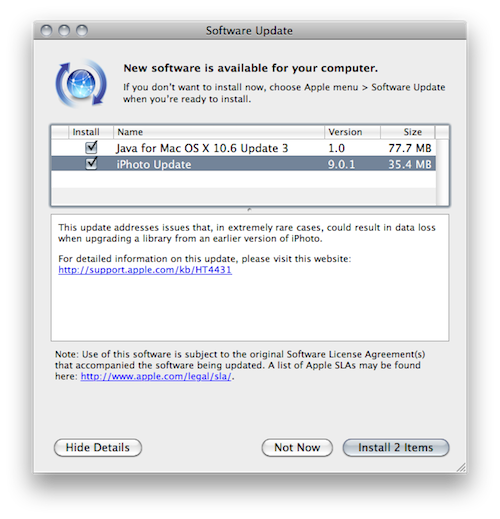
Apple Addresses Data Loss Issue with iPhoto 9.0.1 Update

A few hours ago Apple released an update to iPhoto, version 9.0.1, aimed at fixing issues with data loss, as reported by many blogs and users on Apple’s discussion boards.

This update addresses issues that, in extremely rare cases, could result in data loss when upgrading a library from an earlier version of iPhoto.

Further information about the download (35MB) are available here.


BulletTrain Express Keyboard: MacBook, Meet Desktop Mac

I bought an iMac about a month ago. It’s a great machine, it’s sexy and it’s powerful. Still, when I’m working on it I do miss one thing: they keyboard and trackpad configuration of the MacBook Pro. Having a full-size keyboard above the trackpad is undoubtedly more comfortable than having to constantly switch from the keyboard to a Magic Trackpad on its side. Placing the Magic Trackpad under the keyboard doesn’t help either as it’ll end up moving and sliding on your desk.

So what we have here is possibly the coolest gadget we’ve covered on MacStories in a while: the BulletTrain Express Keyboard is a solid aluminum platform that can embed a Magic Trackpad and an Apple keyboard, all in one single and ergonomic surface. Read more