Posts in Linked

2020 Apple Design Award Winners: The AppStories Interviews

Federico and I had the pleasure of interviewing three of the 2020 Apple Design Award winners for AppStories. The awards, which were announced by Apple last Monday, recognize “outstanding app design, innovation, ingenuity, and technical achievement.”

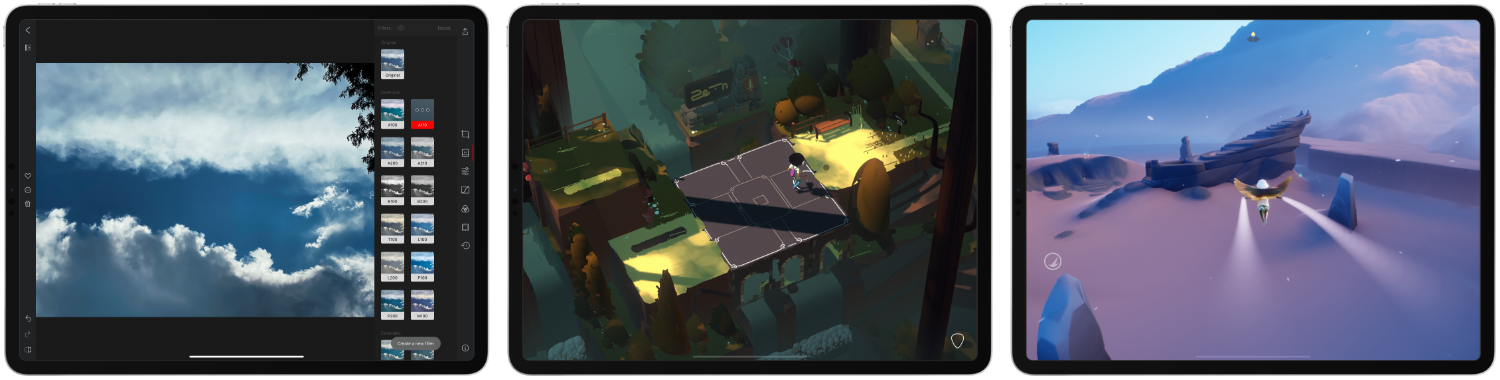
For today’s special episode, we spoke with Majd Taby of Bergen Co., the creator of photo and video editing app Darkroom, Sam Rosenthal of The Game Band, the studio behind Where Cards Fall, which was a launch title on Apple Arcade, and Jenova Chen, of thatgamecompany and the creative director of Sky: Children of the Light, an innovative social adventure game. All three interviews are terrific conversations that reveal common threads of thoughtful design, innovative approaches that feature the latest Apple technology, and a deep understanding of their users.

Thank you to Majd Taby, Sam Rosenthal, and Jenova Chen for taking the time for the interviews, Apple for helping arrange them, and as always, thank you for listening to AppStories. We hope you enjoy the episode.


https://www.macstories.net/podcasts/appstories/episodes/174/embed/

Permalink

Josh Ginter’s First Impressions Review of HEY

Despite all the drama surrounding the App Store launch of HEY, the new email service from Basecamp, I never got around to actually trying out the service for myself. As a result, I was excited to see today that Josh Ginter at The Sweet Setup had published an in-depth first impressions review following a couple weeks of use. In short, he loves it:

To say this is a glowing first impressions review would be an understatement — in just two short weeks, HEY has shown itself to be the most revolutionary app or service I’ve ever tried.

While I may not be alone, I also know many folks who feel otherwise.

Which makes a lot of sense, I think. Email is one of the oldest digital technologies and it’s worked a specific way for a very, very long time. There will be some deeply engrained email habits out there, and old habits die very, very hard.

I also recognize that HEY likely works for a specific type of emailer. HEY appears to thrive with a multitude of daily email and may feel out of place for someone who has either worked out their email workflow, someone who incessantly unsubscribes from anything unworthy, or someone who relies on other forms of communication to get their stuff done each day.

I found Ginter’s review an excellent primer on HEY’s unique approach to email. If you love in-depth app reviews – and I hope you do – and have been wondering why some people are calling HEY the next Gmail, I highly recommend Ginter’s piece.

Permalink

Connected Trio Host Interview with Members of Apple’s iPad Team

Federico, Stephen, and Myke had a special surprise on this week’s episode of Connected, their podcast about Apple, technology, and general shenanigans. Episode 301, titled We Should Be Developers, features an interview with Apple’s Jenny Chen, who works on the Apple Pencil team, and Stephen Tonna, who works in iPad product marketing.

The interview covers the new Scribble feature in iPadOS 14 and other Apple Pencil enhancements, the philosophy behind iPad app design, including the new sidebars and dropdown menus of iPadOS 14, and also how the iPad’s versatility of input methods needs to be kept in mind by app developers.

There are a ton of great insights into how Apple’s team thinks about the iPad and approaches its evolution. If you’re an iPad user, you won’t want to miss it.

Permalink

Michael Flarup on Big Sur’s New Design

In the years since iOS 7 ushered in flat, minimalistic design, Michael Flarup has consistently pushed back, insisting that the trend had gone too far and there was still room for fun and expression in design. With the redesign of macOS 11 Big Sur, Apple surprised the design world by introducing a design that harmonizes macOS with the company’s other OSes, while providing room for expressiveness.

As Flarup explains:

Materials and dimensionality has made its way back into the interface —and every single app icon for every application and utility that Apple ships with macOS has been redesigned with depth, textures and lighting. This is a big deal. Probably bigger than what most people realise.

The post is a fantastic overview of where design stands on Apple’s platforms today and the influence that the company’s choices have on the design community. Whether intended or not, the unexpected design shift on macOS is one that Flarup expects to see radiate out to affect the design of iOS and iPadOS too:

With this approach Apple is legalising a visual design expressiveness that we haven’t seen from them in almost a decade. It’s like a ban has been lifted on fun. This will severely loosen the grip of minimalistic visual design and raise the bar for pixel pushers everywhere. Your glyph on a colored background is about to get some serious visual competition.

It’s interesting to consider where this new direction will lead. Big Sur’s iconography is part of a broad redesign on macOS that runs far deeper than the design changes made to iOS or iPadOS this year. Whether those platforms will follow the Mac’s lead in the future or take their own paths is something I expect to see debated a lot in the months to come. However it plays out, though, I’m glad to see the Mac retain character in its design as it heads into what promises to be a new era for the Mac.

Permalink


Apple News Loses The New York Times

Kellen Browning and Jack Nicas, writing for The New York Times:

The New York Times said on Monday that it was exiting its partnership with Apple News, as news organizations struggle to compete with large tech companies for readers’ attention and dollars.

Starting on Monday, Times stories were no longer appearing alongside other publications’ articles in the curated Apple News feed available on Apple devices.

The Times is one of the first media organizations to pull out of Apple News. The Times, which has made adding new subscribers a key business goal, said that Apple had given it little in the way of direct relationships with readers and little control over the business. It said it hoped to instead drive readers directly to its own website and mobile app so that it could “fund quality journalism.”

This is a major loss for Apple. According to an Apple statement in the piece, the publication “only offered Apple News a few stories a day,” but losing access to the most prestigious newspaper in the US is nonetheless a bad look.

Apple News readers will doubtless still have plenty of quality journalism options to choose from, yet perhaps the most significant problem for the company is that this move may inspire other partners to follow suit. Apple’s 125 million monthly News readers are a formidable audience, and few publishers have near the clout of The New York Times and thus can’t necessarily afford to take similar risks. However, Apple News has long held a reputation – fair or not – for failing to be very profitable for most publications, so this move could indeed spark a larger exodus if Apple doesn’t work hard to keep its partners happy.

Permalink

Apple’s Kevin Lynch on watchOS 7’s Sleep Tracking

Scott Stein of CNET interviewed Apple’s Kevin Lynch about watchOS 7’s upcoming sleep tracking feature. Unlike third-party sleep tracking wearables and apps, Apple’s approach is simpler. As Stein explains:

Unlike other wearables such as the Fitbit or Oura, which measure how much time you spend in the various sleep phases and even give calculated sleep quality scores, Apple’s sleep tech is more simplified. It just tracks duration of sleep, movement disturbances and heart rate. The content of your sleep isn’t analyzed much at all. Instead, Apple’s placed a big focus on the time you go to bed and what you do while you wind down.

Instead of tracking time spent in different sleep phases, Apple’s focus is on winding down before bed and sleep duration, using positive reinforcement to encourage better habits. As Lynch says:

“You can’t really coach yourself to have more or less REM stages,” he says. “We felt like that wasn’t the best way Apple could add value here on sleep. We focused on the transition to the bed, which we think is way more actionable, and will result in people getting a better night’s sleep, which then has secondary effects of perhaps your REM stages sorting themselves.”

I haven’t had a chance to install the watchOS 7 beta yet, but sleep tracking is right at the top of my list of features I want to try this summer. I’ve used third-party apps that made me feel anxious about my lack of sleep, so I’m keen to see how Apple’s approach stacks up.

Permalink

How the watchOS 7 Handwashing Feature Works

Brian Heater at TechCrunch has published a detailed explanation of how the upcoming handwashing feature for Apple Watch works:

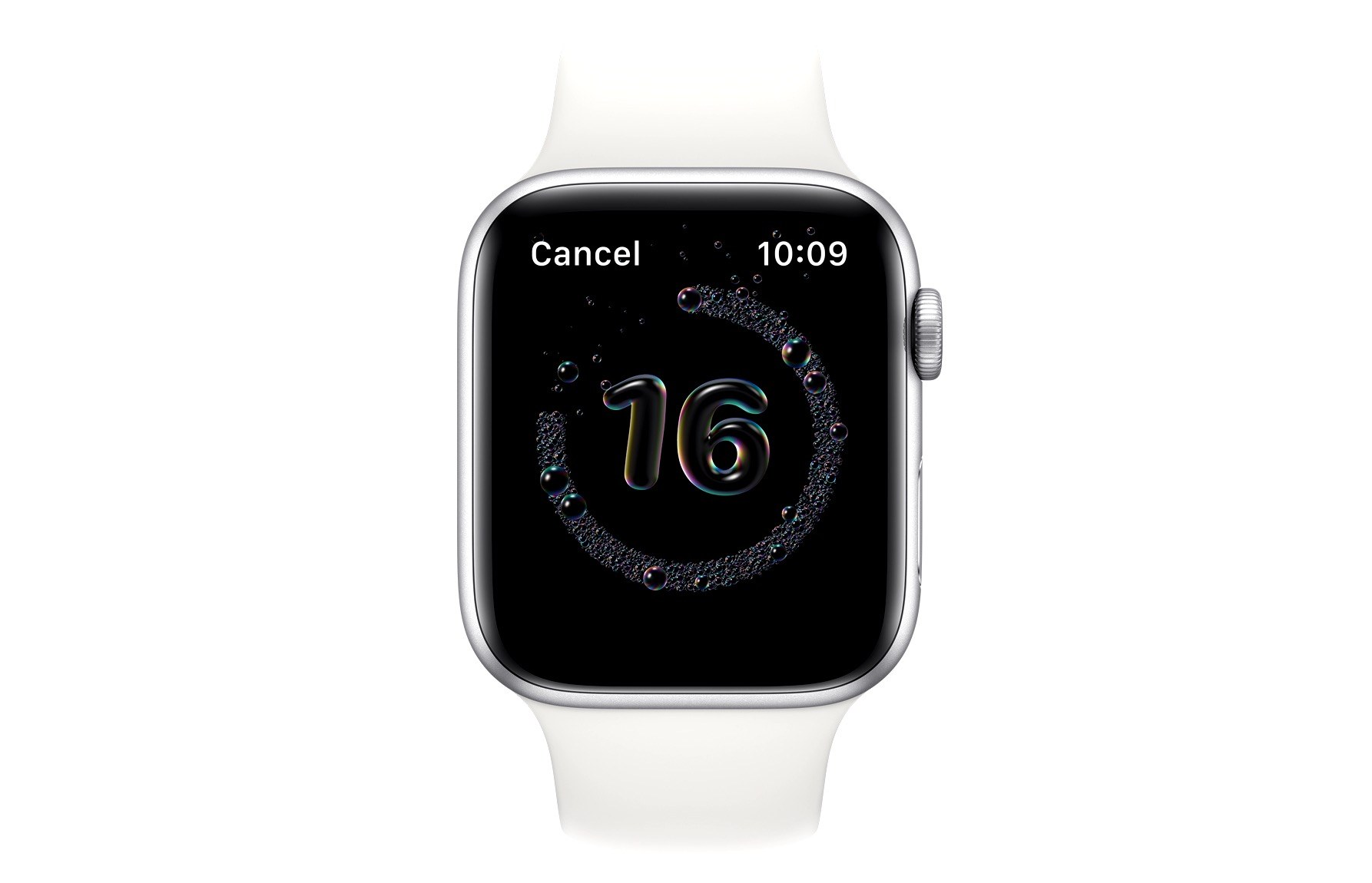
The feature, which is built directly into the forthcoming version of watchOS, is designed to work like fitness tracking in a number of ways. For starters, if the user opts into it, it’s designed to automatically trigger when handwashing is detected, starting a countdown timer of 20 seconds. The accelerometer is the key piece of hardware here, waiting for the specific handwashing pattern — which apparently adopts a number of different methods, depending on who’s actually doing the scrubbing.

The system uses machine learning models to tackle different methods, but the system gets an additional nudge from the Watch’s microphone. Along with motion, the app listens for the sound of running water. Even that’s not enough, though — after all, eco sinks have become increasingly popular, meaning that there’s often less water sound to be listening for. The sound of squishing soap takes care of that last bit. It’s got a unique enough audio signature so as to confirm that handwashing is taking place.

Interestingly, the piece notes that this feature has been in the works for years, it isn’t simply a reaction to the current pandemic. I haven’t tried the feature yet, but I’m anxious to see if it works as advertised. If it’s unreliable, I’ll surely leave it turned off, but if it works well it could be a valuable aid to preventing the contraction of COVID-19. At the very least, I’m always happy to see Apple explore new areas of health.

Permalink

A GoodLinks Read and Listen Later Shortcut and Custom Action

When I reviewed GoodLinks, I knew its unique combination of Shortcuts integration and custom in-app actions that rely on URL schemes had the potential to sit at the center of powerful, automated workflows. My hunch was correct.

When I tried GoodLinks for the first time, I began thinking of ways to integrate it into the research I do for MacStories and Club MacStories. Michael LaPorta’s thoughts, however, immediately turned to music.

LaPorta has built a ton of music-related shortcuts that you can find on his website. After reading my review of GoodLinks, he set out to create a shortcut to allow him to save music reviews and related reviews to read and listen to later. Here’s how LaPorta explains it:

So here’s the concept: GoodLinks can grab music reviews and store them to read or access later. When grabbing the music reviews you can customize the information associated with the review. You can use this customized info to also grab the album and add it to your Music library. Once you have the review (along with its customized info) saved in GoodLinks and the album saved in Music, you can use GoodLinks as a read-and-listen-to-it-later app that can be accessed via Shortcuts in a variety of contexts.

LaPorta didn’t stop there, though. He also added a way to handle upcoming releases and begin listening to an album from inside its review in GoodLinks using the app’s custom action builder.

I highly recommend giving LaPorta’s shortcut and GoodLinks action a try. These are precisely the sort of automations that the new breed of read-it-later apps like GoodLinks make possible.

Permalink