Posts in Linked

Bugs and People

Nick Arnott:

Software is buggy. Humans write and test software and humans are imperfect; as a result, so is software. This is the reality of software and should come as a surprise to nobody. What can be surprising are the kind of bugs we actually see make their way out into the wild.

This is a great article. A good reminder that there’s a difference between knowing that people make software and calling out individuals for the sake of page views.

Permalink

Inside Apple’s iPhone 6 Testing Lab

Josh Lowensohn:

A few blocks away from Apple’s bustling campus in Cupertino is a rather nondescript building. Inside is absolutely the last place on earth you’d want to be if you were an iPhone. It’s here where Apple subjects its newest models to the kinds of things they might run into in the real world: drops, pressure, twisting, tapping. Basically all the things that could turn your shiny gadget into a small pile of metal and glass.

I’m starting to think that the iPhonegates Apple goes through every year may be worth it if only for the peek behind the curtain we get.

This time, in response to the so-called #bendgate, Apple invited the press to visit their secret testing lab for the iPhone 6. The Verge has fascinating photos and details; CNBC has a video report.

See also: a brief history of iPhonegates.

Permalink

Virtual: The Wheels and Stuff

This time Federico and Myke discuss the new Final Fantasy trailers, Microsoft buying Mojang, the updates to the Steam Store and Myke’s trip to Italy.

Also on Relay, Virtual ep. 5 features some thoughts on Minecraft and Steam. And, we’re going to record another episode tomorrow.

Sponsored by:

  • Squarespace: A better web starts with your website. Use code INSERTCOIN for 10% off
  • Studio Neat: Get 10% off anything in their store using the code VIRTUAL
Permalink

Connected: The Divine Comedy of Homescreens

This week Federico expands upon his iOS 8 coverage and Myke talks about his new iPhone 6 Plus.

On this week’s Connected, more thoughts on iOS 8 apps and iPhone 6 Plus impressions by Myke, who also did something new to his iPhone.

Sponsored by:

  • lynda.com: An easy and affordable way to help individuals and organizations learn. Free 7-day trial.
  • Harry’s: An exceptional shave at a fraction of the price. Use code CONNECTED for $5 off your first purchase
Permalink

Apple Releases iOS 8.0.1 [Update: Pulled]

A week after the launch of iOS 8, Apple has released the first update to the new OS – iOS 8.0.1. Available now through software update, iOS 8.0.1 fixes a number of bugs including an issue that prevented HealthKit apps from working correctly and a problem that caused custom keyboards to become deselected after entering a passcode.

iOS 8.0.1 also improves Reachability on the new iPhone 6, fixes a bug that disabled file uploads in Safari, and brings better support for the Ask to Buy feature in Family Sharing.

iOS 8.0.1 can be downloaded now from iTunes or software update on an iOS device.

Update: Following reports of iOS 8.0.1 causing issues with broken cellular connections and Touch ID on some iPhone models, Apple has pulled the update and instructed affected users to restore through iTunes.


iPhone 6 Camera Compared to Previous iPhone Cameras

Lisa Bettany:

In the past seven years, each new advancement in iPhone camera technology has made dramatic improvements to image quality. The iPhone 6 is no different. Besides being faster to shoot and easier to focus, the images taken with the iPhone 6 camera show greater detail and are significantly better in low-light.

In this follow-up post to my iPhone 4s and iPhone 5 comparisons, I present an 8 iPhone comparison from all iPhone versions taken with Camera+ including, the original iPhone, iPhone 3G, iPhone 3GS, iPhone 4, iPhone 4S, iPhone 5, iPhone 5S, and the new iPhone 6 in a variety of situations to test the camera’s capabilities.

Great compilation. Check out the lowlight and backlit galleries to really get the differences.

Permalink

How Time-Lapse Mode in iOS 8 Works

Cool findings by Studio Neat, makers of Frameographer:

What Apple means by “dynamically selected intervals” is they are doubling the speed of the time-lapse and taking half as many pictures per second as the recording duration doubles. Sounds complex, but it’s actually very simple.

Make sure to check out the table with numbers and the videos. In typical Apple fashion, the default solution is clever and simple, leaving room for third-party apps to offer more.

Permalink

Evernote 5.6 for Mac

Evernote released version 5.6 of their Mac app today. Hidden behind a seemingly minor update is a series of important changes to the desktop app that make it faster to sync and that bring welcome new features not available in Evernote for iOS.

The Evernote blog has the details, but, to sum up, I’ve found Evernote 5.6 (public beta testing started a few months ago) to be faster and more reliable than before both in terms of sync and startup times. I’ve seen less conflicted copies of notes (they used to be a problem in shared notebooks) and there’s a ton of other fixes and improvements in the note editor. For instance, images can now be resized and checkboxes are larger and easier to click.

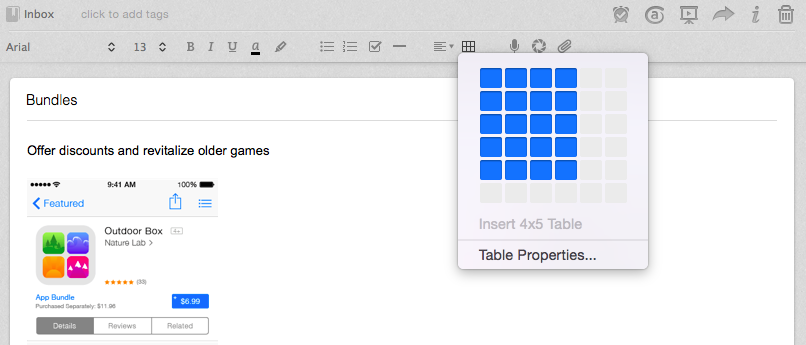
Two of my favorite changes include an easier way to create tables inside notes…

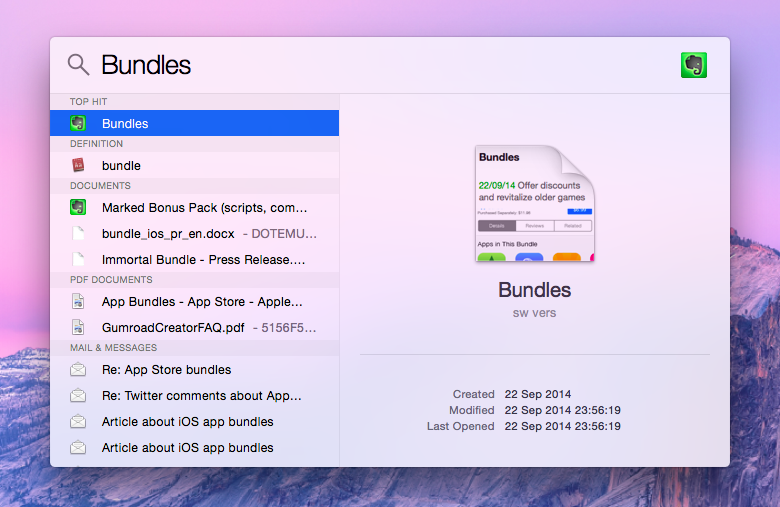
…and the ability to look for specific notes with Spotlight. Here’s how an Evernote search looks like in Yosemite:

Combined with version 7.5 for iOS (which added a great share extension), it’s been a good month for Evernote on Apple platforms. I like that the company is making good on their promise of improving their apps throughout 2014.

Permalink

iPhone 6 and iPhone 6 Plus for One-Handed Use

Georgia and Rene have made the best video about one-handed use for the new iPhones I’ve seen to date. Short, practical examples (replace the Starbucks cup with an espresso in my case), and I’ve finally seen what Reachability looks like in motion.

For someone with relatively big hands, this gives me hope:

The iPhone 6 holds up relatively well. Even with my tiny hands I can still walk, type, and drink effectively. I do have to alter my grip slightly, in the same way I had to alter it when I went from the iPhone 4s to iPhone 5, but it remains extremely doable. Part of that is the thinner, rounder body, which is larger than the iPhone 5 but lighter even than the iPhone 4s. So, it might take some getting used to, and you might have to give your brain a few days to wire in new habits, but you you be just fine.

Permalink