This Week's Sponsor:

Dropzone 5

Improve your Drag-and-Drop Workflow


Posts in Linked

Spotify Year in Music 2014

The year is about to end, and as usual Spotify has launched a Year in Music microsite for global and personal trends.

The global stats are cool, but largely unsurprising. What I really like is the breakdown of your personal listening habits by genre, artist, day of the week, season, and more. You can even see the split between desktop and mobile device streaming, and, if you’re a Premium subscriber, the location of your favorite artists on a chart.

I’m a big fan of Spotify’s use of data to improve algorithms, and this is another nice experiment. If you’re into this kind of visualizations, I also recommend the excellent Exist.io service, which supports Spotify (and many other wearable devices/apps).

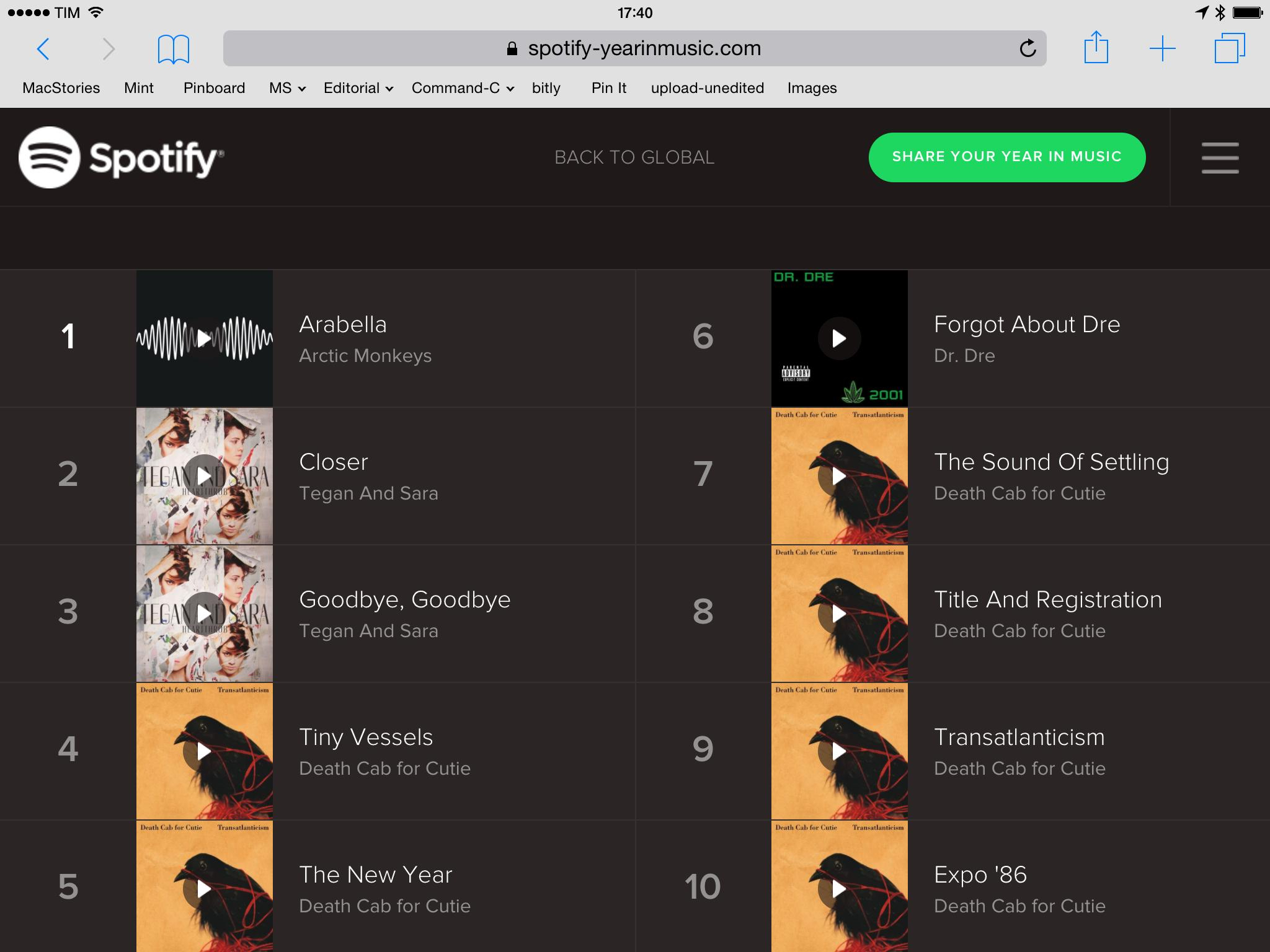
As for my top songs:

Death Cab for Cutie and Tegan and Sara? Looks about right.

Permalink

Apple Watch Website Update

I missed this update to the Apple Watch website when Apple refreshed it last week (via TUAW). The Watch microsite has been updated with more details for timekeeping and fitness features, revealing more details about customizable complications, watch faces, fitness and activity tracking, and more.

Timekeeping:

Many watches include a few specialized functions — known in watchmaking as complications — that go beyond telling the time. But Apple Watch comes with a full range that can be added to most faces. Some complications are traditional, such as moon phases or sunrises and sunsets. And some are unique to Apple Watch, like stock quotes, weather reports, your next calendar event, and a daily activity tracker. When you tap a complication, Apple Watch opens the corresponding app.

New Ways to Connect:

Use the built-in speaker and microphone for quick chats, or seamlessly transfer calls to your iPhone for longer conversations. To mute an incoming call, just cover Apple Watch with your hand.

Health and Fitness:

Apple Watch shows your daily activity at a glance. To see your progress and trends over longer periods of time, there’s Fitness, an Apple Watch companion app on your iPhone. You can view your activity history, workouts, and achievements by the day, week, or month. And the Fitness app can share your activity and workout data with the Health app on your iPhone, where it can be accessed by your favorite third-party health and fitness apps.

You can read our original overview of the Apple Watch here.

Permalink

Stephen Hawking and SwiftKey

Fantastic story from the SwiftKey blog:

SwiftKey built a personal “language model” for Professor Hawking based on his extensive works – including documents not published in the public domain. The software learns from him to ensure it predicts contextually relevant words. It is also able to analyze the content of the specific book or lecture that he might be working on, further tailoring its predictions and autocorrections.

SwiftKey estimates that their technology has “roughly doubled” Professor Hawking’s speech rate – all because SwiftKey can understand how he uses language. I found SwiftKey’s predictions and personalizations based on social accounts to be impressive in their iOS 8 custom keyboard, but this is a whole new level (and SwiftKey says they’ve been collaborating closely with Intel for this, too).

Permalink

A Great App for Recording Podcasts

Allen Pike writes about an idea he had for a professional app dedicated to recording podcasts and interviews remotely to replace Skype:

Okay, so, crazy idea: why doesn’t our team at Steamclock build a Mac app that solves all of these problems? A replacement for Skype, Call Recorder, and all that crap, specifically designed for recording high fidelity interviews? Something that takes the pain out the process, but results in a higher quality end product? A polished, professional tool for people that take podcasts seriously?

Last winter I started investigating exactly this. I spoke with various podcasters whose work I enjoy, and they were incredibly enthusiastic. One said, and I quote, “Take all my money. No, really, this sounds amazing, like an app of my dreams, and I love it.” Okay, that’s a good sign. Every podcaster I talked to about the idea, even ones who weren’t doing double-enders, had various awesome feature ideas. I was giddy with excitement.

It’s sad that there may not be a huge market for a small independent studio to build this kind of product. I’ve been podcasting with Myke and Stephen for over a year now, and working around Skype’s limitations and connection problems is always a pain. Skype wasn’t meant to handle podcasts with multiple guests, but it somehow became the de facto standard because, at least on OS X, it’s still easier to host a Skype call with integrated audio and chat than use FaceTime Audio and Messages for the same task.

And let’s not even mention recording podcasts on iOS without having to use separate hardware or multiple devices. Perhaps someday there will be an app specifically built for podcasters. Like Allen writes, I would pay so much money for that.

Permalink

You Can Now Rename Files and Folders in Dropbox for iOS

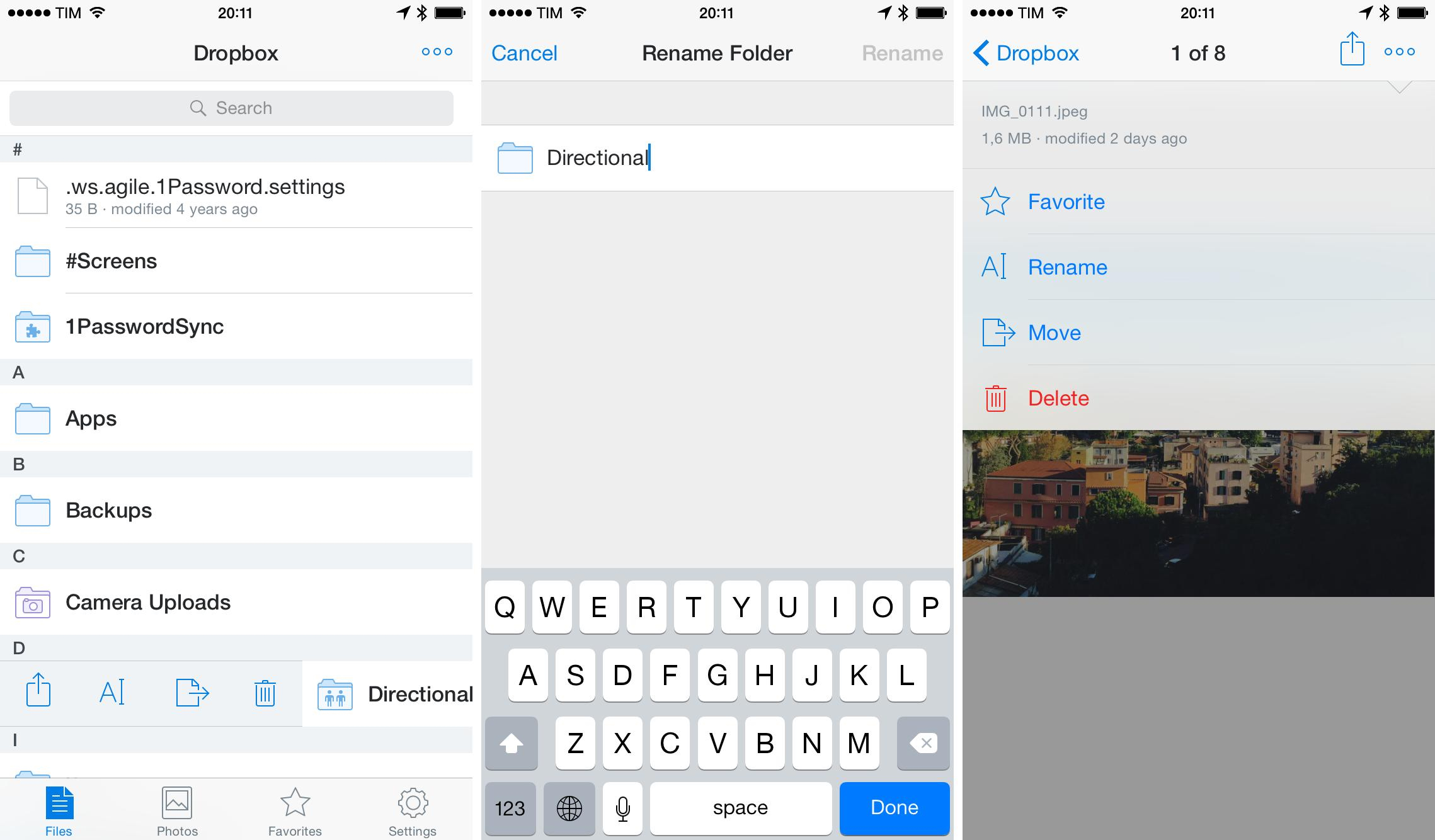
The official Dropbox app for iOS was updated today with much needed renaming capabilities for files and folders. Dropbox has added a new Rename button that you can reveal by swiping over folders or hitting the “More” button in the file preview screen. On the iPhone, this extra panel (pictured above) also shows information about the selected file such as size, filename, and last modified date.

I’ve long used Boxie to rename Dropbox files directly on iOS, so this is good news given the app’s demise. You can find version 3.6 of Dropbox on the App Store and read their blog post here.

Permalink

The Effect of an App Store Feature

So, with almost 2500 downloads you are no. 128, and just 2k more gets you to no. 4. Wow. When you look at this, it’s not really that much top-heavy as I thought. It seems that with decent media exposure you can get pretty consistent number of downloads and chart ranking.

Aleksandar Vacić’s new app, Run 5k, was featured by Apple, and he posted detailed numbers about the effect of Apple’s feature. It’s easy to guess that an Apple promotion on the front page of the App Store may help with downloads, but Aleksandar has actual numbers, and it’s interesting to look at his graphs to observe the effect over time.

Permalink

Virtual: Leaking Battery Acid

This week Federico and Myke discuss a scientific study of Mario Galaxy, the merits and disadvantages of crowd-funded games, a GameBoy HDMI extension, tales of recent local multiplayer experiences and they talk about the iOS games they’ve been playing this week.

And if you’re looking for more podcasts for this holiday weekend, you can’t go wrong with the latest Virtual. Plenty of games and gaming-related links while we’re waiting for this month’s releases on the 3DS and Wii U. Get the episode here.

Sponsored by:

  • Drafts: where text starts on iPhone and iPad. Now easier and more powerful than ever.
  • Dash: Create beautiful dashboards with a few clicks. Sign up now to get one free private dashboard.
  • Loot Crate: a monthly subscription box service for epic geek and gamer items and pop culture gear. Use code VIRTUAL for 10% off.
Permalink

Connected: Poster Child for Power Apps

This week, the boys are back to discuss Federico’s use of a remote Mac mini for weird tasks and Stephen’s new Pebble before debating Twitter’s new App Graph.

On this week’s Connected, we had an interesting discussion about the Twitter app for iOS (which I use) and the relationship that other iOS users have with third-party Twitter clients. Don’t miss it, because I think it’s a good one. Get the episode here.

Sponsored by:

  • Drafts: where text starts on iPhone and iPad. Now easier and more powerful than ever.
  • Studio Neat: Get 10% off anything in their store using the code CONNECTED
  • Dash: Create beautiful dashboards with a few clicks. Sign up now to get one free private dashboard.
Permalink

Pocket’s Data on iPhone and iPad Usage

Fascinating data analysis from Pocket:

To understand how the 6 Plus affects consumption, we first looked at users who owned both an iPhone 5/5S and iPad and looked at how they spent their time reading on both devices. For these users, 55% of content was consumed on an iPhone versus 45% on an iPad. A fairly even split.

All this changed once users had the new iPhones in hand.

I bet that the trends Pocket uncovered could be applied to dozens of other media consumption services with iPhone and iPad apps.

The truth is that bigger phones are big enough for many people who still don’t understand why they need an iPad. Or maybe they did get an iPad, but now they’re discovering that reading and watching videos can be done on an iPhone 6 or 6 Plus just as comfortably and with no compromises.

I think that, for the most part, this is an unavoidable consequence of putting a bigger screen on a device that you carry with you all the time. But, almost five years after the iPad was launched, Apple and third-party developers still tend to come out with iPad apps that are enlarged versions of their iPhone counterparts. I wonder if the lack of widespread unique iPad software is also the reason why people may be using the iPad less.

Permalink