Posts in iPhone

How to Use An iPhone and a DIY IR Trigger to Control Your DSLR

Camera junkies rejoice! The iPhone Guru has a neat little DIY post on how to create a homemade IR trigger capable of firing your DSLR camera from a couple dollars worth of parts. He also shows you how to use DSLR.bot (an iPhone app) to trigger your camera, record GPS locations, and shoot time lapse sequences.

Matthew makes note that the reason he’s doing this and not buying a branded IR or cabled remote is this:

DSLR.bot app has some pretty compelling features that allow you to do GPS tagging with a Map Log and synchronized timing that you can then merge with your image data to create Geo-located images shot with your DSLR among some other nice features like HDR bracketing, time lapse shooting and an Intervalometer. It will do far more than even Canon’s $120 timer remote will do and the whole thing will cost you less than $20.

Video and more pictures after the break… Read more

Access Extra Content and Perks

Founded in 2015, Club MacStories has delivered exclusive content every week for nearly a decade.

What started with weekly and monthly email newsletters has blossomed into a family of memberships designed for every MacStories fan.

Learn more here and from our Club FAQs.

Club MacStories: Weekly and monthly newsletters via email and the web that are brimming with apps, tips, automation workflows, longform writing, early access to the MacStories Unwind podcast, periodic giveaways, and more;

Club MacStories+: Everything that Club MacStories offers, plus an active Discord community, advanced search and custom RSS features for exploring the Club’s entire back catalog, bonus columns, and dozens of app discounts;

Club Premier: All of the above and AppStories+, an extended version of our flagship podcast that’s delivered early, ad-free, and in high-bitrate audio.

Learn more here and from our Club FAQs.


#MacStoriesDeals - Friday

If you didn’t catch all the deals we had yesterday, here’s a link back to the page. Here are today’s deals on iOS, Mac, and Mac App Store apps that are on sale for a limited time, so get ‘em while they’re hot!

Read more

Access Extra Content and Perks

Founded in 2015, Club MacStories has delivered exclusive content every week for nearly a decade.

What started with weekly and monthly email newsletters has blossomed into a family of memberships designed for every MacStories fan.

Learn more here and from our Club FAQs.

Club MacStories: Weekly and monthly newsletters via email and the web that are brimming with apps, tips, automation workflows, longform writing, early access to the MacStories Unwind podcast, periodic giveaways, and more;

Club MacStories+: Everything that Club MacStories offers, plus an active Discord community, advanced search and custom RSS features for exploring the Club’s entire back catalog, bonus columns, and dozens of app discounts;

Club Premier: All of the above and AppStories+, an extended version of our flagship podcast that’s delivered early, ad-free, and in high-bitrate audio.

Learn more here and from our Club FAQs.


NFC Technology In iPhones Could Also Enable Remote Computing

According to a source of Cult of Mac, Apple is planning to use Near Field Communication (NFC) not just as a method for retail payment services but also to turn an iPhone into a pseudo-ID tag for remote login. According to Cult of Mac:

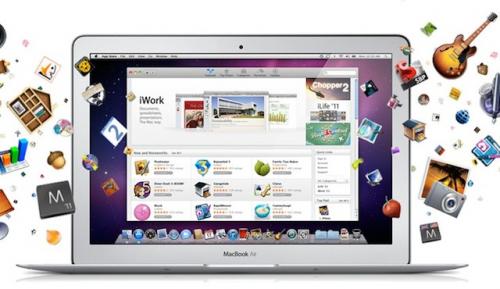
…when a NFC-equipped iPhone is paired with a guest machine, part of the user’s profile includes the apps they’ve purchased through the Mac App Store. The icons for their apps appear on the remote Mac, but aren’t downloaded, our source said.

Once the guest machine is logged into; users would be able to open any of their apps, which would download on demand, although presumably only those from the Mac App Store. Documents too could be accessed and synced using MobileMe from anywhere using this remote login system and once a user leaves, the Mac would wipe any documents and applications.

As MacRumors points out, it is similar to the once promised feature of ‘Home on iPod’ that would have allowed OS X Panther users to sync their Home directory on to an iPod for easy document storage regardless of where you were. Cult of Mac claims that this new feature is currently being developed in OS X Lion but their source stresses that it isn’t guaranteed to become public.

[Via Cult of Mac]

Access Extra Content and Perks

Founded in 2015, Club MacStories has delivered exclusive content every week for nearly a decade.

What started with weekly and monthly email newsletters has blossomed into a family of memberships designed for every MacStories fan.

Learn more here and from our Club FAQs.

Club MacStories: Weekly and monthly newsletters via email and the web that are brimming with apps, tips, automation workflows, longform writing, early access to the MacStories Unwind podcast, periodic giveaways, and more;

Club MacStories+: Everything that Club MacStories offers, plus an active Discord community, advanced search and custom RSS features for exploring the Club’s entire back catalog, bonus columns, and dozens of app discounts;

Club Premier: All of the above and AppStories+, an extended version of our flagship podcast that’s delivered early, ad-free, and in high-bitrate audio.

Learn more here and from our Club FAQs.


AT&T Cracking Down On Unauthorised Tethering

Update: In the email AT&T do explicitly sate that if users do not contact AT&T or stop tethering, they will “automatically enroll you into DataPro 4GB after March 27, 2011”, if the user stops then no change will occur. It would seem that to be automatically upgrading/changing users contract plans, AT&T should have a fairly fool-proof method of checking which users are tethering compared to those just using large amounts of data.

Numerous AT&T users who use MyWi, a jailbreak tweak that allows you to enable tethering without a subscription, yesterday began receiving text messages and emails from AT&T reminding the users that to use your phone for tethering requires a subscription to an AT&T tethering plan.

The notices for most began with a text message that said:

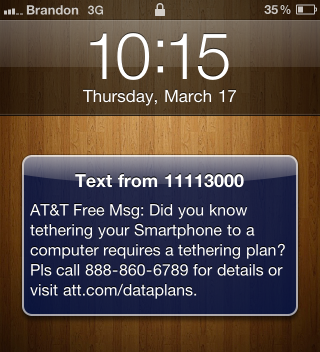
AT&T Free Msg: Did you know tethering your Smartphone to a computer requires a tethering plan? Pls call 888-860-6789 for details or visit att.com/dataplans.

Following this text message many users also received an email (included after the break) which told the user that to “take advantage of [tethering], we require that in addition to a data plan, you also have a tethering plan.” The email also said if the user wishes to continue tethering to sign up to a tethering plan – but did not specify any consequences for continuing to use MyWi without purchasing such a plan.

At this point it is unclear how AT&T knows which users to issue the notices, the presumption is that the notices are going out to any user that uses a large amount of data (some are saying more than 10GB) and are not subscribed to a tethering plan.

Read more

Access Extra Content and Perks

Founded in 2015, Club MacStories has delivered exclusive content every week for nearly a decade.

What started with weekly and monthly email newsletters has blossomed into a family of memberships designed for every MacStories fan.

Learn more here and from our Club FAQs.

Club MacStories: Weekly and monthly newsletters via email and the web that are brimming with apps, tips, automation workflows, longform writing, early access to the MacStories Unwind podcast, periodic giveaways, and more;

Club MacStories+: Everything that Club MacStories offers, plus an active Discord community, advanced search and custom RSS features for exploring the Club’s entire back catalog, bonus columns, and dozens of app discounts;

Club Premier: All of the above and AppStories+, an extended version of our flagship podcast that’s delivered early, ad-free, and in high-bitrate audio.

Learn more here and from our Club FAQs.


#MacStoriesDeals - Thursday

Happy St. Paddy’s Day all over the world and Happy National Unity Day in Italy! Here are today’s deals on iOS, Mac, and Mac App Store apps that are on sale for a limited time, so get ‘em while they’re hot!

Read more

Access Extra Content and Perks

Founded in 2015, Club MacStories has delivered exclusive content every week for nearly a decade.

What started with weekly and monthly email newsletters has blossomed into a family of memberships designed for every MacStories fan.

Learn more here and from our Club FAQs.

Club MacStories: Weekly and monthly newsletters via email and the web that are brimming with apps, tips, automation workflows, longform writing, early access to the MacStories Unwind podcast, periodic giveaways, and more;

Club MacStories+: Everything that Club MacStories offers, plus an active Discord community, advanced search and custom RSS features for exploring the Club’s entire back catalog, bonus columns, and dozens of app discounts;

Club Premier: All of the above and AppStories+, an extended version of our flagship podcast that’s delivered early, ad-free, and in high-bitrate audio.

Learn more here and from our Club FAQs.


New “If You Don’t Have An iPhone” Ads Feature Apple’s Three E-Commerce Stores

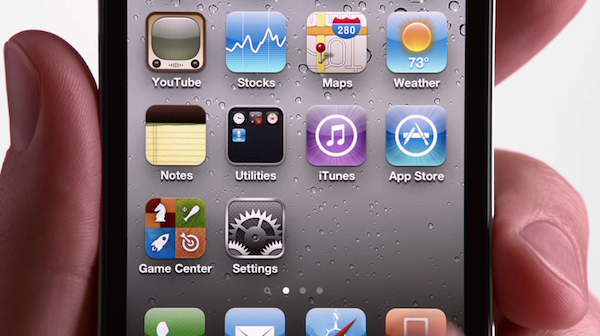
Apple has today added three new adverts for the iPhone to their website and YouTube which have the general theme of “If you don’t have an iPhone” and what you miss out on. The three specific features that the ad’s highlight are the App Store, iPod + iTunes and iBooks which highlight Apple’s strong integration between the iPhone and their three e-commerce stores.

Jump the break to watch the three 30 second ad’s which also all finish with the “Yup, if you don’t have an iPhone, well, you don’t have an iPhone.” phrase - which in typical Apple style is a little self-congratulatory (which you either like or dislike).

Read more

Access Extra Content and Perks

Founded in 2015, Club MacStories has delivered exclusive content every week for nearly a decade.

What started with weekly and monthly email newsletters has blossomed into a family of memberships designed for every MacStories fan.

Learn more here and from our Club FAQs.

Club MacStories: Weekly and monthly newsletters via email and the web that are brimming with apps, tips, automation workflows, longform writing, early access to the MacStories Unwind podcast, periodic giveaways, and more;

Club MacStories+: Everything that Club MacStories offers, plus an active Discord community, advanced search and custom RSS features for exploring the Club’s entire back catalog, bonus columns, and dozens of app discounts;

Club Premier: All of the above and AppStories+, an extended version of our flagship podcast that’s delivered early, ad-free, and in high-bitrate audio.

Learn more here and from our Club FAQs.


WordPress for iOS Updated, Quashes Bugs and Improves UI

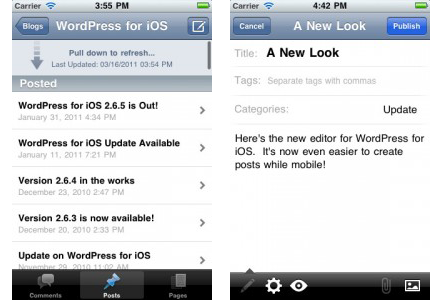
The WordPress iPhone and iPad app just got updated to version 2.7 and it’s a big bug-quashing update that supposedly fixes 117 bugs to vastly improve performance and reduce crashes.

UI has also been retooled with the ‘Post Editor’ interface improved to “make it easier to write and edit posts and pages” with quick access to edit post settings, view attachments and add media. Finally multiple attatchments can be added simultaneously, you can use the “pull down to refresh” feature to quickly update comments, posts and page lists and email and URLs left in comments are now able to be clicked on.

[Via WordPress Blog]

Access Extra Content and Perks

Founded in 2015, Club MacStories has delivered exclusive content every week for nearly a decade.

What started with weekly and monthly email newsletters has blossomed into a family of memberships designed for every MacStories fan.

Learn more here and from our Club FAQs.

Club MacStories: Weekly and monthly newsletters via email and the web that are brimming with apps, tips, automation workflows, longform writing, early access to the MacStories Unwind podcast, periodic giveaways, and more;

Club MacStories+: Everything that Club MacStories offers, plus an active Discord community, advanced search and custom RSS features for exploring the Club’s entire back catalog, bonus columns, and dozens of app discounts;

Club Premier: All of the above and AppStories+, an extended version of our flagship podcast that’s delivered early, ad-free, and in high-bitrate audio.

Learn more here and from our Club FAQs.


#MacStoriesDeals - Wednesday

Here are today’s deals on iOS, Mac, and Mac App Store apps that are on sale for a limited time, so get ‘em while they’re hot!

Read more

Access Extra Content and Perks

Founded in 2015, Club MacStories has delivered exclusive content every week for nearly a decade.

What started with weekly and monthly email newsletters has blossomed into a family of memberships designed for every MacStories fan.

Learn more here and from our Club FAQs.

Club MacStories: Weekly and monthly newsletters via email and the web that are brimming with apps, tips, automation workflows, longform writing, early access to the MacStories Unwind podcast, periodic giveaways, and more;

Club MacStories+: Everything that Club MacStories offers, plus an active Discord community, advanced search and custom RSS features for exploring the Club’s entire back catalog, bonus columns, and dozens of app discounts;

Club Premier: All of the above and AppStories+, an extended version of our flagship podcast that’s delivered early, ad-free, and in high-bitrate audio.

Learn more here and from our Club FAQs.


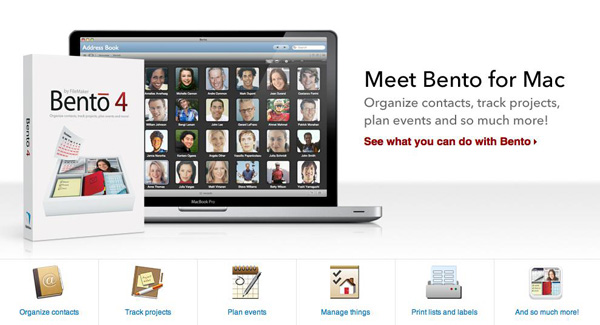
FileMaker’s Bento for Mac Updated to Version 4; iOS Version Updated

Filemaker has released Bento 4 for Mac today, and it’s a major update to the previous version of their popular personal database software. It’s also now available via Apple’s Mac App Store, a first for Bento. It will cost you $49 but if you own a previous version, they will give you a $20 rebate. If you want a ‘family pack’ with 5 licenses, they offer a $99 version of Bento.

New features to Bento 4 include the ability to print labels using Avery and Dymo file formats. Sharing databases is easier with this version as well; the user can export the app’s libraries that are populated with data for other Bento users.

You can also upload a database template to the ‘Bento Template Exchange’ that has over 800 free downloadable templates to use. Bento has also added the ability to use geographical location data, grabbed through Wi-Fi, GPS or cell tower triangulation.

Another new feature adds the ability to lock forms to prevent unnecessary changes from being made to your layout. Improved performance and faster launch times have also been added, along with an easier way to switch from Table to Form view.

Bento for iOS was also updated to version 1.1. Changes include the ability to record voice memos, and sync iCal tasks (when paired with Mac). Multitasking support and better image support for retina displays are also included; here’s the link.

If you want to buy Bento 4 from somewhere other than the Mac App Store, you can always visit an Apple Retail Store or buy it directly from Filemaker’s website.

[via The Loop]

Access Extra Content and Perks

Founded in 2015, Club MacStories has delivered exclusive content every week for nearly a decade.

What started with weekly and monthly email newsletters has blossomed into a family of memberships designed for every MacStories fan.

Learn more here and from our Club FAQs.

Club MacStories: Weekly and monthly newsletters via email and the web that are brimming with apps, tips, automation workflows, longform writing, early access to the MacStories Unwind podcast, periodic giveaways, and more;

Club MacStories+: Everything that Club MacStories offers, plus an active Discord community, advanced search and custom RSS features for exploring the Club’s entire back catalog, bonus columns, and dozens of app discounts;

Club Premier: All of the above and AppStories+, an extended version of our flagship podcast that’s delivered early, ad-free, and in high-bitrate audio.

Learn more here and from our Club FAQs.