

Here are today’s @MacStoriesDeals on iOS, Mac, and Mac App Store apps that are on sale for a limited time, so get them before they end!
Posts in iPad
#MacStoriesDeals - Thursday

Access Extra Content and Perks
Founded in 2015, Club MacStories has delivered exclusive content every week for nearly a decade.
What started with weekly and monthly email newsletters has blossomed into a family of memberships designed for every MacStories fan.
Club MacStories: Weekly and monthly newsletters via email and the web that are brimming with apps, tips, automation workflows, longform writing, early access to the MacStories Unwind podcast, periodic giveaways, and more;
Club MacStories+: Everything that Club MacStories offers, plus an active Discord community, advanced search and custom RSS features for exploring the Club’s entire back catalog, bonus columns, and dozens of app discounts;
Club Premier: All of the above and AppStories+, an extended version of our flagship podcast that’s delivered early, ad-free, and in high-bitrate audio.
Evernote For iOS Gets Some Nice Improvements In 4.1.8 Update
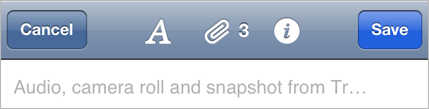
The Evernote iOS app today got a little bit better with 4.1.8 update, bringing some nice additions and improvements. We’re big fans of Evernote here at MacStories, but their iOS app isn’t as good as it could or should be. Thankfully today’s update (although minor) directly addresses some of my complaints which makes me optimistic that the team is hard at work on making Evernote for iOS a truly great app.
Perhaps the best improvement for me is the “better editing, copying, pasting and more”, which translates to faster editing and improved preservation of styles. I’ve been plagued with some weird lag issues when editing large notes, particularly when copying and pasting, so this is much appreciated on my part.
Also new is “predictive note titles” which means Evernote now uses contextual information to create a more appropriate title if you leave the field blank - so no more “Untitled Notes”. Instead it will look at calendar events, location, note contents and other info to create a contextual title that is far more useful and informative. Similarly handy is the new, easier method of sharing a notebook on the iOS app. Now you just need to go to the notebook list, tap on the desired notebook and you’ll see a share icon in the top right corner of the screen.
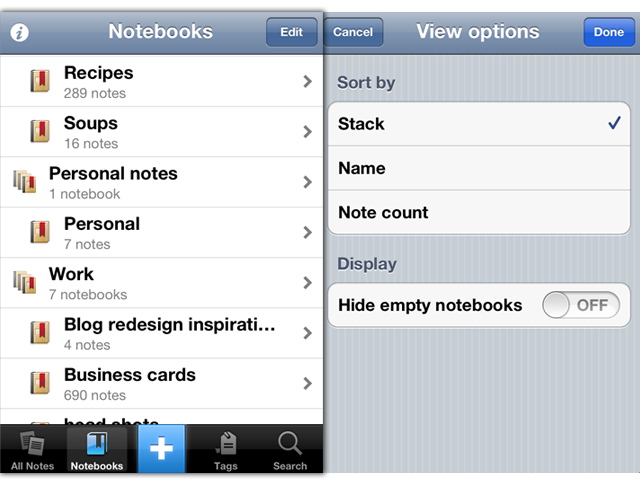
Notebook Stacks, which work well on the desktop are now better represented on the iPhone. They have existed but were hard to enable, now, viewing notebooks will use the Notebook Stacks view as default. Finally this update also includes the standard bunch of bug fixes and also improved stability - including faster and more reliable synchronisation. Now, if only we could get a new design for the iPad app…
For more information the Evernote Blog covers all these new features and improvements to the app in a little more detail.
Access Extra Content and Perks
Founded in 2015, Club MacStories has delivered exclusive content every week for nearly a decade.
What started with weekly and monthly email newsletters has blossomed into a family of memberships designed for every MacStories fan.
Club MacStories: Weekly and monthly newsletters via email and the web that are brimming with apps, tips, automation workflows, longform writing, early access to the MacStories Unwind podcast, periodic giveaways, and more;
Club MacStories+: Everything that Club MacStories offers, plus an active Discord community, advanced search and custom RSS features for exploring the Club’s entire back catalog, bonus columns, and dozens of app discounts;
Club Premier: All of the above and AppStories+, an extended version of our flagship podcast that’s delivered early, ad-free, and in high-bitrate audio.
#MacStoriesDeals - Tuesday

Here are today’s @MacStoriesDeals on iOS, Mac, and Mac App Store apps that are on sale for a limited time, so get them before they end!
Access Extra Content and Perks
Founded in 2015, Club MacStories has delivered exclusive content every week for nearly a decade.
What started with weekly and monthly email newsletters has blossomed into a family of memberships designed for every MacStories fan.
Club MacStories: Weekly and monthly newsletters via email and the web that are brimming with apps, tips, automation workflows, longform writing, early access to the MacStories Unwind podcast, periodic giveaways, and more;
Club MacStories+: Everything that Club MacStories offers, plus an active Discord community, advanced search and custom RSS features for exploring the Club’s entire back catalog, bonus columns, and dozens of app discounts;
Club Premier: All of the above and AppStories+, an extended version of our flagship podcast that’s delivered early, ad-free, and in high-bitrate audio.
#MacStoriesDeals - Monday

Here are today’s @MacStoriesDeals on iOS, Mac, and Mac App Store apps that are on sale for a limited time, so get them before they end!
Access Extra Content and Perks
Founded in 2015, Club MacStories has delivered exclusive content every week for nearly a decade.
What started with weekly and monthly email newsletters has blossomed into a family of memberships designed for every MacStories fan.
Club MacStories: Weekly and monthly newsletters via email and the web that are brimming with apps, tips, automation workflows, longform writing, early access to the MacStories Unwind podcast, periodic giveaways, and more;
Club MacStories+: Everything that Club MacStories offers, plus an active Discord community, advanced search and custom RSS features for exploring the Club’s entire back catalog, bonus columns, and dozens of app discounts;
Club Premier: All of the above and AppStories+, an extended version of our flagship podcast that’s delivered early, ad-free, and in high-bitrate audio.
#MacStoriesDeals - Friday

Here are today’s @MacStoriesDeals on iOS, Mac, and Mac App Store apps that are on sale for a limited time, so get them before they end!
Access Extra Content and Perks
Founded in 2015, Club MacStories has delivered exclusive content every week for nearly a decade.
What started with weekly and monthly email newsletters has blossomed into a family of memberships designed for every MacStories fan.
Club MacStories: Weekly and monthly newsletters via email and the web that are brimming with apps, tips, automation workflows, longform writing, early access to the MacStories Unwind podcast, periodic giveaways, and more;
Club MacStories+: Everything that Club MacStories offers, plus an active Discord community, advanced search and custom RSS features for exploring the Club’s entire back catalog, bonus columns, and dozens of app discounts;
Club Premier: All of the above and AppStories+, an extended version of our flagship podcast that’s delivered early, ad-free, and in high-bitrate audio.
Quick Review: Remarks
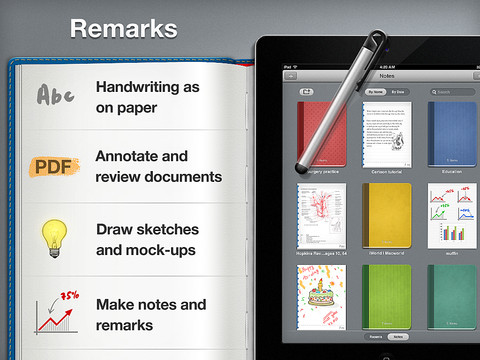
Readdle is today launching their latest iPad productivity app, Remarks. In some ways it is similar to their existing products such as ReaddleDocs or PDF Expert because it features full PDF annotation capabilities, but it is distinctly different because it is the first of their apps to really push the idea of handwriting and note taking as a core function. We’ve reviewed many of Readdle’s products before and by this stage it is clear to us that they make quality productivity software for iOS, so the real question I had when I downloaded this app was what exactly does it let you do and how might it fit into how I work.
What struck me almost instantly was that this app is clearly aimed at being a PDF creation tool, it isn’t like ReaddleDocs or PDF Expert which are more focused as being document management and PDF annotation apps. Remarks may have those same annotation tools but it wants you to create PDF documents, whether it be a handwritten note, drawing or diagram that you want to send to a colleague or perhaps a study note.
In its current form, PDF annotation may be useful but it’s a bit of a pain to get a PDF into Remarks, unlike PDF Expert and ReaddleDocs it doesn’t (yet) have support for cloud services such as Dropbox or SugarSync. Fortunately, this will only be a short-lived annoyance, Readdle plans to have an update ready within two weeks that adds support for cloud services.
Once you do get a PDF into Remarks, you won’t be disappointed - the same powerful annotation functionality that is in Readdle’s other apps is also available in Remarks. So you’ll get the tools to add text, draw shapes and write or draw in freehand on those PDFs, and as usual it is all editable in Preview on the Mac or any other PDF reader such as Adobe Acrobat.
I think for me, this app will come in handy when I need to take down study notes that also require diagrams or illustrations. Things that I can’t do in Evernote, which is very much a text focused note-taking app. In the past I have sketched them down in an exercise book and then for the most important ones I have subsequently drawn them up in Photoshop, OmniGraffle or OmniGraphSketcher, importing those into Evernote. Now I could just use Remarks to make an electronic copy of all my study notes, not just those that are in plain text. I’ll probably still use Photoshop or one of the Omni apps for some of my diagrams that are super important so they are a little neater - but its no longer a requirement.
Before I wrap up, I just wanted to make a quick mention of using a stylus with the iPad. The app does recommend using one and I must admit using a stylus in the context of drawing diagrams and general notes does make a lot of sense - using my finger wasn’t as effective as I had hoped and it soon got tiring. So I foresee myself picking up a stylus in the near future, to make sure I can take full advantage of what Remarks offers.
If you are just looking for an app to annotate PDF documents it might be a better idea to go for PDF Expert or ReaddleDocs. But if you want to do more freeform note-taking, drawing diagrams or creating your own simple PDFs, Remarks is the way to go. Remarks is available in the App Store for $4.99.
Access Extra Content and Perks
Founded in 2015, Club MacStories has delivered exclusive content every week for nearly a decade.
What started with weekly and monthly email newsletters has blossomed into a family of memberships designed for every MacStories fan.
Club MacStories: Weekly and monthly newsletters via email and the web that are brimming with apps, tips, automation workflows, longform writing, early access to the MacStories Unwind podcast, periodic giveaways, and more;
Club MacStories+: Everything that Club MacStories offers, plus an active Discord community, advanced search and custom RSS features for exploring the Club’s entire back catalog, bonus columns, and dozens of app discounts;
Club Premier: All of the above and AppStories+, an extended version of our flagship podcast that’s delivered early, ad-free, and in high-bitrate audio.
#MacStoriesDeals - Thursday

Here are today’s @MacStoriesDeals on iOS, Mac, and Mac App Store apps that are on sale for a limited time, so get them before they end!
Access Extra Content and Perks
Founded in 2015, Club MacStories has delivered exclusive content every week for nearly a decade.
What started with weekly and monthly email newsletters has blossomed into a family of memberships designed for every MacStories fan.
Club MacStories: Weekly and monthly newsletters via email and the web that are brimming with apps, tips, automation workflows, longform writing, early access to the MacStories Unwind podcast, periodic giveaways, and more;
Club MacStories+: Everything that Club MacStories offers, plus an active Discord community, advanced search and custom RSS features for exploring the Club’s entire back catalog, bonus columns, and dozens of app discounts;
Club Premier: All of the above and AppStories+, an extended version of our flagship podcast that’s delivered early, ad-free, and in high-bitrate audio.
Avid Brings Its Video Editing Tools To The iPad With Avid Studio
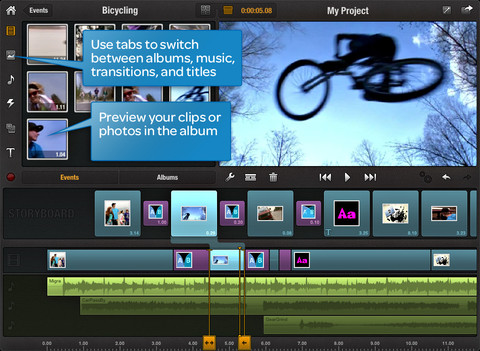
Avid has today brought its “pro-sumer” video production tools to the iPad with its new Avid Studio app. Avid is the maker of a number of high-end video and audio production tools that have also gained appeal in the pro-sumer marketplace.
The new iPad app is claimed to be a “distilled” version of their more complete film-editing applications available on the desktop. This certainly won’t be a replacement for Avid’s full-featured tools, but it may be good option for small projects or for people who want something a little bit more than what Apple’s iMovie for iPad offers. Avid believes the app is a complement to their existing offerings with users able to transfer project files between the apps through iTunes or iCloud.
“We’ve seen a shift in how creation is happening, and it’s really happening on almost any device,” said Tanguy Leborgne, vice president of consumer and mobile technology strategy at Avid. “We think the tablet is more than just a consumer device; more and more people are creating on it.”
Priced at just $4.99 for the first month and $7.99 after that, the app is also priced at a very competitively for its capabilities. Pro-sumer video editing apps on the desktop start at least $60 and go up to $299, with Avid’s desktop app itself at $129.99.
[Via AllThingsD]
Access Extra Content and Perks
Founded in 2015, Club MacStories has delivered exclusive content every week for nearly a decade.
What started with weekly and monthly email newsletters has blossomed into a family of memberships designed for every MacStories fan.
Club MacStories: Weekly and monthly newsletters via email and the web that are brimming with apps, tips, automation workflows, longform writing, early access to the MacStories Unwind podcast, periodic giveaways, and more;
Club MacStories+: Everything that Club MacStories offers, plus an active Discord community, advanced search and custom RSS features for exploring the Club’s entire back catalog, bonus columns, and dozens of app discounts;
Club Premier: All of the above and AppStories+, an extended version of our flagship podcast that’s delivered early, ad-free, and in high-bitrate audio.
Localized Flipboard Content Guides Come To UK & Ireland, Australia and Canada
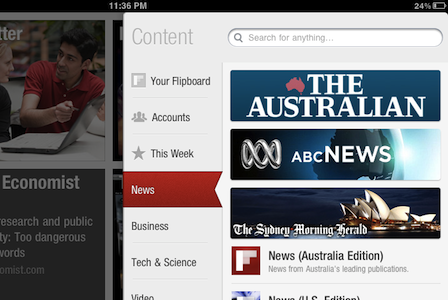
Flipboard has today launched three new localized ‘Content Guides’ in Australia, Canada and the UK and Ireland. Users in these countries will now be shown recommendations that match their location. For example, Australian Flipboard users will now see The Australian, ABC News and the SMH prominently displayed in the News section of the content guide and UK users will be recommended the BBC, The Guardian and The Telegraph amongst others.
The localised recommendations aren’t just for the News section but the other categories such as Business and Tech & Science too. Similarly, it doesn’t mean that no international publications are recommended anymore, it just means that local publications are now recommended more prominently. Flipboard now has six Content Guides for countries outside the US with France, Taiwan and Hong Kong previously receiving localised Content Guides. Flipboard also has a dedicated app for the Chinese market which also has its own Content Guide.
Users in these countries needn’t do anything to receive the new content guides - they are automatically loaded based on the Region Format of the iPad (you can change yours in Settings > General). The Flipboard team does note that they are working on a way to easily change regions from within the app so you can look at recommendations for other regions.
[Flipboard Blog via The Next Web]
Access Extra Content and Perks
Founded in 2015, Club MacStories has delivered exclusive content every week for nearly a decade.
What started with weekly and monthly email newsletters has blossomed into a family of memberships designed for every MacStories fan.
Club MacStories: Weekly and monthly newsletters via email and the web that are brimming with apps, tips, automation workflows, longform writing, early access to the MacStories Unwind podcast, periodic giveaways, and more;
Club MacStories+: Everything that Club MacStories offers, plus an active Discord community, advanced search and custom RSS features for exploring the Club’s entire back catalog, bonus columns, and dozens of app discounts;
Club Premier: All of the above and AppStories+, an extended version of our flagship podcast that’s delivered early, ad-free, and in high-bitrate audio.