Brad Ellis has some interesting ideas and examples on how Apple could shift the iOS interface from top-oriented navigation bars to thumb-friendly cards and sheets sitting towards the bottom of the screen:
The navbar has been essential part of iOS since Apple released the first developer kit, and it has served us well. But it’s time to let go.
Let’s agree to stop sticking important buttons to the top of the screen. Better navigation is within reach.
I think Ellis is onto something here. After Apple Music and Apple Maps in iOS 10, I’d be surprised if we don’t get more of these “reach navigation” redesigns in iOS 11 (which would also make sense if Apple is releasing an iPhone with a taller screen later this year).
With WWDC just around the corner, the Connected trio share their hopes and dreams for Apple’s keynote.
On this week’s Connected, we share our final WWDC wishes before Apple’s big annual event. You can listen here.
Sponsored by:
- Jamf Now: Manage your Apple devices from anywhere. Get your first three devices free!
- PDFpen 9, from Smile: Everything you need for more powerful PDF editing
On this week’s episode of AppStories, we cover more app pricing models including tip jars, patronage, fan clubs, bundles, and in-app merchandise sales.
Sponsored by:
Federico and John cover more app pricing models including tip jars, patronage, fan clubs, bundles, and in-app merchandise sales.
Read more
Good follow-up by Joe Steel (who’s been covering and critiquing the Apple TV for a while) to last year’s tvOS wishes, which were already spot-on.
I found his assessment of the Siri Remote sadly relatable:
This remote was an abomination that should have never made it out of the design lab it was drafted in. It was conjured up by designers from another world who only had TV remote controls described to them using words in their native tongue. I want something that can be held comfortably, doesn’t shatter, and has asymmetry that you can feel to know what you are holding, and what you are pushing, without looking at the tiny monolith. I wanted it in 2015, and I still want it.
Whatever touch surface they include should be fine-tuned to work with a human thumb instead of whatever capuchin monkey the remote’s original designers were imagining.
Justin O’Beirne is back with another in-depth analysis of Google Maps and Apple Maps, with a focus on how Google has taken a different approach over the past year:
Shortly after I published my Cartography Comparison last June, I noticed Google updating some of the areas we had focused on:
Coincidence or not, it was interesting. And it made me wonder what else would change, if we kept watching. Would Google keep adding detail? And would Apple, like Google, also start making changes?
So I wrote a script that takes monthly screenshots of Google and Apple Maps.1 And thirteen months later, we now have a year’s worth of images.
The screenshot comparisons in his post perfectly demonstrate Google’s iteration and Apple’s relative stagnation.
Speaking from personal experience, Google Maps has considerably improved in my area in the past year, while Apple Maps has remained essentially the same. Which isn’t to say that Apple Maps is bad – Google simply has an edge over local business information and they’re evolving at a faster pace than Apple. To me, Apple Maps looks and feels nicer; Google Maps seems smarter and it has modern features I’d like Apple to add.
I wonder what Apple has in store for WWDC and if they should consider separating Maps from their monolithic software release cycle in the summer.
(See also: O’Beirne in May and June 2016.)
The most common questions from Club MacStories members involve some kind of file conversion. Whether it’s about converting PDFs to images (by far, the most frequent request we receive for this column) or exporting documents to formats that aren’t natively supported on iOS, I’ve read dozens of emails about converting files with Workflow over...
On this week’s Canvas, we welcome special guest Merlin Mann to discuss opportunities for improvements that may – or may not – arrive in iOS 11. I had a lot of fun doing this. You can listen here.
Sponsored by:
- SaneBox: Clean up your inbox in minutes. Sign up for a two-week free trial and a $20 credit.
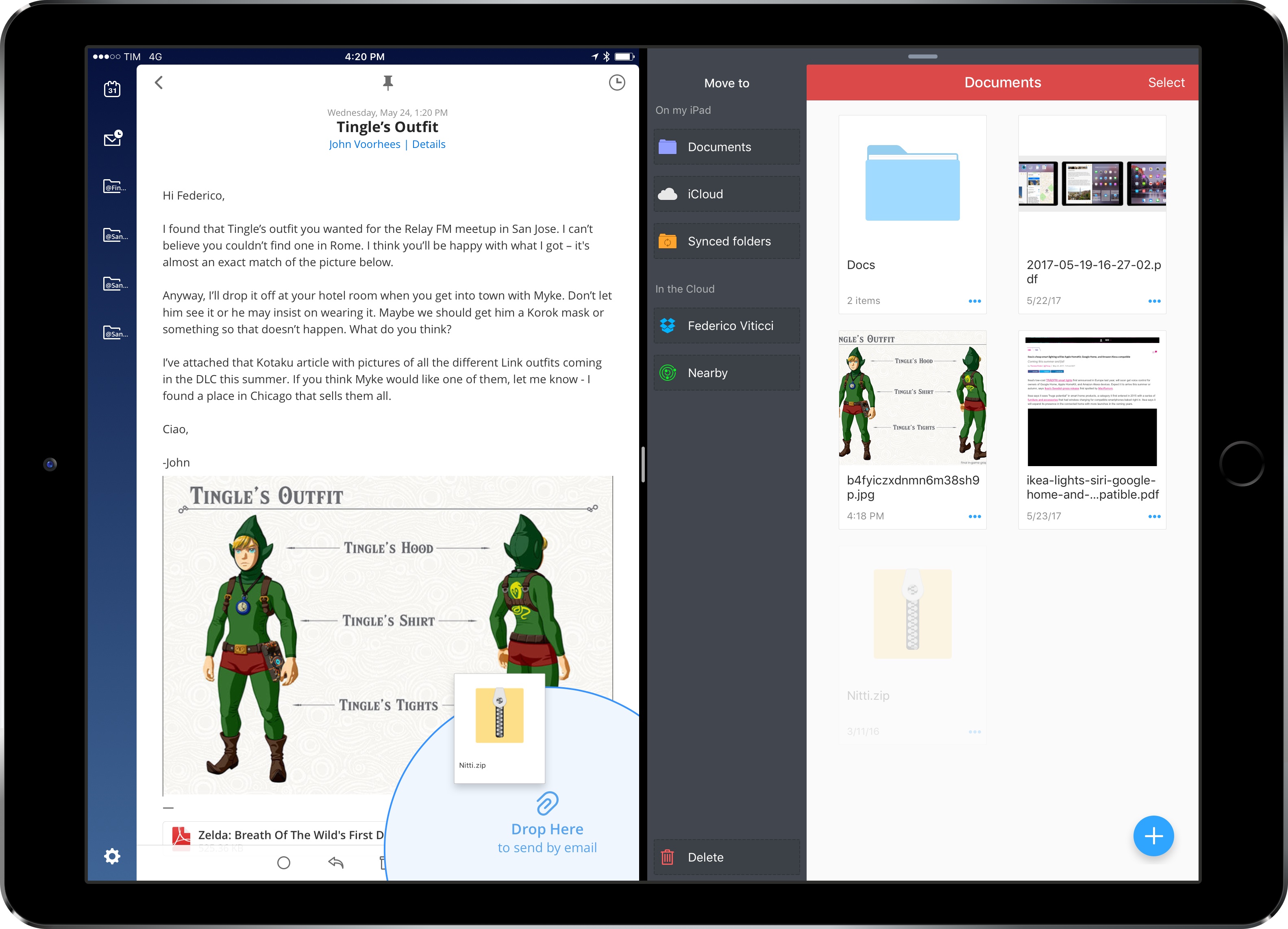
In my iOS 11 wish list for iPad and concept video, I focused on system-wide drag & drop – a feature that could reshape how iPad users move documents and data between apps. Readdle, makers of the popular Spark and PDF Expert, aren’t waiting for Apple to add a native drag & drop framework to iOS, though. Today, in addition to the release of Documents 6, the company is updating most of their iPad apps with a custom drag & drop feature that simplifies the transfer of documents between two apps in Split View. I’ve been testing this functionality for the past week, and, even if it’s not system-wide iOS drag & drop, it’s been enough to pull me back into Spark and PDF Expert – at least for now.
Read more










 John
John