


For the people that use Evernote religiously, it’s an invaluable too. And if you aren’t using Evernote, maybe you should reconsider. Imagine walking down the street with your iPhone, and see you a Tate Real-estate sign promoting a home for sale. Wanting to remember the information later, you simply take a picture of the sign and the flyer with Egretlist, adding it to a to-do list for your agent to check up on. When you get on your Mac at home, you simply search, “Tate,” and Evernote pulls up the to-do note and the picture using its amazing image search technology. That as a matter of fact, was a similar use case for me as I browse apartments. Read more
Felt Tip Couch to 5K Review & Giveaway!
Got cottage cheese for thighs? How bought that muffin top? Moobs got you down? Now I’m not making fun of anyone, but the casual American lifestyle often carries some weight with it. We enjoy our cheese-puffs (do not get me near cheeseburger flavored Doritos), our soda, and our time in front of the television. In fact, I’d say it’s safe to say that we’re a pretty sedentary society. If you already lead an active lifestyle by choice, then I gotta hand it to you guys: please continue to lead the example. Being a reviewer and a college student, a lot of time is spent writing for MacStories (which admittedly has been slack this week), doing homework, or blowing up protoboards in the labs on campus. But you have to find time to at least get out, get active, and do something.
I’m not that tall (I’m under six foot), and right now I weigh 175. I was 180. My target weight is around 155, and it’s certainly possible now that I’ve started the Couch to 5k program. I want to feel good again - like I’m actually in my twenties. So being the geek I am, I decided to hunt out some iPhone and iPod touch applications that would aid me in completing the program. Believe me, holding a wrist watch and having to remember the training times with an attached sticky note sucks.
I got in contact with Felt Tip Inc., who makes an application by the name of the program. Their c25k app is quite excellent, and a personal recommendation for iPhone owners looking to make a change in their lifestyle as well. Running is an incredibly wonderful feeling, so why not start things off with a great app designed to get you running five kilometers non-stop.
Read more
Droid: From a Mac User’s Perspective
Being a Mac review site, Federico and I own some pretty serious Mac hardware. He with a 15” Macbook Pro and iPhone, and I with my 13” Macbook and Droid. It’s a pretty wonderful relationship, Apple products and us.
…wait, did I say Droid? Read more
iPhone OS 4.0: Multitasking, Enterprise, and Folder Thoughts
Oh my goodness, where do I start on iPhone OS 4.0? I’m sure you guys already know about the features. You’re obsessed with multitasking and perhaps a little concerned about iAds. But what’s really captivating is just how much this will change mobile productivity. I want to focus on what the next iPhone OS will deliver you, how it compares to the competitors’ current methods, and how it will change the way you use your iPhone for your daily activities. Read more
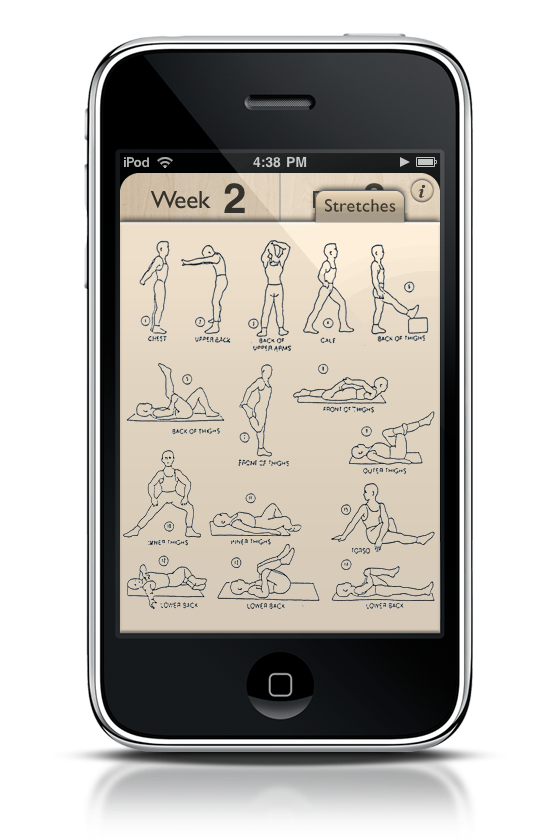
Couch to 5k: Get Ready for MacStories Fitness Camp!
I woke up last Monday, belly first, arm hanging over the side of the bed as the alarm chimed. It was quite early, 6:30 to be exact. I kind of tossed and turned for a bit before lumping the sheets off to one side and planting my feet solidly on terra firma. Yup, I was awake.
A quick banana and glass of milk later, I started my leg stretches, making sure to pay special attention to my quadriceps. With a little jig and a tap of my iPod, I headed out my door on what was a relatively crisp, cool morning. Five minutes later, and I was off running. Literally. Read more
Radium, A Fantastic Internet Radio Application. Review and Giveaway!
Radium is one of those apps I fell instantly in love with. So much in fact, it’s gotten me interested in Internet radio again. While I’ve checked out applications like Snowtape and Radio Gaga, I didn’t want the recording features. That sounds crazy, but I don’t want to manage another library or window of “stuff.” And that’s the problem I have with things like Pandora or Last.fm too: I need a dedicated browser window, widget, or fat application just to stream an hour’s worth of alternative music. So when I was contacted about Radium, I was skeptical, but optimistic. Five minutes after using it, I was sold. It’s perfect for me. Read more
ReadMore, The Reading Log for Everyone
With the induction of the iPad on Saturday, the flood gates will certainly open to a whole new generation of book worms and novelists looking at uncharted, digital territory. I get the feeling that reading books and popular stories, rather than quick text content such as status messages and RSS content, will quickly become more popular among teens and young adults. And with all the new content being devoured, some of us data nuts are gonna wanna be-able-ta track our reading stats. Well there’s an iPhone and iPod Touch app for that (at least until you’ve run out of books to read smarty pants). Read more
Fuel Collective Friday Finale - Win Everything

This week, you got a chance to read up on the company and the applications that make Fuel Collective a pleasure to do business with if you have a Mac. They produce a video converter called Permute, and tools for developers and designers such as Snippet, Swatch, and PunchClock. On top of all that, they have a great Library manager called Contents which we reviewed yesterday. But now it’s the end of the week, and we’ve run out of applications to review. Still, we feel things need to end with a bang. So why not giveaway everything? Read more
Contents, The Library Unearthed. Review and Giveaway!
So folks, we’ve almost run out of applications to review from Fuel Collective, but we got one more to review before coming to a close. Last by not least is Contents, which makes navigating your Mac’s Library folders a breeze. Being something that a lot of users don’t understand, Contents allows users to navigate this dark alley by illuminating the path with its ingenious drop down menu-based system, easy search functions, preferences cleaner, installation utilities, and backup tools. It’s powerful because finally, you can manage everything you’ve always wanted to without the Finder. Read more