



Here are today’s @MacStoriesDeals on iOS, Mac, and Mac App Store apps that are on sale for a limited time, so get them before they end!
Review: #NowPlaying with NowPlayer
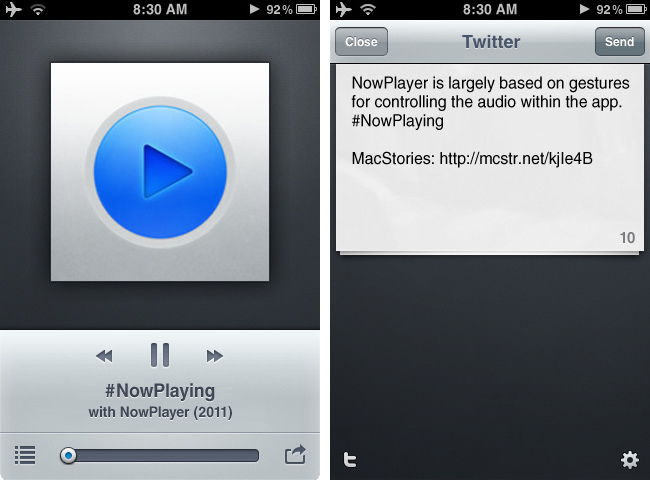
There are many iPhone audio player apps available, yet only a few really stand out. My Artists, which we have reviewed in the past, is one of our favorites and is very feature filled. Notes on artists, links to videos, and lyrics are just some some of the extended features. However, most of the time I don’t need these features and if I’m on AT&T’s stellar EDGE network, many of these features take too long to load on my iPhone.
I jumped on a new beta some time ago from @misecia for an app called NowPlayer. Without ever using it, but only seeing mock-ups on Dribbble, I was very interested. The interface is sexy and every pixel has been placed perfectly. Now, I know that usability is important too, and this app doesn’t fall short in that category either. NowPlayer is largely based on gestures for controlling the audio within the app: you can control your music with swiping or tapping with your finger on screen. These gesture controls are perfect for when you’re exercising or typing up a review and don’t want to look over at your iPhone’s display. The gesture system is totally customizable too: two-finger tap is used to play/pause, but it can be changed to a double tap if you desire; you can then perform a three finger tap to auto-send a tweet, swipe left/right to change tracks, swipe up/down to change the volume, and double tap with two fingers to change shuffle mode. There are a few Easter eggs for extra options, some still haven’t been found! Don’t worry, as there are onscreen controls, too, and they are minimal and look great as well. Read more
#MacStoriesDeals - Wednesday

Here are today’s @MacStoriesDeals on iOS, Mac, and Mac App Store apps that are on sale for a limited time, so get them before they end!
Wren for Mac: Tweet Without Distraction
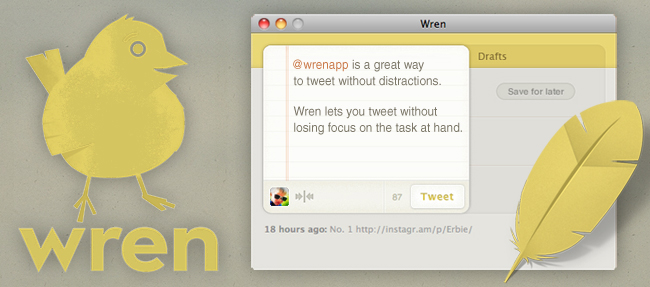
Many of us live in the Twitter world. We use it for breaking news, short conversations, giving input or sharing links with friends. It’s all about comradery one-hundred and forty characters at a time. Social networking is an important aspect of life these days but there are times that we need to detach our brains from the newest iPhone 5 rumors or who @CodyFink was seen with in South Beach last weekend. For those times we need only to tweet without distractions, there is Wren.
Wren is the hatchling of designer Andrew Ramos and developer Kevin Smith. This Mac app lets you tweet without losing focus on the task at hand. Like blinders for your workday and like a librarian for your Twitter experience, Wren lets you tweet without distraction. Wren isn’t a feature-filled Twitter client; it will let you tweet (of course), save drafts for later tweeting, let you use your favorite link shortening service, auto-complete usernames of people that you follow, show and hide app with customizable global keyboard shortcut, and quickly see what and when you last tweeted.
Wren has been beautifully designed with soft, subtle colors and great attention to detail; from the notebook styled composition area to the URL shortener glyph, one can tell that the team took their time to design a great app. The reason Andrew and Kevin made Wren was to avoid distraction and not lose productivity. Turning off Twitter for a few days is great for productivity, but there’s no way to tweet what’s being worked on or funny overheards (OH:) without opening a full-featured Twitter app. Wren is a great way to tweet without seeing your timeline, especially those of us who follow over 500 accounts (like me).
The app is available now in the Mac App Store for $4.99, and the guys even created a really nice video explaining why they created Wren, which you can check out after the break.
Read more
#MacStoriesDeals - Tuesday

Here are today’s @MacStoriesDeals on iOS, Mac, and Mac App Store apps that are on sale for a limited time, so get them before they end!
#MacStoriesDeals - Friday

In case you missed yesterday’s Deals, we kept them in today as well. Happy early Father’s Day! Here are today’s @MacStoriesDeals on iOS, Mac, and Mac App Store apps that are on sale for a limited time, so get them before they end!
#MacStoriesDeals - Thursday

Happy early Father’s Day! Here are today’s @MacStoriesDeals on iOS, Mac, and Mac App Store apps that are on sale for a limited time, so get them before they end!
#MacStoriesDeals - Wednesday

Here are today’s @MacStoriesDeals on iOS, Mac, and Mac App Store apps that are on sale for a limited time, so get them before they end!
BBC Reporters Getting iPhone App to Broadcast Breaking News

Journalism.co.uk is reporting that the BCC in the United Kingdom is working on their own iPhone app that will let its reporters in the field record video, pictures and audio, and then incorporate the data directly into the BBC’s network.
The iPhone app is going to be available to BBC employees this month, giving their field reporters the ability to broadcast while on a 3G or WiFi network. This could be the perfect tool for those that report breaking stories and don’t have the professional A/V equipment with them at the exact moment.
The BCC sees mobile device use as a “logical extension of what [it] can do already” but this will be a great experiment to see how far they can take it.
Martin Turner, head of operations for news, said that “reporters have been using smart phones for a while now but it was never good quality… Now it is beginning to be a realistic possibility to use iPhones and other devices for live reporting, and in the end if you’ve got someone on the scene then you want to be able to use them.”
I can see how important this could be to reports on the scene of a breaking news story, a sporting event or an impromptu interview.
[via TNW]