Igloo: An Intranet You’ll Actually Like [Sponsor]

Why invest in the latest, sleekest devices if you are going to use them to stare at an intranet website that looks like it was built in the 90’s?

Not only can Igloo be customized to look exactly like your brand, but with its responsive design, it’s automatically optimized for almost any device you’re using, including the latest iPhone 6 or 6 Plus. And just like your favourite Apple devices, Igloo helps you do your best work.

Share files, coordinate calendars, provide status updates and manage projects. Igloo’s not just for your traditional intranet stuff like HR policies and expense forms. It also lets you work better together with your teams. And it keeps getting better.

Our latest upgrade, Viking, gives you more control over how you interact with documents, gather feedback and make changes. We’ve even added the ability to track who has read critical information (like read receipts in your email, but less annoying) to keep everyone on the same page.

Not convinced yet? We understand love doesn’t happen overnight. If you sign up now, we will let you try our platform for free for as long as you want.

Our thanks to Igloo for sponsoring MacStories this week.


The War Over Who Steve Jobs Was

Steven Levy, writing at BackChannel on the upcoming Becoming Steve Jobs:

Though I have even less reason than Schlender to claim that ours was anything but a professional relationship, I believe I did get to see Steve as the man in full described in Becoming Steve Jobs. Though as with Schlender, Jobs and I had differences due to the diverging agendas of reporter and subject, we saw eye to eye on many things, including the amazing transformation that technology had on society, the importance of clear, simple design, and the greatness of Bob Dylan. And I am very thankful that, unlike Schlender (whose baffling refusal to see Jobs one last time seems to be tied to unique circumstances regarding not just journalism, but the writer’s health issues), I was able to properly say goodbye to Jobs in the last year of his life. Taking all this into account, I believe that Schlender and Tetzeli have indeed captured elements of Steve Jobs not found in the official biography.

Permalink

Virtual: Free To Start

This week Federico and Myke discuss Nintendo’s mobile gaming news, before Federico quizzes Myke on PS4.

Plenty of Nintendo talk on this week’s Virtual (more than usual, given recent announcements), but also my questions on which PS4 games to buy right now. You can listen to the episode here.

Sponsored by:

  • Igloo: An intranet you’ll actually like, free for up to 10 people.
Permalink

Drafts and Workflow Integration

I missed this last week, but Drafts has been updated with a useful Workflow integration to easily create actions that can trigger workflows with text. From the Agile Tortoise blog:

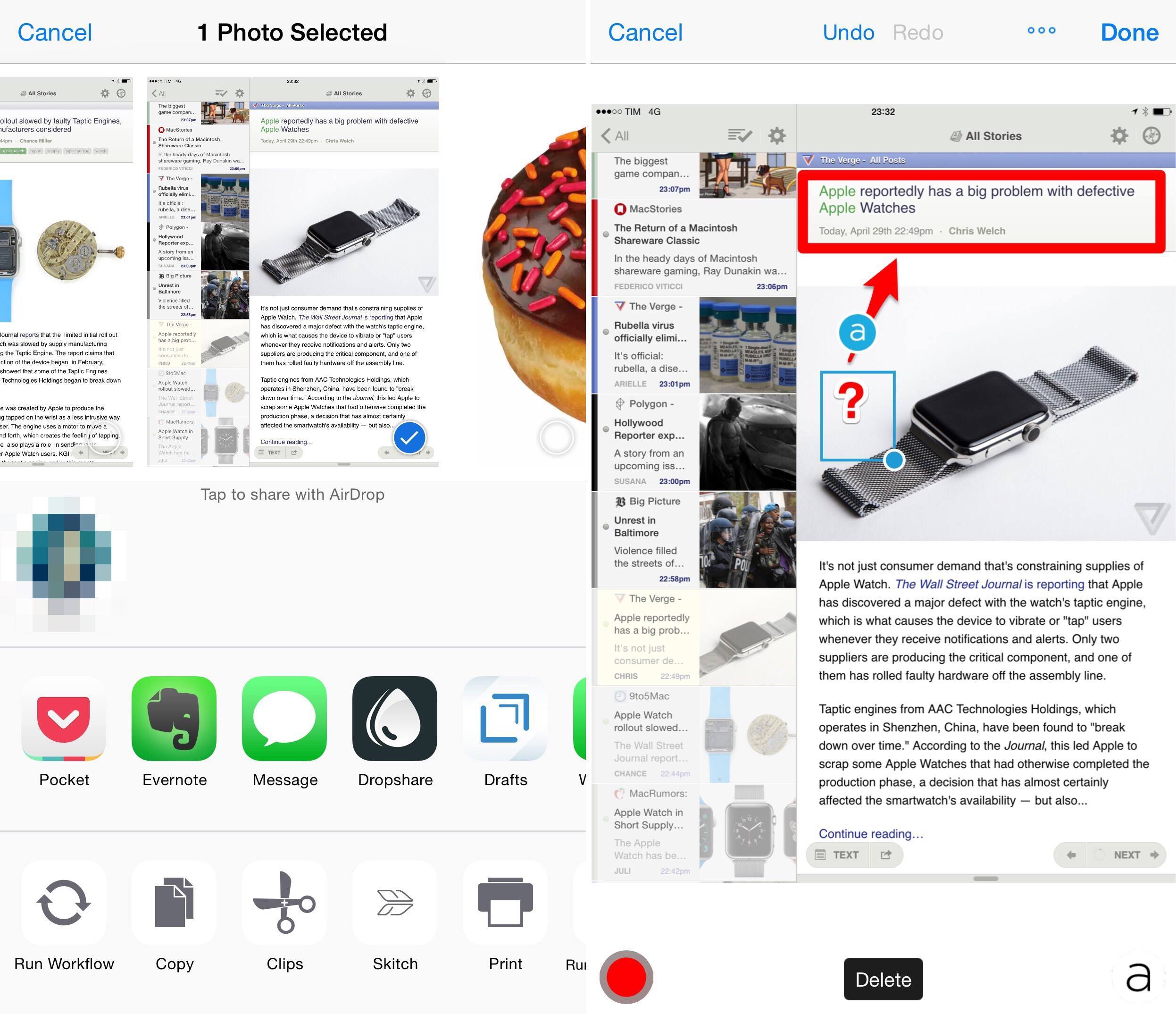
Drafts 4.1.2 has added a new “Run Workflow” action step to provide integration with Workflow app from Desk Connect. This step makes it easy to fire an workflow in Workflow app with a single tap. The action step can be configured with the name of a workflow, has a template to construct the text sent to the workflow and optional flag for whether to return to Drafts after execution. Under the hood, Drafts is constructing x-callback-url URLs to trigger the workflow, but this makes it much easier for the novice user than constructing them yourself in Open URL action steps.

Similarly, the latest version of Workflow has added a shortcut to create a Drafts action:

As an added bonus, the latest update of Workflow has added an option, when viewing settings on a workflow, to “Add to Drafts”, which will open Drafts and automatically create an action, setup with a “Run Workflow” action step, ready to go. This feature will be rolling out over the course of the next couple of days, so if you do not see it immediately in Workflow, try again later. For more details, read the Run Workflow action step documentation.

I’m using this to quickly send links copied from Twitter (which still doesn’t support the iOS 8 share sheet) to Workflow via Drafts, and it works well.

Speaking of Drafts, the app is coming to Apple Watch.

Permalink

Behind the Scenes of Apple’s Secret Health and Fitness Lab

Apple, known for keeping its product developments under the strictest of lock-and-key, gave ABC News exclusive access into its top secret health and fitness lab, where only Apple employees became test subjects for the new Apple Watch.

Apple engineers, managers and developers have been secretly volunteering for the past year in this state-of-the-art lab to participate in rowing, running, yoga and many more fitness activities in order to collect data for the Apple Watch’s inner workings.

ABC News got exclusive access to Apple’s secret fitness lab, where the company tested the fitness and health functionality of Apple Watch and iOS for years. I needed to watch the video with a VPN (ABC is regionally restricted to the U.S.; YouTube version embedded below), and it was worth it: Apple has set up an entire facility with equipment and machinery worth millions of dollars to accurately calculate calorie burn and the response of the human body to various conditions – this includes special climate chambers, breathing masks, and even yoga tests.

This is impressive, and it reinforces the idea that health and fitness are going to be a big deal for Apple going forward. The video makes me even more excited about the potential of Apple Watch as a daily fitness companion.

Permalink

Das Keyboard 4 Pro for Mac Review

The Das will totally dominate smaller desks

The Das will totally dominate smaller desks

Das Keyboard 4 Professional for Mac

Das Keyboard 4 Professional for Mac on Amazon

I like almost everything about the new Das Keyboard 4 Pro, but what I like best is the big volume knob on the top right corner. Not only is it way funner to use than boring old keys, but it’s also easier and quicker. You can lean in from anywhere and quickly adjust the volume without decoding your keycaps from upside down.

In fact, the whole top-left media control panel is pretty sweet. But more on that in a moment. First, what is this thing?

Read more


Connected: They’re My Clapping Phones

This week, the boys talk about Apple Watch apps, Force Touch Trackpads, the Apple Store and Apple’s past (and possible future) moves in television. Oh, and Teletext.

I enjoyed our discussion on upcoming Apple Watch apps on this week’s Connected (see Apple’s webpage).

And, obviously, the underappreciated beauty of Teletext. You can listen to the episode here.

Sponsored by:

  • lynda.com: An easy and affordable way to help individuals and organizations learn. Free 10-day trial.
  • Igloo: An intranet you’ll actually like, free for up to 10 people.
  • PDFPen 7 for Mac, from Smile: Take control of PDF’s on your Mac.
Permalink

‘We Change Every Day’

Fast Company published a great interview with Tim Cook earlier this week. I liked the sections on life at Apple after Steve Jobs, initial response to the Apple Watch, and remembering to keep core values intact. And especially this bit:

Are there any fundamental ways in which you are letting go of parts of Steve’s legacy?

We change every day. We changed every day when he was here, and we’ve been changing every day since he’s not been here. But the core, the values in the core remain the same as they were in ’98, as they were in ’05, as they were in ’10. I don’t think the values should change. But everything else can change.

Yes, there will be things where we say something and two years later we’ll feel totally different. Actually, there may be things we say that we may feel totally different about in a week. We’re okay with that. Actually, we think it’s good that we have the courage to admit it.

Permalink

Blink: Effortless Affiliate Link Generation on iOS

Launching today, Blink is a new Universal iOS app from Squibner that quickly generates affiliate links for content from the App Store, Mac App Store, iTunes Store and iBooks Store. If you’re a member of the iTunes affiliate program you’ll know that you don’t want to be manually editing iTunes links with your own token and campaign tag – Blink automates that process on iOS, making it quick and effortless.

Before I continue, a quick introduction to the world of affiliate linking for those that are unaware. Essentially, anyone can register for the iTunes affiliate program and they will receive their own affiliate token (a series of letters and numbers). If they generate an iTunes URL that includes this affiliate token and share that link with others that click on it, they will receive a (small) percentage of any iTunes sales that flow from any clicks. For many small and independent sites, such affiliate programs are a valuable source of income (and yes, MacStories uses affiliate links). Apple’s website has more details if you’d like to learn more about the technical details of affiliate linking and perhaps even sign up.

Read more