We have many great deals for #MacStoriesDeals’s Cyber Week 2012. Be sure to check our Cyber Monday 2012 page for more ongoing deals!
You can find us as @MacStoriesDeals on Twitter. Happy Holidays from the MacStories Team!

We have many great deals for #MacStoriesDeals’s Cyber Week 2012. Be sure to check our Cyber Monday 2012 page for more ongoing deals!
You can find us as @MacStoriesDeals on Twitter. Happy Holidays from the MacStories Team!
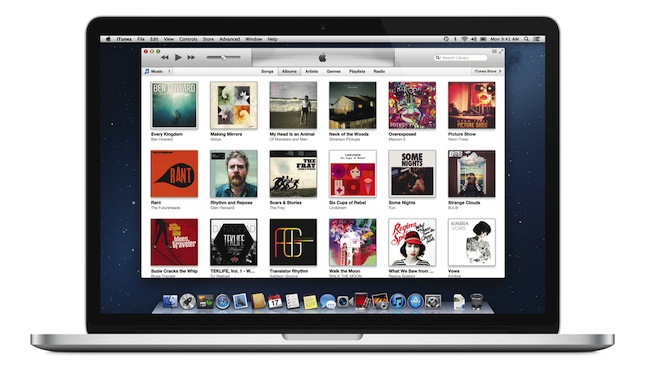
Officially announced at the iPhone 5 media event on September 12, Apple today released iTunes 11, the next major version of the media player/manager for OS X. At the end of October, Apple delayed the original release of the software, saying that it would come out “before the end of November”.
The new iTunes features a new edge-to-edge design that is reminiscent of the Music app for iPad. Album art flows across the display — clicking on an album expands album info as opening a folder does on iOS. iTunes also brings popovers that present a drop down of upcoming songs, and improved search results as you filter through music in your library. One of the big new features is expanded view, which lets users see all the songs of an album in place without opening a different view. The background of an album in expanded view is automatically generated by iTunes based on the item’s artwork.
The new MiniPlayer, unlike previous designs, shows album artwork and gives the option to manage playlists and see upcoming songs as well through the new Up Next feature. From the MiniPlayer, users can now also search for a song in their library by hitting the search button; and to go back to the main screen, all they have to do is click the “expand” icon next to the close button.
The built-in iTunes Store underwent a facelift, too. Inspired by iOS 6, the Store now comes with a cleaner look, carousel-like banners for featured items, and access to a Preview History to check out all media you’ve previewed in chronological order. iCloud integration makes sure purchases are available on every device, and, with iTunes 11, iCloud also syncs position for movies, TV shows, podcasts, iTunes U lessons, and audiobooks users are playing on a device.
iTunes 11 is available for download from Software Update. Our first impressions and screenshots directly below.
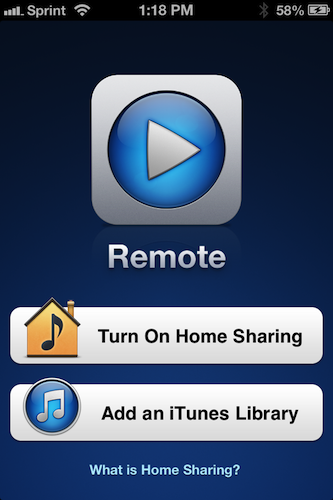
Update: Apple has also released Remote 3.0. The new app supports Up Next, it’s got new view options, and the iPad’s interface highly resembles iTunes for Mac with custom album backgrounds.
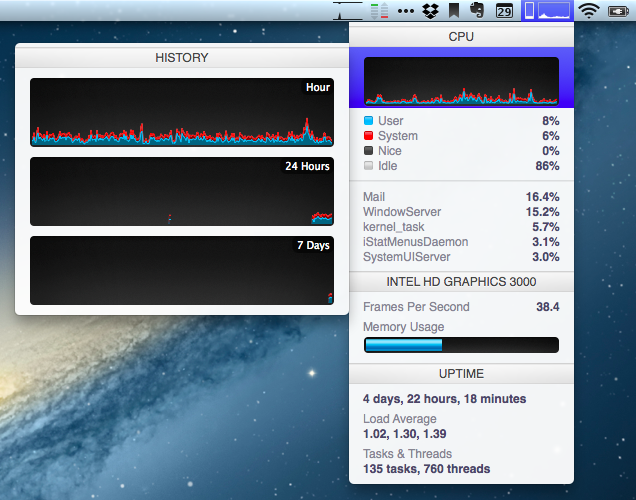
I often mention iStat Menus by Bjango here on MacStories: it is, in fact, one of my must-have apps for Mac. I have been using version 3.0 for years: iStat Menus 3 provided a complete, yet user-friendly and accessible way to keep an eye on your Mac’s hardware (CPU, fans, GPU, RAM, and so on) and other data (network, time zones, battery status) with a series of dropdown menubar windows.
Bjango has now come out with iStat Menus 4, and the new version has some interesting and, for me, welcome changes. Aside from the usual bug fixes, Retina support and better Mountain Lion compatibility, iStat Menus 4 introduces a refreshed look that brings consistency with Bjango’s other iStat app, iStat 2. iStat Menus now features the same style for graphs and charts as iStat 2, and, even better, it comes with the same History menu to view a component’s performance over time. For instance, you can mouse over the CPU’s main graph and check out a second menu with History for the past hour, 24 hours, and 7 days. There are more time-related view options available, and there’s more to customize in the app’s Preferences (which have also been redesigned, and it took me a while to get used to them at first). I appreciate the consistency with iStat 2, and I like History because it lets me easily check my network’s conditions over time.
There are several new features in iStat Menus 4, but I’d like to mention the ones I personally use. The Network widget has a new per-process section to quickly see which process is consuming bandwidth (think a mini version of Little Snitch); the Time widget still supports different time zones (I use this on a daily basis), but it’s now cleaner and it has support for calendar events to get a quick summary of what you need to do on a specific day. It’s no Fantastical, but it’s a nice and unobtrusive addition.
I’m sure there are more powerful ways to check on the status of a Mac’s hardware components and processes. But I just need to see “what’s going on”, and in that regard iStat Menus 4 fits perfectly with my needs. iStat Menus is $16 on Bjango’s website.
I wouldn’t call myself a calendar power-user.
Ever since I started organizing the things I have to do with a system I can trust, I’ve faced a workflow conundrum: is this a task or a calendar event?
I know that there’s a difference between so-called “actionable items” and time-based events. Maybe I’m not hooked up right, but I’ve been looking for a way to immediately visualize, in a single interface, all the things that I have to do on a specific day. Independently from their actionable (“you need to do this”) or time-based (“you need to be here”) status, I want a software that, like a personal assistant, tells me exactly what I need to get done.
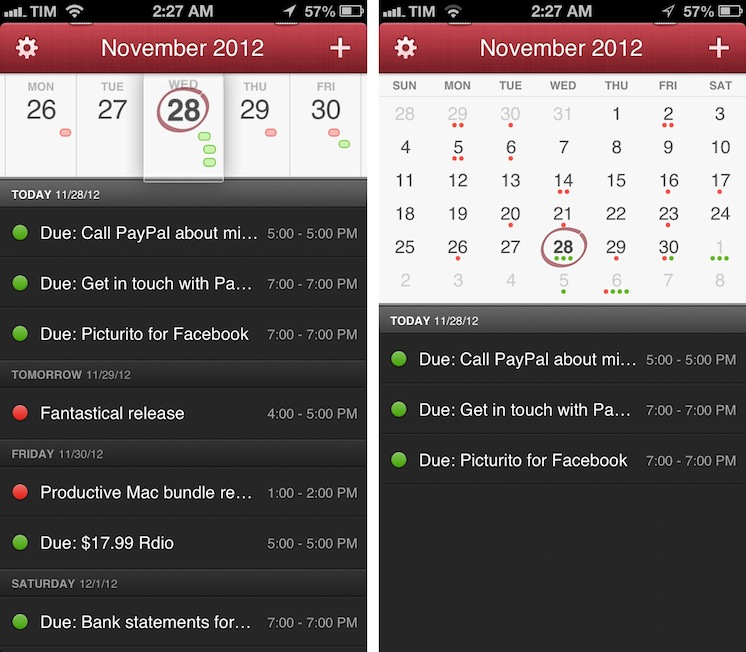
I have found such system in displaying my OmniFocus items inside my calendar. And now, the system has been enriched by the addition of Fantastical for iPhone.
I’ve been a fan of Fantastical for Mac since I first tried it in May 2011. Replacing iCal’s overly complicated interface with a simple menubar overview of your upcoming events, not only did Fantastical show that a simpler way to access your calendar was possible, it also profoundly changed the third-party OS X development scene with its use of natural language input. Futuristic as a concept, in practice Flexibits managed to bundle a powerful language parser within Fantastical that would recognize commands like “Coffee with Chris tomorrow from 6 to 7” and deconstruct them as specific values for a calendar event. It’s not a fancy gimmick: rather than clicking buttons and menus, I constantly find myself invoking Fantastical on a daily basis, typing away like I’d normally do in a blog post or note, saving events in just a few seconds.
Fantastical is one of my must-have apps for OS X. But how could Flexibits ensure its soul wouldn’t get lost in the transition to iOS? Read more
Sometimes innovation comes from unexpected places. Personally, I wouldn’t have thought Expedia would turn out to be one of the most well-designed, innovative, and fun apps I’ve tried on iOS lately. But it is. Released two weeks ago, Expedia 2.0 is a universal app developed by Mobiata, and it is an example of how a hotel-booking application should scale elegantly across different displays without providing a confusing and frustrating experience (a common thread of hotel-booking apps and software).
On the iPhone, the app starts with a gorgeous mosaic of deals for hotel rooms and flights. Photos are nice and compatible with the Retina display, and even the loading indicator has been designed with a hotel theme in mind: for flight search, the same indicator changes to another design, but I won’t spoil it here. Once you tap on a hotel, information is laid out elegantly with swipable galleries, green-colored icons for services offered by the hotel (WiFi, parking, etc), price tags, and an embedded Maps view. You can check out reviews, change the number of people requesting a room, and tweak the duration of your stay with a custom date picker that allows you to select multiple days with a single swipe. On the iPad, the same information is conveyed with a “stacked panel” UI that lets you switch at any time between map view and hotel information.
For flight search, the app is possibly even more pleasant to use. With blurred backgrounds and an Apple Store-like menu that progressively collapses as you confirm your choices, Mobiata managed to make the purchasing experience incredibly natural and good-looking in spite of the amount of data they need to present to the user.
The Expedia app is full of nice touches and details. Even if you’re not interested in hotel or flight booking, you should check it out for its design choices and interaction patterns. Free on the App Store.
We have many great deals for #MacStoriesDeals’s Cyber Week 2012. Be sure to check our Cyber Monday 2012 page for more ongoing deals!
You can find us as @MacStoriesDeals on Twitter. Happy Holidays from the MacStories Team!
Here’s another interesting use case for my ongoing coverage of Pythonista. From the Pythonista Community Forums, user nlecaude shares a script and a demo video showing how he managed to control the lights in his house using Pythonista (thanks, Gabe).
The Pythonista app is pretty simple, it’s basically crossfading between different images to show the current state of the lights. I have one layer for each state (3 lights so 2^3) and I have invisible layers that I use as buttons to trigger the lamps and transition on and off. I’m quite fascinated by the possibilities of Pythonista.
If you watch the video below, it basically looks like magic. This guy is tapping on a photo of his room on an iPad to turn the actual lights on and off. In practice, he’s using a Python library to control a Philips Hue system that reacts to touch input from Pythonista.
For those unaware of Philips’ product, Hue is a personal wireless lightning system that can be remotely controlled and programmed to offer different lightning settings and color combinations for every occasion. Philips isn’t offering an SDK for developers yet, but the Python library manages to directly connect to the Hue wireless bridge and send input commands.
As nlecaude writes, this is just a script put together in 10 minutes with an unofficial library. The possibilities for home automation programmed from an iPad are seriously intriguing.
Jonathan Poritsky has posted a review of PodGrasp, a new podcatcher for OS X:
All of that said though, PodGrasp is currently the best option available on the Mac App Store for desktop podcast management. It will only get better and it truly is an incredible start, especially considering there is almost no competition for this right now. Go get it so Gary Hughes, PodGrasp’s developer, can make it even better. His FAQ says an iPhone app is planned as well, so it’s not like he’s gonna take your Washingtons and run.
The lack of good podcast apps for OS X has consistently surprised me. Just a few weeks ago I tweeted about the subject, and proposed a possible API to figure out the (trickier than Twitter timelines) problem of syncing podcasts across platforms and devices.
But things are changing. Aside from PodGrasp, which I’ll make sure to try out, Instacast’s developer Martin Hering announced this morning that he’s working on a Mac version of Instacast. I have been trying the new Instacast for iOS, and it’s a solid update with new functionalities that I like; furthermore, it has a custom sync architecture that – unsurprisingly – works much better than the former iCloud sync. I’m looking forward to his Mac app.
In the meantime, to make sure I can listen to podcasts with my Mac’s speakers while using a podcast app I like, I have been using AirPlay with Reflection to get the job done.
Chris Bowler writes (via Shawn Blanc) about his slow yet inexorable migration to iCloud:
And so it has gone with iCloud overall. I never really set out to use it to its fullness, but it has become integral to my computing experience. It should have been an obvious transition, but instead it was subtle. This past year came with migrations to two new laptops. The ease of setting up each blew me away both times. The combination of Dropbox (my data), Rdio (my music) and iCloud (preferences, OS X integrations, applications and everything else) is a powerful one and a testament to the time we live in.
I have previously written about how, for the end user, iCloud may as well look like “the operating system”.
When I think about it, I’m thankful for the kind of integration that iCloud provides. I use Calendar, Safari Tabs, and Find My iPhone on a regular basis and I enjoy their functionality. On the other hand, I’m less excited about iCloud Mail and its continuous downtimes, and I understand third-party developers who lament the poor state of iCloud sync and APIs for their apps.
Major shifts like iCloud take time. When you consider that Apple hasn’t traditionally been great at web services, what they have managed to make work reliably is quite a remarkable achievement. Yet, like Maps, average users don’t care about this: they just want their devices to work. And if Apple gave them iCloud, then Apple needs to make sure users can trust it.
As an aside, I’d point out that several friends of mine constantly ask me about iCloud – the things it does and what it is. Maybe my friends are lazy, but I’d go all the way out to guess perhaps Apple needs to tweak the initial guided setup to make iCloud even more understandable. I’ve always thought the short trackpad videos Apple embeds in OS X are nice and effective because they show features in context. Rather than using an animated cloud, short videos and actual screenshots would be a nice addition to iOS’ first setup guide.