How Apple is Reinventing The Pro Market

Ken Segall writes about Apple’s commitment to the professional market and how they’re resetting expectations.

In FCP7, the controls are rich and deep. As a consequence, getting proficient with the app is a serious undertaking.

FCPX is very powerful, but less daunting and more seductive — streamlining and automating some of its advanced capabilities.

For a lot of pros, this represents a dumbing down of FCP. In this way of thinking, FCP is evolving into “iMovie Pro.”

But one must be careful to separate two very different issues. First, there is the feature set of the app itself. Then there’s the bigger issue of where video editing is headed. Clearly Apple would like to rethink the fundamentals and build something better.

As a result, Apple does lose some customers. (Some of whom are rather loud about it.) But it keeps a core group of pros happy by pushing the boundaries. At the same time, it invites a larger audience of high-end consumers who can suddenly understand, enjoy and benefit from the app.

Permalink

Rdio, Now With Better Stations And ‘You FM’

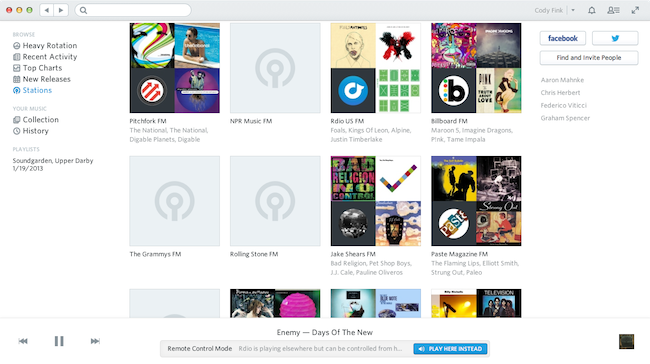
Rdio has always allowed you to play a mix of songs based on what you or your friends are listening to in their collections. Today, Rdio has updated their website and mobile apps with vast improvements to stations, allowing you to instantly listen to stations surrounding artists, songs, and genres.

Everything is a station

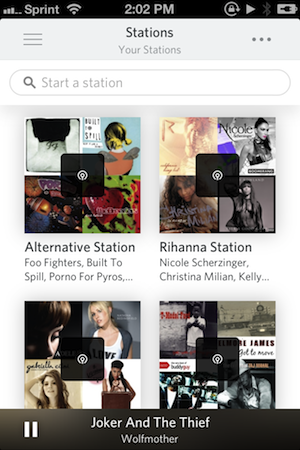
Rdio’s Stations is a response to both Spotify Radio and iTunes Radio. Drawing from a library of 20 million songs, Rdio hopes to turn anything into a custom Station. Your favorite pop radio song? That band you can’t stop listening to? By visiting Stations in the sidebar on your mobile device or desktop, you’re instantly greeted with a search bar and collections of music by your friends, stuff that’s in heavy rotation, and popular artists and genres. And no matter where you are in Rdio, you can also select songs and artists to make a station out of them as well.

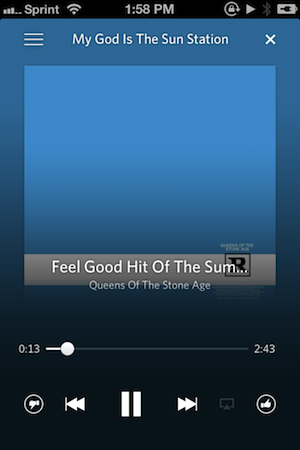
Just like the music player, the Stations Player puts album art front and center over a blurred background that provides some contrast for the scrubber and other controls. New to the Stations Player are like and dislike buttons that let you vote on your favorite tracks.

It’s about you (FM)

You FM is the biggest new thing here, which is Rdio’s way of curating stations based on what you do across your social networks. Rdio says they’ll look at who you follow on Twitter, things you like on Facebook, and things you thumbs up in Rdio to create Rdio stations of all your favorite songs and “related tracks.” So if you follow Nine Inch Nails and have your Twitter account hooked into Rdio you’ll hear a lot more Reznor in your Stations mixes.

It’s also about your friends

Then there’s your friends. There’s a People tab in Stations that’s supposed to highlight what your friends are listening to, which is basically their ‘You FM’ stuff. It’s the previous implementation on steroids. You’ll also find Stations in there like Pitchfork FM and Rolling Stone FM if you want indie or Top 40 Stations.

So if you like radio here you go

Rdio can be downloaded for free from the App Store, but requires a monthly subscription to use. Check out Rdio’s pricing here and read more about their Stations update on their blog page.


Thoughts on the New AirPort Extreme

Thomas Brand of Egg Freckles thinking out loud about Apple’s latest AirPort Extreme and Time Capsule.

In the era of Post-PC computing I would like to see an AirPort Extreme of Time Capsule that do more than just desktop backup and wireless networking. A central household cache for iTunes streaming, App Store downloads, and iCloud backups would be a great start. Maybe next year we will see another vertically oriented white box that does just that.

When iCloud Backups became a thing that we started seeing on rumor blogs, I remember quite a few of us positing that our AirPort devices would become an important piece in that equation. We were wrong, but it’s not hard to imagine an iPhone or iPad syncing to a Time Capsule in the same manner that our Macs do with scheduled Time Machine backups.

You can come close to a proposed solution like this today. Take any old USB hard drive, copy your iTunes data to it, plug it in your AirPort Extreme or Time Capsule, and you’re off to the races. Although loading an iTunes library over a network is so slow there’s really no benefit.

The big con in doing any of this of course is what happens when the hard drive in that Time Capsule dies. If all of your music and mobile backups are on this thing you’re suddenly hosed unless Apple has some cloud storage or RAID solution in mind. This is why I think our Macs and iTunes continues to be the gateway for syncing and backing up our iOS devices — data is at least redundantly stored on both your Mac and Time Capsule.

Although Apple claims the vertical departure from the previous AirPort Extreme’s six-year-old design was choosen for better reception, I tend to think it was a cost cutting measure. The new AirPort Extreme and AirPort Time Capsule share the same enclosure along designed around the same 3.5 inch hard drive. The added price of the Time Capsule gets you nothing more than said drive, and the cables needed to connect it. Saving Apple millions on duplicate parts.

I forgot who said it, but the theory I like the most is that the new AirPort Extreme design keeps people from stacking crap on top it.

Permalink

The Boy Who Beat Ocarina of Time in 22 Minutes

This link isn’t strictly about Cosmo Wright’s Ocarina of Time speedrun – which, by the way, is incredible to watch. Make sure to read Computer and Video Games’ feature on it as well.

Rather, I’d like to point out these two tweets by Sonny Fazio in response to Peter Hajas, who originally shared the link to Cosmo Wright’s speedrun last night:

This is an interesting side effect of the App Store that I didn’t think about. Speedruns are an extremely fun-to-watch, but niche use case that, as Fazio notes, are generally facilitated by glitches and bugs in the source code of games. This goes beyond the App Store and extends to games sold on online platforms like Steam and PlayStation Network as well. Because of updates and patches, will it become increasingly difficult – if not impossible – for speedrunners to analyze and play through games in their original form decades from now?

In the video I linked above, for instance, Cosmo explains that a major glitch in Ocarina of Time took 13 years to be discovered and used. That was only possible thanks to the fact that a) Nintendo 64 cartridges are still physically available today and b) Nintendo’s conversion for the Wii’s Virtual Console is a 1:1 port of the original – bugs and glitches included. Can you imagine someone still playing an iOS game in 13 years?

Twenty or thirty years from now, will we see speedruns for iOS, PS3, or Xbox 360 games? Sadly, I think that a mix of retrocompatibility issues, OS and app updates, and lack of physical access to games will hinder speedrunning. Not to mention Apple’s current state of affairs with games and the gaming community.

Overall, Digital preservation is the bigger topic we should be discussing.

Permalink

On Twitter’s Two-Factor Authentication

Authy (who make consumer and enterprise products for multi-factor authentication) offered their two cents on Twitter’s latest implementation, which works by having you acknowledge login attempts on your iPhone or Android phone. Twitter will show you things like the browser and a general location so you can verify that you’re the one making the attempt, but Authy says this isn’t that secure in practice.

In fact, we publically tested this about a year ago and realized that showing the IP, location, browser or any other data wasn’t enough for people to determine if they should or not authorize a request. Further this data is easy to spoof (like location), so if the attacker is familiar with the user, he can easily select “good” values to further trick the user into authorizing the request. TOTP might seem like a hassle, but the user knows exactly where he is typing the token and the whole Authentication flow happens right in front of him.

TOTP stands for “Time-based One-time Password.” If you have Google Authenticator, you’re already familiar with the concept: the mobile app spits out a randomly generated number that you then enter on your computer. It’s is what you’ll find sites like Amazon, Dropbox, and Google using if you decide to enable multi-factor authentication for those accounts.

Permalink

The Anti-Apple

Horace Dediu has a great take on the reputed differences and actual similarities between Apple and Amazon:

What I take issue with is the premise that Amazon is the “anti-Apple” in its hunger for growth and patience for profits. Apple has its own “Amazon-like-business”: iTunes has been growing at a steady 25% or more and it also has its ancillary zero-profit hardware analogue to the Kindle called Apple TV. iTunes is a great business in the Amazon vein, harvesting hundreds of millions of users (and their credit cards.) Presumably iTunes could also some day “flip the switch” and become profitable, but something magical needs to happen. Something like becoming a payments processor or retailer of other things. Analyst beware however. There might be conditions that make such switch flipping extremely difficult.

Permalink

Wake-Up Call for New Yorkers

Winnie Hu and J. David Goodman, reporting for The New York Times on a case of child abduction on July 17, 2013:

You have a lot of people on the road at that hour,” said Robert Hoever, director of special programs at the National Center for Missing and Exploited Children, which tracks Amber Alerts across the country. “You’re looking for those eyes and ears to try to find that child.”

By Wednesday afternoon, the police said that they had found Ms. Lopez and her son in “good condition.” Ms. Lopez was arrested and charged with custodial interference. The police said she was found after the Amber Alert led to a tip to the department’s Crime Stoppers hot line.

And the key risk for non-mandatory AMBER alerts, later in the article:

One former state law enforcement official, Michael Balboni, said the alert system should be used prudently.

“It is crucial that emergency notification systems take every precaution to never ‘cry wolf’ or alert needlessly,” said Mr. Balboni, former deputy secretary of public safety for the state. “The risk is evident: If the public loses faith in the system, they may stop participating and the purpose of the system will be lost.


Permalink