Ryan Christoffel

984 posts on MacStories since November 2016

Ryan is an editor for MacStories and co-hosts the [Adapt](https://www.relay.fm/adapt) podcast on Relay FM. He most commonly works and plays on his iPad Pro and bears no regrets about moving on from the Mac. He and his wife live in New York City.


Moleskine Flow Review: An Elegant, Accessible Digital Notebook for iPad and iPhone

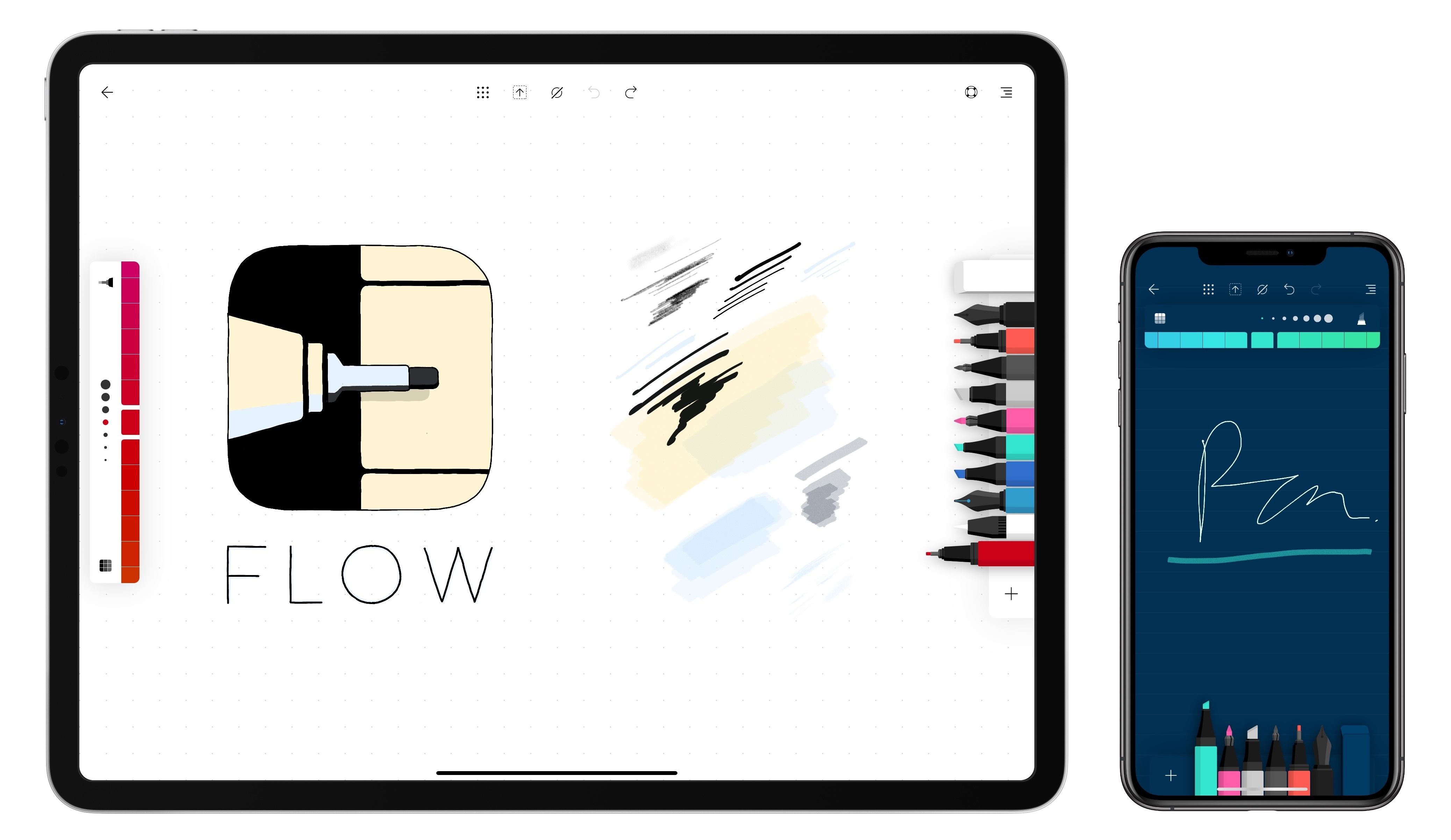
One strength of an analog notebook is its simplicity. The times in my life when I’ve used a notebook regularly, I would always keep a pen attached to the notebook so that the process of writing involved just two simple steps: open the cover, and press pen to paper. Many digital notebook apps forfeit this simplicity due to overly complex interfaces and toolsets.

Moleskine’s new app, Flow, is a digital notebook that understands what it takes to succeed as a notebook replacement – giving you the tools to customize your experience to your own preferences. It’s available on both iPad and iPhone, and offers an elegant balance of convenience and flexibility that make it my favorite digital notebook to date.

Read more


A Peek Inside Apple’s Music Apps Studio

In celebration of Garageband’s 15th anniversary this year, Rolling Stone was granted special access to the studio where Apple’s music apps come to life. If I had one major takeaway from the article, it would be that the amount of thought and effort Apple’s team expends in Garageband’s development is remarkable. Rolling Stone’s Amy Wang writes:

In the first media visit Apple has ever allowed to its under-the-radar Music Apps studio, the team of engineers showed Rolling Stone how the creation process for Garageband’s two types of sounds — synthetic and “real” — can span weeks or sometimes months per instrument, with new hurdles at every turn. Synthesized sounds (i.e. the type of obviously artificial notes often heard in EDM) are made from code and tweaked by code; “real” sounds have to be recorded in a drop-dead-silent studio setting, dozens of times, then pieced together like patchwork to form single perfect notes, one by one.

Some instruments are extra excruciating. In the digital reproduction of an American upright bass, a player in the studio plucks a string, holds his breath for seven seconds to ensure there’s no extra noise on the recording whatsoever as the note shivers into the air (engineers have custom-coded an app to time the duration precisely), and repeats the endeavor at different finger positions, volumes and pressures, day in and day out. After wheeling each of the cavalcade of instruments out of the studio, the team pores over the hundreds of recordings to pick out the best. When adding a suite of East Asian instruments in a recent product update, the engineers consulted with designers across the world to pick out the specific color of wood and font of a poem that would make a Chinese guzheng appear the most authentic. Engineers also constantly browse music-making forums for complaints, suggestions and thoughts on what to tweak next.

Garageband’s continued development over such a long period of time is a testament to music’s importance to Apple, a point that’s reinforced several times in the full article.

Besides highlighting the work that goes into making Garageband a better tool for creators, one other interesting tidbit from the article involves Apple’s future direction for the app:

“Without getting into specifics, I think machine learning — as in, systems and software that will enable more ability to help anticipate what someone wants to do — will be of value,” [Phil] Schiller says about what’s in the works.

Perhaps before the year’s out we’ll see the fruits of Apple’s efforts to apply machine learning to music creation.

Permalink


Apple Announces WWDC 2019 Kicks Off June 3

Today Apple announced the dates for WWDC 2019. The annual developer conference will take place June 3-7, hosted for the third year in a row at the McEnery Convention Center in San Jose, California.

WWDC is where Apple traditionally lays out its software plans for the year ahead, with major new OS versions like iOS 13 and watchOS 6 expected to be unveiled in detail. The conference typically kicks off with a keynote address where these software updates are previewed, so mark June 3 as the day to find out all about what improvements will come to your Apple devices later this year. From Apple’s press release:

“WWDC is Apple’s biggest event of the year. It brings thousands of the most creative and dedicated developers from around the world together with over a thousand Apple engineers to learn about our latest platform innovations and to connect as a community,” said Phil Schiller, Apple’s senior vice president of Worldwide Marketing. “Our developers are incredibly passionate about creating the next generation of mind-blowing experiences for the world through apps. We can’t wait to get together with them and share what’s next.”

The keynote is usually live-streamed around the world, but any developers interested in attending the full conference in person can apply for a ticket. Winners of the ticket lottery are chosen randomly, but all submissions must be in by March 20th.

Students and STEM organization members can apply for WWDC scholarships by submitting a Swift playground that demonstrates their creativity. Scholarship applicants must have submissions in by March 24th, and will be notified of their status by April 15th.


Twitter’s iOS App Makes the Camera More Prominent Than Ever

Twitter today announced a change to its iOS app that will be rolling out over the next few days: the in-app camera has been redesigned, and it will now be only a left-swipe away from your timeline.

https://twitter.com/twitter/status/1105815777616191489?s=21

The new camera placement models that of Instagram, which has long enabled quick camera access via a horizontal swipe on your feed. Though this change for Twitter doesn’t come with an entirely new feature, such as Stories, it does condense a couple existing features into an easier-to-access location.

Upon opening the new camera screen, you can tap the Capture button to snap a quick shot for tweeting, or hold down that button to record video clips that can be strung together and shared as a single video – both of these features existed before in the tweet compose screen, but they’ll now be more prominent than ever. The new camera interface also grants quick access to Twitter’s live-streaming feature, which previously was also limited to the compose screen. The idea here is that sharing photos, video, or livestreams of current happenings should be as seamless as possible.

As demonstrated in the video above, photos and video captured by the new camera are formatted in a special way. Casey Newton of The Verge describes the new look: “Once you’ve snapped your image, a colorful chyron appears on top, ready to add an optional location and caption. You can change the chyron from the default blue to one of five other colors.”

Though Twitter’s new camera doesn’t bring with it big feature changes, it does serve as a key indicator of direction for the company. By providing a new, prominent method for accessing the camera, Twitter is signaling that it likely has more camera-focused moves up its sleeve for the future.


Spark Launches Email Delegation Feature for Teams

Today Spark launched a new Delegation feature for teams, which is available on both the Mac and iOS. Delegation enables team members to assign emails to one another, with optional due dates attached, and follow the progress of those emails over time. It’s a feature that addresses well the workflows a manager or executive may have with their assistant or other team members.


Read more