
Focused Work, Federico with a shortcut for creating web clippings in Notes, an all-new episode of MacStories Unplugged, plus the usual Links, App Debuts, the latest happenings in the Club MacStories+ Discord community, a recap of MacStories articles, and a preview of upcoming MacStories podcast episodes....
 Up Next On MacStories Podcasts
Next week on AppStories, Federico and John are joined by David Smith, the creator of Widgetsmith and other apps, to talk about the history of Widgetsmith, Lock Screen widgets, iPhone 14 Pro photography, and the Apple Watch Ultra. This week on MacStories Unwind, Federico recommends Cyberpunk 2077 and John’s been playing Shovel Knight...
In This Issue
This month, Federico shares a shortcut for creating internal links between notes in Apple Notes, and John explains why the bugginess of Stage Manager on the iPad is cause for concern for Mac users too....
Kosmik: For All Mindkind [Sponsor]
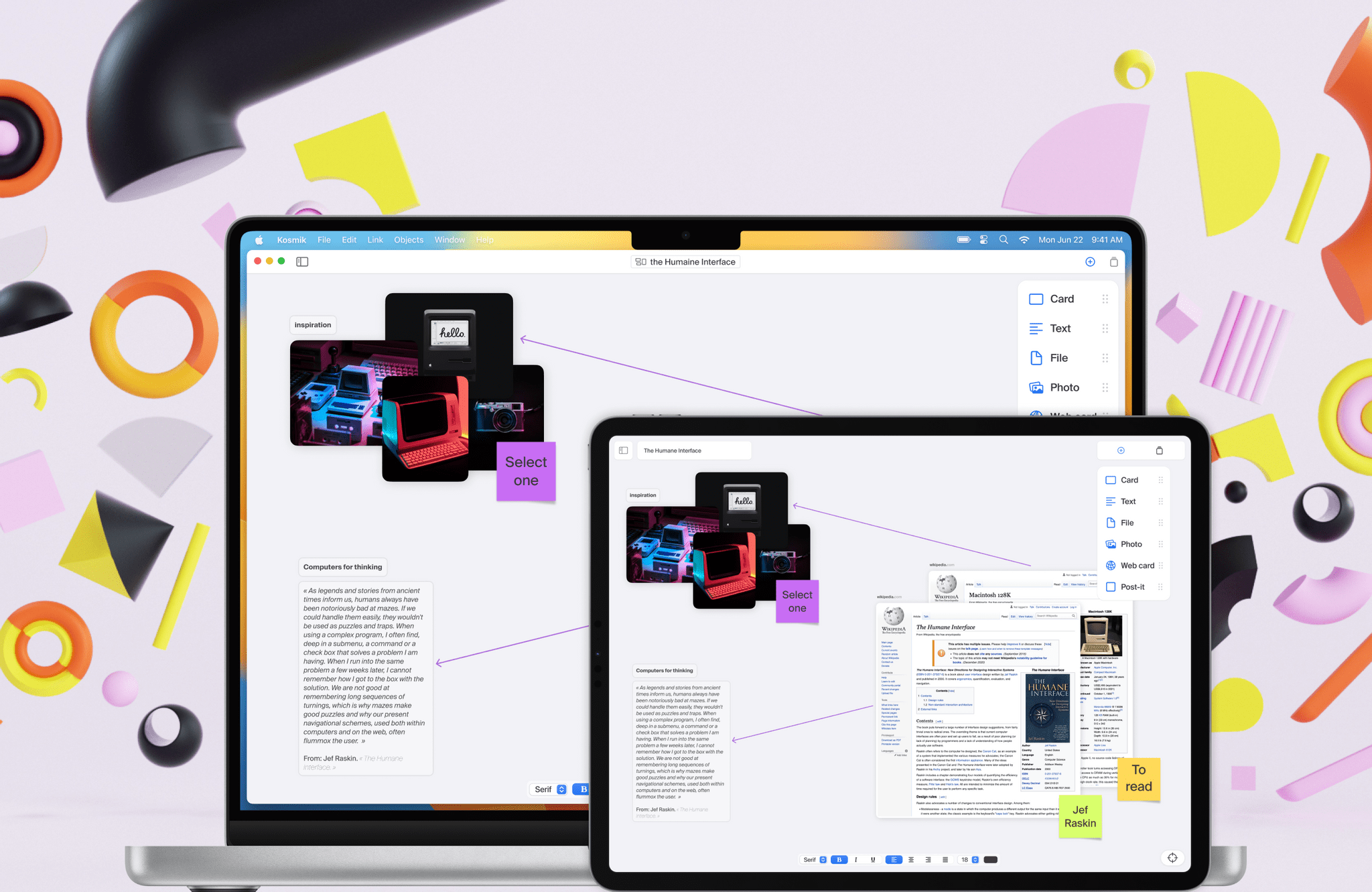
Kosmik is a dashboard for your creativity. Built for designers, researchers, and writers, Kosmik’s infinite canvas for the iPad and Mac lets you bring together notes, your writing, images, websites, PDFs, and more on a single canvas called a Universe, so you can stop switching between apps and focus on what you’re creating.
Everything in a Kosmik Universe is a card, and cards from one canvas can be incorporated into another, making the first canvas app with the sort of transclusion found in note-taking apps like Roam Research and Obsidian. It’s a powerful yet simple architecture that reduces friction, so you can focus on your work.
The flexibility of Kosmik’s canvas means you can take notes, browse the web, collect PDFs, images and other resources, and write all in one place. That encourages spatial thinking, making new connections and links between materials, and reduces distractions all at once in a single easy-to-use interface.
Kosmik is a completely native, peer-to-peer solution that syncs your data between devices with no central server. Everything is encrypted end-to-end too.
You can publish your Kosmik canvases and cards to the web for sharing with colleagues, with even more collaboration features coming later this year. Kosmik is available on the web now, too, making it accessible in more places and to more users than ever before.
If you’re looking for a new way to organize your thoughts, writing, and, really, anything else, sign up for Kosmik today. MacStories readers can enjoy a free year of access just by following this link. From ideation to production, Kosmik lets you think better and more freely to uncover insights and have some fun too!
Kosmik is available to download on the App Store and also offers great resources for new users like its Substack newsletter and Discord community.
Our thanks to Kosmik for sponsoring MacStories this week.
Previously, On MacStories
Stories iOS 16.0.2 Fixes iPhone 14 Pro and Pro Max Camera Shake, Pasting Alerts, and More Pixelmator Pro 3.0 Adds Templates Victoria Song of The Verge Answers the Question: Who Is the Apple Watch Ultra For? GoodLinks 1.7: New iOS 16 Shortcuts Actions, Focus Filter Support, Lock Screen Widgets, and More Last Week, on Club...
In This Issue
Federico shares a faster way to delete apps on iPadOS, John explores iPhone and Apple Watch customization with Focus modes, plus the usual Links, App Debuts, the latest happenings in the Club MacStories+ Discord community, a recap of MacStories articles, and a preview of upcoming MacStories podcast episodes....
Up Next On MacStories’ Podcasts
Next week on AppStories, Federico and John continue their look at third-party apps with new iOS 16 features with apps that feature more Lock Screen widgets, Shared with You support, and Focus Filters. This week on MacStories Unwind, Federico has as surprise pick and John has been playing Rollerdrome....
Kolide: Nail Third-Party Audits and Compliance Goals with Endpoint Security for Your Entire Fleet [Sponsor]

Do you know the old thought experiment about the AI designed to make paper clips that quickly decides that it will have to eliminate all the humans to maximize paper clips?
Many security teams have a similar idea when meeting compliance goals: it would be much simpler if it weren’t for all the pesky users.
That way of thinking has brought us to the current state of endpoint security, dominated by MDMs that hamper device performance and turn every laptop into Big Brother. This approach to security is bad for culture and morale; moreover, it doesn’t actually work. If it did, no company with an MDM and annual security training would have a data breach.
Kolide is endpoint security and fleet management that takes a different approach. They help their customers meet their compliance goals–whether for auditors, customers, or leadership–by enlisting the support of end users.
Kolide works by notifying your employees of security issues via Slack, educating them on why they’re important, and giving them step-by-step instructions to resolve them themselves.
For IT admins, Kolide helps you prove compliance via a single dashboard. From there, you can monitor the security of your entire fleet, whether they’re running on Mac, Windows, or Linux. (You read that right; Kolide can finally provide visibility into your Linux users.)
If you’ve read this far, it’s because you’re intrigued by an approach to endpoint security that gets end users involved. Click here to learn more about how it works. If you like what you see, you can sign up for a free trial; no credit card required.
Our thanks to Kolide for sponsoring MacStories this week.
Previously, On MacStories
Stories iOS 16: All the Things I Didn’t Like The Halide Team Compares the Camera Specs of the iPhone 14 Pro to the iPhone 13 Pro Austin Mann Reviews the iPhone 14 Pro’s Cameras Lock Screen One: Text Widgets for Your iOS 16 Lock Screen Automated with Shortcuts Sticker Drop Lets You Use iOS 16’s...