Jake Underwood

128 posts on MacStories since December 2015

Former MacStories contributor.

Halide Review: Instantly Better Photography

Photography isn’t my specialty, and more often than not, my lack of knowledge stops me from getting the shot I have set up in my mind. They say the best camera is the one you have with you at all times, but the stock iPhone 7 camera can only do so much with my limited skill set.

So when a tool comes along that makes taking great photos so much easier, it’s hard to pass it up. That’s Halide, which offers real-time, user-driven changes in your camera’s viewfinder to help you get the picture you want.

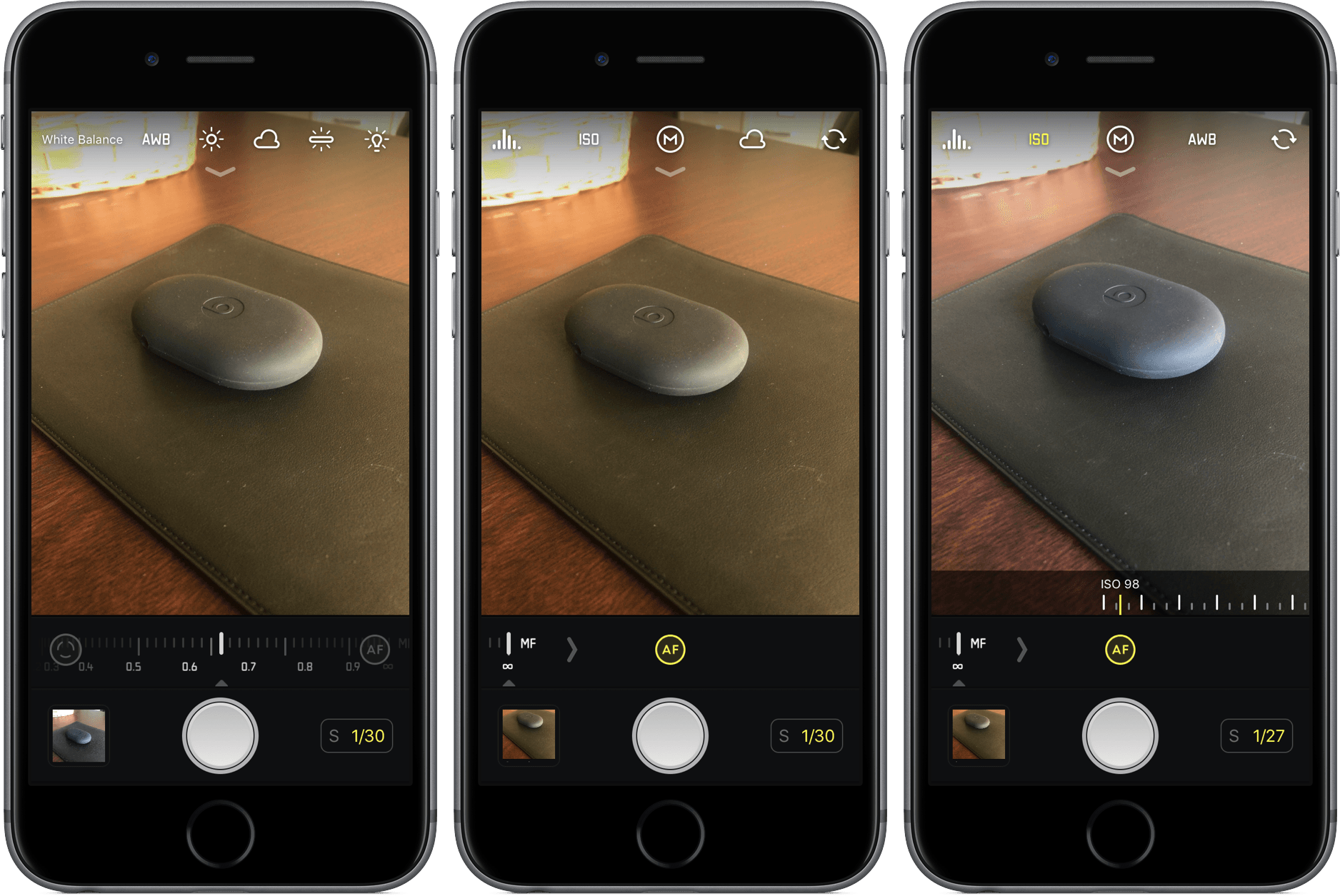
As you line up your shot in Halide, you’ll have the opportunity to make adjustments – focus, ISO, white balance, and exposure – that will change the way your picture will look. These aren’t pre-packaged filters, but rather manual options that can give your photo a unique look and feel. For different occasions, environments, and lighting, you’ll appreciate the control.

What I love so much about Halide is that I don’t have to have the deepest understanding of these tools to take advantage of them. Instead of focusing on numbers, I can see my changes as they are made. Halide offers the benefits of a complex photo app without the learning curve.

Much of how you edit in Halide is by sliding your finger, either arbitrarily up and down or along a scale, left to right. For white balance, you can select from presets, which drastically alter the mood of the photo without making it look unrealistic. Aside from focus, all of these options work on the front camera, too, so your selfies can be even more artistic.

Halide can capture your photos in either RAW or JPEG, but it’s up to you to select the latter in the “Quick Bar”, an extra set of buttons that appears by pulling down at the top of the screen. Also in the Quick Bar is an on/off switch for flash, a grid tool, and location management.

Conclusion

When I’m inexperienced in a certain field, I want apps to enable and teach me, not leave me confused and incapable. Halide undoubtedly accomplishes the former, putting the control back in my hands instead of in the camera.

And that’s what I can’t seem to shake about Halide – it’s empowering, a $4.99 investment into better photos without much work. For quick, simple shots, I’m probably still going to choose Camera for its convenience; for everything else, I’m choosing Halide.

If you’d like to give Halide a try, you can pick it up in the App Store for $4.99 (iPhone only).


iOS Apps for Sports Fans

ESPN When I need immediate updates on the teams I follow, I almost always turn to ESPN’s app. It is by no means perfect – it’s clunky and can take too long to load – but ESPN on iOS is still the best way to check up on the score of the big...


Money Management on iOS, Vol. 2

Clarity Money Though every app on this list has its own areas of strength, Clarity Money is the best all-around solution for managing your money. By linking up your bank account, Clarity can give you deep insight on your spending habits, including specifics about how, when, and where you’re spending money. Giving Clarity...


Super Arc Light Review: A Classic Arcade Shooter

Developer No Code Studio knows how to make a game, as evidenced by their offerings across a variety of subgenres. But if you need proof of No Code Studio’s prowess, look no further than the addicting shooter Super Arc Light.

In a modern-day take on the style of gameplay made popular by titles like Space Invaders, Super Arc Light assigns you one task: ward off enemies creeping ever closer to you. As a barrage of shapes appears, you’ll fire shots their way, hoping to hit them as soon as you can, both to continue the game and to score higher points. If an enemy stays for too long, it’ll move in faster and, if not dealt with, end your game.

A seemingly easy premise becomes far more difficult with Super Arc Light’s movement mechanisms, which ditches a linear movement for a more circular approach. Since enemies can approach you from any side, you’ll rotate around a circle, changing direction by shooting. This takes a while to get used to, but it provides a unique challenge that adds difficulty to the game.

Throughout your play-throughs, you’ll unlock new weapons that make taking down enemies much easier. Each has its benefits and drawbacks, but discovering and utilizing the tools you find in-game will be imperative to raising your overall score.

Overall, Super Arc Light isn’t a story-driven game that you’ll sink dozens of hours into – but that’s okay. It’s a stellar arcade experience, one that will challenge you at a blistering pace from start to finish of each run. For a quick, intense gaming fix, Super Arc Light is a perfect choice.

If you’d like to give Super Arc Light a try, you can pick it up in the App Store for $1.99 (Universal).


Apple to Recognize National Parks with Donations, Activity Badge

Paying homage to United States national parks, Apple announced today that it will introduce opportunities for customers to donate to the National Park Foundation and earn a new Activity badge and iMessage stickers.

For two weeks beginning July 1, Apple will donate $1 for every Apple Store purchase made with Apple Pay, whether made in-store or online, to the National Park Foundation.

In a press release, Apple explained that: “Proceeds will support the National Park Foundation’s mission to help protect and preserve national parks through conservation projects and other initiatives, as well as inspire the next generation of park enthusiasts with enriching youth programming.”

In addition, Apple will award an Activity badge for Apple Watch and a set of iMessage stickers when users complete a 3.5 mile or more workout on July 15. The distance, Apple says, is roughly the same as the trek from Old Faithful to Mallard Lake – but luckily, you don’t have to go to Yellowstone to get the badge.

For more information on how Apple is working to celebrate national parks, you can find their press release here.


The iPhone Enabled My Future

When the first iPhone was released on June 29, 2007, I wasn’t able to get one. The phone was expensive, untested, and hard to find, but none of that really mattered; what stopped me from being the earliest of early adopters was that I was eleven years old. I’ll save you from some quick...


Apps from Apple Keynotes

Affinity Photo Affinity Photo was the star app at WWDC 2017, and for good reason: it’s one of the most advanced photo editing tools available and an awesome showcase of the power of the iPad Pro. The demo, through the creation of a movie poster for Pirates of the Caribbean, walked us through...


Sputnik Eyes Review: Puzzles in Space

I’m going to let you in on a couple prevailing facts about Sputnik Eyes, a “homemade” game by Shelly Alon.

The first is that the story, at least in my eyes, makes little sense. It includes – but is not limited to – robots, space, planets, constellations, exploration, Earth, scorpions, hearts, and a rocket ship. It’s a hodgepodge of an idea, one that I immediately misunderstood and hardly plays any role in the overall game.

But the second fact is that Sputnik Eyes is one of the most enjoyable puzzle games I’ve played in a while, and one I can’t seem to stop playing. Equal parts charming and challenging, Sputnik Eyes feels exactly like what a puzzler should in 2017: clean, fun, and to the point.

Move Along, Robot Friend

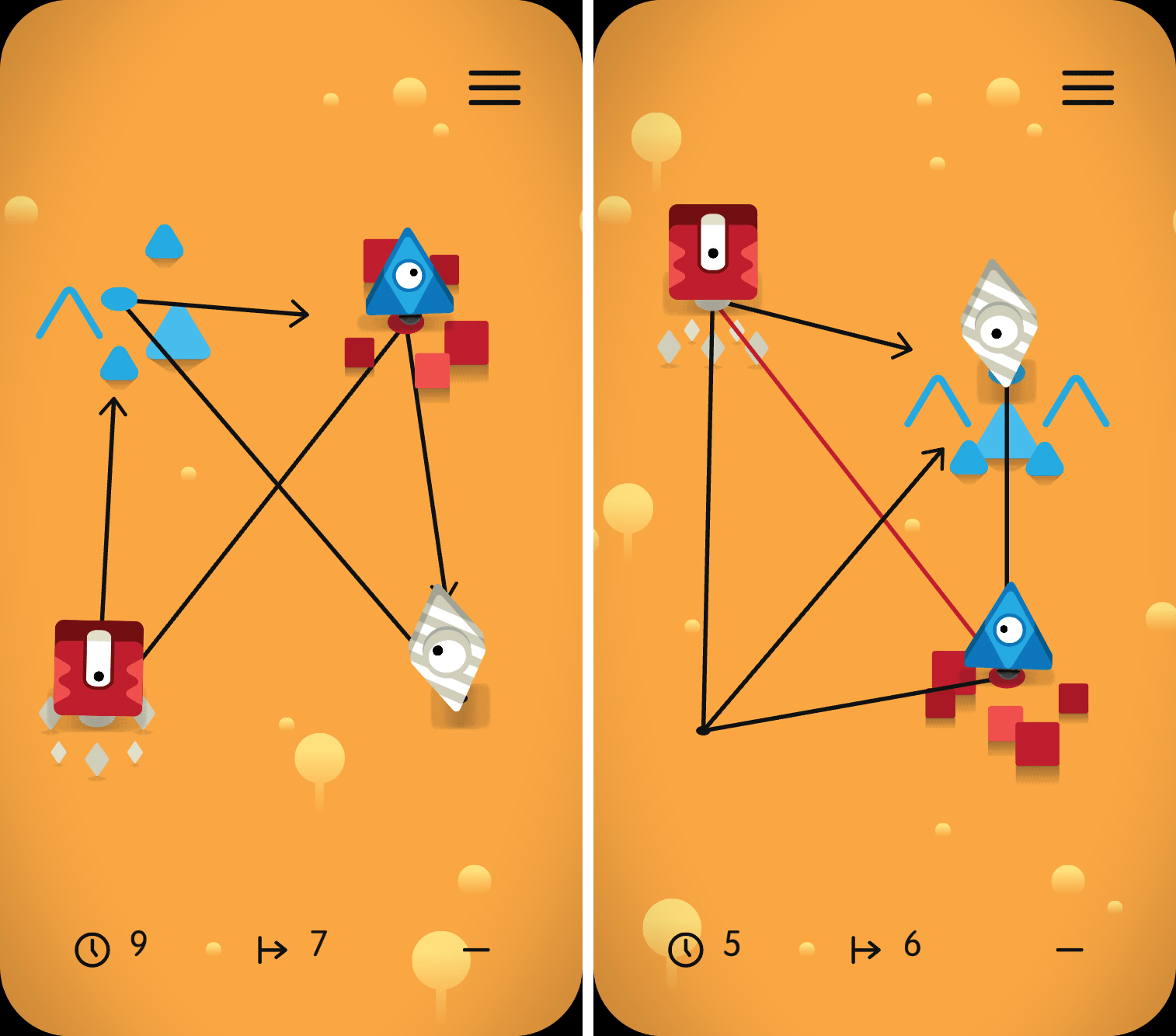
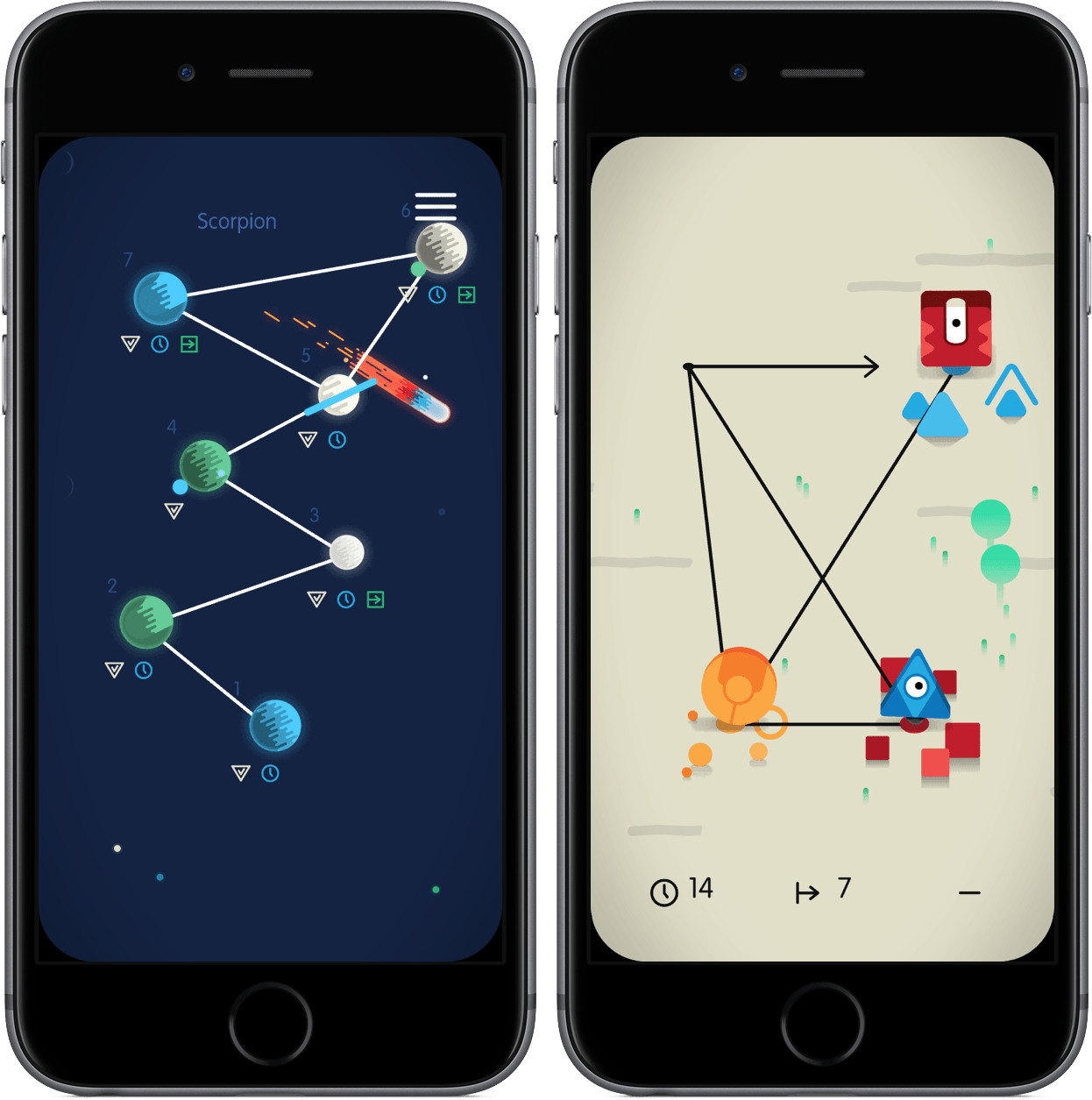
When you start a level of Sputnik Eyes, you’ll find yourself accompanied by a grid and your robot pals. Each stage has a unique pattern, a series of connected lines that form points, sat on by the bots of varying colors. Take a look at the examples below:

Effectively, Sputnik Eyes is a matching game, one that requires you to pair the robot to its respective colored spot on the map. While it sounds easy in theory, the game throws interesting obstacles in your way, like one-way lines and paths that can only be traveled by a certain color. The more you play, the more complex Sputnik Eyes becomes; eventually, each puzzle seems more crowded than the one before it.

From there, the game can be played in a variety of ways. At the most basic level, you only need to complete the level to move on. However, finish the level in a limited set of moves or within the time period and you’ll receive badges signifying your accomplishments. Although badges have no in-game value, they’re a completionist’s symbol of pride.

Carefully Crafted, Wonderfully Executed

I normally like to weave in comments about a game’s design into a review, but much of what makes Sputnik Eyes so endearing is some of its aesthetic choices. One of the best examples is the game’s framing – instead of the game taking up the full screen, it rounds off its corners to give it a distinct look.

Throughout the gameplay and menu navigation, you’ll see carefully crafted animations, character models, and level designs. Motion is utilized exceptionally in Sputnik Eyes, adding touches that make the atmosphere more alive and vivid. And behind it all lies a soundtrack that shifts between ambient and thought-provoking, unafraid to take your attention but simple enough to fade into the background when you’re thinking hard about a puzzle.

All of this is to say that Sputnik Eyes feels created in a way that makes you, the player, feel cared for. When playing, I felt like each piece of the game was built for me to notice, appreciate, and consider as part of the overall experience.

Conclusion

$1.99 and many levels later, I’m thrilled by Sputnik Eyes. Had it been in the earlier days of the App Store, I think it’d be considered a touchstone of the puzzle genre; now, despite the App Store’s continuous growth in its biggest category, Sputnik Eyes still stands out as a must-have for puzzle fans.

If you’d like to pick up Sputnik Eyes, you can do so for $1.99 in the App Store (Universal).


Reddit Apps for iOS

Reddit The official Reddit app is all about giving you what the site believes is the optimum browsing experience. For the typical Reddit user, all of the most important pieces are there right when you launch the app: your front page, a search option with all of your subreddits, quick access to messages,...