Posts in news

Pixelmator Pro 2.4 Adds New Color Adjustment and Effects Layers, Plus 200+ Vector Images

Source: Pixelmator.

Source: Pixelmator.

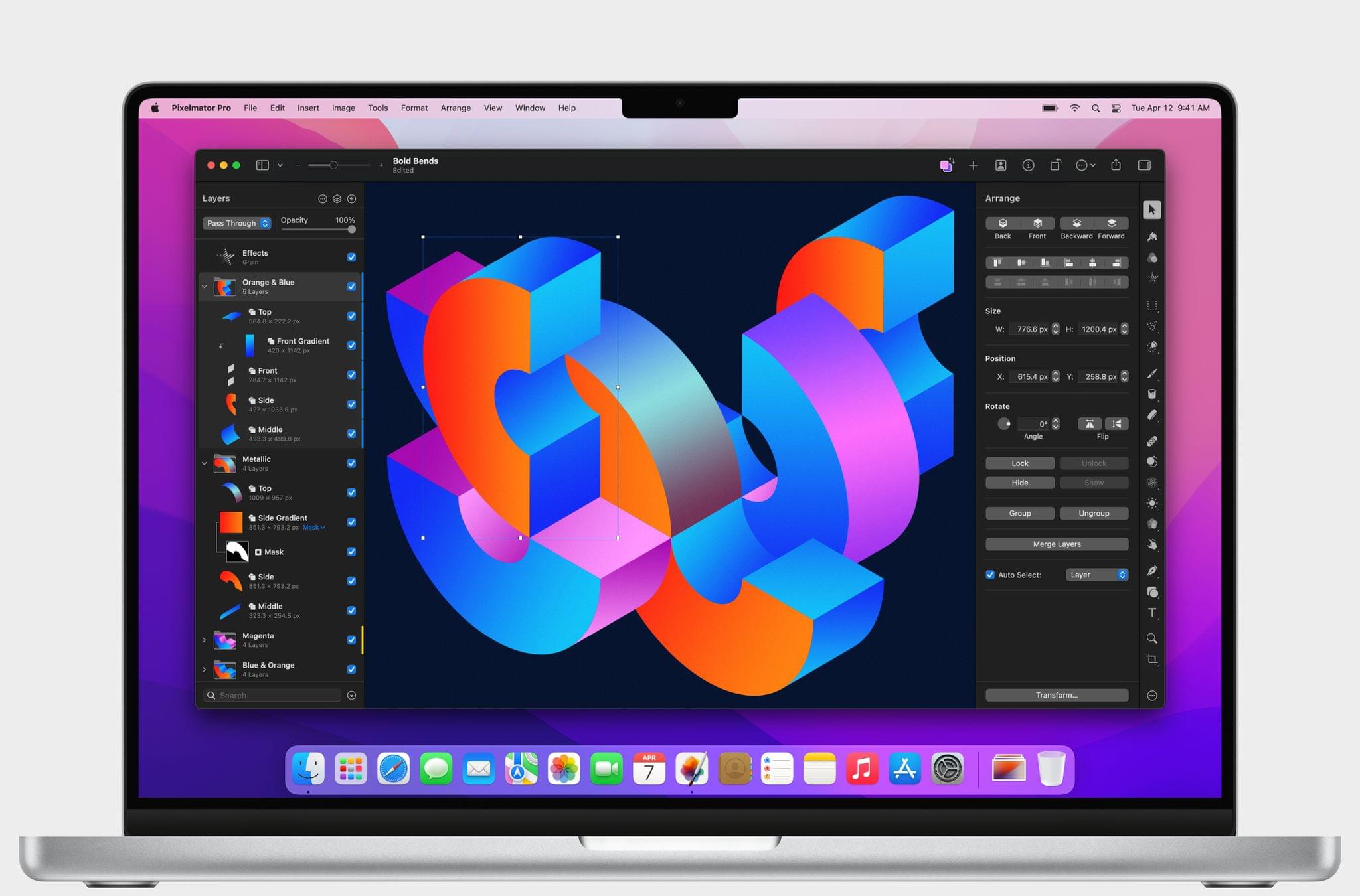
Pixelmator Pro 2.4, the photo and image editor for Mac, was released today with two new layer types, a redesigned layers sidebar, and over 200 built-in vector images.

Today’s addition of color adjustment and effects layers adds new flexibility to Pixelmator Pro that should simplify the creation of more complex layered projects. According to Simonas Bastys, lead developer at the Pixelmator Team:

One of the things that users love most about Pixelmator Pro is how it makes advanced layer-based image editing incredibly easy. And with the addition of color adjustments and effects layers, layer-based editing in Pixelmator Pro becomes even more powerful, enabling all-new workflows, such as advanced selective editing of photos.

I haven’t had a need for Pixelmator Pro’s new layers yet, but the possibilities are intriguing and something I plan to spend some time experimenting with more in the weeks ahead.
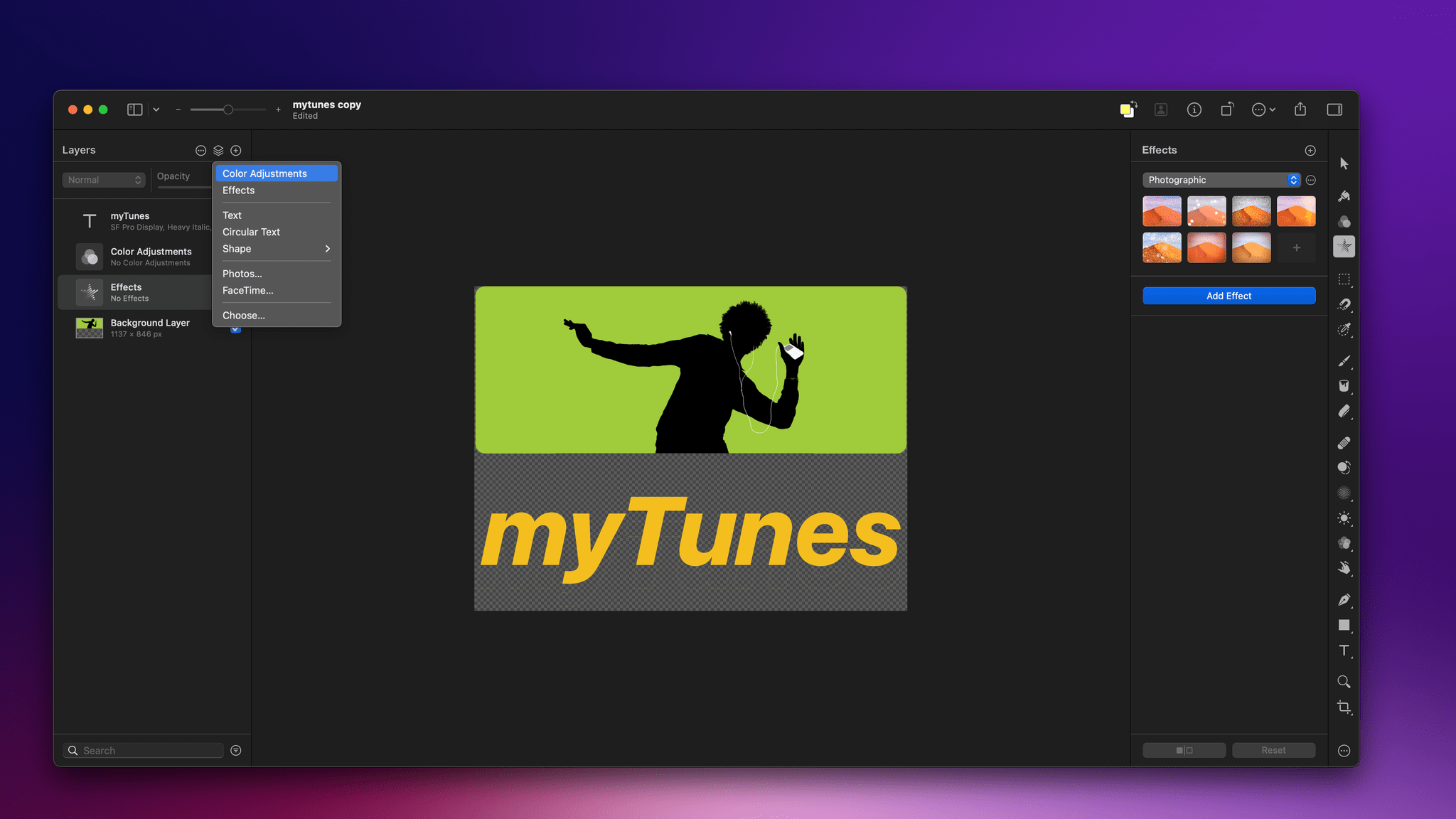
Adding new layer types to an image.

Adding new layer types to an image.

Pixelmator Pro has expanded well beyond photo editing to become a full-blown design tool. With today’s update, the app adds over 200 vector images designed by artists that can be incorporated into design projects using the app’s Shapes tool. The collection includes all sorts of shapes and symbols, along with categories like science and activities.

M1 Mac optimization isn’t a new feature of Pixelmator Pro, but the Pixelmator team reports that thanks to the app’s M1 tuning, machine learning tasks like ML Super Resolution and background removal run up to 1.7 times faster on Apple’s latest M1 Ultra chip. So, if you’ve got a new M1 Ultra-based Mac Studio, all of those computationally-intensive tasks should be faster than ever.

Pixelmator Pro is available on the Mac App Store as a free update to existing customers and is $39.99 for new users.


Best Everyday Shortcut: A New Automation April Shortcuts Contest Category

One of our top goals with Automation April is to encourage the participation of Shortcuts users of every level. That’s why the Automation April Shortcuts Contest judges won’t just be looking for the most complex shortcuts with the most actions. They’ll be looking at factors like originality, performance, design, user experience, and usefulness, which are all applicable to simple shortcuts too.

To drive home the message that the contest isn’t just for experts, we’ve added a new category: Best Everyday Shortcut. The category will be judged like the others, but with an emphasis on clever uses of actions to create a shortcut that does one thing particularly well, from which a broad cross-section of users can benefit.

Entries for all categories are being accepted through April 20, 2022 at shortcuts.macstories.net. Full details are available in our Automation April Shortcuts Contest announcement post from last week.

We’ve been incredibly pleased with the response to the contest so far. The MacStories audience has already submitted a lot of shortcuts, many of which are in the running for the new Best Everyday Shortcut category, but we’d love to see more. So, if you’ve got a shortcut that you rely on every day and think would benefit others, we’d love it if you would submit it for consideration.

And remember, we’ve got some terrific prizes for the top shortcuts in each category:

Best Overall Shortcut

  • A 3-year subscription (or membership upgrade and/or extension for existing Club members) to Club Premier
  • An Elgato Stream Deck XL
  • An Analogue Pocket
  • A special Discord contest winner role
  • Induction into the Automation April Hall of Fame

Best Everyday Shortcut, Best HomeKit Shortcut, Best Productivity Shortcut, Best Media Shortcut, and Best Mac-specific Shortcut

  • A 1-year subscription to Club Premier (or membership upgrade and/or extension for existing Club members)
  • A special Discord category winner role
  • Induction into the Automation April Category Hall of Fame

So, whether you have a simple shortcut that you rely on every day or one that’s more complex, visit shortcuts.macstories.net to enter the contest before the April 20, 2022 deadline.


You can also follow MacStories’ Automation April coverage through our dedicated hub, or subscribe to its RSS feed.


Last Week, on Club MacStories: Discord App Giveaways, an Obsidian Listen and Read Later Setup, and Automating Note Management

Because Club MacStories now encompasses more than just newsletters, we’ve created a guide to the past week’s happenings along with a look at what’s coming up next:

Club MacStories+ Discord Community Giveaways

Last week, we kicked off Automation April app giveaways on Discord for Downie, Permute, Bear, and Streaks, with more to come this week and throughout the month.

MacStories Weekly: Issue 315

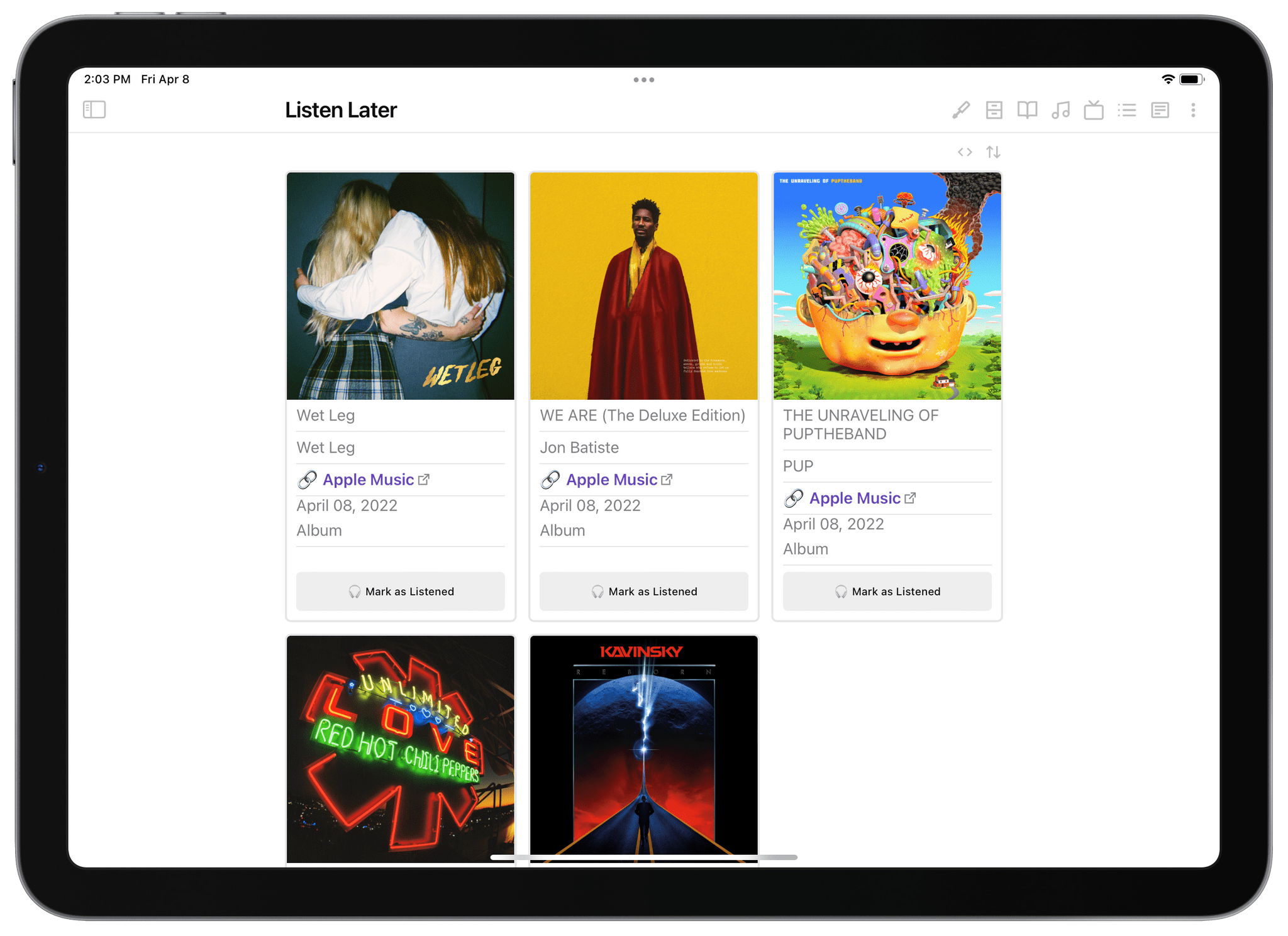
Federico's Obsidian and Dataview-based Listen Later setup

Federico’s Obsidian and Dataview-based Listen Later setup


MacStories Unwind: Never Let Me Go by Placebo, Magic Rays of Light, and Slow Horses

0:00
26:37


This week on MacStories Unwind, Federico provides a detailed look behind the making of Placebo’s latest album, Never Let Me Go, and John recommends the podcast Magic Rays of Light and the Apple TV+ show Slow Horses.

Kolide: Endpoint security for teams that Slack. Try Kolide for 14 days free; no credit card required.


This Week on MacStories Unwind

Automation April Update

Federico’s Pick:

John’s Picks:


AppStories, Episode 268 – Automation April: Our Shortcuts Setups

This week on AppStories, we introduce Automation April, a month-long community celebration of automation on Apple’s platforms and share our Shortcuts library setups.

Sponsored by:

  • Kolide –  Endpoint security powered by people. Try Kolide for 14 days free; no credit card required.
  • Things – The award-winning to-do app
  • Sourcegraph – Universal Code Search. Move fast, even in big codebases. Try it now.

On AppStories+, we take listeners on a behind-the-scenes look at the origins of Automation April.

We deliver AppStories+ to subscribers with bonus content, ad-free, and at a high bitrate early every week.

To learn more about the benefits included with an AppStories+ subscription, visit our Plans page, or read the AppStories+ FAQ.

Permalink

Apple Announces That WWDC 2022 Will Be Online-Only June 6 - 10

Apple has announced that WWDC will be an online-only event again this year, running from June 6-10, 2022, but with a limited in-person event for developers and students. The company also opened submissions for the Swift Student Challenge from now through April 25.

In a press release issued by today, Susan Prescott, Apple’s Vice President of Worldwide Developer Relations and Enterprise and Education Marketing said:

At its heart, WWDC has always been a forum to create connection and build community. In that spirit, WWDC22 invites developers from around the world to come together to explore how to bring their best ideas to life and push the envelope of what’s possible. We love connecting with our developers, and we hope all of our participants come away feeling energized by their experience.

Here’s what Apple has to say about a special day planned at Apple Park during the conference:

In addition to the online conference, Apple will host a special day for developers and students at Apple Park on June 6 to watch the keynote and State of the Union videos together, along with the online community. Space is limited and details on how to apply to attend will be provided soon.

Although there are benefits to a fully in-person event that can’t be replicated online, the past two years were both widely considered to be successes. In 2020 and 2021, Apple released dozens of excellent videos about its latest APIs and conducted online lab sessions for developers that received high marks. Although Apple hasn’t released details about this year’s online format yet, it’s a safe bet that it will be similar to last year. It’s also nice to see an in-person component added, though limited in scope.

I still hold out hope that WWDC will be a fully in-person event again someday, but this year clearly isn’t the right year. Still, it’s been far too long since I’ve seen many of the developers and friends I’ve made at the conference over the years. It would be a shame if people who have never been to WWDC never get to experience it in person.

Of course, MacStories readers can expect the same kind of comprehensive WWDC coverage we do every year. We’ll have extensive coverage on MacStories and AppStories, which will extend to Club MacStories too.


Last Week, on Club MacStories: Automation April, MacStories Unplugged, a Developer Interview, a Reader Setup

Because Club MacStories now encompasses more than just newsletters, we’ve created a guide to the past week’s happenings along with a look at what’s coming up next:

Automation April

Last Friday marked the launch of Automation April, a month-long celebration of automation on Apple’s platforms. Each week during April we’ll be doing giveaways in MacStories Weekly and in our Club MacStories+ Discord community. Between the two, we have over 20 participating apps.

Last week we kicked things off with a MenuBar Stats giveaway in MacStories Weekly and 50% off the first year of Ulysses discount for Club MacStories+ and Premier members that is available throughout April by visiting the Club Discounts page.

MacStories Weekly: Issue 314

Monthly Log: March 2022

Up Next

Today at 12:30 PM Eastern US time, we’ll do the first Shortcuts Town Hall Workshop live in the Club MacStories+ Discord Town Hall Voice Chats channel.

We’ll also continue giveaways in the Club Discord community this week and on Friday in MacStories Weekly.


MacStories Unwind: PS Remote Play and Xbox All-Access

0:00
26:11


This week, Federico explains the many ways to play the PS5 remotely, and John recommends Microsoft’s All-Access Pass as an entry point into the Xbox universe of videogames.

Show Notes

Federico’s Pick:

John’s Pick:


AppStories, Episode 267 – State of the Platforms, with Apple’s Vivek Bhardwaj

This week on AppStories, we had the pleasure to interview Apple’s Vivek Bhardwaj about Universal Control, Shortcuts, Live Text, and more.


On AppStories+, Federico and John discuss the irony that the Studio Display contains the hardware of a base-model iPad, Federico explores the best way to trigger Shortcuts from app launchers, and John reports on Netflix’s iOS gaming efforts.

We deliver AppStories+ to subscribers with bonus content, ad-free, and at a high bitrate early every week.

To learn more about the benefits included with an AppStories+ subscription, visit our Plans page, or read the AppStories+ FAQ.