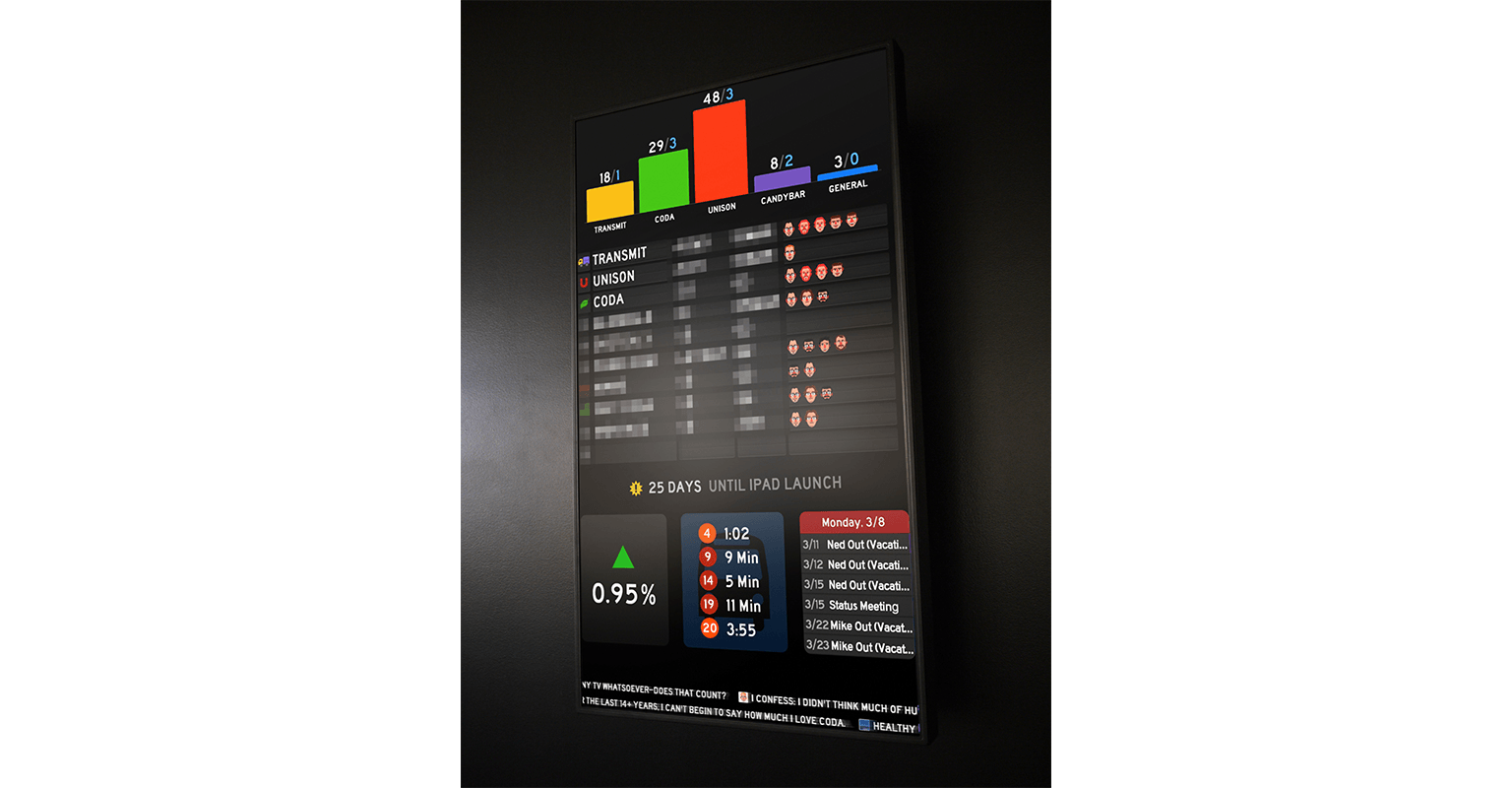
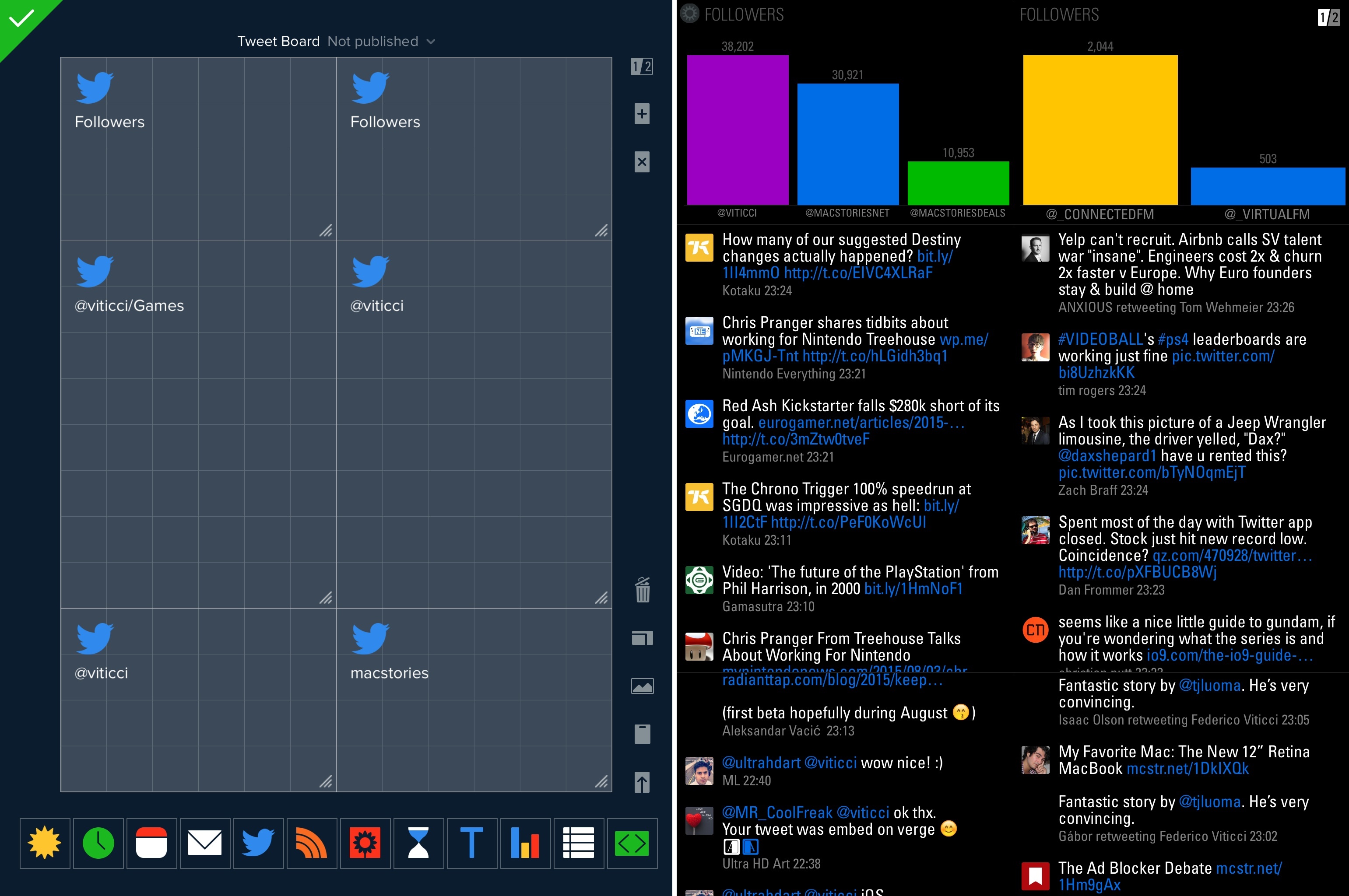
Fascinating look at the widgets and hardware Panic is using for their own Status Board setup.

This bit caught my attention:

Units have been especially interesting since they reveal so much about the economics of (our) iOS software, as this Graph panel shows. Although (our) iOS apps sell a respectable number of units, the revenue they bring in barely charts compared to our Mac stalwarts. So far! We’re working hard on improving our iOS apps, and trying new ideas, in order to crack the iOS market a little bit more.

Diet Coda, priced at $19.99, is a fantastic piece of iPad software, and yet it doesn’t bring in much revenue compared to Panic’s Mac apps.

Just yesterday, I was thinking that it’s strange how Apple still hasn’t brought the Developer Tools category of the Mac App Store over to the iOS App Store. There are excellent examples of developer-oriented software, especially on the iPad: Textastic, xScope Mirror, Codea, Pythonista, and the aforementioned Diet Coda come to mind — plus many more. Two years ago, I asked whether the iPad needed programming apps.

Times have changed. Today, I wonder: would a Developer Tools category in the App Store help apps like Diet Coda get more exposure? Wouldn’t it make sense to give these tools another category, more specific and focused than the crowded Productivity one?

In my review of Panic’s Status Board, I mentioned that I was looking forward to seeing what the user community would come up with. That didn’t take long.

Hilton Lipschitz came up with a way to integrate Google Analytics with Status Board. He also has a version for Top Pages.

Thomas Bensmann created a script to fetch server statistics and display them in a table widget in Status Board.

Dave Verwer of Shiny Development has already updated the popular Average App Store Review Times site to include two feeds for Status Board, though he says a better version is in the works.

Adriano Manocchia posted a PHP script to parse data from AppFigures API 1.1 into JSON files ready for Status Board.

Bob VanderClay built a Nest panel for Status Board, and posted the code on GitHub.

And last, a Mint pepper for Status Board by Maxime Valette. My friend Preshit has the details:

Today, Maxime Valette, the creator of URI.LV has now released a Pepper for Mint that lets you add graphs for hourly, daily, weekly and monthly stats from your Mint installation to Status Board. He was kind enough to let me test it on my site and was quick to squash a few bugs. The installation of the pepper is simple and it even readily gives you clickable panicboard:// links that’ll automatically install the graph in your Status Board app.

I’m glad to see people are already creating cool hacks and widgets for Status Board, and I can’t wait to see more official Sources.

(Note: the URL of this linked post goes to my public statusboard tag on Pinboard, where you can find all the websites also linked above)

Update: Chris Patterson has put together a webpage collecting all Status Board-related links for hacks and scripts. Go bookmark it right now.

Cabel Sasser:

One of the things we wanted to make truly excellent in our brand-new Status Board iPad app was the setup process. Setup assistants are never fun, always annoying, and kill that “new app” buzz faster than anything. The only thing worse is that giant overlay some apps do that draw arrows all over your screen pointing to all the buttons and things like some demented football coach.

In my review, I likened the illustrations and tone of the QuickGuide Manual to Portal’s GLaDOS, but I forgot to mention the music. Now you can listen to it on Cabel’s blog. I want to make this my new iPhone ringtone.

Apr
9
2013

Panic Status Board Review

Posted by at

Status Board

Since the introduction of the iPad three years ago, several developers tried to create second-screen experiences to leverage the device’s large display as a window for additional content coming from a user’s primary device – traditionally a desktop computer. It wasn’t clear at the time how an iPad could be used as a “creation device” – either because of a lack of apps or imagination – so developers started playing around with the idea of iPad as an external display, iPad as an alarm clock, or iPad as a digital weather station to place on a desk next to a Mac. As years passed and people started using the iPad as, effectively, a computer capable of real work, Apple still added functionalities related to screen-sharing to iOS: users could hook up the iPad to an external monitor for an even bigger second-screen experience, or connect apps and games to an Apple TV via AirPlay to display more information and data on the iPad’s screen.[1]

Panic’s latest app, Status Board, takes the concept of using the iPad as a desk accessory one step further by turning it into a dashboard for a variety of data that you’d normally check in dedicated apps or websites. (more…)

Diet Coda 1.1

Earlier today, Panic released a nice update to Diet Coda, its iPad version of popular web development app for the Mac, Coda. I’m not a web developer, but in my initial look at the app I appreciated the workflow it enabled to copy URLs for images uploaded to my web server.

Diet Coda, finally, allows me to copy the public URL for images uploaded to my FTP server. That’s a small feature, but you’d be surprised to know how many FTP iPad apps end up lacking it amidst dozens of other “power user options”. I wish Diet Coda would let me upload from the Camera Roll — hopefully that’s coming in a future update.

And in version 1.1, uploads have indeed been enabled. By tapping on a + button in the upper right corner of the UI, you can choose to upload photos or videos from your Camera Roll. Before uploading, you’ll be asked of you want to convert a .png file (such as an iOS screenshot) to .jpg, or if you want to keep it as it is. If you’ve been looking for a way to upload images from the iPad for, say, a mobile blogging workflow, this is the Diet Coda update to check out (too bad the app doesn’t support CDN providers such as Rackspace yet).

Also in this version, among other things, there’s an option to display folders on top, a toggle to show hidden files, a light theme, and code indentation as you type.

Diet Coda 1.1 is a substantial update that improves on many aspects of version 1.0. Check out the app at $19.99 on the App Store.

CandyBar Goes Free, Heads To The Iconfactory

Panic has announced popular Mac customization utility CandyBar has gone free and unsupported due to system changes in Mountain Lion (namely, code signing). The app will also head to The Iconfactory, where it “may turn into something new”.

Since we’re unsure about the long-term future of changing system icons, we’re not comfortable charging money for CandyBar, and we’re also not comfortable simply making it disappear, instead we’re going to make the current CandyBar free — but unsupported.

And here’s from The Iconfactory blog:

We and our good friends over at Panic have taken a hard look at the future of desktop icons on the Mac and unfortunately, the writing is on the wall. There may come a time, very soon in fact, when it won’t be possible to customize any system level icon on the desktop except perhaps folders. Apple’s push to sandbox applications, the addition of signed apps and the increasing unification of OS X and iOS mean CandyBar’s days (in its current form) are numbered.

First launched back in 2007, the ease of use of CandyBar spurred the proliferation of websites and communities aimed at showcasing icon and UI replacements for OS X, such as MacThemes and IconPaper. In an interview with MacThemes from 2008 (via Shawn Blanc), Panic’s Cabel Sasser said:

The innovation, the elegance, the lack of focus testing, the general feeling that people care about the end product, it makes us want to keep doing what we do. It’s a feedback loop of inspiration.

Goodbye, CandyBar. You’ve been a trusted companion and served us well in moments of deep crisis.

A Web Developer’s look at Diet Coda

Diet Coda is great. Seriously. This app might not be your first choice to do serious work on (yet). However, if the only reason you’re taking your huge, heavy laptop with you on that otherwise relaxing vacation is just in case you get the 5-alarm-fire call from your boss because of a major bug that needs to get fixed RIGHT NOW (don’t they all?), Diet Coda and an iPad with an LTE/3G connection could be all you need.

Joesph Schmitt gives an honest perspective of the good, the bad, and what he’d like to see come down the pipeline for Diet Coda in the future. Diet Coda isn’t and shouldn’t be your replacement for a desktop app like Coda 2 or Espresso, but it is a fantastic companion touchscreen editor that it makes it relatively easy to dart around your projects and apply changes as needed. I’m trying not to take for granted having an always on-hand iPad app that lets me seamlessly implement changes as they come to mind — I think people forget that even having a tool like Diet Coda on the iPad is something special (especially when it has that quality Panic user interface behind it). If you’re looking for a reasonable review that weighs the pros and cons of Diet Coda, I’d say Schmitt does a good job of summarizing the praises and complaints — you’ll be well prepared as to what to expect concerning a mobile editor. As of now, Diet Coda is still $9.99 on the App Store, half-off during its initial launch period.

I am no web developer — I write prose, not code — but I just bought Panic’s highly-anticipated, fantastically-named Diet Coda for iPad from the Italian App Store. I want to show my support to the great independent developers of the iOS and OS X community. Furthermore, I want to help disrupting the long-standing meme that the iPad can only be used for “content consumption”, whatever that has come to mean in 2012. I didn’t know I could still find Diet Coda useful for my iPad-based writing and blogging workflow.

I can’t review Diet Coda — as I said, I wouldn’t be able to fully understand its functionalities and judge its (possible) shortcomings when compared to the (also coming today) Coda 2. But I can recognize software crafted with care and attention to detail. Diet Coda immediately stands out as one of those apps where pixels aren’t just there to fill the screen — they’re the epitome of design enhanced for function.

Take the custom text selection method Panic built. It’s not entirely custom — it’s still fundamentally based on “drag handles” and a “zoomed-in view” of the cursor — but Panic reworked it to allow for faster selection by swiping on the left (where numbered lines are) and to visualize a larger, rounded “zoom selector” (they call it the Super Loupe) when you’re moving the cursor between characters. It feels much better than standard iOS text selection — faster, and somewhat more accurate — albeit it really needs to be experienced “in motion”, rather than through the screenshot I have embedded below.

I wouldn’t mind seeing Apple drawing some inspiration from Panic’s Super Loupe and Hooper Selection for the next major version of iOS.

Or, again, search. Within a document — Diet Coda can edit files on your server with syntax highlighting for languages like HTML, PHP, or JavaScript — you can hit the search icon to initiate a query with options for Find & Replace, Case Sensitive settings, Regex, and Search in Selection. I can’t tell you how many times I wished a text editor would implement search through selected text within a document the way Panic did.

It’s about getting the details right, yet making sure the main foundation is also solid to begin with. Diet Coda features a perhaps not so innovative, yet reliable column-based navigation for browsing folders and opening files; at any time, the column view can be “enhanced” with thumbnail tabs (also called “document shelf”) displaying open files, the main Sites page, and Terminal along the top of the screen.

And if you go back to the Sites page — where you add the servers you want to connect to using Diet Coda — and enter “wiggle mode” to edit the sites you’ve configured, Panic added a nice button at the bottom to confirm you want to exit the wiggle animation. You could stop it anyway by touching anywhere on the screen, but this is a nice extra visual cue.

Same for buttons: the purple ones “glow” when tapped, and the Delete action is, again, custom by Panic, yet incredibly nice to use on iOS.

I may not write a full review of Diet Coda, but I was sure happy to find out Panic’s latest effort will find its well-deserved spot in my iPad writing workflow. Diet Coda, finally, allows me to copy the public URL for images uploaded to my FTP server. That’s a small feature, but you’d be surprised to know how many FTP iPad apps end up lacking it amidst dozens of other “power user options”. I wish Diet Coda would let me upload from the Camera Roll — hopefully that’s coming in a future update. However, together with buttons to copy the public URL and file path, Panic added options to copy an image’s HTML <a> and <img> tags to the system clipboard, making it extremely easy to paste the code into Blogsy, my blogging app of choice. The simple, yet often ignored “copy URL” action will play nicely with Writing Kit’s shortcut for inserting images into Markdown, too.

Even without fully utilizing Diet Coda’s set of features, I’m happy to see the app filling a particular void in my workflow — and even better, with style and prowess.

We will have more detailed looks at Coda 2 and Diet Coda later this week on MacStories; personally, I believe Panic’s latest iOS effort will redefine the category of web code editors on the iPad, proving once again that the platform has moved beyond “consumption” — and that’s just up to users to accept it now.

Diet Coda is now available on the Italian App Store and other international stores (same for Coda 2). Diet Coda and Coda 2 will be available here and here, respectively, on the US App Store in a few hours.

Panic, makers of popular software for the Mac like website creation tool and code editor Coda or UI & icon customization manager Candybar, have released four updates to their flagship applications for OS X tonight, adding Lion compatibility ahead of the upcoming Mac App Store release for the new OS. As tweeted a few minutes ago by the company’s Twitter account, Transmit, Candybar, Coda and Unison have all been updated with a series of bug fixes and 10.7-related improvements.

Candybar, the desktop app to change system icons and other graphical files, has received a substantial update to version 3.3 that prevents the application from doing “harmful customization” to Mac App Store icons (this has been an issue since January when the Mac App Store came out and users found out changing applications’ resources could be a problem for the Store’s update mechanism) and also introduces other interface changes. Candybar was last updated on October of last year, and today’s new version brings a smarter slider that presents common export sizes as you interact with it, and copy of icons onto Collections in the Info window.

Other changelogs for the updates Panic released today:

Transmit 4.1.6

  • Improved compatibility with Mac OS X 10.7 (Lion)
  • Added support for AWS Tokyo region
  • Added bookmark importing from Cyberduck 4
  • Dates are now read properly on SabreDAV servers
  • Improved Unicode filename support with download Syncing

Coda 1.7.1

  • Improves compatibility with Mac OS X 10.7 (Lion)

Unison 2.1.5

  • Fixed an issue that could cause preferences to be reset
  • Fixed a possible crash when playing an audio file
  • Improved decoding of Chinese messages
  • Sped up the performance of header loading with lots of “Ignore Sender” rules
  • Images without filenames in HTML messages are now shown properly

Currently, the new updated versions can be only downloaded from Panic’s website. The Mac App Store counterparts will likely receive the updates as soon as Apple processes them, so make sure to keep an eye on the developers’ Mac App Store page.